A service-business website has a different job from a personal blog or online portfolio.
It needs to help a potential customer quickly understand:
- what you do;
- where you work;
- why they should trust you;
- how much the next step costs;
- how to contact or book you.
For businesses such as:
- plumbers;
- electricians;
- HVAC companies;
- cleaners;
- roofers;
- landscapers;
- contractors;
- locksmiths;
- pool-service companies;
- pressure washers;
the website is often part of the sales process.
A good site can help turn:
Google Search
↓
Website Visit
↓
Service Page
↓
Quote Request
↓
Booked Job
That is why choosing the right website platform matters.
The best website builders for service businesses in 2026 are no longer just drag-and-drop design tools.
Many now include:
- AI site generation;
- SEO tools;
- online booking;
- forms;
- payments;
- CRM integrations;
- marketing automation;
- blogs;
- analytics.
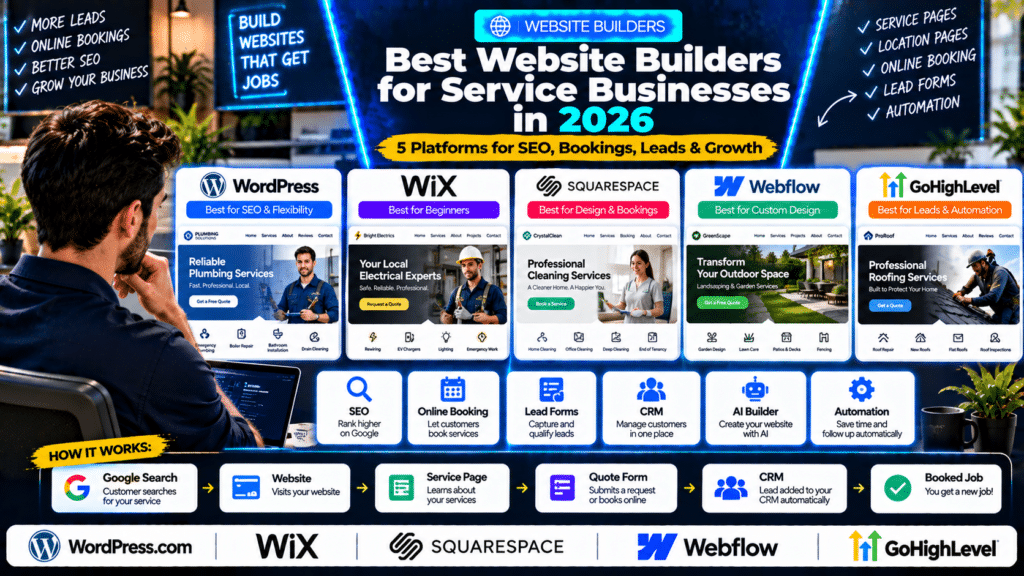
In this guide, we compare five strong options:
- WordPress.com;
- Wix;
- Squarespace;
- Webflow;
- GoHighLevel.
Quick Comparison of the Best Website Builders for Service Businesses
| Platform | Best For | Main Strength |
|---|---|---|
| WordPress.com | SEO-focused and content-heavy service businesses | Flexibility, plugins, blogging and long-term scalability |
| Wix | Beginners wanting an all-in-one business website | Easy AI building, booking and business tools |
| Squarespace | Design-focused service businesses | Polished templates and simple appointment booking |
| Webflow | Businesses wanting premium custom design | Advanced visual control and scalable design system |
| GoHighLevel | Lead-generation-focused service businesses | Website + CRM + funnels + automation |
What Should a Service Business Website Actually Do?
Before comparing platforms, it helps to define the job of the website.
A strong service-business site should usually do five things.
1. Explain the Service Quickly
A visitor should immediately understand:
- what the company does;
- who it serves;
- where it operates.
For example:
Emergency Plumbing in Birmingham
is much stronger than:
Welcome to Our Website
2. Build Trust
Useful trust signals include:
- reviews;
- certifications;
- insurance information;
- project photos;
- years in business;
- guarantees;
- service-area experience.
3. Generate Leads
The website should make it easy to:
- call;
- request a quote;
- book;
- send a message.
4. Rank in Search
For many local service businesses, SEO can produce long-term leads.
That means the site should support:
- service pages;
- location pages;
- blogs;
- metadata;
- redirects;
- schema;
- fast loading.
5. Connect to the Business Workflow
A strong website should ideally connect with:
- CRM;
- calendar;
- forms;
- email;
- automation;
- analytics.
That is where platforms begin to differ significantly.
1. WordPress.com
WordPress remains one of the strongest choices for businesses that care about:
- SEO;
- content;
- flexibility;
- long-term growth.
WordPress.com now includes hosting, security, CDN, managed updates and plugin support across its paid plans. Its pricing currently starts at $4 per month when billed annually, while longer three-year billing can start lower. (wordpress.com)
Why WordPress.com Is Strong for Service Businesses
The biggest advantage is flexibility.
A service company can start with:
- five basic pages;
and later add:
- hundreds of service pages;
- location pages;
- blog content;
- booking systems;
- CRM integrations;
- advanced forms;
- review tools.
That makes WordPress particularly useful for SEO-heavy growth strategies.
WordPress AI Website Builder
WordPress.com now includes an AI website builder on all paid plans.
The tool can generate a complete website from a prompt and let users continue editing:
- pages;
- sections;
- text;
- colors;
- layout
using AI or normal editing tools. (wordpress.com)
Example
You could ask:
Create a professional website for an electrical contractor serving Manchester, with pages for rewiring, EV chargers, emergency electrical work, About and Contact.
The AI builder can create a starting structure.
The business can then refine it.
WordPress AI Assistant
WordPress.com has also expanded its AI tools significantly in 2026.
Its AI Assistant can help:
- write content;
- redesign sections;
- generate images;
- update pages;
- manage parts of the site. (wordpress.com)
WordPress.com also supports external AI-agent connections through MCP, allowing compatible agents to work with site content and settings. (wordpress.com)
That is a significant development for businesses that want deeper AI-assisted site management.
Plugins
One of WordPress’s biggest advantages is the plugin ecosystem.
A service business can add tools for:
- forms;
- SEO;
- booking;
- CRM;
- reviews;
- speed;
- analytics.
This makes WordPress highly adaptable.
Blogging and SEO
WordPress is particularly strong for content marketing.
A service business can build:
- service pages;
- city pages;
- guides;
- FAQs;
- case studies.
That makes it a strong fit for businesses that want SEO to become a major lead channel.
WordPress Pricing
WordPress.com currently offers:
- a free plan;
- paid plans starting from $4 per month when billed annually;
- even lower effective monthly pricing on longer commitments.
Paid plans include hosting, a global CDN and plugin installation. (wordpress.com)
Important Distinction
WordPress.com and self-hosted WordPress.org are not the same buying model.
Self-hosted WordPress lets you choose your own hosting provider and typically offers even more hosting flexibility.
The pricing above applies specifically to WordPress.com.
Best For
WordPress may be best for:
- SEO-focused businesses;
- content-heavy sites;
- companies planning long-term growth;
- businesses wanting flexible integrations;
- agencies managing custom websites.
Possible Limitation
WordPress can become more complex than simpler hosted builders once:
- plugins;
- custom themes;
- advanced integrations
are added.
2. Wix
Wix is one of the easiest all-in-one website platforms for small businesses.
It combines:
- website building;
- AI;
- booking;
- SEO;
- marketing;
- ecommerce;
- business apps.
Wix Harmony
In 2026, Wix launched Wix Harmony, its new AI-first website-building experience.
Harmony combines:
- AI prompting;
- visual drag-and-drop editing;
- custom component generation;
- ongoing AI assistance.
Wix says users can describe what they want and its AI agent, Aria, can build or modify the site using natural language. (wix.com)
Why Wix Is Good for Beginners
Wix is designed to remove much of the technical setup.
Its AI website builder can generate:
- layout;
- theme;
- content;
- business features
from a conversation about the business. (wix.com)
That makes it attractive to an owner who wants to get online without learning:
- hosting;
- themes;
- plugins;
- code.
Wix Bookings
Wix also has built-in booking functionality.
Wix Bookings allows customers to:
- schedule services;
- pay online;
- choose staff;
- buy memberships or packages;
- receive email or SMS communication. (wix.com)
That can be useful for:
- cleaners;
- consultants;
- photographers;
- mobile services;
- appointment-based businesses.
SEO
Wix includes built-in SEO tools and has continued investing heavily in SEO, GEO and AI-driven optimization.
For many small service businesses, the platform provides enough control for:
- page titles;
- descriptions;
- URLs;
- structured content;
- local service pages.
Business Tools
The platform can also support:
- forms;
- contacts;
- automations;
- email marketing;
- payments;
- memberships.
Pricing
Wix pricing varies by location and plan.
Wix itself notes that Premium plan pricing can differ depending on geography, so businesses should check their account region rather than relying on a universal price shown in an old comparison. (wix.com)
Best For
Wix may be best for:
- beginners;
- solo service providers;
- small local businesses;
- businesses wanting built-in booking;
- owners who do not want to manage plugins.
Possible Limitation
Businesses with very advanced custom SEO architecture or complicated integrations may eventually want more control than a simpler site builder provides.
3. Squarespace
Squarespace is particularly strong for businesses that care about polished visual presentation.
Its current website plans combine:
- design templates;
- drag-and-drop editing;
- domain support;
- business tools.
Current annual pricing begins at $19 per month for the Basic plan, while higher plans add more business functionality. (squarespace.com)
Why Squarespace Is Good for Service Businesses
Squarespace makes it relatively easy to create a website that looks professional without heavy customization.
That can work especially well for:
- designers;
- photographers;
- consultants;
- wellness businesses;
- boutique service firms;
- premium local brands.
Fluid Engine
Squarespace’s editor allows businesses to visually arrange site content using its drag-and-drop system.
This can make it easier to produce polished pages without hiring a developer.
Acuity Scheduling
One of Squarespace’s biggest advantages for appointment-based businesses is Acuity Scheduling.
Acuity can handle:
- customer self-booking;
- payments;
- deposits;
- reminders;
- forms;
- packages;
- memberships;
- multiple calendars. (squarespace.com)
Customers can book directly through a Squarespace site or through a separate Acuity booking page.
Example
A consultant could create:
30-Minute Consultation
90-Minute Strategy Session
Monthly Support Package
Customers can then:
- choose a time;
- complete an intake form;
- pay online;
- receive reminders.
Pricing
Squarespace currently lists annual pricing beginning around:
- Basic: $19/month;
- Core: $29/month;
- Plus: $49/month;
- Advanced: $99/month.
Monthly billing costs more. (squarespace.com)
Best For
Squarespace may be best for:
- design-conscious businesses;
- appointment-based services;
- consultants;
- photographers;
- premium local brands.
Possible Limitation
Businesses building very large local SEO sites with hundreds of service and location pages may prefer a platform with more flexible content architecture.
4. Webflow
Webflow is one of the strongest choices for businesses that want a premium custom design without relying entirely on traditional coding.
It combines:
- visual website building;
- CMS;
- animations;
- responsive control;
- SEO tools;
- AI.
Webflow AI Site Builder
Webflow’s AI site builder can generate a structured multi-page site from a prompt.
The AI can create:
- site structure;
- pages;
- content;
- design theme.
Users can then continue editing the result inside Webflow’s visual builder. (webflow.com)
Why Webflow Is Different
Webflow gives designers much more control over:
- layouts;
- spacing;
- responsive behavior;
- interactions;
- animations;
- visual systems.
That makes it suitable for businesses wanting a website that feels more custom than a typical template site.
Webflow AI
Webflow AI now supports more than initial site generation.
It can help with:
- generating sections;
- writing content;
- CMS content;
- SEO metadata;
- development assistance. (webflow.com)
SEO and AEO
Webflow’s current plans include built-in tools for:
- redirects;
- sitemaps;
- schema support;
- SEO;
- answer-engine optimization.
Its 2026 platform also includes AI-driven SEO and AEO features. (webflow.com)
Pricing
Webflow’s current Site plans include:
- Starter: Free;
- Basic: $15/month billed yearly;
- Premium: $25/month billed yearly.
The Premium plan replaced the older CMS/Business split for new customers under Webflow’s 2026 pricing changes. (webflow.com)
Best For
Webflow may be best for:
- premium service brands;
- design-led companies;
- agencies;
- businesses wanting custom animations;
- companies with an in-house designer.
Possible Limitation
Webflow can be harder to learn than Wix or Squarespace.
A business owner who only wants a simple five-page site may not need its design depth.
5. GoHighLevel
GoHighLevel is the most different platform in this comparison.
It is not simply a website builder.
It combines:
- websites;
- funnels;
- CRM;
- forms;
- calendars;
- SMS;
- email;
- pipelines;
- automation;
- reputation management.
That makes it particularly relevant to lead-generation-focused service businesses.
HighLevel Website Builder
HighLevel lets businesses build multi-page websites using:
- templates;
- sections;
- rows;
- columns;
- elements;
- responsive editing;
- custom CSS;
- tracking code. (gohighlevel.com)
The website can live inside the same system as:
- leads;
- calendars;
- sales pipelines;
- automations.
Why HighLevel Is Different
With a traditional website platform, the workflow might be:
Website
↓
External CRM
↓
External SMS Tool
↓
External Automation
With HighLevel, much of that can happen inside one platform.
A lead can submit a form and automatically move into:
CRM
↓
SMS
↓
↓
Pipeline
↓
Appointment
That is powerful for businesses heavily focused on lead follow-up.
AI Studio
HighLevel introduced AI Studio in 2026.
AI Studio can generate:
- website layouts;
- content;
- images;
- multi-page experiences
from natural-language prompts. (gohighlevel.com)
That brings it closer to newer AI-first website builders.
Blogs and SEO
HighLevel also supports blogs with:
- categories;
- tags;
- author pages;
- custom domains;
- SEO descriptions. (gohighlevel.com)
Its website pages also support:
- page titles;
- meta descriptions;
- domains.
Pricing
HighLevel’s Starter plan is currently $97 per month.
It includes:
- website builder;
- booking;
- pipelines;
- CRM;
- forms;
- workflow builder;
- email;
- SMS functionality;
- reputation tools. (gohighlevel.com)
The Unlimited plan currently costs $297 per month and is positioned more toward agencies managing multiple sub-accounts. (gohighlevel.com)
Best For
GoHighLevel may be best for:
- lead-generation businesses;
- agencies;
- companies heavily using SMS;
- businesses needing CRM + website;
- companies wanting advanced automation.
Possible Limitation
If the business only wants a beautiful informational website, HighLevel may be more system than it needs.
Which Website Builder Is Best for Service Businesses?
The answer depends on the business model.
Choose WordPress When
You want:
- strong SEO;
- content marketing;
- plugin flexibility;
- long-term scalability;
- control over site architecture.
Choose Wix When
You want:
- easy setup;
- AI website generation;
- booking;
- built-in business tools;
- minimal technical management.
Choose Squarespace When
You want:
- polished design;
- simple editing;
- appointments;
- a premium visual feel.
Choose Webflow When
You want:
- custom design;
- advanced responsive control;
- premium branding;
- animation;
- a designer-led site.
Choose GoHighLevel When
You want:
- website;
- CRM;
- forms;
- SMS;
- email;
- pipelines;
- automation
inside one lead-generation platform.
Best Website Builder for Local SEO
For businesses that want SEO to become a major long-term acquisition channel, WordPress is usually the strongest overall option.
Why?
Because local SEO campaigns often grow into many pages.
For example:
Plumber Manchester
↓
Emergency Plumber Manchester
↓
Boiler Repair Manchester
↓
Bathroom Plumbing Manchester
↓
Plumber Salford
↓
Plumber Stockport
A flexible CMS becomes increasingly valuable as that structure grows.
WordPress is particularly well suited to:
- service clusters;
- location pages;
- blogs;
- internal linking;
- custom schema;
- SEO plugins.
Webflow can also be excellent for SEO-oriented sites when used properly, particularly when design quality is a high priority.
Best Website Builder for Beginners
For someone who has never built a website:
Wix is one of the easiest options.
Its AI builder can generate a professional starting point from a conversation, and Wix’s built-in business apps reduce the need to manage plugins separately. (wix.com)
Squarespace is also relatively beginner-friendly, particularly when the desired website is visually simple.
Best Website Builder for Appointment-Based Businesses
For businesses primarily selling appointments:
Squarespace + Acuity deserves strong consideration.
Acuity handles:
- scheduling;
- reminders;
- payments;
- deposits;
- packages;
- memberships. (squarespace.com)
Wix Bookings is another strong option and may work better for businesses that want broader built-in website and marketing functionality. (wix.com)
Best Website Builder for Contractors and Trades
For contractors and trades businesses, I would usually narrow the decision to:
WordPress
Wix
or
GoHighLevel
depending on the growth strategy.
WordPress
Best when:
- SEO matters heavily;
- many location pages are planned;
- custom integrations are needed.
Wix
Best when:
- simplicity matters;
- the owner wants to manage the site personally;
- online booking is useful.
GoHighLevel
Best when:
- leads;
- follow-up;
- SMS;
- sales pipeline;
- automation
are more important than advanced website design.
Best Website Builder for Lead Generation
For pure lead-generation workflows:
GoHighLevel is one of the strongest options.
Why?
Because the website is directly connected to:
- forms;
- CRM;
- SMS;
- pipelines;
- automated follow-up.
For example:
Visitor Requests Quote
↓
Lead Enters CRM
↓
SMS Sent
↓
Email Sent
↓
Salesperson Notified
↓
Appointment Booked
This can reduce the need to connect multiple separate tools.
Best Website Builder for Premium Design
For custom design:
Webflow has a major advantage.
It provides a much deeper visual system than most beginner website builders.
A premium construction company, architectural firm or high-end home-service brand can build a highly customized site without using a rigid template.
Squarespace may be the simpler option when the business wants a polished result without that complexity.
Best Website Builder for AI Website Creation
AI website building is now available across several platforms.
WordPress.com
Can generate a full site with AI and continue editing it conversationally. (wordpress.com)
Wix
Wix Harmony combines AI generation with ongoing visual editing and its Aria AI agent. (wix.com)
Webflow
Can generate structured multi-page sites and design systems from a prompt. (webflow.com)
GoHighLevel
AI Studio can generate website experiences from natural-language prompts. (gohighlevel.com)
AI can speed up the initial build.
It should not replace:
- strategy;
- positioning;
- real service information;
- conversion planning;
- SEO research.
Website Builder vs Custom Website
Not every service business needs a fully custom-coded website.
A website builder is usually enough when you need:
- Home;
- About;
- Services;
- Contact;
- Quote form;
- Blog.
Custom development becomes more valuable when the business needs:
- complex integrations;
- custom customer portals;
- unusual functionality;
- specialized databases;
- advanced web applications.
What Pages Should a Service Business Website Have?
At minimum:
Home
Explain:
- what you do;
- where you work;
- why customers should choose you.
About
Build trust.
Services
Create dedicated pages for major services.
Locations
Useful for local SEO when done properly.
Reviews or Projects
Provide proof.
Contact / Quote
Make contacting the business easy.
Should Every Service Business Have a Blog?
Not necessarily.
A blog is useful when the business wants to grow through:
- SEO;
- educational content;
- long-tail search queries.
For example, a plumber might publish:
Why Does My Boiler Keep Losing Pressure?
That article can attract a potential customer before they search directly for a plumber.
WordPress and Webflow are particularly strong for content-heavy strategies.
What Makes a Service Business Website Convert?
A visually impressive site can still fail to generate leads.
High-converting service websites usually include:
- a clear headline;
- obvious service area;
- phone number;
- quote CTA;
- reviews;
- project photos;
- service pages;
- trust signals.
Avoid forcing users to search for basic information.
Service Business Website Homepage Structure
A practical homepage might follow this order:
Hero
↓
Trust Signals
↓
Services
↓
Why Choose Us
↓
Reviews
↓
Projects
↓
Service Areas
↓
FAQ
↓
Final CTA
This structure is simple but effective.
Common Website Builder Mistakes
Choosing Only by Template Design
A nice template does not guarantee:
- good SEO;
- fast loading;
- lead generation.
Building Everything on One Page
Dedicated service pages usually provide more SEO and conversion opportunities.
Using Generic AI Copy
Avoid phrases such as:
We provide innovative solutions tailored to your unique needs.
Use real information.
Hiding the Service Area
Local customers should immediately know where the business operates.
No Clear CTA
Every important page should guide the customer toward:
- calling;
- requesting a quote;
- booking.
Ignoring Mobile Design
A large percentage of local-service searches happen on phones.
Test:
- buttons;
- forms;
- navigation;
- phone links.
How to Choose a Website Builder for a Service Business
Step 1: Define the Main Goal
Is the website primarily supposed to:
- generate calls;
- collect quote requests;
- book appointments;
- rank on Google?
Step 2: Decide How Important SEO Is
If SEO is central, prioritize:
- content structure;
- metadata;
- page control;
- redirects;
- CMS flexibility.
Step 3: Decide Who Will Maintain the Site
If the owner will maintain everything personally:
simplicity matters.
If an agency or developer will manage the site:
flexibility may matter more.
Step 4: Test Forms and Booking
Do not only look at the editor.
Test:
Customer → Form → Confirmation → CRM
or:
Customer → Booking → Reminder
Step 5: Test Mobile
Build a sample service page and check:
- text size;
- buttons;
- navigation;
- page speed.
Step 6: Consider Future Growth
Ask:
Will this platform still work when we have 50 service and location pages?
That question matters more than which template looks best today.
More to Consider for a Trades Website
2. Wix
Wix is an all-in-one website builder designed to make website creation easier for non-technical users.
Its current plans include hosting, custom domains on paid plans, AI creation tools and business features, with higher tiers adding services such as payments, ecommerce and scheduling (source: wix.com).
Why Wix Is Popular With Small Businesses
Wix is easy to edit visually.
A business owner can usually change:
- text;
- images;
- layouts;
- forms;
- service information
without touching code.
That makes it attractive to small businesses that want to manage the website themselves.
Useful Features for Trades
Depending on the plan, Wix can support:
- forms;
- online booking;
- service pages;
- payments;
- marketing tools;
- basic SEO settings;
- mobile layouts.
Best For
Wix may suit:
- solo tradespeople;
- small home-service businesses;
- businesses wanting a simple all-in-one platform;
- owners who want to edit everything themselves.
Possible Limitation
A highly customized SEO or development strategy may eventually feel more constrained than WordPress.
For a simple service website, however, Wix can be perfectly adequate.
Click-to-Call
Mobile visitors should be able to call easily.
Quote Request Forms
Keep forms simple.
Ask only for the information needed to understand the enquiry.
Fast Mobile Performance
Many local-service searches happen on phones.
The site needs to be usable on smaller screens.
Clear Service Areas
Visitors should immediately know whether the business serves their location.
Reviews and Trust Signals
Useful trust elements include:
- reviews;
- qualifications;
- accreditations;
- guarantees;
- real project photographs.
Analytics
You should know:
- where visitors come from;
- which pages they visit;
- which forms generate leads.
Free Website Builders: Are They Worth It?
Free plans are useful for testing a platform.
They are usually not ideal for a serious trade-business website.
A professional business generally needs:
- its own domain;
- no platform branding;
- proper analytics;
- full SEO control;
- reliable business features.
Treat free plans mainly as a way to experiment before paying.
How Much Should a Trades Website Cost?
The builder subscription is only one part of the cost.
A website may also involve:
- domain registration;
- hosting;
- premium templates;
- plugins;
- professional design;
- copywriting;
- maintenance;
- SEO.
The cheapest website is not always the cheapest long-term option.
A poorly built site that generates no enquiries can be far more expensive than a professional site that produces customers.
Related guides
- Best Local SEO Tools for Service Businesses in 2026: 6 Tools Compared
- How to Build Location Pages That Rank Without Doorway Spam in 2026
- How to Build Service Pages That Rank on Google in 2026
- Tools, Software and Automation for Trades: Start Here
Frequently Asked Questions
What is the best website builder for service businesses?
WordPress.com, Wix, Squarespace, Webflow and GoHighLevel are all strong options. WordPress is particularly flexible for SEO, Wix is beginner-friendly, Squarespace is design-focused, Webflow offers advanced custom design and GoHighLevel combines websites with CRM and automation.
What is the best website builder for trades?
WordPress is a strong choice for trades that want SEO and location pages. Wix is useful for businesses prioritizing ease of use, while GoHighLevel can be especially useful when lead follow-up and automation are central to the business.
Is WordPress still good for small businesses in 2026?
Yes. WordPress.com now offers an AI website builder, plugin installation on paid plans, built-in hosting and newer AI-management tools while retaining strong content and customization capabilities. (wordpress.com)
Is Wix good for service businesses?
Yes. Wix combines AI website creation with business functionality such as Wix Bookings, online payments and marketing tools. (wix.com)
Is Squarespace good for booking services?
Yes. Squarespace works closely with Acuity Scheduling, which supports self-booking, reminders, payments, packages and memberships. (squarespace.com)
Is Webflow good for service-business websites?
Yes. Webflow is particularly strong for businesses that want premium visual design, advanced layouts and a scalable CMS. Its AI site builder can now generate structured multi-page websites from a prompt. (webflow.com)
Is GoHighLevel a website builder?
Yes. HighLevel includes a multi-page website builder as part of its platform, alongside CRM, forms, calendars, pipelines and automation. (gohighlevel.com)
Which website builder is best for SEO?
WordPress is generally one of the strongest choices when SEO and content scale are priorities. Webflow also offers strong technical SEO controls. Results still depend heavily on content quality, site structure, competition and implementation.
Conclusion
The best website builders for service businesses solve different problems.
WordPress.com is one of the strongest choices for businesses that care about SEO, content, plugins and long-term flexibility. Its 2026 platform now combines traditional WordPress extensibility with AI site generation and AI-assisted site management. (wordpress.com)
Wix is a strong choice for business owners who want to launch quickly, manage the website themselves and use built-in functionality such as booking. Wix Harmony has also pushed the platform further into conversational AI website creation in 2026. (wix.com)
Squarespace is particularly attractive to design-focused and appointment-based businesses because it combines polished website design with Acuity Scheduling. (squarespace.com)
Webflow stands out for businesses that want greater design control, custom layouts and a premium digital brand while still using visual website tools. Its AI builder can now generate complete multi-page websites and structured design systems. (webflow.com)
And GoHighLevel is especially powerful for businesses where the website is primarily part of a lead-generation and sales system. Its website builder sits directly beside CRM, SMS, email, pipelines, calendars and automation. (gohighlevel.com)
The best choice depends on the primary goal.
If you want:
SEO + Content → WordPress
Simplicity + Business Tools → Wix
Design + Appointments → Squarespace
Premium Custom Design → Webflow
Leads + CRM + Automation → GoHighLevel
The most important question is not:
“Which website builder has the most features?”
It is:
“Which platform gives customers the easiest path from finding us to becoming a booked job?”
For a service business, that path should usually be:
Google → Website → Service Page → Trust → Quote or Booking → Follow-Up
Build that process well, and the website becomes more than an online brochure.
It becomes part of the business’s lead-generation system.