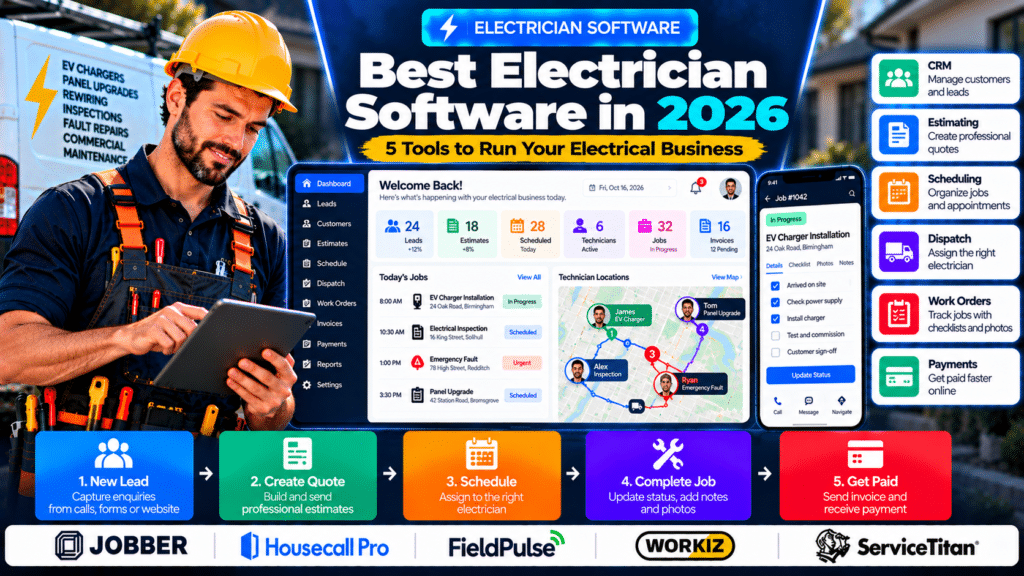
This guide compares the five main all-in-one platforms for electricians, then goes deeper on each job they handle: scheduling, dispatch, route optimization, work orders, CRM and invoicing. Use the table of contents to jump to the part you need.
Running an electrical business involves far more than doing electrical work.
A growing contractor may need to manage:
- new leads;
- customers;
- estimates;
- electrician schedules;
- dispatch;
- work orders;
- job photos;
- materials;
- invoices;
- payments;
- recurring maintenance.
When every part of that process lives in a different app, administration can become unnecessarily complicated.
That is where electrician software can help.
The best electrician software brings the most important parts of an electrical business into one connected workflow.
Instead of managing a lead in one system, scheduling in another, and invoicing somewhere else, electrical contractor software can connect the process from the first enquiry to the final payment.
A typical workflow may look like:
Lead → Estimate → Schedule → Dispatch → Complete Job → Invoice → Payment
For this guide, we compare five platforms electrical contractors may want to evaluate in 2026:
- Jobber;
- Housecall Pro;
- FieldPulse;
- Workiz;
- ServiceTitan.
Quick Comparison of the Best Electrician Software
| Software | Best Fit | Key Strength |
|---|---|---|
| Jobber | Small and growing electrical businesses | Straightforward all-in-one field-service workflow |
| Housecall Pro | Residential electrical service companies | Scheduling, dispatch and customer communication |
| FieldPulse | Growing electrical teams | Flexible workflows, projects and job profitability |
| Workiz | Businesses prioritizing automation | Automation, jobs, pricing and field operations |
| ServiceTitan | Larger electrical contractors | Advanced dispatch, reporting and operational management |
What Is Electrician Software?
Electrician software is business-management software designed to help electrical contractors organize office and field operations.
Depending on the platform, it may combine:
- CRM;
- estimating;
- scheduling;
- dispatch;
- work orders;
- customer history;
- mobile technician tools;
- invoicing;
- payments;
- reporting.
The purpose is not simply to digitize paperwork.
Good software should make it easier to answer questions such as:
Which jobs are happening today?
Which electrician is assigned?
Has the customer approved the quote?
What happened at this property previously?
Was the invoice paid?
Why Electrical Contractors Use Business Software
Small electrical businesses can often operate using:
- spreadsheets;
- paper notes;
- phone calendars;
- email;
- text messages.
That may work initially.
Problems tend to appear as the number of customers and electricians grows.
These problems may include:
- forgotten leads;
- double bookings;
- technicians receiving incomplete details;
- estimates taking too long;
- customer history being difficult to find;
- invoices being delayed;
- excessive travel between jobs.
A connected electrical contractor platform can reduce the number of places where information needs to be entered and updated.
What Should Electrician Software Include?
Different electrical companies need different features.
However, several capabilities are particularly useful.
CRM and Customer Management
The software should make customer information easy to find.
A useful customer profile might include:
- contact details;
- service locations;
- previous jobs;
- estimates;
- invoices;
- communication history;
- technician notes.
This becomes especially valuable for repeat customers.
Estimating
Electricians should be able to build professional estimates containing:
- labour;
- materials;
- equipment;
- markups;
- taxes;
- optional services.
Accepted estimates should ideally convert into jobs without duplicate data entry.
Scheduling
A central calendar should show:
- electricians;
- jobs;
- appointment windows;
- availability.
This becomes essential once several technicians share the workload.
Dispatch
Dispatch tools help office staff determine which electrician should take each job.
Useful information may include:
- availability;
- location;
- drive time;
- technician skills;
- existing workload.
Work Orders
A digital work order should give electricians clear job information.
That may include:
- customer;
- address;
- work requested;
- notes;
- photos;
- checklist;
- priority.
Mobile App
Electricians should be able to work from the field without constantly calling the office.
A useful app may provide access to:
- schedule;
- job details;
- customer history;
- photos;
- checklists;
- invoices.
Invoicing and Payments
The ideal workflow is:
Job Complete → Invoice → Payment
Reducing the delay between finishing work and billing the customer can improve administrative efficiency.
Reporting
Growing companies may want visibility into:
- job volume;
- revenue;
- estimate conversion;
- technician productivity;
- job profitability.
1. Jobber
Jobber is a field-service management platform that provides dedicated software for electrical contractors.
Its current electrician platform connects estimates, scheduling, dispatch, jobs, customer management, invoicing, payments, and automation in one system (source: Jobber).
Why Jobber Works Well for Electrical Businesses
Jobber is built around the full customer and job lifecycle.
A typical workflow can look like:
Customer Request
↓
Estimate
↓
Scheduled Job
↓
Electrician Dispatched
↓
Work Completed
↓
Invoice
↓
Payment
This reduces the need to recreate the same customer or job details across separate applications.
Estimating
Jobber lets contractors create professional quotes using:
- templates;
- job descriptions;
- pricing;
- photos;
- optional services.
Customers can approve estimates online, after which the quote can move into a scheduled job (source: Jobber).
Scheduling and Dispatch
Jobber currently supports scheduling and dispatch based on technician availability and drive time.
Electrical businesses can also reassign work when emergency calls arrive, while technicians and customers can receive schedule-change notifications (source: Jobber).
Mobile App
Field electricians can access:
- daily schedules;
- job details;
- checklists;
- photos;
- time tracking
from Jobber’s mobile app (source: Jobber).
CRM
Customer records and work-order history stay connected.
Jobber also provides a customer portal where customers can request services, approve estimates, view visits and make payments (source: Jobber).
Automation
Jobber supports automated:
- confirmations;
- reminders;
- follow-ups;
- recurring-service visits;
- payment workflows (source: Jobber).
Integrations
Its current electrician platform also highlights integrations with QuickBooks Online and a marketplace connecting Jobber with many other business tools (source: Jobber).
Best For
Jobber may be a good fit for smaller and growing electrical contractors that want most everyday business-management functions inside one relatively straightforward platform.
Possible Limitation
Companies with complex commercial construction, advanced resource planning, or very large dispatch operations may eventually need more specialized functionality.
2. Housecall Pro
Housecall Pro is a field-service platform focused heavily on home-service businesses, including electrical contractors.
Its electrical software combines:
- scheduling;
- quotes;
- dispatch;
- CRM;
- invoicing;
- field operations
inside one platform (source: Housecall Pro).
Why Housecall Pro Works for Electricians
Housecall Pro is particularly relevant to electrical businesses performing residential service work.
A company may use the platform to manage:
Lead → Estimate → Schedule → Electrician → Invoice
without moving the job through several disconnected systems.
Scheduling and Dispatch
Housecall Pro provides field-service scheduling and dispatch functionality for home-service teams. Its 2026 product updates have also added improved route-based scheduling and refreshed mobile workflows (source: Housecall Pro).
Estimates and Invoices
Electrical contractors can manage quotes and invoicing within the same platform, reducing the need to rebuild customer and job information after the work is approved (source: Housecall Pro).
Mobile Experience
Housecall Pro announced a rebuilt mobile experience as part of its 2026 platform refresh, alongside workflow improvements across scheduling and field operations (source: Housecall Pro).
Customer Communication
For residential service companies, connected customer communication can be particularly useful for:
- appointment updates;
- reminders;
- technician-arrival communication;
- follow-up.
Best For
Housecall Pro may suit:
- residential electricians;
- home-service electrical companies;
- multi-technician teams;
- businesses that place strong importance on scheduling and customer communication.
Possible Limitation
Commercial or project-heavy contractors should check whether the platform provides enough project depth for the type of electrical work they perform.
3. FieldPulse
FieldPulse provides dedicated electrical contractor software built around jobs, customers, crews and business profitability.
Its current electrical platform includes:
- scheduling;
- dispatch;
- work orders;
- customer management;
- inventory;
- asset management;
- forms;
- maintenance agreements;
- communication (source: FieldPulse).
Why FieldPulse Works for Growing Electrical Businesses
FieldPulse becomes particularly interesting when a business needs stronger visibility across office staff, technicians and larger jobs.
Its electrical platform is designed to keep the workflow moving from:
Quote → Job → Technician → Payment (source: FieldPulse).
Scheduling and Dispatch
FieldPulse lets businesses:
- view crew workload;
- assign work;
- reschedule jobs;
- react when plans change.
Its electrical platform specifically emphasizes preventing:
- delays;
- double bookings;
- last-minute scheduling problems (source: FieldPulse).
Work Order Management
FieldPulse provides centralized work-order records where electrical businesses can:
- create work orders;
- assign tasks;
- monitor progress;
- track work from dispatch through payment (source: FieldPulse).
Job Profitability
One of FieldPulse’s stronger angles is visibility into costs.
Its current platform highlights monitoring:
- labour;
- materials;
- overhead
across electrical jobs and crews (source: FieldPulse).
That can help businesses identify where projects are overspending.
Inventory and Assets
The platform also includes electrical inventory-management and asset/equipment-management capabilities (source: FieldPulse).
Best For
FieldPulse may suit:
- growing electrical companies;
- multi-crew businesses;
- companies handling residential and commercial work;
- businesses that need deeper operational flexibility.
Possible Limitation
A solo electrician may not need all of the platform’s workflow and operational depth.
4. Workiz
Workiz provides dedicated electrical contractor software focused on job management, field operations, pricing and automation.
Its current electrician platform includes features such as:
- flat-rate pricebook tools;
- automation;
- electrical checklists;
- multi-day project management (source: Workiz).
Why Workiz Is Relevant to Electrical Contractors
Workiz places particular emphasis on automating administrative processes.
That can be valuable when a growing electrical business starts spending too much time on:
- scheduling;
- communication;
- quoting;
- billing;
- follow-up.
Pricebook
Workiz currently promotes an industry-maintained flat-rate pricebook for electrical contractors.
This can help technicians use more consistent prices when preparing quotes (source: Workiz).
Automation
The platform supports automation intended to reduce repetitive administrative work (source: Workiz).
Possible workflows can include:
Job booked → technician notified
or:
Work completed → billing workflow begins
Electrical Checklists
Workiz also supports custom checklists for electrical safety and service workflows.
Its current electrician materials specifically mention processes such as:
- mislabeled panels;
- circuit checks;
- lockout/tagout procedures (source: Workiz).
Multi-Day Jobs
Workiz supports managing electrical projects that extend across multiple days rather than treating every job as a single service call (source: Workiz).
Inventory
Workiz also currently provides electrician inventory tools designed to help track parts across vehicles and jobs (source: Workiz).
Best For
Workiz may suit:
- growing electrical service companies;
- businesses interested in automation;
- companies managing both short service work and longer jobs.
Possible Limitation
Businesses should compare the exact features available in each current package because advanced automation and other capabilities may vary by plan.
5. ServiceTitan
ServiceTitan is generally positioned toward larger home-service and trade businesses that need deeper operational management.
For electrical contractors, it can combine functions such as:
- scheduling;
- dispatch;
- CRM;
- estimates;
- jobs;
- invoicing;
- reporting;
- pricebooks;
- inventory;
- technician management.
Why ServiceTitan Is Relevant to Larger Electrical Businesses
A larger electrical contractor may have:
- dedicated call-booking staff;
- dispatchers;
- dozens of technicians;
- several service areas;
- different business units.
At that stage, the problem is no longer simply keeping a calendar organized.
The business may need a more detailed operating system connecting multiple departments.
Scheduling and Dispatch
ServiceTitan’s dispatch-oriented tools are designed for coordinating larger field teams where technician availability, job types and assignments need to be managed centrally.
Reporting
Advanced reporting becomes increasingly important when management needs visibility into:
- job performance;
- technician performance;
- revenue;
- operational trends.
Electrical Service and Project Work
For larger electrical businesses, the appeal of ServiceTitan is the ability to connect field-service management with broader business operations rather than using a collection of independent apps.
Best For
ServiceTitan is more relevant to:
- larger electrical service companies;
- multi-location contractors;
- businesses with dedicated dispatchers;
- companies needing deeper reporting and operational controls.
Possible Limitation
The depth that makes ServiceTitan useful for larger businesses may be unnecessary for a solo electrician or a very small team.
Which Electrician Software Is Best for a Small Business?
A smaller business should avoid choosing software simply because it has the largest feature list.
The most important question is:
Which features will actually be used every week?
For a small electrical business, the essentials may be:
- customer management;
- estimates;
- scheduling;
- mobile job information;
- invoicing;
- payments.
Jobber
Useful when simplicity and a connected field-service workflow are the priority.
Housecall Pro
Worth comparing if residential service, scheduling and customer communication are major priorities.
FieldPulse
Becomes more attractive as the business needs more advanced workflows, project visibility and cost tracking.
Workiz
Useful when automation and reducing repetitive administrative work are major goals.
ServiceTitan
More appropriate when the operation has become large enough to justify deeper dispatch and management tools.
Electrician Software for Solo Electricians
A solo electrician does not need everything a large electrical contractor needs.
There is little benefit in paying for advanced technician dispatch when there is only one technician.
More useful priorities may include:
- estimates;
- schedule;
- customer history;
- invoices;
- mobile payments.
Jobber’s electrical software is built to support businesses ranging from solo electricians to larger contracting teams (source: Jobber).
The goal should be to eliminate administrative work rather than introduce more software complexity.
Electrician Software for Residential Contractors
Residential electrical businesses may handle:
- repairs;
- EV charger installation;
- panel upgrades;
- inspections;
- rewiring;
- emergency work.
These businesses often benefit strongly from a field-service platform because the workflow is usually:
Customer → Appointment → Electrician → Job → Invoice
Jobber and Housecall Pro both provide electrician-specific platforms built around these types of workflows (source: Jobber).
Electrician Software for Commercial Contractors
Commercial electrical contractors may have different requirements.
They may need:
- longer sales pipelines;
- projects;
- multiple crews;
- maintenance agreements;
- assets;
- detailed cost tracking.
FieldPulse’s current electrical platform, for example, includes project-oriented, asset and maintenance functionality alongside field-service management (source: FieldPulse).
Commercial companies should therefore look beyond basic scheduling when comparing software.
Electrician Software for EV Charger Installers
EV charger businesses often have a predictable workflow:
Lead
↓
Site Assessment
↓
Estimate
↓
Installation
↓
Invoice
A connected platform can keep those steps in one customer record.
Useful features may include:
- CRM;
- estimates;
- scheduling;
- technician assignment;
- photos;
- digital approval.
Electrician Software for Emergency Service Businesses
Emergency electrical companies need flexibility.
The schedule may change throughout the day.
Software should make it easy to:
- create urgent jobs;
- see technician availability;
- reassign work;
- inform the electrician;
- update customers.
Jobber’s current electrical contractor tools specifically support rescheduling and reassignment when emergency service calls arrive (source: Jobber).
Electrician Software for Multi-Crew Companies
Once several crews operate at the same time, the company needs stronger visibility.
Managers may need to see:
- technician workload;
- job status;
- route;
- crew availability;
- material costs.
FieldPulse specifically emphasizes seeing crew workloads in real time and quickly reassigning electrical jobs as plans change (source: FieldPulse).
Electrician Software vs Separate Apps
An electrical business could use:
HubSpot for CRM
Google Calendar for scheduling
Joist for estimates
QuickBooks for accounting
That can work.
However, every additional platform can create:
- duplicate customer records;
- more integrations;
- additional subscriptions;
- more training.
All-in-one field-service software tries to reduce this fragmentation.
The trade-off is that specialist software can sometimes provide more depth in a particular area.
Electrician Software vs CRM
A traditional CRM focuses mostly on:
Lead → Opportunity → Customer
Electrician business software can extend the process into:
Lead → Estimate → Schedule → Electrician → Job → Invoice
If lead generation and sales are your main challenges, CRM may be the priority.
If managing actual electrical jobs is the bigger problem, broader field-service software is likely more relevant.
Electrician Software vs Accounting Software
Accounting software is designed to manage financial records.
Examples include:
- income;
- expenses;
- bookkeeping;
- financial reports.
Electrical contractor software is designed around service operations.
The two often work best together.
For example:
Jobber → QuickBooks Online
Jobber currently supports QuickBooks Online integrations for workflows such as syncing approved timesheets and other business data (source: Jobber).
How to Choose the Best Electrician Software
Step 1: Map Your Business Workflow
Write down the real process.
For example:
Lead → Estimate → Schedule → Job → Invoice → Payment
Step 2: Identify the Biggest Problem
What currently wastes the most time?
It may be:
- lost leads;
- scheduling;
- dispatch;
- estimates;
- job paperwork;
- invoicing.
Do not purchase software primarily for problems you do not have.
Step 3: Count Your Users
Include:
- electricians;
- administrators;
- dispatchers;
- managers.
The number of users can significantly affect software cost.
Step 4: Define Must-Have Features
For example:
Must Have
- CRM;
- schedule;
- mobile app;
- estimates;
- invoices.
Useful Later
- advanced automation;
- inventory;
- project management;
- AI.
Step 5: Test a Real Job
Use a realistic workflow such as:
EV charger installation at 24 Oak Road
Then test whether you can:
- create the lead;
- prepare the estimate;
- get approval;
- schedule the work;
- assign an electrician;
- access details from mobile;
- complete the job;
- create the invoice;
- collect payment.
This is much more useful than simply watching a software demo.
Step 6: Test an Emergency Job
Create:
Urgent electrical fault
Then see how easily you can:
- add the job;
- change the schedule;
- assign a technician;
- update the customer.
Step 7: Test the Mobile App
Electrical contractors spend much of their working day away from a desk.
The field experience is just as important as the office dashboard.
Step 8: Review Integrations
Check compatibility with tools such as:
- accounting software;
- payment processors;
- marketing platforms;
- automation tools.
Step 9: Compare Total Cost
Do not compare only the advertised monthly price.
Consider:
- additional users;
- payment fees;
- onboarding;
- SMS;
- add-ons;
- premium modules.
Common Mistakes When Choosing Electrician Software
Choosing the Biggest Platform
More functionality does not automatically mean a better fit.
Buying for Future Problems Only
Choose something that solves current operational problems while still leaving room to grow.
Ignoring the Mobile App
A poor field experience can destroy adoption.
Not Testing Real Jobs
Marketing demos rarely reflect your exact workflow.
Keeping Old Spreadsheets Forever
Once the new platform is reliable, decide which system is the main source of truth.
Not Training the Team
Every employee should understand:
- where customer information goes;
- how job status is updated;
- where photos are stored.
Adding Too Many Automations at Once
Start with simple workflows before automating everything.
Scheduling Software for Electricians
Scheduling is where most electrical businesses feel the pain first. These points matter on top of the general features above.
Skill-Based Scheduling
This is particularly valuable for electrical contractors.
A company may want specific electricians assigned to:
- EV chargers;
- commercial work;
- inspections;
- high-voltage work;
- residential service.
The software should help avoid assigning the wrong technician.
Emergency Scheduling
Fault calls can disrupt the planned day.
The software should make it easy to:
- insert urgent jobs;
- move lower-priority work;
- reassign technicians.
Scheduling Software for Emergency Electricians
Emergency electrical work requires flexibility.
A planned schedule may change instantly when an urgent fault call arrives.
Prioritize software with:
- live technician availability;
- easy reassignment;
- real-time notifications;
- customer updates;
- dispatch controls.
A basic calendar is often not enough for this type of operation.
Electrician Scheduling Software vs Google Calendar
Google Calendar can work well for a very small electrical business.
However, it does not naturally connect appointments to:
- customer history;
- estimates;
- job notes;
- work orders;
- invoices;
- technician status.
A field-service platform makes the appointment part of a complete job record.
Common Electrician Scheduling Mistakes
Using Separate Personal Calendars
This makes team-wide visibility difficult.
Ignoring Skill Requirements
Not every electrician should be assigned to every job.
Forgetting Travel Time
Two jobs that appear to fit on a calendar may not fit once driving is considered.
Giving Technicians Incomplete Information
Technicians should receive enough context before arriving.
Letting Customers Book Complex Work Automatically
Some jobs should be reviewed before a final time is confirmed.
Buying Enterprise Software Too Early
A two-person electrical company probably does not need the same system as a 100-technician operation.
Dispatch Software for Electricians
Once you have more than one or two electricians on the road, dispatch becomes its own job.
Visual Dispatch Board
Dispatchers should be able to see the full working day in one place.
A useful board should show:
- electricians;
- jobs;
- status;
- appointment windows.
Skill-Based Assignment
This is especially important for electrical contractors.
Not every electrician has the same experience or qualifications.
Jobs may require specialists in:
- EV chargers;
- commercial systems;
- panel work;
- inspections;
- emergency service.
Emergency Reassignment
Dispatchers should be able to quickly insert urgent work.
For example:
Emergency Fault Arrives
↓
Locate Suitable Electrician
↓
Move Lower-Priority Job
↓
Notify Both Customers
Dispatch Software for Emergency Electricians
Emergency electrical work is one of the strongest use cases for dispatch software.
A typical workflow may look like:
Emergency Call
↓
Job Created
↓
Nearest Qualified Electrician Identified
↓
Technician Assigned
↓
Customer Receives ETA
↓
Job Tracked in Real Time
FieldPulse, Workiz, Jobber, Housecall Pro, and ServiceTitan all currently offer dispatch features aimed at faster technician assignment and schedule changes (source: Jobber).
Dispatch Software for EV Charger Installers
EV charger businesses may use dispatch to match installation jobs with electricians who have the appropriate experience.
A workflow might look like:
Approved Estimate → Installation Scheduled → Qualified Electrician Assigned → Customer Notified
Skill-based dispatch can be particularly useful for this type of work.
Common Electrician Dispatch Mistakes
Assigning Based Only on Availability
The closest free electrician may not always be the right electrician.
Ignoring Skills
Match technicians to appropriate jobs.
Ignoring Travel Time
A schedule can look efficient on paper but fail once driving is included.
No Emergency Workflow
Define what should happen when urgent work arrives.
Poor Customer Communication
Customers should not be left wondering when someone will arrive.
No Real-Time Updates
Technicians need schedule changes immediately.
Buying Too Much Software
A two-person business does not need enterprise-level dispatch complexity.
Route Optimization for Electricians
Driving time is unpaid time. Route optimization helps electrical companies fit more jobs into a day.
Route Planning vs Route Optimization
These terms are related, but they are not always identical.
Route Planning
Route planning means deciding which locations a technician should visit and in what sequence.
Route Optimization
Route optimization goes further by trying to find a more efficient sequence automatically.
The goal may be to reduce:
- drive time;
- unnecessary mileage;
- backtracking.
For a small business with only two appointments a day, manual route planning may be enough.
For a larger service business, optimization becomes more valuable.
Why Route Optimization Matters for Electricians
Electrical contractors often work across a wide geographic area.
A technician may handle:
- inspection;
- repair;
- EV charger installation;
- emergency fault;
- panel upgrade
all in one day.
If jobs are assigned without considering location, technicians may spend too much time travelling.
Even reducing a small amount of driving per technician can create more usable time across a larger team.
Route optimization may help businesses:
- complete more jobs;
- reduce fuel usage;
- improve punctuality;
- handle emergency calls faster;
- reduce unnecessary mileage.
Start and End Locations
Some electricians begin and finish from:
- office;
- warehouse;
- home;
- another customer location.
A useful routing system should account for that.
Fixed Appointments
Some jobs cannot be moved.
For example:
Inspection booked for 10:00 AM
The routing system should optimize flexible jobs around fixed appointments.
Route Optimization vs Google Maps
Google Maps is excellent for navigation.
However, normal navigation is different from field-service route optimization.
Google Maps can help answer:
How do I get from Job A to Job B?
Field-service route optimization tries to answer:
Should Job B actually come before Job C?
and potentially:
Which technician should take the job?
That operational context is the main difference.
Route Optimization for Multi-Location Electrical Companies
Larger electrical companies may operate from multiple branches.
Routing becomes more complex because dispatchers may need to consider:
- technician home branch;
- current location;
- service zone;
- skills;
- job priority.
More advanced platforms such as FieldPulse, Workiz, and ServiceTitan become increasingly relevant at this stage.
Common Route Optimization Mistakes
Optimizing Only for Distance
The closest technician may not have the right skills.
Ignoring Fixed Appointments
Some customers require specific arrival windows.
Using Incorrect Addresses
Routing depends on accurate location data.
Ignoring Job Duration
A short route is useless if the schedule does not leave enough time for the actual work.
Overloading the Schedule
Route optimization cannot make an unrealistic day achievable.
Failing to Account for Emergency Work
Electrical service businesses need flexibility.
Buying Dedicated Routing Software Too Early
If your existing field-service platform already includes route optimization, you may not need another app.
Work Orders for Electricians
Clear work orders protect you on inspections, warranty questions and disputes.
What Should an Electrical Work Order Include?
A useful electrical work order should give the technician enough information to understand the job before arriving.
Customer Information
Include:
- name;
- phone number;
- email.
Service Location
Include the full address and any access instructions.
Job Description
Describe the electrical problem or requested work clearly.
For example:
Install customer-supplied 7kW EV charger in garage. Existing consumer unit to be assessed during visit.
Priority
Common priorities might include:
- emergency;
- high;
- normal;
- low.
Assigned Electrician
The work order should clearly identify who is responsible.
Scheduled Date and Time
Include the expected service window.
Materials
Add expected materials if they are already known.
For example:
- cable;
- breaker;
- conduit;
- fittings.
Checklists
Include relevant procedural steps.
Photographs
Photos can document:
- condition before work;
- equipment;
- installation progress;
- completed work.
Technician Notes
Electricians should be able to add notes from the field.
Job Status
Useful statuses may include:
New → Scheduled → In Progress → Complete
Digital Work Orders for Electrical Inspections
Inspections are particularly well suited to structured work orders.
A checklist might include:
- verify customer details;
- inspect equipment;
- record findings;
- upload photos;
- document recommendations;
- complete report.
This helps technicians follow a consistent process.
Work Orders for EV Charger Installations
An EV charger work order might include:
Customer
Property
Charger model
Cable route
Electrical panel information
Appointment
Assigned electrician
Photos
Testing checklist
Keeping these details in one place can reduce confusion.
Work Orders for Panel Upgrades
A panel-upgrade work order may contain:
- existing panel details;
- proposed replacement;
- breaker requirements;
- labour;
- materials;
- customer notes;
- inspection requirements.
Larger work may require several visits.
Work Order Templates
Templates can save time when the business repeatedly performs the same service.
Examples include:
EV Charger Installation
- confirm equipment;
- inspect electrical supply;
- install charger;
- test operation;
- upload completion photos.
Electrical Inspection
- inspect installation;
- record findings;
- document issues;
- upload evidence;
- mark complete.
Routine Maintenance
- inspect equipment;
- complete checklist;
- record materials;
- note recommendations.
Templates can also improve consistency across technicians.
Common Electrical Work Order Mistakes
Too Little Job Information
Electricians should not arrive without understanding the customer’s issue.
Too Many Required Fields
Do not make technicians complete unnecessary paperwork for every small service call.
No Standard Statuses
Use simple statuses everyone understands.
Photos Stored Outside the Work Order
Important job evidence should remain connected to the customer record.
No Templates
Repeated electrical jobs should use standardized forms where appropriate.
No Mobile Testing
A good desktop system can still fail if technicians dislike the mobile app.
Running Paper and Digital Systems Forever
Eventually choose one main source of truth.
CRM for Electricians
If you mainly need to win more quotes rather than run jobs, a standalone CRM may be enough. Two general CRMs are worth knowing alongside the all-in-one platforms above.
HubSpot CRM
HubSpot is a general-purpose CRM rather than electrician-specific software.
That can still make it useful for electrical contractors with a strong focus on:
- sales;
- marketing;
- lead generation;
- commercial opportunities.
HubSpot’s free CRM currently supports up to two users and 1,000 contacts, with no expiration date. Its free tools include contact, deal, task, email, meeting, and quote functionality (source: HubSpot).
Why HubSpot Can Work for Electricians
HubSpot is particularly useful when the business has a longer sales process.
For example:
New Lead
↓
Consultation
↓
Site Survey
↓
Quote
↓
Follow-Up
↓
Won
That type of pipeline is especially relevant to:
- commercial electricians;
- larger installation contractors;
- solar or EV charging businesses;
- project-based electrical companies.
Useful CRM Features
HubSpot’s free CRM includes features such as:
- contact management;
- deal tracking;
- tasks;
- email tracking;
- meeting scheduling;
- quotes (source: HubSpot).
Best For
HubSpot may suit:
- commercial electrical contractors;
- businesses investing heavily in marketing;
- companies managing longer sales cycles;
- teams wanting a traditional CRM.
Possible Limitation
HubSpot does not replace field-service software.
If you need:
- dispatch;
- technician scheduling;
- work orders;
- field invoicing;
you may need another system.
Zoho CRM
Zoho CRM is another traditional CRM with a flexible setup.
Its current free edition supports up to three users and includes contact management, follow-up reminders, workflow automation, tasks, meetings, calls, reports, and mobile access (source: Zoho).
Why Zoho CRM Can Work for Electrical Businesses
Zoho CRM is attractive when an electrical contractor wants to customize the sales process.
For example:
New Enquiry
↓
Qualified
↓
Site Visit
↓
Quote Sent
↓
Follow-Up
↓
Won
The business can build workflows around those stages.
Automation
Zoho’s CRM supports workflow automation even on its current free edition, helping teams automate repetitive processes such as lead routing or record updates (source: Zoho).
Best For
Zoho CRM may suit:
- small electrical contractors;
- B2B electrical companies;
- commercial service businesses;
- teams wanting flexible CRM workflows.
Possible Limitation
Zoho is not designed primarily for field-service operations.
You may still need separate software for:
- technician scheduling;
- dispatch;
- jobs;
- invoices.
Property and Service-Site Information
Electrical businesses often work across multiple locations.
A customer may own:
- a home;
- rental properties;
- commercial buildings.
The CRM should make it easy to associate the correct site with the correct customer.
Quote Tracking
Electrical quotes can represent valuable opportunities.
The CRM should help you see:
- when a quote was sent;
- whether it needs follow-up;
- whether it was accepted.
CRM for Commercial Electrical Contractors
Commercial contractors often have longer sales cycles.
A lead may move through:
Initial Enquiry → Site Survey → Proposal → Revision → Approval
Traditional CRMs such as HubSpot or Zoho may provide more control over this process.
A commercial contractor may then use separate software for project delivery.
CRM for EV Charger Installers
EV charger installation can involve:
- lead qualification;
- property information;
- quote;
- site survey;
- follow-up;
- installation.
A CRM can help organize these opportunities.
Trade-specific platforms can then connect the accepted quote directly to the scheduled installation.
Electrician CRM vs Spreadsheet
A spreadsheet can work when the business only receives a few leads.
However, spreadsheets do not naturally provide:
- follow-up reminders;
- activity history;
- communication tracking;
- automated workflows;
- pipeline visibility.
A CRM provides more structure.
Common Electrician CRM Mistakes
Choosing CRM Without Defining the Sales Process
Software cannot fix an unclear workflow.
Using CRM Only as a Contact List
The real value comes from:
- follow-up;
- pipeline tracking;
- communication history.
Maintaining Duplicate Spreadsheets
Choose one reliable source of customer information.
Ignoring Field-Service Needs
A general CRM may not be enough once technicians and jobs need coordination.
Creating Too Many Pipeline Stages
Keep the sales process understandable.
Not Training Employees
Everyone should know how and when records must be updated.
Invoicing Software for Electricians
Some electricians only need better invoicing, not a full platform. These options and features are worth comparing.
Joist
Joist is built specifically around estimating, invoicing and payments for contractors.
Its electrician-specific platform lets contractors create estimates, send invoices, accept payments and keep client and property information organized (source: Joist).
Why Joist Works Well for Solo Electricians
Joist is simpler than a full field-service platform.
That can be an advantage for a solo electrician or small contractor who mainly wants to manage:
- estimates;
- invoices;
- payments;
- customer information.
Mobile Invoicing
Joist allows electricians to invoice customers directly from the job site.
Its current electrician tools let contractors add labour, materials and markups, then send the invoice and accept payment from a phone (source: Joist).
Estimate-to-Invoice Workflow
Joist also allows businesses to convert estimates into invoices rather than entering the same information again (source: Joist).
That creates a straightforward workflow:
Estimate → Customer Approval → Invoice → Payment
Invoice Tracking
Joist can also show whether invoices have been:
- sent;
- paid.
This makes it easier to see which jobs still need payment follow-up (source: Joist).
Customer Records
Joist’s electrician software also stores client history, photos, invoices and property details together (source: Joist).
Best For
Joist may suit:
- solo electricians;
- small electrical contractors;
- businesses focused mainly on estimates and invoices;
- contractors wanting a simpler mobile billing tool.
Possible Limitation
Businesses that also need deeper:
- dispatch;
- technician scheduling;
- CRM;
- work orders
may prefer a broader field-service platform.
QuickBooks Online
QuickBooks Online is primarily accounting software, but it also provides strong invoicing and estimate-management functionality.
Businesses can create invoices, add customers and services, configure payment methods and reminders, and send invoices electronically (source: QuickBooks).
Why QuickBooks Works for Electrical Contractors
The biggest advantage is that invoicing is already connected to the business’s financial records.
An electrician can manage:
- customer invoices;
- income;
- expenses;
- payments;
- accounting reports
inside the same broader financial system.
Estimate-to-Invoice Conversion
QuickBooks currently allows businesses to create estimates and convert accepted estimates directly into invoices without re-entering the information (source: QuickBooks).
This can create a useful workflow:
Estimate → Approval → Work Completed → Invoice
Online Approval and Payments
Customers can review and approve estimates online, while QuickBooks also supports online invoice payment options when QuickBooks Payments is configured (source: QuickBooks).
Invoice Tracking and Reminders
QuickBooks allows businesses to review invoice status, send reminders and record payments from its invoice management area (source: QuickBooks).
Progress Invoicing
QuickBooks Online also supports progress invoicing, allowing businesses to invoice against an estimate over time as work is completed (source: QuickBooks).
That can be useful for:
- larger rewiring jobs;
- panel upgrades;
- commercial installations.
Best For
QuickBooks may suit:
- electricians wanting full accounting;
- small electrical companies with an accountant;
- businesses needing invoicing plus bookkeeping;
- contractors managing larger financial workflows.
Possible Limitation
QuickBooks is not a full field-service platform.
It does not replace dedicated:
- technician dispatch;
- job scheduling;
- field-service work orders.
Xero
Xero is another cloud accounting platform with strong online invoicing functionality.
Its current invoicing system supports branded invoice templates, online sending, mobile invoicing, invoice tracking, recurring invoices and automated payment reminders (source: Xero).
Why Xero Works for Electrical Businesses
Xero can be attractive when the company wants accounting and invoicing integrated.
A business can manage:
- invoices;
- payments;
- accounts receivable;
- bank reconciliation;
- financial reporting.
Mobile Invoicing
Xero currently allows invoices to be sent through its mobile app using email, SMS or PDF (source: Xero).
That can be useful for electricians who want to send an invoice shortly after completing the job.
Automated Reminders
Xero supports automatic payment reminders before or after an invoice becomes due (source: Xero).
This can reduce the amount of time spent manually chasing late payments.
Online Payments
Xero also supports a Pay Now button on invoices, with payment options available through supported providers and payment methods (source: Xero).
Recurring Invoices
Recurring invoices can be useful for electrical businesses that provide:
- commercial maintenance;
- recurring inspections;
- ongoing service contracts.
Xero currently supports repeated invoicing and automated reminders for those workflows (source: Xero).
Best For
Xero may suit:
- electrical contractors wanting cloud accounting;
- businesses with recurring invoices;
- companies already using Xero;
- teams wanting automated payment reminders.
Possible Limitation
Like QuickBooks, Xero does not replace a complete field-service management system.
Deposits
Larger electrical projects may require upfront payments.
Deposits can be useful for:
- equipment;
- materials;
- larger installations.
Progress Invoicing
Progress invoicing is especially valuable for larger projects.
Instead of waiting for final completion, the business can bill as milestones are reached.
Field Service Invoicing vs Accounting Software
This is one of the most important decisions.
Field-Service Invoicing
Best when billing needs to connect closely with:
- customer;
- technician;
- job;
- estimate;
- work completion.
Examples include:
- Jobber;
- Housecall Pro.
Accounting Software
Best when invoicing needs to connect closely with:
- bookkeeping;
- expenses;
- taxes;
- financial reporting.
Examples include:
- QuickBooks;
- Xero.
Many electrical businesses use both.
The key is making sure the systems communicate properly.
Common Electrician Invoicing Mistakes
Waiting Too Long to Send the Invoice
Billing delays can turn into payment delays.
Leaving Invoice Descriptions Too Vague
Customers should understand exactly what they are paying for.
Forgetting Materials
Make sure all billable items are included.
No Payment Terms
Clearly explain:
- due date;
- payment methods.
Not Following Up on Overdue Invoices
Automation can help make follow-up more consistent.
Using Too Many Billing Systems
If invoices exist in several different places, financial records can become confusing.
Ignoring Mobile Invoicing
Sending the invoice while the job is still fresh can simplify the process.
Field Service Software for Electrical Maintenance Companies
Field Service Software vs Basic Scheduling Software
Scheduling software mainly answers:
When is the appointment?
Field service software can also answer:
Who is the customer?
Which electrician is assigned?
What work needs to happen?
What happened at this property before?
Was an estimate approved?
Has the customer been invoiced?
That broader workflow is what makes field service management software useful for growing electrical businesses.
Electrical Field Service Software for Maintenance Companies
Maintenance-focused electrical contractors may need:
- recurring jobs;
- service agreements;
- equipment history;
- reminders;
- work orders.
FieldPulse currently includes maintenance agreements, asset management, work orders, and customer history, while ServiceTitan includes commercial service-agreement workflows (source: FieldPulse).
Field Service Software vs Separate Apps
A business could use:
- CRM;
- calendar;
- estimate app;
- invoicing software;
- payment tool.
That can work.
However, separate systems may create:
- duplicate entry;
- more integrations;
- inconsistent customer records.
A field-service platform can reduce the number of tools required.
Estimating Software for Electricians
Estimating is where many electrical businesses lose time and margin. These are the estimating features and use cases to check when comparing the platforms above.
Pricebooks
A pricebook helps standardize how the business prices common services.
Instead of manually deciding the price every time, technicians can select a predefined service.
Optional Line Items
Optional work can help customers understand additional services.
Examples include:
- surge protection;
- smart controls;
- extra circuits;
- safety upgrades.
Digital Approval
Customers should be able to approve an estimate easily.
Reducing friction between:
Quote Sent → Quote Approved
can help speed up the sales process.
Electrical Estimating Software for EV Charger Installers
EV charger installation can be well suited to estimating templates.
A typical estimate might include:
- charger equipment;
- cable;
- breaker;
- installation labour;
- testing;
- optional upgrades.
The software can help standardize quotes across similar installations.
Electrical Estimating Software for Panel Upgrades
Panel upgrades often involve multiple pricing components.
These may include:
- panel;
- breakers;
- labour;
- materials;
- inspection;
- additional electrical work.
Multi-option estimates can also help customers compare upgrade levels.
Electrical Estimating Software for Commercial Contractors
Commercial electrical estimating is usually more complex.
Businesses may need:
- takeoffs;
- detailed labour calculations;
- material databases;
- supplier pricing;
- bid tracking;
- project costing.
ServiceTitan distinguishes between simple service estimates and more detailed construction estimating, and notes that electrical estimating software may also integrate with digital takeoff tools and material catalogs (source: ServiceTitan).
For very complex commercial bidding, specialist takeoff or electrical estimating software may be more appropriate than a general field-service app.
Common Electrician Estimating Mistakes
Forgetting Labour Overhead
Labour cost is more than the employee’s hourly wage.
The business may also have:
- insurance;
- payroll costs;
- vehicles;
- administration;
- tools.
Using Outdated Material Prices
Material costs can change.
Update pricing regularly.
Sending Vague Estimates
Customers should understand what is included.
Not Defining Exclusions
Clearly explain what is not part of the quote.
Forgetting Follow-Up
A good estimate still needs follow-up.
Pricing Only to Beat Competitors
The lowest price does not automatically mean the best job.
Pricing should support a sustainable profit margin.
Related guides
- Best Invoicing Software for Service Businesses in 2026: 7 Tools Compared
- Best Field Service Management Software for Small Businesses in 2026
- Best Work Order Software for Small Service Businesses
- Tools, Software and Automation for Trades: Start Here
Frequently Asked Questions
Do electricians need separate scheduling, dispatch and invoicing apps?
Usually not. Jobber, Housecall Pro, FieldPulse, Workiz and ServiceTitan cover scheduling, dispatch, work orders and invoicing in one place. Separate apps such as HubSpot, Joist or QuickBooks make sense when you only need one of those jobs done better.
What is the most important feature in electrician software?
For most electrical businesses it is a reliable mobile app. If electricians cannot see job details, photos and checklists on site, and update the job from their phone, the rest of the system will not get used.
What is the best electrician software?
Jobber, Housecall Pro, FieldPulse, Workiz and ServiceTitan are all relevant options for electrical contractors. The right platform depends on business size, service type, technician count and required operational complexity.
What software do electricians use?
Electrical businesses may use software for estimating, CRM, scheduling, dispatch, work orders, invoicing, accounting and field-service management. All-in-one platforms combine several of these functions.
Is Jobber good for electricians?
Yes. Jobber currently provides electrician-specific estimating, scheduling, dispatch, work-order tracking, CRM, invoicing, payments, automation and mobile field tools (source: Jobber).
Is Housecall Pro good for electricians?
Housecall Pro provides electrical contractors with scheduling, quoting, dispatch and invoicing functionality inside a field-service platform (source: Housecall Pro).
Is FieldPulse good for electrical contractors?
FieldPulse provides electrical businesses with scheduling, dispatch, work orders, inventory, asset management, maintenance agreements and job-cost visibility (source: FieldPulse).
Is Workiz good for electricians?
Workiz provides an electrical contractor platform that includes job management, flat-rate pricebook tools, automations, custom checklists and support for multi-day projects (source: Workiz).
Do solo electricians need business software?
Not necessarily, but software can become useful when estimates, customers, schedules and invoices become difficult to manage through separate manual systems.
What is the difference between electrician software and field service software?
Electrician software is often field-service software configured or marketed specifically for electrical contractors. It may include electrician-focused workflows, checklists, estimating and service-management features.
Conclusion
If you are unsure where to start, list the three admin jobs that take the most time in your week, then trial the platform that handles all three best with one real job before rolling it out to the team.
The best electrician software is not necessarily the platform with the longest feature list.
It is the one that fits how your electrical business actually operates.
For small and growing electrical service companies, Jobber provides a connected workflow covering quoting, scheduling, dispatch, jobs, customer management, invoicing and payments (source: Jobber).
Housecall Pro is another option to evaluate for residential electrical businesses that place particular importance on scheduling, dispatch, customer communication and mobile workflows (source: Housecall Pro).
FieldPulse becomes especially interesting for growing contractors that need deeper crew management, work orders, inventory, project visibility and profitability tracking (source: FieldPulse).
Workiz is worth comparing when automation, electrical checklists, pricing workflows and multi-day jobs are major priorities (source: Workiz).
And larger electrical contractors may need a more advanced platform such as ServiceTitan when dispatch, reporting and operational complexity increase substantially.
Before choosing anything, test your real workflow:
Lead → Estimate → Schedule → Electrician → Job → Invoice → Payment
If the software makes that process easier for the office, electrician and customer without introducing unnecessary complexity, it is probably moving your business in the right direction.