A missed phone call can be much more than a missed conversation.
For a service business, it can be a customer who is actively trying to buy.
Someone may be calling because:
- their boiler stopped working;
- they are locked out;
- their garage door will not open;
- they need an electrician;
- their washing machine is leaking;
- they want a cleaning quote;
- they need an emergency repair.
If nobody answers, many callers will not leave a voicemail and patiently wait.
They may simply call the next company.
That is why learning how to automate missed calls for a service business can be one of the simplest ways to improve lead response.
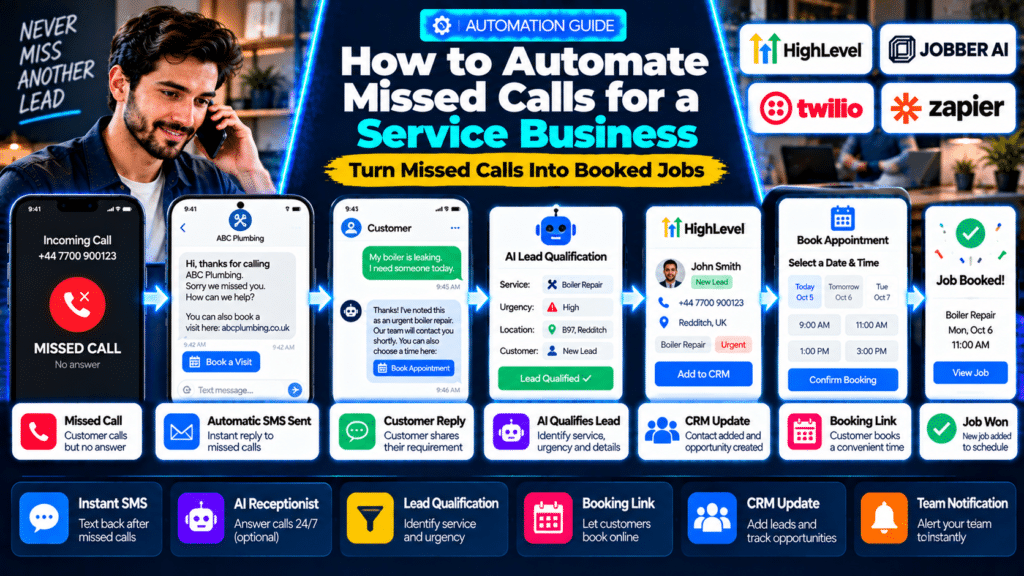
A useful workflow looks like this:
Customer Calls
↓
Nobody Answers
↓
Automatic SMS Sent
↓
Customer Replies or Books
↓
Lead Added to CRM
↓
Team Follows Up
↓
Job Booked
The business still controls the conversation.
Automation simply makes sure the lead does not disappear while everyone is busy.
Why Missed Calls Matter So Much for Service Businesses
Service businesses have a unique problem.
The people most qualified to answer customer calls are often doing work that makes answering difficult.
A technician may be:
- driving;
- using tools;
- climbing a ladder;
- inside a customer’s property;
- wearing gloves;
- speaking with another customer.
That means the business can be generating demand while simultaneously being unable to answer it.
The problem becomes even worse after normal working hours.
Customers may still search for:
- emergency plumbing;
- locksmiths;
- HVAC repair;
- appliance repair;
- garage-door repair.
An automated missed-call system creates a bridge between the initial phone call and the eventual human conversation.
What Is Missed Call Automation?
Missed-call automation is a workflow that detects when an inbound call was not answered and automatically performs one or more actions.
Those actions might include:
- sending an SMS;
- creating a CRM contact;
- creating a lead;
- notifying the team;
- scheduling a callback task;
- sending a booking link;
- starting an AI conversation.
The simplest version is:
Missed Call → Automatic Text
More advanced versions can become:
Missed Call → Text → Customer Reply → AI Qualification → Booking → CRM Update
The Simplest Missed Call Workflow
You do not need to build a complicated AI system to get started.
A basic workflow can be extremely effective.
Step 1: Customer Calls
The customer calls your main business number.
Step 2: The Call Is Not Answered
The phone system identifies the call as:
- unanswered;
- busy;
- voicemail;
- missed.
Step 3: Send an Automatic SMS
The customer immediately receives something like:
Hi, thanks for calling ABC Plumbing. Sorry we missed you. Reply here with what you need help with, or book a visit here: [booking link]
Step 4: Create or Update the Lead
The CRM stores:
- caller’s number;
- call time;
- communication history.
Step 5: Notify the Team
The owner, dispatcher or office team receives a notification.
Step 6: Continue the Conversation
The customer can:
- reply by text;
- book online;
- wait for a callback.
This gives the customer multiple ways to continue without having to call again.
Option 1: Use GoHighLevel Missed Call Text Back
One of the most direct tools for this workflow is GoHighLevel.
HighLevel has a dedicated Missed Call Text Back feature that automatically sends an SMS when an inbound call is missed.
As of September 2026, HighLevel also improved the feature so that if the number the customer called cannot send SMS, the platform can select another eligible sending number rather than simply letting the follow-up fail (source: HighLevel Support Portal).
Basic HighLevel Workflow
Incoming Call
↓
Not Answered
↓
HighLevel Sends SMS
↓
Customer Replies
↓
Conversation Continues in CRM
The business can customize the text message and use dynamic information such as the customer’s name where available (source: HighLevel Support Portal).
How to Set Up HighLevel Missed Call Text Back
HighLevel’s current setup is relatively straightforward.
Step 1: Open Phone Settings
Navigate to:
Settings → Phone System → Voice
Step 2: Open Missed Call Text Back
Go into the voicemail and missed-call settings.
Step 3: Enable the Feature
Turn on:
Missed Call Text Back
Step 4: Customize the Message
Write a message that matches the business.
For example:
Hi, thanks for calling Bright Electrical. Sorry we couldn’t answer. Reply here with what you need help with and we’ll get back to you as soon as possible.
Step 5: Send a Test
HighLevel lets businesses test the message before putting the workflow live (source: HighLevel Support Portal).
Avoid Sending Too Many Texts
This is important.
HighLevel notes that the basic missed-call text-back feature can trigger on every missed call.
That means if someone calls:
three times in ten minutes
they could potentially receive multiple automated messages.
HighLevel recommends using workflows, waiting periods or tags when more control is needed (source: HighLevel Support Portal).
A better advanced workflow might be:
Missed Call
↓
Check:
Has this person already received a missed-call SMS in the past 30 minutes?
Yes
Do nothing.
No
Send SMS.
That creates a better customer experience.
Option 2: Build a HighLevel Missed Call Workflow
Instead of using only the simple text-back toggle, businesses can build a more advanced workflow.
HighLevel’s Call Details trigger can start an automation based on information such as:
- call direction;
- call status;
- phone number;
- custom call disposition.
It can specifically detect statuses such as:
- busy;
- voicemail;
- not answered (source: HighLevel Support Portal).
Example Advanced Workflow
Trigger
Incoming call status = Not Answered
↓
Send SMS
↓
Create Opportunity
↓
Assign Salesperson
↓
Wait 10 Minutes
↓
Check:
Did customer reply?
Yes
Stop automated follow-up and let the team continue.
No
Send second message or create callback task.
Example SMS Sequence
Immediate Message
Thanks for calling ABC Heating. Sorry we missed you. What can we help with today?
If No Reply After 10 Minutes
If it’s easier, you can book a visit here: [booking link]
Internal Task
Call missed lead within 15 minutes if they haven’t booked.
This is much better than simply letting the call disappear into voicemail.
Option 3: Use an AI Receptionist
A text-back system is useful.
But an AI receptionist goes further.
Instead of waiting until the call is missed, the AI can answer the call itself.
The workflow becomes:
Customer Calls
↓
AI Receptionist Answers
↓
Customer Explains Problem
↓
AI Captures Details
↓
AI Answers Basic Questions
↓
Job Request or Appointment Created
This can be useful for businesses that receive:
- high call volume;
- after-hours calls;
- multiple calls at the same time.
Jobber AI Receptionist
Jobber currently offers Receptionist powered by Jobber AI.
It can provide 24/7 service over phone and text and can handle tasks such as:
- answering enquiries;
- creating work requests;
- booking jobs;
- taking messages (source: Jobber Help Center).
Jobber also supports an SMS send back feature.
If a caller disconnects before the AI receptionist begins the conversation, Jobber can automatically send a follow-up text (source: Jobber Help Center).
This creates an interesting two-layer system:
Call Arrives
↓
AI tries to handle call
↓
If caller disconnects
↓
Automatic text follows up
Jobber AI Receptionist Availability
As of 2026, Jobber’s Receptionist is included with unlimited usage on its Plus plan and can also be added to certain other plans. Jobber states that the receptionist can manage multiple simultaneous calls and can operate around the clock (source: Jobber Help Center).
Businesses should verify current pricing and allowances before subscribing because plan details can change.
AI Escalation Rules
One of the most important AI receptionist features is escalation.
Jobber allows businesses to create escalation policies for urgent or sensitive conversations (source: Jobber Help Center).
For example:
Customer says:
I smell gas.
The system should not continue with a normal booking script.
It should follow the business’s emergency escalation procedure.
The same principle applies to:
- electrical emergencies;
- vulnerable customers;
- safety issues;
- complaints;
- security-sensitive locksmith situations.
AI should handle routine calls.
Human staff should handle unusual or high-risk calls.
Option 4: Build Your Own Workflow With Twilio and Zapier
Some businesses do not want to use one all-in-one CRM.
They may already have:
- Twilio;
- Zapier;
- Google Sheets;
- a CRM;
- another booking system.
In that case, a custom automation can work well.
Zapier’s Twilio integration supports call and SMS automation, including triggers from phone calls and actions that send messages (source: Zapier Help).
Zapier also provides a template specifically for sending a follow-up SMS after a missed Twilio call (source: Zapier).
Example Twilio + Zapier Workflow
Twilio Receives Call
↓
Call Finishes
↓
Filter:
Was call unanswered?
↓
Send SMS
↓
Create CRM Lead
↓
Notify Team
↓
Create Callback Task
This gives businesses much more control over the process.
When a Custom Workflow Makes Sense
A custom Zapier or Make-style workflow can be useful when:
- the phone system is separate from the CRM;
- leads need to enter several systems;
- the business wants custom routing logic;
- multiple departments need notifications.
For example:
Missed Plumbing Call
↓
Send to plumbing dispatcher.
Missed Electrical Call
↓
Send to electrical dispatcher.
That may be harder to manage with a simple built-in text-back toggle.
What Should the Missed Call Text Actually Say?
The message should be short.
It should not sound robotic.
It should make the next action obvious.
Example 1: General Service Business
Hi, thanks for calling [Business Name]. Sorry we missed you. Reply here with what you need help with and we’ll get back to you shortly.
Example 2: Business With Online Booking
Thanks for calling [Business Name]. Sorry we couldn’t answer. Reply with what you need, or book a time here: [booking link]
Example 3: Emergency Service
Hi, this is [Business Name]. We missed your call. If this is urgent, reply URGENT with your postcode and a short description of the problem.
Example 4: Quote-Based Business
Thanks for calling [Business Name]. Sorry we missed you. Reply with your name, address and the service you need, and we’ll prepare the next step.
What Not to Send
Avoid messages such as:
Your call is very important to us.
That does not give the customer a useful next action.
Also avoid sending an enormous paragraph.
The goal is:
acknowledge → guide → continue conversation.
Should You Include a Booking Link?
Often, yes.
A booking link can remove another step from the process.
The workflow becomes:
Missed Call
↓
Automatic SMS
↓
Customer Opens Booking Link
↓
Chooses Appointment
↓
Appointment Added to Calendar
HighLevel itself recommends using missed-call follow-up to keep prospects engaged and direct them toward booking when appropriate (source: HighLevel Support Portal).
However, booking links are not ideal for every business.
An emergency locksmith or complex roofing contractor may need to collect more information before allowing self-booking.
Use Different Workflows for Different Call Types
Not every caller should receive the same automation.
Consider separating:
New Leads
Goal:
Book the job.
Existing Customers
Goal:
Resolve the issue or connect them with support.
Emergency Calls
Goal:
Escalate quickly.
Sales Calls
Goal:
Create opportunity and follow-up.
Supplier Calls
Goal:
Route internally.
As call automation gets more advanced, segmentation becomes increasingly useful.
Missed Calls From Google Business Profile
For many local service businesses, Google Business Profile is one of the largest sources of phone leads.
HighLevel supports Google Business Profile call tracking by placing a tracking-enabled number in the primary slot while retaining the existing number in the secondary slot.
When the call comes through HighLevel and nobody answers, Missed Call Text Back can automatically send a follow-up SMS if the feature is enabled (source: HighLevel Support Portal).
A workflow can therefore become:
Google Search
↓
Google Business Profile
↓
Customer Calls
↓
Call Missed
↓
Automatic SMS
↓
Lead Recovered
That is particularly valuable for local SEO-driven businesses.
SMS vs WhatsApp for Missed Calls
SMS is usually the simplest channel because almost every mobile phone supports it.
However, WhatsApp may be more useful in some markets.
HighLevel introduced Missed Call WhatsApp Back, which can automatically send a WhatsApp message when a call is classified as missed (source: HighLevel Support Portal).
The workflow becomes:
Missed Call → WhatsApp Message
instead of:
Missed Call → SMS
This may make sense when customers in the business’s market regularly use WhatsApp for service enquiries.
Should You Automatically Call Back?
You can.
But automatically launching another phone call immediately may not always create the best experience.
A better sequence is often:
Missed Call
↓
Immediate SMS
↓
Customer replies
or
↓
Team receives callback task
This gives the caller control.
If they are still available, they can respond.
If not, the team has a clear follow-up task.
Create a CRM Opportunity Automatically
A missed call should not only create a text.
It should create a trackable business opportunity.
A useful pipeline could be:
New Missed Call
↓
Contacted
↓
Qualified
↓
Quote Sent
↓
Booked
↓
Lost
This lets the owner measure how many missed calls eventually become jobs.
Without CRM tracking, the business knows messages were sent but does not know whether the automation actually generated revenue.
Notify the Team
Even when an automatic text is sent, someone should still know the call happened.
A notification might include:
New Missed Call
Customer: 078xx xxx xxx
Time: 2:42 PM
Status: Automatic SMS sent
Reply: None yet
That gives staff context before calling back.
Add AI Lead Qualification
Once the customer replies, AI can help classify the message.
For example:
My boiler is leaking and I have no hot water.
AI could classify:
Service: Boiler Repair
Urgency: High
Location: Needs postcode
Next Action: Dispatcher review
Another reply:
I’m looking for a quote for a new bathroom sometime next month.
could become:
Service: Bathroom Renovation
Urgency: Normal
Intent: Quote
Next Action: Sales follow-up
This is where AI becomes more useful than a basic text-back.
Do Not Let AI Handle Everything
Missed-call automation works best when it knows when to stop.
Escalate to a person when the customer:
- sounds angry;
- reports a safety issue;
- disputes a charge;
- asks a technical question the system cannot verify;
- needs an unusual service;
- mentions an emergency.
A good automation should make humans more responsive.
It should not make them harder to reach.
How Long Should You Wait Before Following Up?
The first response should normally be immediate.
After that, avoid overwhelming the caller.
A simple structure could be:
Immediately
Automatic SMS.
10–15 Minutes Later
Internal callback task if there is no response.
Several Hours Later
Optional second follow-up for normal sales leads.
Next Day
Final follow-up if appropriate.
The exact timing depends on the business.
An emergency locksmith should behave differently from a landscaping company quoting garden work.
Do Not Send Repeated Messages After Multiple Calls
This is an easy automation mistake.
A frustrated customer may call:
three times
because nobody answered.
If each call triggers the same SMS, the customer receives:
- three calls;
- three identical texts.
That looks badly automated.
HighLevel specifically recommends using workflows and waiting logic to avoid repeated missed-call messages (source: HighLevel Support Portal).
A useful rule is:
Only send one missed-call message per contact within a defined period.
Business Hours vs After Hours
Consider using different messages depending on the time.
During Business Hours
Sorry we missed your call. We’re helping another customer right now. Reply with what you need and we’ll get back to you shortly.
After Hours
Thanks for calling [Business Name]. We’re currently closed, but you can reply here with what you need or book online: [link]. We’ll follow up when we reopen.
An emergency service business may have a separate escalation path.
Add Voicemail Carefully
Voicemail can still be useful.
But do not make the customer complete a long voicemail process before the automation begins.
HighLevel allows businesses to configure the ring timeout that determines when a call is considered missed and to upload a custom voicemail greeting (source: HighLevel Support Portal).
Keep the greeting short.
For example:
Sorry we couldn’t answer. You’ll receive a text from us shortly so we can continue helping you.
Now the voicemail and automation work together.
How to Measure Missed Call Automation
Do not judge the system only by whether messages are being sent.
Track business results.
Useful metrics include:
Missed Calls
How many calls went unanswered?
Text Delivery Rate
Did the automated SMS actually reach the caller?
Reply Rate
How many callers responded?
Callback Rate
How many required a human callback?
Booking Rate
How many missed calls became jobs?
Revenue Recovered
How much revenue came from leads that originally entered as missed calls?
This is the most important metric.
If 100 missed calls produce 20 booked jobs, the automation is doing more than saving administrative time.
It is recovering revenue.
Example Missed Call Automation for a Plumber
Customer Calls
↓
No Answer
↓
SMS:
Thanks for calling ABC Plumbing. Sorry we missed you. Reply with your postcode and a short description of the issue.
↓
Customer replies:
B97. Boiler leaking.
↓
AI classifies:
Boiler Repair — High Priority
↓
Dispatcher receives alert.
↓
Human calls customer.
↓
Job booked.
Example for a Cleaning Business
Customer Calls
↓
Missed Call
↓
SMS:
Thanks for calling Bright Cleaning. Are you looking for home cleaning, office cleaning or end-of-tenancy cleaning?
↓
Customer replies:
End of tenancy.
↓
Automation sends:
Great. Please send the property postcode and number of bedrooms.
↓
Lead created.
↓
Quote process begins.
Example for a Locksmith
Customer Calls
↓
No answer
↓
SMS:
Thanks for calling ABC Locksmiths. If you’re locked out, reply with your location and whether this is a home, vehicle or commercial property.
↓
Customer responds.
↓
Urgent notification sent.
A human locksmith should then verify authorization and job details before carrying out security-sensitive work.
Example for a Pressure-Washing Business
Customer Calls
↓
Missed
↓
SMS:
Thanks for calling ABC Exterior Cleaning. What would you like cleaned—driveway, patio, house exterior or something else?
↓
Customer:
Driveway and patio.
↓
Automation:
Great. Please send your postcode and, if possible, a couple of photos.
↓
Lead enters quote pipeline.
Common Missed Call Automation Mistakes
Waiting Too Long
The main advantage of automation is speed.
Do not send the first response hours later.
Sending the Same Message Repeatedly
Use suppression rules.
Sounding Robotic
Write the message as if a real member of staff sent it.
Asking Too Many Questions
The first SMS should start the conversation, not become a 15-question form.
No Human Handoff
There should always be a clear escalation path.
Not Tracking the Lead
If missed calls never enter the CRM, you cannot measure the system properly.
Ignoring SMS Compliance
Businesses should comply with applicable messaging rules, consent requirements and carrier requirements.
For example, HighLevel’s 2026 missed-call documentation notes that text sending still needs to align with requirements such as A2P or toll-free verification where applicable (source: HighLevel Support Portal).
The Best Tools for Missed Call Automation
Several approaches can work.
GoHighLevel
Best for businesses wanting:
- CRM;
- missed-call text back;
- workflows;
- booking;
- SMS;
- marketing automation.
Jobber AI Receptionist
Best for field-service businesses already using Jobber that want:
- AI phone answering;
- texting;
- booking;
- CRM integration.
Jobber’s Receptionist can handle enquiries and bookings around the clock, and its text-back system can follow up with disconnected callers (source: Jobber Help Center).
Twilio + Zapier
Best for businesses wanting a customizable phone and SMS workflow connected to other tools.
Zapier supports Twilio triggers and actions for calls and SMS and provides missed-call follow-up templates (source: Zapier Help).
Existing Field-Service Software
Before buying another platform, check whether your existing software already provides:
- call answering;
- SMS;
- AI receptionist;
- CRM automations.
Adding more software is not always necessary.
Related guides
- How to Automate Invoice Reminders for a Service Business in 2026
- How to Automate Review Requests for a Service Business in 2026
- How to Automate Appointment Reminders for a Service Business in 2026
- Tools, Software and Automation for Trades: Start Here
Frequently Asked Questions
What is missed call text back?
Missed call text back automatically sends an SMS when someone calls your business and the call is not answered.
The message usually acknowledges the call and gives the customer another way to continue the conversation.
Can GoHighLevel automatically text missed callers?
Yes. HighLevel has a dedicated Missed Call Text Back feature that can automatically send an SMS after an unanswered inbound call (source: HighLevel Support Portal).
Can HighLevel trigger workflows from missed calls?
Yes. The Call Details trigger can start workflows based on call status, including not answered, busy and voicemail (source: HighLevel Support Portal).
Can Jobber answer calls automatically?
Yes. Jobber’s AI-powered Receptionist can answer incoming calls and texts, handle enquiries, create work requests and book jobs based on the business’s configuration (source: Jobber Help Center).
Does Jobber send texts after disconnected calls?
Yes. Jobber’s Receptionist has an SMS send-back feature that can automatically follow up if a caller disconnects before the receptionist begins a conversation (source: Jobber Help Center).
Can I build missed call automation with Zapier?
Yes. Zapier connects with Twilio for call and SMS automation and offers workflows specifically designed to send follow-up SMS messages after missed calls (source: Zapier Help).
Should I use an AI receptionist or missed-call text back?
Use missed-call text back if you mainly want a simple backup when nobody answers.
Consider an AI receptionist if you want calls to be handled automatically with capabilities such as:
- answering questions;
- collecting lead details;
- booking work.
What should an automated missed-call text say?
Keep it short.
A good starting message is:
Hi, thanks for calling [Business Name]. Sorry we missed you. Reply here with what you need help with and we’ll get back to you shortly.
Can missed-call automation help book more jobs?
It can reduce the delay between an unanswered call and the next customer interaction.
Whether it produces more bookings depends on:
- lead quality;
- response flow;
- staff follow-up;
- service availability;
- pricing;
- customer experience.
Conclusion
Learning how to automate missed calls for a service business does not require building a complicated AI system.
The simplest useful workflow is:
Missed Call → Instant Text → Customer Reply → Human Follow-Up
From there, the business can add:
- CRM tracking;
- booking links;
- AI qualification;
- internal notifications;
- automated callback tasks.
GoHighLevel is particularly useful for this because it has dedicated missed-call text-back functionality and call-based workflow triggers. Its 2026 improvements also make text delivery more reliable by selecting an eligible messaging number when the originally called number cannot send SMS (source: HighLevel Support Portal).
Jobber AI Receptionist is a stronger option when the goal is not only to recover a missed call but to have an AI system answer customers, collect information and potentially book work directly inside the field-service platform (source: Jobber Help Center).
And Twilio + Zapier provides a flexible option for companies that prefer to build their own phone, SMS and CRM workflow (source: Zapier Help).
The important principle is simple:
Do not let voicemail be the end of the customer journey.
Turn it into:
Call → Automatic Response → Conversation → Booking
For a service business, that small automation can turn an unanswered phone into a lead that still has a chance to become a paying job.