
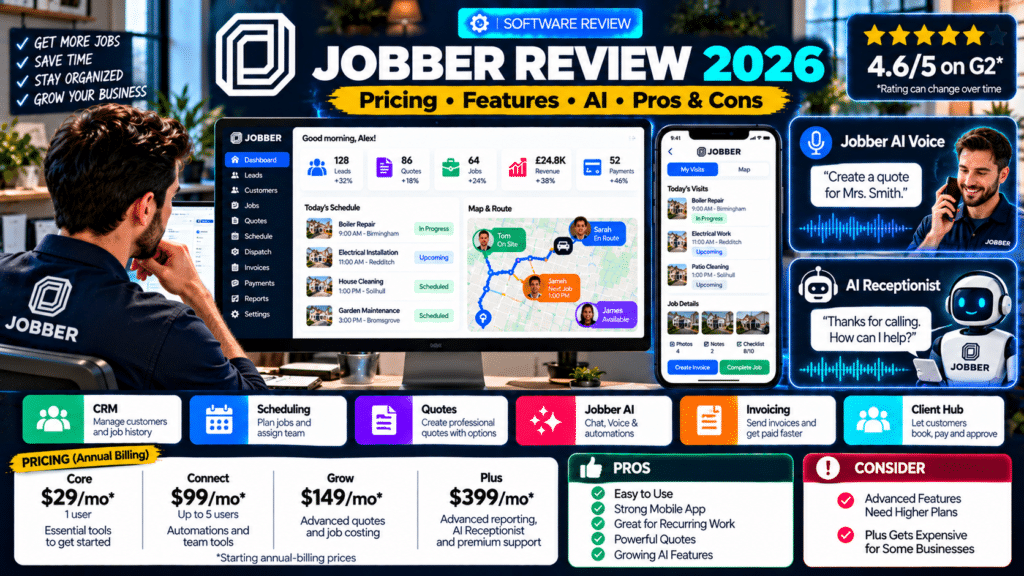
Jobber is one of the better-known field service management platforms for small and growing service businesses.
It is designed to help companies manage the complete workflow from:
New Lead
↓
Quote
↓
Schedule
↓
Complete Job
↓
Invoice
↓
Payment
That makes it potentially useful for businesses such as:
- plumbers;
- electricians;
- HVAC contractors;
- cleaners;
- landscapers;
- painters;
- pest-control companies;
- pool-service businesses;
- pressure washers;
- roofers;
- tree-care companies.
But Jobber has changed significantly in 2026.
It is no longer just scheduling and invoicing software.
Its current platform also includes:
- CRM;
- online booking;
- automated quote follow-up;
- route and GPS functionality;
- job costing;
- workflow automation;
- AI voice and chat;
- AI receptionist;
- AI-generated reports;
- marketing tools;
- integrations with ChatGPT and Claude.
So is Jobber actually worth paying for in 2026?
For many small service businesses, yes—particularly when the company wants a relatively straightforward system covering the full quote-to-payment workflow.
However, it is not automatically the best choice for every company.
Some of its strongest sales, automation, reporting and AI capabilities require higher plans, while companies with complex inventory, enterprise accounting or highly specialized operational workflows may need a different system.
This Jobber review looks at its pricing, features, AI tools, mobile app, strengths, weaknesses and the types of service businesses it fits best.
Jobber Review: Quick Verdict
Overall: Strong all-in-one field service software for small and growing service businesses.
Best For:
Owner-operators and growing service teams that want customer management, quoting, scheduling, field work, invoicing and payments in one platform.
Starting Price:
From $29 per month with annual billing for one Core user (source: Jobber).
Free Trial:
Available without requiring a credit card (source: Jobber).
Mobile Apps:
iOS and Android (source: Jobber Help Center).
Standout Features:
- quote-to-payment workflow;
- recurring jobs;
- Client Hub;
- automated reminders;
- mobile field app;
- Jobber AI;
- AI Receptionist;
- job costing;
- custom automations;
- AI reporting.
Main Drawback:
Several of the most valuable growth features are reserved for Grow, Plus or paid add-ons.
Jobber at a Glance
| Area | Our Assessment |
|---|---|
| Ease of Use | Very Good |
| CRM | Very Good |
| Quoting | Excellent on higher plans |
| Scheduling | Very Good |
| Field App | Excellent |
| Recurring Jobs | Excellent |
| Invoicing | Very Good |
| Automation | Strong |
| AI Features | Strong and expanding |
| Reporting | Good; strongest on Plus |
| Solo Businesses | Excellent fit |
| Small Teams | Excellent fit |
| Large/Complex Operations | Depends on requirements |
| Value | Good if the plan matches your workflow |
This assessment is based on Jobber’s current published functionality rather than hands-on testing of every feature.
What Is Jobber?
Jobber is cloud-based field service management software.
Instead of using separate tools for:
- leads;
- schedules;
- customer records;
- quotes;
- invoices;
- technician notes;
the business can manage these inside one connected system.
Every request, quote, job and invoice in Jobber can be linked back to a customer record containing information such as:
- contact details;
- service address;
- billing history;
- work history;
- notes (source: Jobber Help Center).
That gives the office and field team a shared view of the customer.
Who Is Jobber Designed For?
Jobber primarily targets small and medium field-service businesses.
Its supported industries include areas such as:
- cleaning;
- construction and contracting;
- electrical;
- handyman work;
- HVAC;
- landscaping;
- lawn care;
- painting;
- pest control;
- plumbing;
- pool service;
- pressure washing;
- roofing;
- tree care (source: Jobber).
It works particularly well when a company follows a workflow like:
Customer Request → Quote → Scheduled Job → Technician Visit → Invoice
That is why it fits home-service businesses well.
Jobber Pricing in 2026
Jobber currently has four main plan tiers:
- Core;
- Connect;
- Grow;
- Plus.
The exact amount depends on:
- billing frequency;
- commitment;
- number of users.
Under Jobber’s current annual pricing for the configurations shown on its pricing page, plans start around:
| Plan | Starting Annual-Billing Price |
|---|---|
| Core | $29/month |
| Connect | $99/month |
| Grow | $149/month |
| Plus | $399/month |
All prices are listed in USD, and team size can change pricing (source: Jobber).
Jobber Core
Core is designed primarily for a solo operator.
Jobber says Core supports:
- one user;
- unlimited quotes;
- unlimited jobs;
- unlimited invoices (source: Jobber Help Center).
Important features include:
- lead management;
- online booking;
- quotes;
- jobs;
- invoicing;
- online payments;
- website tools;
- basic reporting;
- integrations.
Who Should Choose Core?
Core makes sense for someone such as:
- solo plumber;
- handyman;
- window cleaner;
- pressure washer;
- landscaper.
If you are currently managing customers through:
- WhatsApp;
- paper;
- spreadsheets;
- calendar apps;
Core can bring those processes into one place without forcing you immediately into a larger business plan.
Jobber Connect
Connect adds more operational automation.
Jobber describes Connect as its most popular plan and says it can support up to five users (source: Jobber Help Center).
Additional features include:
- automated customer reminders;
- automatic payments;
- job checklists;
- quote follow-up;
- invoice follow-up;
- QuickBooks Online syncing;
- time and expense tracking (source: Jobber).
Who Should Choose Connect?
Connect may make sense once a business has:
- multiple team members;
- recurring jobs;
- more invoices;
- growing customer volume.
For many small service businesses, this may be the point where Jobber begins saving substantially more administrative time.
Jobber Grow
Grow is aimed more at businesses focused on improving sales and profitability.
It adds capabilities such as:
- advanced quote customization;
- optional quote line items;
- job costing;
- two-way customer SMS;
- custom workflow automation (source: Jobber).
Why Grow Matters
Consider a landscaping business.
Instead of simply sending:
Garden renovation — $4,000
it could present:
Core Project
Garden Renovation
Optional Upgrade
Irrigation System
Optional Upgrade
Outdoor Lighting
That can help increase job value while still letting the customer control the final selection.
Grow is also where profitability tracking becomes more useful.
Jobber Plus
Plus is Jobber’s highest standard tier and is aimed at companies scaling more complex operations.
Its current annual pricing begins at $399 per month for five users (source: Jobber).
Plus includes features such as:
- advanced job-file management;
- team mentions;
- automated profitability monitoring;
- custom reports;
- Pipeline;
- Marketing Suite;
- AI Receptionist;
- dedicated onboarding;
- premium support (source: Jobber).
It also expands tools for larger teams around:
- crew coordination;
- time tracking;
- reporting;
- business oversight (source: Jobber Help Center).
Who Should Choose Plus?
Plus is more relevant when the business has moved beyond basic:
schedule → job → invoice
and needs stronger systems around:
- sales pipeline;
- crews;
- profitability;
- marketing;
- AI;
- management reporting.
Is Jobber Expensive?
That depends on what it replaces.
A service business may otherwise pay separately for:
- CRM;
- scheduling;
- quoting;
- invoicing;
- SMS;
- route planning;
- customer portal;
- automation;
- AI receptionist.
If Jobber replaces several systems, the monthly cost can make sense.
But if you only need:
- a calendar;
- invoices;
- a customer list;
a higher Jobber plan may be excessive.
The key is to compare the plan you actually need, not Jobber’s cheapest advertised price.
Jobber CRM Review
Jobber’s CRM is one of its core strengths.
Every customer profile can keep information including:
- phone numbers;
- email;
- addresses;
- previous work;
- quotes;
- invoices;
- billing activity;
- notes (source: Jobber Help Center).
Field staff can access customer profiles directly through the mobile app.
They can also:
- call the customer;
- text them;
- create new work;
- view previous activity (source: Jobber Help Center).
Why This Matters
Imagine an electrician returning to a customer six months later.
Instead of asking:
What did we do here last time?
the technician can inspect the customer record.
That can improve both professionalism and efficiency.
CRM Verdict
Very good for service businesses.
It is not trying to be a complex enterprise sales CRM such as Salesforce.
It is a customer-management system designed around field work.
That distinction is important.
Jobber Quotes Review
Quoting is one of Jobber’s strongest features.
Jobber lets businesses create interactive quotes that customers can approve online (source: Jobber).
Depending on the plan, businesses can also use:
- optional line items;
- rich visuals;
- reviews;
- automated follow-up;
- financing options (source: Jobber).
Example
A painter could offer:
Standard
Walls + Ceilings
Optional
Doors and Trim
Optional
Feature Wall
The customer can decide what to include.
Quote Follow-Up
Jobber can automatically follow up when a quote has not received a response (source: Jobber).
That addresses a common problem:
quotes sent but never chased.
Quoting Verdict
Excellent, particularly on Grow and Plus.
Smaller plans handle basic quotes well, but the strongest sales functionality sits higher in the pricing structure.
Jobber Scheduling Review
Jobber lets businesses schedule:
- one-time jobs;
- recurring jobs;
- assigned team members;
- visits.
Jobber distinguishes between a job, meaning the overall scope of work, and visits, meaning individual scheduled occurrences related to that job (source: Jobber Help Center).
This structure works particularly well for recurring services.
Example
A pool-service company could create:
Job: Weekly Pool Maintenance
with recurring:
Visits: Every Friday
This avoids rebuilding the same job every week.
Scheduling Verdict
Very strong for recurring and field-service operations.
Jobber Dispatch and Routing
The mobile and scheduling tools can help businesses see daily visits and assign work based partly on location.
Jobber’s mobile app lets users view daily visits on a map and make scheduling decisions from the field (source: Jobber).
Its wider feature set also includes:
- GPS tracking;
- dispatch;
- scheduling;
- technician coordination.
Who Benefits Most?
Routing becomes particularly useful when a business has:
- several technicians;
- many small daily jobs;
- large service areas.
Examples include:
- pest control;
- cleaning;
- pool service;
- window cleaning;
- pressure washing.
Jobber Mobile App Review
Jobber provides mobile apps for:
- iOS;
- Android (source: Jobber Help Center).
The mobile app is one of the platform’s most important strengths because field-service software only works properly if technicians actually use it.
Technicians can use the app for tasks such as:
- viewing jobs;
- seeing customer information;
- checking schedules;
- uploading photos;
- completing forms;
- creating quotes;
- creating invoices;
- communicating with customers (source: Jobber).
Invoicing From the Field
A technician can create an invoice before leaving the customer’s property.
Jobber can also generate an invoice when a job is completed, ready for review and sending (source: Jobber).
This can shorten the gap between:
work completed
and:
invoice sent.
That matters for cash flow.
Jobber Mobile App Verdict
One of Jobber’s strongest areas.
The app is built around actual field activity rather than being a simplified copy of a desktop CRM.
Jobber AI Review
Jobber has invested heavily in AI in 2026.
Jobber AI now operates across several parts of the product rather than existing as a separate chatbot.
It powers or supports:
- AI chat;
- AI voice;
- automations;
- AI rewrite;
- Receptionist;
- reporting (source: Jobber Help Center).
Jobber AI Chat
Users can ask questions about business information and get assistance completing certain tasks.
For example, a user may want help understanding:
- customer information;
- business activity;
- upcoming work.
Jobber AI Voice
Voice is especially interesting for technicians.
Jobber says its mobile AI can perform hands-free tasks including:
- creating quotes;
- sending invoices;
- checking schedules;
- capturing information from the field (source: Jobber Help Center).
Why Voice Matters
A technician may be:
- driving;
- carrying equipment;
- wearing gloves.
Speaking:
Add a note that the customer wants the filter replaced next visit.
may be much faster than typing.
Jobber AI Verdict
Promising and increasingly practical.
The most useful aspect is that the AI operates inside the service-business workflow rather than being disconnected from company data.
Jobber AI Receptionist Review
Jobber’s AI-powered Receptionist is designed to reduce missed calls.
It can provide customer service over:
- phone;
- text;
24 hours a day.
Depending on how the business configures it, the Receptionist can help with tasks including:
- answering enquiries;
- creating requests;
- booking work (source: Jobber Help Center).
Receptionist Pricing
Jobber currently includes unlimited Receptionist use with Plus.
On selected other plans, it can be added for $29 per month, currently including 30 conversations (source: Jobber Help Center).
Businesses should verify these details before subscribing because add-on pricing can change.
Receptionist in the Mobile App
Jobber also lets users review Receptionist conversations inside the mobile app (source: Jobber Help Center).
That means a technician can see what happened with a customer call while they were busy working.
Receptionist Verdict
Potentially very useful for owner-operators and smaller companies without full-time office staff.
The key question is whether its conversation quality and booking rules fit your actual business.
Test it with real scenarios before relying on it for every call.
Jobber Reporting Review
Basic reporting is available lower in the product, but Jobber’s reporting becomes significantly more powerful at the top tier.
One notable 2026 feature is Custom Report Builder with Jobber AI.
Admins can describe the report they want in normal language, and Jobber generates the report using live Jobber data (source: Jobber Help Center).
For example:
Show revenue by service type over the last six months.
or:
Which technicians generated the highest average job value?
The feature is currently available on Plus (source: Jobber Help Center).
Reporting Verdict
Good overall, much stronger on Plus.
Small businesses will have enough for normal operational reporting, while companies wanting custom business intelligence will likely need the higher plan.
Jobber Job Costing Review
Job costing is available on Grow and Plus.
Jobber calculates profitability using information such as:
- employee time;
- hourly employee cost;
- line-item costs;
- selling prices (source: Jobber Help Center).
It can show metrics such as:
- job profit;
- profit margin;
- total cost.
Why Job Costing Matters
Revenue alone does not tell you whether a job was good.
Imagine:
Job Revenue: $2,500
But:
- materials: $900;
- labour: $1,000;
- travel and other costs: $250.
The job may look impressive in the sales report but produce a relatively small margin.
Job Costing Verdict
Useful for growing companies.
It is one of the reasons Grow becomes more attractive once the company begins managing several employees and larger jobs.
Jobber Client Hub Review
Client Hub gives customers a self-service experience.
Customers can use it for things such as:
- approving quotes;
- checking appointments;
- paying invoices (source: Jobber).
Why This Matters
Customers increasingly expect digital self-service.
They may prefer clicking:
Approve Quote
instead of:
- printing;
- signing;
- emailing documents back.
The same applies to payments.
Client Hub Verdict
A strong customer-experience feature.
Jobber Automation Review
Automation becomes more powerful as you move up Jobber’s plans.
Connect includes automations around:
- customer reminders;
- quote follow-up;
- invoice follow-up (source: Jobber).
Grow adds:
- custom workflow automations (source: Jobber Help Center).
Example
Quote Sent
↓
Wait
↓
No Approval
↓
Send Follow-Up
Another workflow:
Job Complete
↓
Invoice Sent
↓
Payment Overdue
↓
Reminder
These simple automations can save substantial office time when repeated across hundreds of jobs.
Jobber Integrations
Jobber says its marketplace supports connections with more than 100 tools (source: Jobber).
Its ecosystem includes integrations for areas such as:
- accounting;
- payments;
- marketing;
- business operations.
One notable new capability is direct connection with ChatGPT and Claude.
Jobber’s October 2026 documentation says these connectors are available across Core, Connect, Grow and Plus (source: Jobber Help Center).
Users can ask supported AI tools questions about their business and perform some record-creation tasks using connected Jobber data.
Why This Is Interesting
A contractor could potentially use ChatGPT for a broader business workflow while keeping Jobber as the operational system.
For example:
Incoming work-order email
↓
ChatGPT interprets it
↓
Jobber request created
This shows how field-service software is becoming more connected to general AI tools.
What Are Jobber’s Biggest Strengths?
1. Straightforward Workflow
Jobber’s biggest strength is that its structure makes sense for many small service businesses.
Request → Quote → Job → Invoice
is easy to understand.
2. Strong Mobile App
Technicians can do substantial work without returning to the office.
3. Good Recurring-Service Support
This makes it useful for:
- cleaning;
- lawn care;
- pool service;
- pest control;
- window cleaning.
4. Strong Quoting Tools
Optional line items and visual quotes can help companies sell more work.
5. Customer Experience
Features such as:
- Client Hub;
- reminders;
- online booking;
- on-my-way communication
can make a small company look much more organized.
6. Expanding AI
Jobber AI is becoming deeply integrated into:
- field work;
- phone answering;
- reporting;
- administration.
7. Suitable Starting Point for Solo Operators
The $29 annual-billing entry point makes Core more accessible than some competing field-service platforms (source: Jobber).
What Are Jobber’s Main Weaknesses?
1. Important Features Move Up the Plans
The headline starting price is attractive.
But features such as:
- advanced quoting;
- optional line items;
- job costing;
- custom workflows
require Grow or above (source: Jobber).
Businesses should price the plan they actually need.
2. Plus Is a Significant Price Jump
Plus begins at $399 per month with annual billing for the currently listed five-user configuration (source: Jobber).
That can be difficult to justify for a smaller company unless it genuinely needs:
- AI Receptionist;
- custom reporting;
- Pipeline;
- Marketing Suite;
- advanced profitability tools;
- premium support.
3. Not a Full Enterprise ERP
A very large contractor may require deeper systems for:
- purchasing;
- warehouse inventory;
- payroll;
- complex multi-branch financials.
Jobber is field-service management software first.
4. Some AI Features Are Still Evolving
Jobber’s AI Voice and Chat documentation currently labels that experience as beta (source: Jobber Help Center).
Businesses should therefore test AI workflows rather than assuming every output or action will always be perfect.
5. Receptionist Is Not Included on Every Plan
Outside Plus, Receptionist may require a paid add-on (source: Jobber Help Center).
What Do Users Think About Jobber?
As of early October 2026, Jobber’s seller profile on G2 shows an average rating of 4.6 out of 5 from 530 reviews (source: G2).
Jobber’s own Plus page also states an average rating of 4.6 based on more than 3,200 combined reviews across G2, Capterra and TrustRadius. Because that broader figure is published by Jobber itself, it is best treated as vendor-reported aggregated review data (source: Jobber).
Review scores can change over time, so check current listings before making a purchase decision.
Is Jobber Good for Solo Businesses?
Yes.
A solo operator is one of the clearest Jobber use cases.
Core is designed specifically around a one-user business and allows unlimited:
- quotes;
- jobs;
- invoices (source: Jobber Help Center).
A solo pressure washer, cleaner or handyman could use Jobber to replace a combination of:
- spreadsheet;
- calendar;
- invoice tool;
- notes app.
Our Verdict for Solo Operators
Excellent fit if you are becoming too busy to manage work manually.
Is Jobber Good for Small Teams?
Yes.
Once the company grows, features such as:
- shared schedules;
- team assignments;
- customer history;
- checklists;
- time tracking;
- route tools
become more valuable.
Connect supports up to five users according to Jobber’s current plan documentation (source: Jobber Help Center).
Verdict for Small Teams
One of Jobber’s strongest use cases.
Is Jobber Good for Larger Businesses?
Potentially.
Plus expands Jobber substantially with:
- crew tools;
- custom reports;
- profitability features;
- lead pipeline;
- marketing;
- AI Receptionist (source: Jobber).
However, larger companies should compare Jobber with systems such as:
- ServiceTitan;
- FieldPulse;
- Workiz;
depending on operational complexity.
Is Jobber Good for Recurring Service Businesses?
Yes.
This is one of Jobber’s strongest areas.
A recurring cleaning business might create:
Job
Weekly Office Cleaning
↓
Visits
Every Monday at 6 PM
Jobber supports both one-time and repeating job schedules (source: Jobber Help Center).
This makes it relevant for:
- cleaning;
- lawn care;
- landscaping maintenance;
- pest control;
- pool service;
- window cleaning.
Is Jobber Good for Contractors?
Yes, particularly smaller contractors.
Job costing, advanced quotes, field photos, customer communication and scheduling can make it useful for businesses doing:
- electrical;
- painting;
- roofing;
- remodeling;
- installation work.
For extremely complex projects involving:
- phases;
- subcontractor procurement;
- detailed construction accounting;
dedicated construction-management software may be more appropriate.
Jobber vs Housecall Pro
Jobber and Housecall Pro are direct competitors.
A simple way to think about the difference is:
Jobber
Particularly strong for:
- straightforward workflows;
- recurring service;
- quoting;
- smaller businesses;
- lower entry price.
Housecall Pro
Particularly strong for:
- home-service operations;
- detailed price books;
- flat-rate pricing;
- specialized AI assistants.
We covered the comparison in detail in our Jobber vs Housecall Pro guide.
Jobber vs Workiz
Workiz deserves consideration when the company is heavily dependent on:
- phone calls;
- dispatch;
- AI answering;
- technician coordination.
Jobber may feel simpler for a typical small field-service company, while Workiz can be compelling for call-heavy operations such as:
- locksmiths;
- garage-door repair;
- appliance repair.
Jobber vs ServiceTitan
These platforms often target different stages of business growth.
Jobber is generally easier to evaluate for:
- solo businesses;
- smaller service teams.
ServiceTitan goes deeper into:
- inventory;
- complex reporting;
- large-team management;
- enterprise operations.
A small contractor should not automatically assume that the more complex platform is better.
Best Jobber Alternatives
Depending on the business, alternatives include:
Housecall Pro
Strong all-around home-service platform.
Workiz
Good for communications, AI answering and dispatch-heavy teams.
FieldPulse
Good for custom workflows and operational flexibility.
ServiceM8
Good for smaller, mobile-first trade businesses.
ServiceTitan
Good for larger and more operationally complex contractors.
The right alternative depends on why Jobber does not fit.
Who Should Use Jobber?
Jobber is worth considering if your business:
- sends people to customer locations;
- creates quotes;
- schedules jobs;
- sends invoices;
- manages recurring work;
- wants better customer communication;
- needs a mobile field app.
It can be particularly attractive for companies with roughly:
1–10 team members
although Jobber also supports larger teams.
Who May Not Need Jobber?
You may not need Jobber if:
- you only complete a few jobs per month;
- a basic calendar and invoice tool already work well;
- you run primarily long-term construction projects rather than service calls;
- you need highly specialized enterprise inventory or ERP functionality.
Do not buy software simply because competitors use it.
Buy it because it solves a specific operational problem.
How to Test Jobber Properly
Jobber offers a free trial and says no credit card is required to start (source: Jobber).
Do not spend the entire trial looking around the dashboard.
Run one complete realistic workflow.
Test Scenario
Create:
Customer: Sarah Williams
Service: Exterior House Painting
Then:
- Create the lead.
- Add customer details.
- Create a quote.
- Add an optional service.
- Send the quote.
- Approve it.
- Create the job.
- Schedule the visit.
- Assign a team member.
- Open the job on mobile.
- Add photos.
- Complete the job.
- Create the invoice.
- Record payment.
- Check the customer history.
Then ask:
- Was the workflow easy?
- Could a technician learn it quickly?
- Did the customer-facing documents look professional?
- Did you need features from a more expensive plan?
- Would this save enough office time to justify the subscription?
That will tell you more than reading another 20 software comparisons.
Related guides
- Workiz Review 2026: Pricing, Features, Genius AI, Pros & Cons
- Jobber vs Workiz (2026): Which Is Better for Service Businesses?
- Housecall Pro Review 2026: Pricing, Features, AI, Pros & Cons
- Tools, Software and Automation for Trades: Start Here
Frequently Asked Questions
Is Jobber worth it in 2026?
For many small and growing service businesses, yes. Jobber combines CRM, quoting, scheduling, field operations, invoicing and payments in one system, with automation and AI added on higher tiers and through selected add-ons (source: Jobber).
How much does Jobber cost?
Jobber’s current annual-billing starting prices are approximately $29/month for Core, $99/month for Connect, $149/month for Grow and $399/month for Plus under the configurations currently shown on its pricing page. Team size and billing method can change the price (source: Jobber).
Does Jobber have a free version?
Jobber offers a free trial, but its standard field-service product is subscription based (source: Jobber).
Does Jobber have a mobile app?
Yes. Jobber offers both iOS and Android apps for field teams (source: Jobber Help Center).
Does Jobber have AI?
Yes. Jobber AI currently supports chat, mobile voice, automations, AI rewrite, Receptionist and other AI-assisted workflows (source: Jobber Help Center).
Can Jobber answer phone calls?
Yes. Receptionist powered by Jobber AI can provide 24/7 call and text support and can handle actions such as answering enquiries and booking work based on the business’s settings (source: Jobber Help Center).
Does Jobber have job costing?
Yes. Job costing is currently available on Grow and Plus and tracks job profitability using labour and line-item cost data (source: Jobber Help Center).
Can Jobber connect with ChatGPT?
Yes. Jobber’s current connector supports ChatGPT and Claude and is documented as available across Core, Connect, Grow and Plus (source: Jobber Help Center).
Is Jobber good for recurring jobs?
Yes. Jobber supports repeating job schedules with individual visits, making it particularly suitable for recurring service businesses (source: Jobber Help Center).
Jobber Review: Final Verdict
Our Jobber review for 2026 comes down to one main point:
Jobber remains one of the strongest all-around field-service platforms for smaller service businesses because it keeps the core workflow relatively simple.
A business can manage:
Lead → Quote → Schedule → Field Work → Invoice → Payment
inside the same system.
That is valuable because many growing service businesses do not need more software.
They need fewer disconnected tools.
Core gives solo operators a relatively affordable entry point at $29 per month with annual billing and includes unlimited quotes, jobs and invoices (source: Jobber).
Connect adds the operational automation that becomes valuable once the business starts managing more customers and employees.
Grow becomes more compelling for businesses that need stronger quoting, upselling, profitability tracking and custom automation (source: Jobber Help Center).
And Plus takes Jobber further into larger-team management with AI Receptionist, Pipeline, Marketing Suite, advanced profitability controls and AI-generated reporting (source: Jobber).
The platform is also becoming significantly more AI-driven.
Jobber AI can now assist with voice and chat tasks, while the AI Receptionist can handle customer conversations and its custom report builder can translate natural-language questions into business reports (source: Jobber Help Center).
The main weakness is that Jobber’s most interesting capabilities can push you toward increasingly expensive tiers.
So the right question is not:
“Is Jobber good?”
It generally is.
The better question is:
“Which Jobber plan gives my business enough value to justify its cost?”
For a solo operator or small team struggling with:
- disconnected customer information;
- slow quoting;
- messy scheduling;
- late invoices;
- forgotten follow-ups;
Jobber is absolutely worth testing.
Use the free trial.
Run a real job from:
lead to payment.
If that process becomes noticeably easier for both your office and technicians, Jobber may be a very strong fit.


1 thought on “Jobber Review 2026: Pricing, Features, Pros & Cons”
Pingback: ServiceTitan Review 2026: Pricing, Pros, Cons & Fit