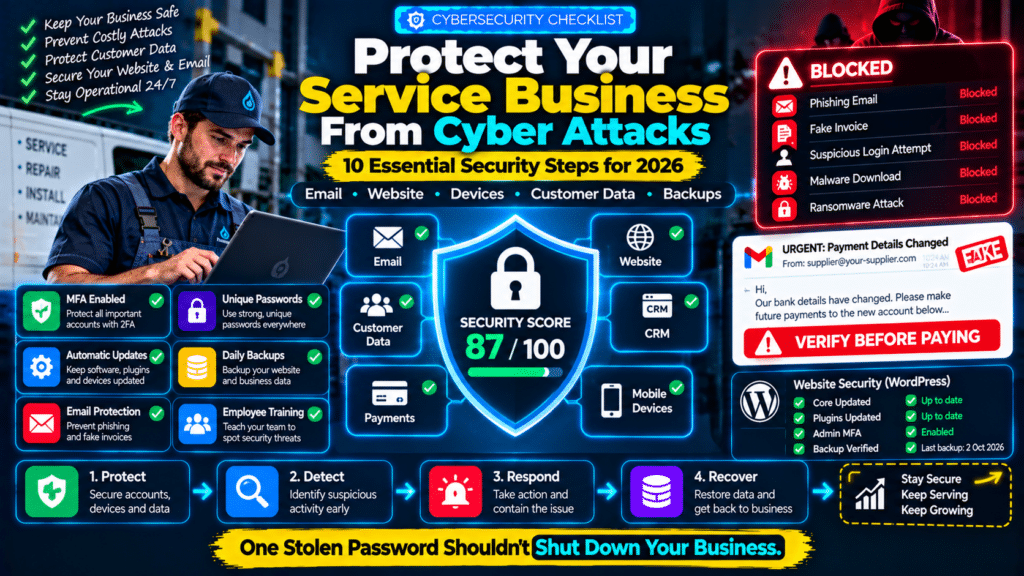
Cybersecurity is not only a problem for banks, software companies and large corporations.
A plumbing company can be attacked.
An electrical contractor can lose access to email.
A cleaning business can have customer information exposed.
A small HVAC company can be tricked into paying a fake supplier invoice.
Service businesses increasingly rely on:
- email;
- cloud software;
- mobile phones;
- websites;
- CRM systems;
- online payments;
- accounting platforms;
- customer databases.
That means a compromised password or phishing email can interrupt real business operations.
A useful cybersecurity checklist for small service businesses should focus on practical controls rather than complicated security jargon.
The strongest starting point is:
Protect Accounts
↓
Protect Devices
↓
Protect Data
↓
Protect Email
↓
Back Up Critical Information
↓
Train Staff
↓
Prepare for an Incident
The Federal Trade Commission says businesses of all sizes can be targeted by cybercriminals and recommends basics including software updates, strong passwords, multifactor authentication, encryption, regular backups and employee training (source: Federal Trade Commission).
Why Service Businesses Need Cybersecurity
A modern service business may store:
- customer names;
- addresses;
- phone numbers;
- emails;
- invoices;
- payment information;
- job history;
- employee data.
It may also depend on cloud systems to run:
- scheduling;
- dispatch;
- estimates;
- payroll;
- accounting;
- email.
If one important account is compromised, the attacker may gain access to much more than one inbox.
For example:
Email Account Compromised
↓
Password reset email intercepted.
↓
CRM account accessed.
↓
Customer information downloaded.
↓
Fake invoices sent.
That is why cybersecurity should be treated as part of normal business operations.
1. Turn On Multi-Factor Authentication
One of the most important security improvements is multi-factor authentication, often called MFA or 2FA.
A password alone should not be the only protection for important accounts.
MFA adds another verification step, such as:
- authenticator app;
- security key;
- temporary code.
The FTC recommends requiring MFA for people who access networks, devices or sensitive business information (source: Federal Trade Commission).
Accounts That Should Have MFA
Prioritize:
- business email;
- Google or Microsoft account;
- domain registrar;
- WordPress administrator;
- accounting platform;
- CRM;
- field-service software;
- payment processor;
- cloud storage;
- social media;
- advertising accounts.
If an account controls:
money, customer data or other accounts
MFA should be considered essential.
Do Not Leave MFA Only on the Owner’s Account
Imagine:
Owner has MFA.
Office assistant does not.
The attacker compromises the assistant’s email and gains access to:
- customer files;
- calendar;
- invoices.
Your security is only as strong as the accounts that can reach important information.
2. Use Unique Passwords
Do not reuse the same password across:
- email;
- website;
- CRM;
- accounting.
If one website suffers a breach, attackers may try those same credentials elsewhere.
The FTC recommends long passwords or passphrases and explicitly advises businesses not to reuse passwords (source: Federal Trade Commission).
Use a Password Manager
A password manager can help employees use:
- long;
- unique;
- random
passwords without remembering every one.
A good rule is:
One Account = One Password
Avoid passwords such as:
CompanyName123
or:
Plumbing2026
especially across multiple services.
3. Protect Business Email First
Email is one of the most important accounts in a business.
Why?
Because email is often used to reset passwords for:
- websites;
- accounting;
- banking tools;
- CRM systems.
If an attacker controls your email, they may be able to reset access to other services.
Common Email Attacks
Fake Microsoft or Google Login
You receive:
Your account will be suspended. Sign in now.
The link leads to a fake login page.
Fake Supplier Invoice
The attacker pretends to be:
- supplier;
- subcontractor;
- accountant.
They ask you to send money to a new bank account.
Fake Boss Request
The message says:
I need this paid urgently. Don’t call me, I’m in a meeting.
The FTC warns that scammers often impersonate trusted businesses, coworkers or managers and create urgency to pressure employees into acting before verifying the request (source: Federal Trade Commission).
Verify Payment Changes by Phone
Suppose a supplier emails:
We changed our bank details. Please pay all future invoices here.
Do not rely on the email alone.
Call the supplier using a trusted phone number you already have.
The FTC recommends independently confirming suspicious requests using contact information known to be legitimate rather than details supplied in the suspicious message (source: Federal Trade Commission).
4. Learn to Recognize Phishing
Phishing is designed to trick someone into:
- clicking a malicious link;
- downloading malware;
- sharing passwords;
- sending money.
The FTC notes that phishing messages often appear to come from familiar vendors, colleagues or companies and commonly use urgency to push the recipient into acting quickly (source: Federal Trade Commission).
Warning Signs
Be cautious if a message:
- creates unusual urgency;
- asks for passwords;
- changes payment details unexpectedly;
- contains strange attachments;
- sends you to an unfamiliar login page;
- comes from a slightly different email address.
For example:
Real:
accounts@supplier.com
Fake:
accounts@suppIier.com
The second may use a capital “I” instead of a lowercase “l”.
Do Not Log In Through Suspicious Email Links
If an email says:
Your Microsoft account needs attention.
Instead of clicking the link:
- open your browser;
- go directly to Microsoft;
- sign in normally;
- check the account there.
The FTC specifically recommends navigating to a company’s site independently rather than using a suspicious message’s login link (source: Federal Trade Commission).
5. Keep Software Updated
Outdated software can contain known vulnerabilities.
That includes:
- Windows;
- macOS;
- iPhones;
- Android phones;
- web browsers;
- WordPress;
- plugins;
- themes.
The FTC recommends setting software, browsers and operating systems to update automatically where possible because updates often contain important security fixes (source: Federal Trade Commission).
WordPress Businesses Should Pay Special Attention
If your company website uses WordPress:
- update WordPress core;
- update plugins;
- update themes;
- remove plugins you no longer use;
- remove inactive admin accounts.
Do not keep an abandoned plugin installed simply because:
It is disabled.
Unused software still increases what you have to monitor.
6. Limit Administrator Accounts
Not every employee needs administrator-level access.
Use the principle:
only give people the access they actually need.
For example:
Technician
May need:
- job information;
- customer contact;
- schedule.
They probably do not need:
- website administrator access;
- accounting administrator access;
- domain-control access.
Marketing Freelancer
May need:
- website editing;
- analytics.
They probably do not need:
- payroll;
- company banking information.
The FTC recommends limiting access to sensitive information to people who need it for their work (source: Federal Trade Commission).
Remove Access When Someone Leaves
When an employee, freelancer or agency stops working with you:
- disable account;
- revoke sessions;
- remove shared access;
- change shared credentials if necessary.
Do not leave old accounts active indefinitely.
7. Back Up Important Business Data
Backups help when:
- files are accidentally deleted;
- hardware fails;
- ransomware encrypts systems;
- websites are damaged.
The FTC recommends regular backups and specifically advises keeping backups disconnected from the main network so they remain available if the network is compromised (source: Federal Trade Commission).
What Should You Back Up?
Depending on the business:
- website;
- customer database;
- financial files;
- contracts;
- important documents;
- employee records;
- operational spreadsheets.
Cloud software providers may already provide some resilience, but do not automatically assume:
cloud = complete backup strategy.
Know:
- what is backed up;
- how long versions are kept;
- how restoration works.
Test Your Backups
A backup you cannot restore is not very useful.
Periodically test:
Can we actually recover this?
For a WordPress website:
- create backup;
- confirm database included;
- confirm media included;
- test restoration on staging where practical.
8. Protect Mobile Phones
Field-service businesses rely heavily on smartphones and tablets.
Technicians may use them for:
- job addresses;
- customer notes;
- photos;
- invoices;
- payment apps.
Every business mobile device should have:
- screen lock;
- operating-system updates;
- device encryption;
- remote locate / wipe capability where available.
The FTC recommends protecting portable devices and encrypting devices that contain sensitive information (source: Federal Trade Commission).
Do Not Share One Device PIN Across the Company
Each employee should ideally use their own secure authentication.
The goal is:
lost phone ≠ open access to business systems.
9. Separate Personal and Business Accounts
Avoid running an established company entirely through:
- one employee’s personal Gmail;
- one employee’s personal Dropbox;
- personal social-media login.
Use business-controlled accounts.
For example:
Instead of:
john.personal@gmail.com
controlling your company’s website,
use an account owned by the business.
That makes employee changes much easier to manage.
10. Protect Your Domain Name
Your domain is critical infrastructure.
If someone takes control of:
yourbusiness.com
they may potentially interfere with:
- website;
- email;
- DNS.
Protect the registrar account with:
- unique password;
- MFA;
- current recovery information.
Avoid giving registrar administrator access to freelancers unless genuinely necessary.
11. Protect WordPress Administrator Access
For WordPress websites:
Avoid Shared Admin Accounts
Do not have five people using:
admin
with one shared password.
Give each user their own login.
Use Strong Roles
Editors do not necessarily need administrator access.
Delete Old Accounts
Former developers and employees should not retain access.
Back Up Before Major Changes
Before:
- plugin updates;
- theme changes;
- major development;
make sure you can recover the website.
12. Secure Customer Information
Only collect data you genuinely need.
For example, a cleaning business may need:
- name;
- address;
- contact details;
- service notes.
It probably should not collect unrelated sensitive information just because a form allows additional fields.
The FTC recommends businesses retain only data they actually need and properly dispose of information they no longer require (source: Federal Trade Commission).
Less Data Can Mean Less Risk
Ask:
Why are we storing this information?
If there is no business need, consider whether it should be retained.
13. Encrypt Sensitive Data
Sensitive data should be protected:
- while stored;
- while being transmitted.
The FTC recommends encryption for sensitive business information both at rest and in transit (source: Federal Trade Commission).
For most small businesses, this often means choosing reputable modern platforms that already provide:
- HTTPS;
- encrypted connections;
- secure cloud storage.
But still check how sensitive information is handled.
14. Secure Business Wi-Fi
Do not leave routers with:
- default administrator username;
- default password.
The FTC recommends changing router defaults and securing network administration (source: Federal Trade Commission).
Also consider separate networks for:
Business Devices
Computers, printers and systems.
Guest Wi-Fi
Customers and visitors.
The FTC recommends keeping guest Wi-Fi separate from the business network (source: Federal Trade Commission).
15. Be Careful With Public Wi-Fi
Technicians may work from:
- cafés;
- hotels;
- airports;
- customer sites.
Avoid accessing highly sensitive systems over unknown public networks without appropriate protections.
Employee cybersecurity policies should explain:
- public Wi-Fi risk;
- approved devices;
- secure access.
The FTC specifically recommends educating staff about public Wi-Fi risks (source: Federal Trade Commission).
16. Check Third-Party Vendors
Your security depends partly on the vendors you use.
That may include:
- web developer;
- IT provider;
- accountant;
- CRM;
- field-service platform;
- marketing agency.
Ask:
- Do they support MFA?
- Who can access our data?
- Can access be removed?
- What happens if their account is compromised?
The FTC recommends limiting vendor access to only what is necessary and including security expectations in vendor relationships (source: Federal Trade Commission).
17. Protect Payment Processes
Payment fraud does not always require hacking your website.
Sometimes the attacker simply sends a convincing email.
Create a rule such as:
Bank-detail changes must be verified through a second channel.
For example:
Email says:
New bank account.
Then:
Call supplier using saved phone number.
Do not approve major payment changes based on a single email.
18. Use Email Authentication
Business email domains can be impersonated.
Email authentication technologies such as:
- SPF;
- DKIM;
- DMARC
help email providers verify whether messages claiming to come from your domain are legitimate.
The FTC recommends email authentication as part of protecting businesses against spoofing and phishing (source: Federal Trade Commission).
If you operate:
abcplumbing.com
these controls help reduce the chance that criminals successfully send fake emails pretending to be:
accounts@abcplumbing.com
19. Train Staff Regularly
Cybersecurity is not only an IT responsibility.
One employee clicking a convincing phishing link can create a serious problem.
Training should cover:
- suspicious emails;
- fake invoices;
- password handling;
- payment-change verification;
- reporting suspicious activity.
The FTC repeatedly emphasizes employee training because scammers regularly change tactics and often target workers directly (source: Federal Trade Commission).
Keep Training Practical
Do not give your technician a 90-page security manual and assume the problem is solved.
Teach simple rules.
For example:
Rule 1
Never share passwords by email.
Rule 2
Verify unexpected payment changes.
Rule 3
Do not approve unfamiliar MFA requests.
Rule 4
Report suspicious messages immediately.
Rule 5
Do not install random software on business devices.
20. Beware of MFA Fatigue
An attacker who already has a password may repeatedly trigger login approval prompts.
The employee sees:
Approve Sign-In?
over and over.
Eventually they may click:
Approve
just to make it stop.
Teach staff:
If you did not initiate the login, do not approve it.
Report it.
21. Create an Incident Response Plan
Do not wait until an attack happens to decide what to do.
The FTC recommends creating an incident-response plan as part of basic cybersecurity preparation (source: Federal Trade Commission).
A simple plan should identify:
- who to contact;
- how to isolate affected devices;
- how passwords will be reset;
- where backups are stored;
- which external IT/security provider to call;
- how customers will be informed if necessary.
Example Incident
Office manager receives a phishing email.
They enter Microsoft credentials.
Ten minutes later they realize the mistake.
Without a plan:
panic.
With a plan:
- reset password;
- revoke sessions;
- contact IT;
- inspect MFA;
- review mailbox rules;
- investigate other access;
- determine whether data was exposed.
Speed matters.
22. Disconnect Infected Devices
If malware is suspected, prevent it from spreading.
The FTC advises disconnecting infected devices from the network when responding to attacks, while preserving information that may be useful during investigation (source: Federal Trade Commission).
Do not have employees continue using an obviously compromised device because:
We need to finish today’s invoices.
23. Prepare for Ransomware
Ransomware can:
- encrypt files;
- disrupt systems;
- prevent employees from accessing business data.
Good preparation includes:
- updates;
- backups;
- training;
- access control;
- incident plan.
The FTC advises businesses to maintain backups outside the main network because those backups may allow recovery if ransomware affects live systems (source: Federal Trade Commission).
24. Protect Accounting and Banking Accounts
These should receive your strongest security controls.
Use:
- MFA;
- unique passwords;
- minimal user access;
- transaction notifications where available.
Do not allow everyone in the business to have full accounting administrator permissions.
25. Review Security When Employees Change Roles
Security should change when:
- someone joins;
- changes job;
- leaves.
For example:
A technician promoted to operations manager may need more access.
A former office manager should have access removed immediately after departure.
Create a repeatable:
Joiner → Role Change → Leaver
access process.
Simple Cybersecurity Setup for a Small Service Business
A small business does not necessarily need an enterprise security department.
A practical baseline could include:
Accounts
Unique passwords + MFA.
Business email + phishing training + SPF/DKIM/DMARC.
Devices
Updates + screen locks + encryption.
Website
Updates + backups + limited admin access.
Data
Only store what is needed.
Backups
Automatic + recoverable + separate from the main environment.
People
Basic security training.
Incidents
Written response plan.
That already provides a much stronger foundation than:
“We use antivirus, so we’re secure.”
Cybersecurity Checklist
Use this as a quick audit.
Accounts
- MFA enabled on critical accounts.
- Unique passwords.
- Password manager used.
- Shared admin passwords removed.
- Staff trained on phishing.
- Payment changes independently verified.
- SPF configured.
- DKIM configured.
- DMARC reviewed/configured.
Website
- CMS updated.
- Plugins updated.
- Old plugins removed.
- Admin accounts reviewed.
- Backups working.
Devices
- Automatic updates enabled.
- Screen locks enabled.
- Encryption enabled.
- Lost-device process available.
Data
- Access limited by role.
- Unnecessary information deleted.
- Sensitive data encrypted.
- Vendor access reviewed.
Network
- Router default password changed.
- Guest Wi-Fi separated.
- Remote access secured.
Backups
- Important data backed up.
- Backups protected from the live network.
- Restore process tested.
Team
- Staff receives security training.
- Suspicious activity can be reported.
- Former employee access is removed.
Incident Response
- IT/security contact identified.
- Compromised account procedure documented.
- Device-isolation procedure documented.
- Customer-notification process considered.
What Should You Secure First?
If your business currently has almost no security process, do not become overwhelmed.
Start with the highest-impact items.
First
Enable MFA on:
- email;
- domain;
- accounting;
- CRM.
Second
Stop password reuse.
Third
Update:
- computers;
- phones;
- website.
Fourth
Set up reliable backups.
Fifth
Train employees on phishing.
Sixth
Create a basic incident-response document.
Those six improvements can significantly improve your security posture.
Common Small Business Cybersecurity Mistakes
“Nobody Would Target Us”
Attackers do not need to know your company personally.
Many attacks are automated or opportunistic.
Shared Passwords
One password used by multiple employees makes accountability and revocation difficult.
No MFA
A stolen password becomes much more dangerous.
Ignoring WordPress Updates
Website vulnerabilities can become an easy entry point.
Trusting Every Supplier Email
Invoice fraud often relies on impersonation rather than sophisticated hacking.
No Backup Testing
Having files in a backup folder is not the same as knowing you can restore them.
Former Employees Still Have Access
This creates unnecessary exposure.
Cybersecurity Owned by Nobody
If everyone assumes:
Someone else handles that.
important tasks may never happen.
Related guides
- How to Improve Technician Utilization in a Service Business: Practical Guide
- How to Reduce No-Shows and Last-Minute Cancellations in a Service Business
- How to Set Customer Expectations Before a Service Job: 12 Practical Steps
- Tools, Software and Automation for Trades: Start Here
Frequently Asked Questions
Do small service businesses really need cybersecurity?
Yes.
Small service businesses commonly rely on email, websites, payment platforms, customer information and cloud software, all of which can be targeted.
The FTC states that cybercriminals target businesses of all sizes (source: Federal Trade Commission).
What is the most important cybersecurity step for a small business?
There is no single control that solves everything, but enabling MFA on critical accounts is one of the most valuable early steps.
It should be combined with:
- unique passwords;
- updates;
- backups;
- staff training.
Which accounts should have MFA?
At minimum, prioritize:
- email;
- domain registrar;
- website admin;
- accounting;
- CRM;
- payment processors;
- cloud storage.
How often should we back up business data?
The right schedule depends on how quickly your data changes.
Critical systems may need:
- daily;
- continuous;
- provider-managed
backups.
The important point is that backups happen regularly and can actually be restored.
How can I protect my company from phishing?
Use several layers:
- employee training;
- MFA;
- email authentication;
- updated software;
- independent verification of financial requests.
The FTC specifically recommends training staff and using email authentication technologies to reduce phishing risk (source: Federal Trade Commission).
Should a small business use a password manager?
For many businesses, yes.
It makes unique passwords practical and reduces the temptation to reuse simple credentials.
Is WordPress secure for a service business?
WordPress can be used securely, but it requires ongoing management.
Keep:
- core;
- plugins;
- themes
updated, remove unused components and protect administrator access.
What should I do if an employee clicks a phishing link?
The exact response depends on what happened.
If credentials were entered, immediately:
- reset the password;
- revoke active sessions;
- review MFA;
- contact your IT/security provider.
If malware may have been installed, isolate the device and investigate.
What is ransomware?
Ransomware is malicious software that can block access to systems or encrypt data and demand payment.
Regular offline or separately protected backups can make recovery more achievable (source: Federal Trade Commission).
What is an incident response plan?
It is a documented process explaining what your business will do after a cybersecurity incident.
It should identify:
- responsible people;
- immediate actions;
- recovery process;
- external contacts.
Conclusion
A useful cybersecurity checklist for small service businesses does not need to begin with expensive enterprise software.
It begins with basic discipline.
Protect your accounts.
Use:
- unique passwords;
- MFA.
Protect your devices.
Use:
- updates;
- screen locks;
- encryption.
Protect your email.
Train staff to identify:
- phishing;
- impersonation;
- fake payment requests.
Protect your data.
Only give people the access they need.
Protect your recovery options.
Maintain backups and test them.
Protect the business operationally.
Have an incident-response plan before you need one.
The FTC’s current small-business guidance emphasizes exactly these fundamentals: updates, MFA, encryption, restricted access, backups and staff training (source: Federal Trade Commission).
For a service business, cybersecurity ultimately protects more than computers.
It protects:
- customer trust;
- your reputation;
- your cash flow;
- your ability to keep scheduling and completing jobs.
The goal is not:
“Make hacking impossible.”
No company can guarantee that.
The goal is:
make attacks harder, limit what an attacker can access, and be able to recover quickly if something goes wrong.
A practical security program looks like:
MFA
Unique Passwords
Updates
Backups
Employee Training
Incident Plan
That is a much stronger foundation than waiting until the first serious security problem occurs.