Small businesses lose opportunities when calls go unanswered.
That problem is especially common for trades and service businesses.
A plumber may be working under a sink.
An electrician may be on-site.
A contractor may be driving between jobs.
A cleaning company owner may be coordinating staff.
When the phone rings, there is not always someone available to answer.
That is where an answering service for small business can help.
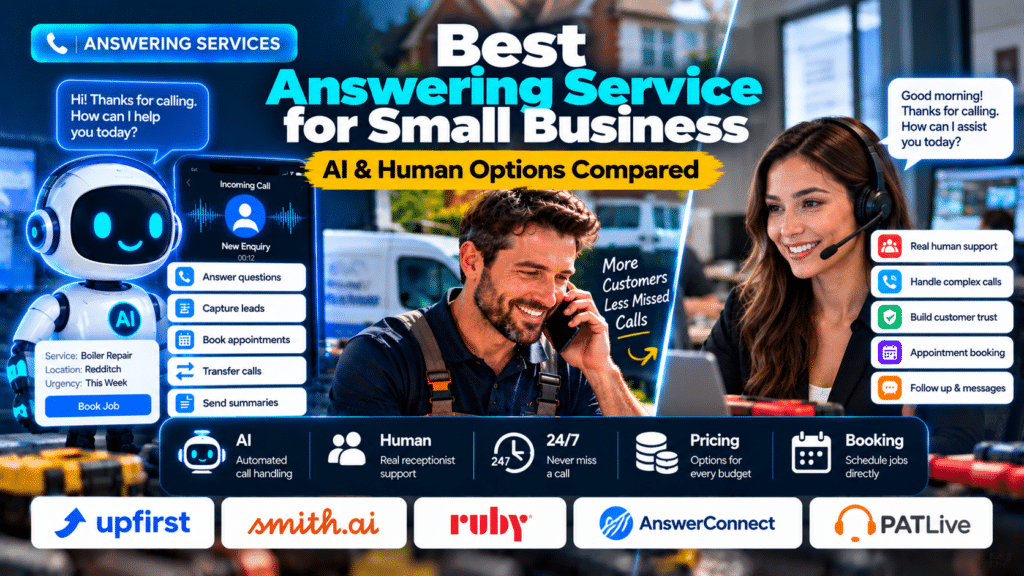
Modern answering services generally fall into three categories:
- AI answering services;
- live human answering services;
- hybrid services that combine both.
The right option depends on your call volume, budget, customer expectations and how complicated your conversations are.
This guide compares several current AI and human answering-service options and explains what trades and service businesses should look for before choosing one.
Quick Comparison of the Best Answering Services
| Service | Type | Best For | Current Entry Pricing |
|---|---|---|---|
| Upfirst | AI | Budget-conscious small businesses | $24.95/month for 30 calls |
| Smith.ai | AI or human | Businesses wanting AI or live receptionists | AI free for 25 calls; live from $300/month |
| Ruby | Human | Businesses prioritizing premium live service | $395/month for 100 minutes |
| AnswerConnect | Human | Businesses needing 24/7 live answering | $350/month for 200 minutes |
| PATLive | Human | Small businesses wanting flexible live coverage | Starts with pay-as-you-go plans |
Pricing can change, so check the provider’s current page before subscribing.
What Is a Business Answering Service?
A business answering service handles incoming calls when you or your team cannot answer.
Depending on the service, it may:
- answer calls;
- take messages;
- collect lead information;
- qualify enquiries;
- book appointments;
- transfer urgent calls;
- send call summaries;
- update a CRM;
- provide after-hours coverage.
Some answering services use human receptionists.
Others use conversational AI.
The goal is the same:
make sure important customer calls do not disappear into voicemail.
AI Answering Service vs Human Answering Service
The first decision is whether you want AI, people or a combination.
AI Answering Services
AI systems use automated conversational technology.
They are often strong at:
- 24/7 coverage;
- predictable call flows;
- lead qualification;
- booking;
- CRM integrations;
- lower entry pricing.
Human Answering Services
Human receptionists are usually better at:
- emotional callers;
- complex questions;
- unusual situations;
- relationship-building;
- nuanced conversation.
Hybrid Answering Services
Hybrid providers combine AI with human escalation.
Routine calls can be automated, while complicated situations move to a person.
For many small businesses, this can provide a useful middle ground.
1. Upfirst
Upfirst is an AI answering service aimed at small businesses.
Its current Starter plan costs $24.95 per month for 30 calls, with additional calls charged at $1.50 each. It also offers higher tiers for larger call volumes (source: Upfirst).
What Upfirst Includes
Current features include:
- 24/7 answering;
- appointment scheduling;
- call transfers;
- message taking;
- in-call texting;
- transcripts;
- call summaries;
- multilingual support;
- Zapier integrations (source: Upfirst).
Why It Works for Trades
A solo electrician or plumber may not need a full human receptionist service.
They may simply need someone—or something—to answer when they are busy.
Upfirst can work well for:
- missed-call coverage;
- after-hours enquiries;
- basic lead qualification;
- appointment requests.
Best For
Upfirst may suit:
- solo tradespeople;
- small home-service businesses;
- businesses with moderate call volume;
- companies wanting low-cost AI call handling.
Possible Limitation
It is AI-only.
If your customers regularly need empathy, negotiation or complex discussion, a human answering service may be a better fit.
2. Smith.ai
Smith.ai offers both AI receptionist and live virtual receptionist services.
That flexibility makes it useful for businesses deciding between automation and human support.
Smith.ai AI Receptionist
Smith.ai currently offers an AI plan with 25 calls per month free, while paid AI plans start from $150 per month for higher call volumes (source: Upfirst).
Smith.ai Live Receptionists
Its human virtual receptionist service currently starts at $300 per month for 30 calls.
The plans include:
- 24/7 answering;
- bilingual receptionists;
- appointment booking;
- lead screening;
- intake;
- warm transfers;
- payment collection;
- recordings and transcripts;
- email and SMS follow-up (source: Smith.ai).
Why Smith.ai Is Useful
Smith.ai is attractive when you want more than basic message taking.
It can handle structured lead intake and business workflows.
Best For
Smith.ai may suit:
- contractors;
- professional service firms;
- growing service companies;
- businesses wanting AI or live-agent options.
Possible Limitation
Its live receptionist plans are considerably more expensive than basic AI services.
For a low-volume solo trade business, that cost may be difficult to justify.
3. Ruby
Ruby focuses on live virtual receptionists.
Its current pricing starts at $395 per month for 100 receptionist minutes, with larger plans available for higher usage. Ruby says its plans include 24/7 phone coverage and access to the same core feature set across plan levels (source: Ruby – 24/7 Virtual Receptionists).
What Ruby Offers
Ruby highlights:
- live human receptionists;
- 24/7 coverage;
- appointment scheduling;
- bilingual answering;
- client intake;
- personalized call handling (source: Ruby – 24/7 Virtual Receptionists).
Why Businesses Choose Ruby
The main attraction is human interaction.
A caller speaks with a real receptionist instead of an automated system.
That can be valuable for businesses where first impressions matter heavily.
Best For
Ruby may suit:
- contractors with higher-value leads;
- service businesses wanting premium call handling;
- businesses with complex customer conversations.
Possible Limitation
The cost is significantly higher than most AI options.
Small businesses should estimate call volume carefully before committing.
4. AnswerConnect
AnswerConnect is a 24/7 live answering service.
It uses real receptionists rather than bots and positions itself around continuous human call coverage (source: AnswerConnect).
Current Pricing
AnswerConnect currently lists:
- Entry: $350/month for 200 minutes;
- Growth: $395/month for 300 minutes;
- Standard: $575/month for 400 minutes.
Its Entry and Standard plans currently list a $49.99 setup fee, while the Growth plan does not. Extra-minute charges vary by plan (source: AnswerConnect).
Features
Plans include:
- 24/7 live answering;
- scripting;
- CRM integrations;
- mobile and desktop app access;
- urgent call handling;
- lead capture.
Higher plans can also include live chat (source: AnswerConnect).
Best For
AnswerConnect may suit:
- plumbing companies;
- electrical businesses;
- contractors;
- emergency-service companies;
- businesses wanting humans answering around the clock.
Possible Limitation
AnswerConnect bills in minute increments, and interactions are rounded up to the next full minute. That can affect the real cost, particularly for many short calls (source: AnswerConnect).
5. PATLive
PATLive provides live answering services using human receptionists.
Its service can handle:
- call answering;
- message taking;
- call routing;
- appointment scheduling;
- bilingual support.
PATLive describes its virtual receptionist service as an off-site human receptionist model rather than an automated answering system (source: PATLive).
Pricing Approach
PATLive offers plans ranging from pay-as-you-go to bundled minute plans.
Recent pricing comparisons place its entry option around $49 per month plus per-minute usage, although businesses should confirm current pricing directly before subscribing (source: Upfirst).
Best For
PATLive may suit:
- small businesses wanting live human answering;
- companies with variable call volume;
- businesses wanting appointment scheduling or call routing.
Possible Limitation
Because live answering is billed around time usage, costs can rise if calls are lengthy.
AI vs Human Answering Service: Cost Comparison
Cost is one of the biggest differences.
Current market pricing shows a wide gap between AI and human services.
AI answering services can start below $30 per month, while live receptionist services commonly begin in the hundreds of dollars per month. A recent 2026 pricing comparison found live answering entry plans ranging roughly from $25 to $350 per month depending on the provider and billing model, while AI plans often start much lower (source: Upfirst).
That does not mean AI is automatically better.
It means you need to compare the value of each call.
A $400/month human service could still be worthwhile if it helps convert high-value leads.
Per-Call vs Per-Minute Pricing
Pricing models matter.
Per-Call Pricing
You pay for each answered call.
This can be easier to predict.
AI services often use this model.
Per-Minute Pricing
You pay based on how long the call lasts.
This is common with human answering services.
Why Rounding Matters
Some providers round calls to the next full minute.
A 61-second call may therefore be billed as two minutes.
That can significantly affect cost over hundreds of calls. AnswerConnect, for example, states that interactions are rounded up to the nearest minute (source: AnswerConnect).
Always check:
- rounding rules;
- overage rates;
- setup fees;
- after-hours charges;
- transfer fees.
Best Answering Service for Plumbers
Plumbers often need a mix of:
- emergency call handling;
- lead capture;
- after-hours coverage;
- appointment booking.
For routine enquiries, AI can work very well.
For emergencies or upset customers, live human support may be better.
A hybrid approach is often worth considering.
Best Answering Service for Electricians
Electricians may receive calls about:
- power outages;
- EV chargers;
- rewiring;
- inspections;
- faults.
An answering service should collect the right details and identify urgent situations without giving technical advice.
AI can handle structured intake.
Humans may be better for unclear or high-stress calls.
Best Answering Service for HVAC Companies
HVAC companies can experience very high seasonal call volume.
That makes 24/7 or overflow coverage valuable.
AI can help absorb repetitive booking calls.
Live answering may be useful during extreme weather or urgent breakdown periods.
Best Answering Service for Contractors
Contractors often receive fewer but higher-value leads.
A caller might want to discuss:
- renovation work;
- commercial projects;
- extensions;
- estimates.
For these businesses, live answering may be worth the extra cost because conversations are often more nuanced.
What Features Should Small Businesses Look For?
24/7 Coverage
If after-hours calls matter, confirm that coverage is genuinely available overnight, on weekends and on holidays.
Appointment Booking
A good answering service should be able to book appointments or consultations when appropriate.
Lead Qualification
The service should collect useful information such as:
- name;
- phone number;
- postcode;
- service needed;
- urgency.
Call Transfer
Important callers should be able to reach the right person.
CRM Integration
The best systems can send lead details directly into your CRM.
Call Summaries
Summaries save time when reviewing missed enquiries.
Multilingual Support
This can be valuable in diverse service areas.
Spam Filtering
You do not want to pay for obvious spam calls.
Human Escalation
If you choose AI, check whether complex calls can reach a person.
How to Choose the Right Answering Service
Step 1: Measure Your Call Volume
Track:
- total monthly calls;
- missed calls;
- after-hours calls;
- average call duration.
Step 2: Estimate Lead Value
How much is one new customer worth?
This helps determine how much you can reasonably spend to avoid missed calls.
Step 3: Identify Call Complexity
If most calls are simple booking enquiries, AI may be sufficient.
If calls often involve:
- complaints;
- complicated projects;
- emergencies;
- technical questions;
human answering may be more suitable.
Step 4: Compare Billing Models
Calculate actual cost based on your expected volume.
Do not compare only headline monthly prices.
Step 5: Test the Service
Make test calls before going live.
Try:
- new enquiry;
- urgent enquiry;
- existing customer;
- unusual question;
- appointment booking.
Step 6: Review Calls Regularly
Check transcripts, recordings and summaries where available.
Look for:
- incorrect information;
- missed details;
- awkward interactions;
- bad routing.
Common Answering Service Mistakes
Choosing the Cheapest Option Automatically
The cheapest service can become expensive if it handles valuable leads poorly.
Ignoring Overage Fees
A low base plan may become costly once call volume rises.
No Escalation Rules
Make sure emergencies and important customers can reach a person.
Giving the Service Incomplete Information
Your answering service needs accurate:
- services;
- hours;
- service areas;
- pricing policies;
- booking rules.
Letting the Service Give Technical Advice
For trades businesses, technical and safety advice should remain with qualified professionals.
Never Reviewing Call Quality
Call handling should be monitored regularly.
Which Answering Service Is Best for Small Businesses?
There is no single answer for every business.
For Low-Cost AI Coverage
Consider Upfirst.
Its current entry price is substantially lower than human answering services (source: Upfirst).
For AI or Human Options
Consider Smith.ai.
It offers both AI and live receptionist services (source: Smith.ai).
For Premium Live Human Service
Consider Ruby.
It focuses on personalized human answering and 24/7 service (source: Ruby – 24/7 Virtual Receptionists).
For High-Volume 24/7 Human Answering
Consider AnswerConnect.
Its plans include larger bundles of live receptionist minutes and CRM integrations (source: AnswerConnect).
For Flexible Live Answering
Consider PATLive.
It focuses on live receptionists, message taking, scheduling and call routing (source: PATLive).
Bilingual Answering Services (English and Spanish)
If many of your customers prefer Spanish, or another language, a standard answering service can lose you jobs. This section covers what to look for in bilingual call handling.
Why Bilingual Call Handling Matters for Service Businesses
Home-service calls are often urgent.
A customer calling about:
- a water leak;
- heating failure;
- electrical issue;
- broken air conditioning;
- emergency repair
does not want to struggle through a conversation.
Clear communication can help reduce misunderstandings around:
- address;
- problem description;
- appointment time;
- contact details;
- urgency.
That is especially important when the caller is already stressed.
5. Abby
Abby offers both human and AI receptionist options.
Its 2026 product comparisons position the service as a hybrid model where businesses can use human or AI receptionists within the same broader service framework (source: Abby Connect).
Why Abby Is Relevant
Abby may appeal to businesses that do not want to commit completely to:
- AI-only answering;
- human-only answering.
A company can use automation for routine calls while keeping human support available.
Bilingual Support
Recent 2026 bilingual comparisons indicate that Spanish support is included rather than sold as a separate add-on (source: FitMyCall).
Best For
Abby may suit:
- growing service businesses;
- contractors;
- companies wanting AI and human flexibility;
- bilingual teams.
What Does Bilingual Support Actually Mean?
Do not assume every provider handles languages in the same way.
Ask whether the service provides:
Native or Fluent Human Receptionists
For human services, ask whether receptionists are fluent or simply following translated scripts.
Automatic Language Detection
AI platforms may detect which language the caller is speaking automatically.
Mid-Call Language Switching
Some callers may begin in English and switch to Spanish.
The system should handle that naturally.
Written Follow-Up in the Same Language
If the service sends:
- SMS;
- email;
- booking confirmation,
ask whether those messages can also be bilingual.
Bilingual Answering Service vs Translation Service
These are not the same thing.
A translation service translates language.
A bilingual answering service actually manages the business interaction.
That may include:
- answering;
- qualifying;
- scheduling;
- transferring;
- recording the lead.
For service businesses, that operational role is usually more important than translation alone.
Is AI Good Enough for Bilingual Calls?
For predictable workflows, it can be.
AI is particularly useful when the business mainly needs to:
- collect details;
- book appointments;
- answer common questions;
- transfer calls.
However, human receptionists still have an advantage in:
- emotional situations;
- unclear accents;
- unusual conversations;
- complicated complaints.
Businesses should test the service using real-world scenarios before relying on it.
How Much Does Bilingual Answering Cost?
The answer depends heavily on the provider.
Recent 2026 pricing research found several different approaches:
- some providers include Spanish at no extra charge;
- AnswerConnect was reported with a flat monthly Spanish add-on;
- Smith.ai’s live human plans were reported with a per-call bilingual fee while AI included Spanish (source: FitMyCall).
This is why you should compare:
base price + bilingual fee + overages + setup fees
rather than just the advertised monthly plan.
How to Test a Bilingual Answering Service
Do not test only in English.
Use both languages.
Scenario 1: Routine Booking
Ask to book a standard service.
Scenario 2: Emergency Call
Describe an urgent issue.
Scenario 3: Mixed Language
Start in English and switch to Spanish.
Scenario 4: Address and Name
Test whether the service captures difficult names and street addresses correctly.
Scenario 5: Transfer
Ask to speak to a specific person.
Then review:
- accuracy;
- tone;
- response speed;
- booking;
- summary quality.
After-Hours Answering Services
Emergency calls at night and weekends are often the most valuable calls a trade business gets. This section covers services and call flows built for after-hours coverage.
Why After-Hours Coverage Matters for Trades
Home-service businesses often deal with problems that do not happen conveniently between 9 AM and 5 PM.
For example:
Plumbing
- burst pipes;
- major leaks;
- no hot water;
- blocked drains.
Electrical
- power loss;
- tripping circuits;
- burning smells;
- urgent faults.
HVAC
- no heating;
- no cooling;
- system failure during extreme weather.
Contractors and Maintenance Companies
- urgent property damage;
- access problems;
- emergency repairs.
In these situations, the caller may contact several businesses until someone answers.
A professional after-hours response can therefore help prevent valuable enquiries from being lost.
Upfirst
Upfirst is an AI answering service that can be configured specifically for after-hours calls.
Its current pricing starts at $24.95 per month for 30 calls, with higher tiers for 90, 300 and 600 calls. The service can be set to answer every call, overflow calls or only after-hours calls (source: Upfirst).
What Upfirst Can Do
Current features include:
- 24/7 answering;
- instant call summaries;
- call recordings and transcripts;
- call transfers;
- appointment scheduling;
- in-call texting;
- spam blocking;
- Zapier integration;
- support for 35+ languages (source: Upfirst).
Why It Works for After-Hours Coverage
A small trades business may not need a receptionist answering during the day.
The owner or office team may already handle normal-hours calls.
Upfirst can instead be configured so that AI answers only when the office is closed (source: Upfirst).
That creates a workflow such as:
Business hours → staff answer
After hours → AI answers
Best For
Upfirst may suit:
- solo plumbers;
- electricians;
- small HVAC companies;
- trades businesses wanting affordable overnight coverage.
Potential Limitation
It is AI rather than human call handling.
Complex, emotional or unusual calls may need escalation to a person.
PATLive
PATLive provides a fully human after-hours answering service.
Its current after-hours offering provides 24/7 coverage, including weekends and holidays, using US-based human receptionists. PATLive also advertises customizable call flows and bilingual support at no additional charge (source: PATLive).
Current Pricing
PATLive currently advertises answering-service plans starting at $49 per month, with no contracts (source: PATLive).
Why PATLive Stands Out
The biggest advantage is human interaction.
Customers speak with a real receptionist rather than an automated voice.
That can be useful when callers are:
- stressed;
- confused;
- unsure whether the situation is urgent;
- asking more complicated questions.
Additional Capabilities
PATLive also offers services such as:
- outbound calls;
- follow-ups;
- appointment reminders;
- website live chat (source: PATLive).
Best For
PATLive may be a good fit for:
- plumbing companies;
- HVAC businesses;
- contractors;
- businesses wanting human after-hours answering without hiring overnight staff.
AnswerConnect
AnswerConnect offers a live after-hours answering service using human customer-experience agents.
Its service is designed to answer calls outside normal business hours so customers can reach a real person rather than voicemail (source: AnswerConnect).
How Pricing Works
AnswerConnect uses monthly plans based on receptionist minutes.
It calculates usage from the total time required to handle the call, including after-call work such as taking messages (source: AnswerConnect).
This matters because businesses should compare:
- total included minutes;
- average call length;
- overage pricing.
Why It Works for Home Services
AnswerConnect can be particularly useful for companies with:
- an in-house daytime team;
- meaningful overnight demand;
- urgent calls;
- customers who strongly prefer human interaction.
Best For
AnswerConnect may suit:
- emergency-service companies;
- plumbers;
- electricians;
- HVAC companies;
- larger home-service businesses.
Per-Call vs Per-Minute Pricing
This is an important distinction.
Per-Call Pricing
You pay for each answered call.
This can be attractive when:
- call length varies;
- some calls are relatively long.
Per-Minute Pricing
You pay based on conversation length.
This can work well when:
- most calls are short;
- billing increments are fair.
However, some answering services round call time.
That can make many short calls more expensive than expected.
Always read the billing rules carefully.
How to Set Up an After-Hours Call Flow
A simple workflow might look like this.
Step 1: Greeting
“Thanks for calling ABC Plumbing. Our office is currently closed, but I can help with your enquiry.”
Step 2: Identify the Reason for the Call
Ask what service the caller needs.
Step 3: Determine Urgency
Is this:
- urgent;
- routine;
- existing job;
- quote request?
Step 4: Collect Details
Collect:
- name;
- phone number;
- service address;
- problem description.
Step 5: Choose the Next Action
Urgent: transfer or alert technician.
Routine: book appointment or callback.
Quote request: capture lead and schedule follow-up.
Step 6: Send Confirmation
Tell the customer what happens next.
Clarity matters.
Should You Answer Every After-Hours Call?
Not necessarily in the same way.
A business can have different workflows for different situations.
For example:
Emergency Plumber
Call may need immediate escalation.
Routine Boiler Service
Book for normal hours.
Sales Enquiry
Collect details and schedule callback.
Existing Customer Complaint
Create an urgent follow-up task.
This is better than treating every call as identical.
How to Calculate Whether After-Hours Coverage Is Worth It
Use your own business numbers.
Suppose you currently miss 30 calls outside business hours every month.
If:
- 15 are genuine leads;
- 5 would have become jobs;
- average profit per job is $200,
those missed opportunities may represent substantial value.
Compare:
Potential recovered revenue
against:
Monthly answering-service cost
This gives you a much better decision framework than simply asking whether $50 or $300 per month “sounds expensive.”
Related guides
- AI Receptionist vs Virtual Receptionist: Which Is Better for Trades?
- Best AI Receptionist for Small Business: Trades Edition
- Best AI Tools for Small Business: 15 Practical Tools to Save Time and Grow
- Tools, Software and Automation for Trades: Start Here
Frequently Asked Questions
What is the best answering service for small business?
The best option depends on whether you prefer AI or human call handling, your monthly call volume and how complex your customer conversations are.
How much does a small business answering service cost?
AI plans can start below $30 per month, while live answering services commonly start in the hundreds of dollars per month depending on usage and provider (source: Upfirst).
Is an AI answering service good for plumbers?
Yes. AI can work well for lead capture, after-hours calls and routine booking. Complicated emergencies may still be better handled by a person.
What is the difference between an answering service and a virtual receptionist?
A basic answering service may mainly take messages and route calls. A virtual receptionist usually handles broader tasks such as lead qualification, booking and customer intake.
Are live answering services available 24/7?
Some are. Ruby, Smith.ai and AnswerConnect currently advertise 24/7 live coverage (source: Ruby – 24/7 Virtual Receptionists).
Can answering services book appointments?
Yes. Many AI and live receptionist services support appointment scheduling.
Is a human answering service better than AI?
Human receptionists generally handle complicated or emotional conversations better. AI is often cheaper and stronger for repetitive, structured calls.
Conclusion
The best answering service for small business depends on the kind of calls your customers make.
If your calls are mostly:
- predictable;
- repetitive;
- appointment-focused;
an AI answering service can provide strong value at a relatively low cost.
If your calls are often:
- complicated;
- emotional;
- high-value;
- unpredictable;
a human answering service may justify the higher price.
For some businesses, a hybrid approach is the strongest option.
Use AI for routine calls.
Use humans when judgment and empathy matter.
Before choosing a service, compare:
- call volume;
- real monthly cost;
- booking capability;
- integrations;
- escalation options;
- call quality.
The goal is not simply to answer every phone call.
It is to make sure each caller reaches a useful next step.