A technician arrives at a customer site and finds equipment they have not worked on recently.
They need to know:
- the company’s procedure;
- a manufacturer note;
- a previous job detail;
- an approved troubleshooting step;
- which part is normally used.
The information probably exists somewhere.
The problem is finding it.
It may be inside:
- a PDF manual;
- a shared drive;
- an old email;
- the CRM;
- a training document;
- someone’s memory.
The technician does not want to spend 20 minutes searching through folders while standing in a customer’s property.
This is where an AI knowledge base for field technicians can become useful.
Instead of asking:
Where is the document about this?
the technician could ask:
What is our standard procedure for documenting a boiler pressure-loss call?
or:
Which company SOP covers electrical fault callouts?
or:
What should I record before closing an installation job?
The AI can search approved company knowledge and return a concise answer with the source attached.
A practical system looks like:
Company Documents
↓
SOPs + Manuals + Guides + Job Knowledge
↓
Searchable Knowledge Base
↓
Technician Question
↓
AI Finds Relevant Information
↓
Answer + Source
↓
Technician Verifies and Acts
The important principle is:
AI should retrieve approved knowledge—not invent technical knowledge.
That distinction is what makes an AI knowledge base useful rather than risky.
What Is an AI Knowledge Base?
A traditional knowledge base stores documents people can search manually.
An AI knowledge base adds a conversational layer.
Instead of searching for:
“Boiler SOP v3 final final.pdf”
a technician can ask:
What do I need to document after replacing a boiler component?
The system searches the approved documents and produces an answer.
The technician gets:
- relevant steps;
- document source;
- section reference.
That is far more practical in the field.
Why Field Technicians Need Better Access to Knowledge
Service businesses accumulate knowledge quickly.
That knowledge may include:
- SOPs;
- installation checklists;
- company policies;
- manufacturer documents;
- troubleshooting procedures;
- training notes;
- warranty processes;
- customer-history standards.
The problem is not usually:
we have no information.
It is:
the information is difficult to find when somebody actually needs it.
The Cost of Poor Knowledge Access
Poor knowledge access can lead to:
- unnecessary calls to senior technicians;
- repeated mistakes;
- slow diagnosis;
- inconsistent procedures;
- longer onboarding.
Imagine five technicians each spend:
15 minutes per day
searching for information.
That becomes:
75 minutes/day.
Over 20 working days:
25 staff hours/month.
Even modest search friction can become expensive.
AI Does Not Replace Technical Expertise
This needs to be clear.
An AI knowledge base should not be positioned as:
a replacement for qualified technicians.
It is better thought of as:
an intelligent search layer over approved company information.
The technician still decides:
- what the fault is;
- what work is appropriate;
- what is safe;
- what complies with applicable standards.
AI helps locate information.
The Best Rule
AI retrieves.
Technicians verify.
Qualified people decide.
Step 1: Decide What Belongs in the Knowledge Base
Do not upload every file your business has ever created.
Start with useful operational information.
Good sources include:
- SOPs;
- checklists;
- training documents;
- internal troubleshooting guides;
- warranty procedures;
- approved installation procedures;
- field documentation standards.
Think:
What do technicians repeatedly ask the office or senior staff?
Start there.
Step 2: Create a Knowledge Inventory
Make a simple list.
For example:
| Knowledge Area | Current Source | Owner |
|---|---|---|
| Boiler service process | PDF SOP | Operations |
| Electrical job closeout | Word document | Electrical Lead |
| Callout checklist | Shared Drive | Dispatch |
| Warranty process | Email / PDF | Office |
| Van stock list | Spreadsheet | Operations |
This shows where your knowledge actually lives.
Step 3: Remove Outdated Documents
One of the biggest risks in an AI knowledge base is:
outdated information.
Suppose you have:
SOP v1
and:
SOP v4
in the same system.
The AI may retrieve the wrong one.
Before adding documents:
- remove duplicates;
- archive obsolete versions;
- identify current approved version.
A clean knowledge base starts with clean source material.
Step 4: Add Document Ownership
Every important document should have an owner.
For example:
Electrical Procedures
Owner:
Electrical Supervisor.
Customer Service SOPs
Owner:
Office Manager.
Job Documentation Standards
Owner:
Operations Manager.
Someone should be responsible for:
- reviewing;
- updating;
- approving.
AI cannot know whether your business process changed last month unless somebody updates the source.
Step 5: Add Version Information
Every important SOP should include:
Document Name
Version
Approved Date
Owner
Review Date
Example:
Electrical Callout Documentation SOP
Version:
2.1
Approved:
1 September 2026
Owner:
Operations Manager
Review:
March 2027
Now technicians and AI can understand which document is current.
Step 6: Start With Company SOPs
Company SOPs are often the best first knowledge source.
Examples:
- how to close a job;
- how to record parts;
- how to handle callbacks;
- how to take site photos;
- how to escalate complaints.
These are internal procedures the AI can explain reliably if the source material is clear.
Example Question
Technician asks:
What photos do I need before closing an installation?
AI response:
According to Installation Closeout SOP v2.1:
- Equipment before final handover.
- Completed installation.
- Relevant label / identification.
- Any required test documentation.
Source: Installation Closeout SOP v2.1.
This is much better than an answer with no source.
Step 7: Add Checklists
Checklists work especially well in AI knowledge systems.
Examples:
Pre-Job Checklist
- address confirmed;
- parts loaded;
- customer notes reviewed.
Installation Closeout
- required photos;
- test results;
- customer handover;
- documentation.
Technician can ask:
Give me the closeout checklist for this job type.
The AI can return it instantly.
Step 8: Add Training Material
Training documents can also be useful.
For example:
- diagnostic process;
- customer communication;
- documentation quality.
A new technician might ask:
What does our company expect in a good job note?
The AI can answer from training material.
This helps reinforce onboarding after formal training ends.
Step 9: Add Manufacturer Documentation Carefully
Manufacturer documents may be useful for:
- approved procedures;
- product specifications;
- setup references.
But they require careful management.
Manufacturer documentation changes.
Make sure:
- product;
- model;
- document version
are clear.
Manufacturer Data Should Not Be Blended Carelessly
If the AI has manuals for:
- Model A;
- Model B;
- Model C;
the answer should state which model the information comes from.
Bad:
Reset procedure: hold button for five seconds.
Better:
For Model B, the manufacturer’s manual states…
This prevents information from one model being applied to another.
Step 10: Require Source Citations
Every operational answer should ideally show:
where the answer came from.
For example:
According to the Electrical Fault Callout SOP, technicians should record the affected circuit, reported symptoms, work completed, testing performed, and customer advice.
Source: Electrical Fault Callout SOP, Version 3.0.
This makes the answer easier to trust and verify.
Answers Without Sources Should Be Treated Differently
If the AI cannot find approved information, it should say:
I could not find this in the approved knowledge base.
Not:
Here is what I think you should do.
That is a critical safety feature.
Use an “I Don’t Know” Rule
A good system should be allowed to answer:
I don’t know.
For example:
I could not find an approved procedure for this model. Check the manufacturer documentation or contact the technical lead.
That is much safer than generating a confident guess.
Step 11: Separate Internal Knowledge From General AI Knowledge
This distinction is important.
Internal Knowledge
- company SOP;
- approved checklist;
- manufacturer manual;
- company policy.
General AI Knowledge
May come from model training or outside information.
For technical field use, your system should clearly prioritize:
approved internal sources.
Example
Technician:
What is our procedure for callback jobs?
The answer should come from:
your company’s callback SOP.
Not a generic internet-style explanation.
Step 12: Create Topic Categories
Organize knowledge by areas such as:
Operations
SOPs and workflow.
Technical
Approved technical reference.
Customer Service
Communication policies.
Documentation
Job notes, photos, closeout.
Safety
Approved procedures and escalation.
Warranty
Warranty processes.
Inventory
Parts and stock procedures.
Good organization improves search and maintenance.
Step 13: Create Trade-Specific Sections
If your company has multiple trades:
separate relevant knowledge.
Plumbing
- leak response;
- boiler documentation;
- drain callouts.
Electrical
- circuit fault callouts;
- EV charger job procedures;
- inspection documentation.
HVAC
- maintenance;
- system diagnostics;
- equipment records.
This reduces irrelevant answers.
Step 14: Add Role-Based Access
Not every employee needs access to everything.
Technician may need:
- technical SOPs;
- job procedures.
Office staff may need:
- booking;
- billing;
- customer policies.
Managers may need:
- financial;
- HR;
- internal policies.
Role-based access reduces unnecessary exposure.
Step 15: Protect Sensitive Information
Do not put things into a technician AI knowledge base that technicians do not need.
Examples:
- employee personal information;
- confidential financial reports;
- payment information;
- passwords.
The knowledge base should follow:
least-access principle.
Step 16: Create Standard Question Patterns
Technicians should know what they can ask.
Examples:
What is our SOP for ___?
What information do I need before closing ___?
Show me the checklist for ___.
What does the manual say about ___?
What previous guidance do we have for ___?
This encourages useful queries.
Step 17: Use Retrieval Instead of Free-Form Answers
The ideal system should work like:
Question
↓
Search Approved Documents
↓
Find Relevant Sections
↓
Generate Answer From Those Sections
This is often described as retrieval-based AI.
The important idea is simple:
the answer is grounded in documents you control.
Step 18: Show the Relevant Source Passage
A technician should be able to see:
- summary;
- original source.
Example:
AI Summary
Use the installation closeout checklist before marking the job complete.
Source
Installation Closeout SOP v2.1, Section 4.
Then technician can open:
Section 4
if more detail is needed.
Step 19: Keep Answers Short in the Field
Technicians do not want:
1,500-word AI responses
while standing beside equipment.
A good field answer might show:
Quick Answer
3–5 steps.
Source
Document reference.
More Detail
Expandable section.
This is much more usable.
Step 20: Use Different Answer Modes
You can offer:
Quick Answer
Short steps.
Checklist
Action list.
Explain
More context.
Show Source
Original document.
This gives technicians control over detail.
Step 21: Add Job Context
A more advanced AI assistant may know:
- trade;
- job type;
- equipment;
- customer history.
Then the technician can ask:
What documentation do I need for this job?
Instead of specifying everything manually.
But job context must be accurate.
Example
Job type:
EV Charger Installation
AI can retrieve:
- installation closeout checklist;
- photo requirements;
- customer handover process.
That is more useful than a generic answer.
Step 22: Connect the Knowledge Base to CRM History Carefully
You can also make relevant customer history searchable.
For example:
Technician asks:
What work have we done on this boiler before?
AI might return:
March 2026: Annual service.
October 2026: Pressure relief valve replaced.
January 2027: Pressure issue investigated.
This creates useful job context.
Historical Job Notes Should Remain Attributed
If an old technician wrote:
possible expansion vessel issue
the AI should not rewrite it as:
Expansion vessel was faulty.
Preserve uncertainty.
Step 23: Combine Knowledge With AI Call Summaries
Before the visit:
AI has:
- customer call summary;
- CRM history.
It can then suggest:
Relevant Knowledge
For example:
Customer reports repeated breaker trips. Relevant company document: Electrical Fault Investigation Checklist.
The technician receives:
- job context;
- correct checklist.
This is a powerful combination.
Step 24: Combine Knowledge With Technician Job Reports
After the job:
technician records a voice note.
AI can compare the report against:
- company closeout requirements.
For example:
Missing Required Field
Testing not documented.
It can prompt:
The Electrical Job Closeout SOP requires testing information. What testing was performed?
That improves compliance.
Step 25: Use AI for SOP Compliance Checks
Example report:
- issue;
- diagnosis;
- repair;
- advice.
SOP requires:
- testing;
- parts used.
AI flags:
Missing: Testing
Missing: Parts Used
Then technician completes the report.
AI is now supporting:
process quality.
Step 26: Create an Escalation Rule
The AI should know when to say:
contact a human.
Examples:
- no approved source found;
- conflicting documents;
- safety-critical question;
- unclear model;
- unusual customer situation.
A strong system knows its limits.
Example
Technician asks:
Can I modify this wiring arrangement?
AI response:
I cannot find an approved company procedure covering this situation. Stop and confirm with the electrical supervisor before proceeding.
That is a useful answer.
Step 27: Flag Conflicting Knowledge
Suppose two documents say different things.
The AI should not secretly choose one.
It should say:
I found conflicting guidance in SOP v2 and SOP v3. SOP v3 is newer, but please verify with the document owner.
Even better:
remove obsolete documents before they enter production.
Step 28: Add an Approval Workflow for New Documents
Do not let anyone upload a random document and make it official.
Use:
Draft
↓
Review
↓
Approved
↓
Published to AI Knowledge Base
This protects quality.
Step 29: Create a Document Review Schedule
Important documents should be reviewed:
- every 6 months;
- annually;
- when a process changes.
Example:
Document
Callback SOP.
Last Review
October 2026.
Next Review
April 2027.
This reduces outdated guidance.
Step 30: Add an Expiry Rule
Some documents may automatically become:
Needs Review
after a certain date.
The AI can warn:
This document was last approved 18 months ago and may require review.
This improves trust.
Step 31: Track What Technicians Ask
Technician questions reveal where knowledge is weak.
For example:
Top questions this month:
- Callback procedure.
- EV charger documentation.
- Warranty claim steps.
- Boiler pressure job checklist.
That tells management:
what training or SOP improvement is needed.
Step 32: Track Unanswered Questions
Suppose technicians ask:
50 questions
and the knowledge base cannot answer:
14.
Those 14 are valuable.
They show:
- missing documentation.
Create:
Knowledge Gap Backlog
Then improve the system.
Step 33: Track Repeated Questions
If technicians repeatedly ask:
How do I close a warranty job?
the workflow may be unclear.
The solution may not be:
better AI.
It may be:
simpler process.
AI should help reveal operational friction.
Step 34: Use Search Analytics
Useful metrics:
Most Searched Topics
Unanswered Questions
Documents Opened
Answers Rated Helpful
Escalations to Supervisor
This shows whether the knowledge base actually helps.
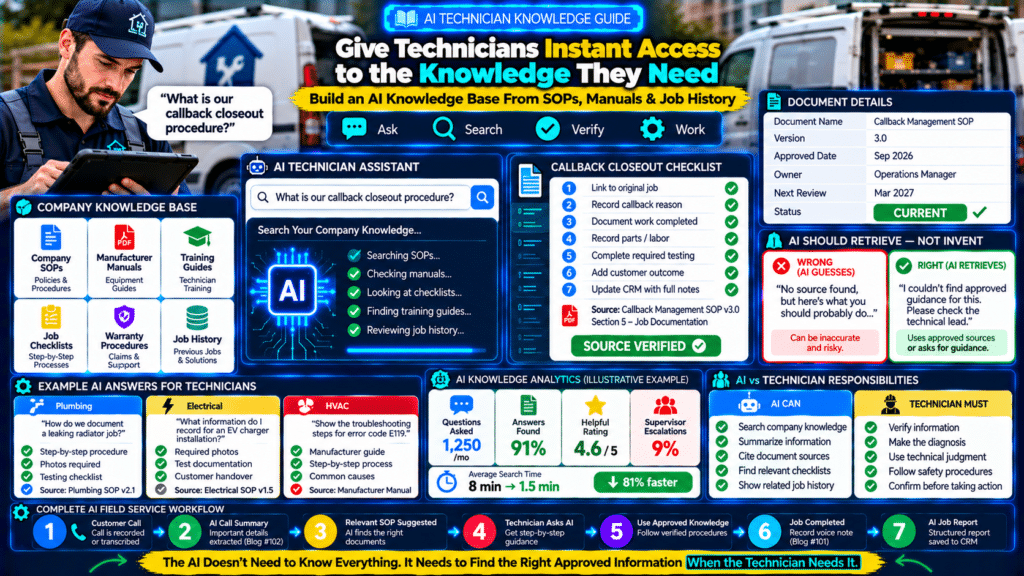
Example Dashboard
Questions asked:
1,250/month
Answers found in approved knowledge:
91%
Technician helpful rating:
4.6/5
Supervisor escalations:
9%
Average information search time:
Before:
8 min
After:
1.5 min
Label:
Illustrative Example
Step 35: Measure Senior-Technician Interruptions
Experienced technicians often become:
walking knowledge bases.
Junior technician calls:
Can I ask you something?
20 times per week.
If AI handles routine questions, senior staff can focus on:
- difficult problems;
- training;
- quality.
Do not eliminate human mentoring.
Use AI for:
repeatable questions.
Step 36: Measure Onboarding Time
New technicians may need weeks to learn:
- company procedures;
- software;
- documentation standards.
An AI knowledge assistant can reinforce:
- onboarding.
Example:
New technician asks:
How do I process a warranty callback here?
Instead of searching:
- handbook.
This can reduce dependency on memory.
AI Is Not a Substitute for Formal Training
An AI knowledge base should reinforce:
- training.
It should not replace:
- competency development;
- certifications;
- hands-on supervision.
Technicians still need proper training.
Step 37: Create a Technician Feedback Button
Every answer can include:
Helpful
or:
Needs Improvement
If technician chooses:
Needs Improvement
ask:
What was wrong?
Options:
- outdated;
- unclear;
- wrong document;
- missing information.
This improves the knowledge base.
Step 38: Allow Experts to Correct Knowledge
Suppose a technician notices:
This SOP changed last month.
They should not directly overwrite the document.
Instead:
Submit Correction
↓
Document Owner Reviews
↓
Approved Update
↓
AI Knowledge Base Updated
This keeps control.
Step 39: Start With a Small Pilot
Do not build the whole company knowledge base on Day 1.
Start with:
20–30 high-value documents.
For example:
- job closeout;
- callbacks;
- warranties;
- photos;
- common procedures.
Test with:
2–3 technicians.
Then improve.
Pilot Questions
Ask technicians:
- Was the answer correct?
- Was it fast?
- Was the source useful?
- Did you still need to call someone?
Use real feedback.
Step 40: Expand After the Core Works
Once reliable:
add:
- manufacturer documents;
- training;
- customer history;
- inventory procedures.
Do not prioritize size.
Prioritize:
quality.
A Small Accurate Knowledge Base Beats a Huge Mess
100 approved, current documents:
can be more useful than:
10,000 random files.
AI does not magically fix:
- bad documentation.
It can make bad documentation easier to find.
That is not the goal.
Example Technician Question
What do I need to capture before closing a callback job?
AI answer:
Callback Closeout Checklist
According to Callback Management SOP v3.0:
- Link callback to original job.
- Record reason for callback.
- Document additional work completed.
- Record additional parts/labor.
- Complete required testing.
- Add customer outcome.
- Escalate repeat callbacks.
Source: Callback Management SOP v3.0, Section 5.
This is practical.
Example Manufacturer Question
What does the approved manual say about resetting this controller?
AI:
I found the following procedure in the manufacturer manual for Model X. Confirm the equipment model before using these steps.
Then:
- short steps;
- source link.
The model warning matters.
Example Unknown Question
Technician:
Can I bypass this safety sensor temporarily?
AI:
I cannot find an approved procedure authorizing that action. Do not rely on AI guidance for bypassing safety controls. Follow the approved manufacturer/company procedure or escalate to the technical supervisor.
The system should be comfortable refusing to invent.
AI Knowledge Base + Call Summaries + Job Reports
Now the AI workflow becomes much more powerful.
Before the Job
Customer Call
↓
AI Summary
↓
Relevant SOP Suggested
↓
Technician Brief
During the Job
Technician asks:
Show me the checklist.
↓
AI Knowledge Base
After the Job
Technician Voice Note
↓
AI Job Report
↓
SOP Compliance Check
↓
CRM Updated
This creates an end-to-end information system.
The Bigger Goal
The goal is not:
give technicians a chatbot.
The goal is:
put approved knowledge where technicians need it.
That may mean:
- fewer phone calls;
- faster onboarding;
- more consistent processes;
- better documentation.
AI is only the interface.
The real asset is:
organized company knowledge.
Common AI Knowledge Base Mistakes
Uploading Everything
Creates noise.
Leaving Old SOPs Active
Creates conflicting answers.
No Source Citations
Technicians cannot verify.
Allowing General AI Guessing
Creates unreliable technical answers.
No “I Don’t Know” Behavior
AI invents answers.
Mixing Models and Manuals
Wrong equipment guidance can appear.
No Document Ownership
Nobody maintains knowledge.
No Review Dates
Documents become stale.
No Human Escalation
AI is treated as final authority.
No Technician Feedback
Problems remain hidden.
Measuring Only Usage
High usage does not mean high accuracy.
AI Knowledge Base Checklist
Before launch:
- Knowledge inventory completed
- Outdated documents removed
- Current versions identified
- Document owners assigned
- Review dates defined
- SOPs structured clearly
- Trade categories created
- Manufacturer documents labeled by model
- Source citations required
- “I don’t know” behavior configured
- Human escalation process defined
- Role-based access applied
- Sensitive documents excluded
- Technician pilot completed
- Feedback process created
- Knowledge-gap tracking enabled
- Usage and accuracy metrics defined
Sources and Further Reading
These official resources back up the methods in this guide and are worth reading alongside it.
- AI Risk Management Framework (NIST): a practical framework for using AI responsibly.
- Secure Your Business (CISA): protecting customer data and business accounts.
Related guides
- How Small Service Businesses Can Use AI Without Replacing Their Team
- Best AI Receptionist for Small Business: Trades Edition
- Best AI Tools for Small Business: 15 Practical Tools to Save Time and Grow
- Tools, Software and Automation for Trades: Start Here
Frequently Asked Questions
What is an AI knowledge base for field technicians?
It is a searchable collection of approved company knowledge that technicians can access using natural-language questions.
What documents should be included?
Good starting points include:
- SOPs;
- checklists;
- training documents;
- warranty procedures;
- approved technical references.
Can AI troubleshoot equipment for technicians?
AI can help retrieve approved troubleshooting information.
Qualified technicians should still perform actual diagnosis and make technical decisions.
Should manufacturer manuals be included?
They can be useful, provided:
- model;
- version;
- source
are clearly identified.
What happens if AI cannot find an answer?
It should say so and direct the technician to:
- approved documentation;
- technical supervisor.
It should not guess.
Should AI answers show sources?
Yes.
Source visibility makes answers easier to verify.
Can the knowledge base use CRM history?
It can include relevant customer/job history if access controls and privacy requirements are handled properly.
Can an AI knowledge base replace training?
No.
It should reinforce training, not replace technical competency or supervision.
How do I prevent outdated answers?
Use:
- document ownership;
- version control;
- review dates;
- removal of obsolete documents.
Should every employee see all documents?
No.
Use role-based access based on what each employee needs.
Conclusion
An AI knowledge base for field technicians can solve one of the most frustrating problems in a growing service business:
the answer exists, but nobody can find it quickly.
Instead of forcing technicians to search through:
PDFs
folders
emails
old job notes
give them a structured way to ask:
What is our approved procedure for this?
Then the system should:
Search Approved Knowledge
↓
Find Relevant Information
↓
Provide a Short Answer
↓
Show the Source
↓
Allow Human Verification
The most important rule is:
AI must not become an unofficial technical authority.
It should retrieve:
- approved SOPs;
- manuals;
- procedures;
- company knowledge.
If the answer does not exist:
it should say:
I could not find approved guidance.
That is much safer than guessing.
Combined with:
AI call summaries
and:
AI technician job reports
the knowledge base can complete an information loop:
Customer Explains
↓
AI Captures
↓
Technician Gets Context
↓
AI Retrieves Relevant Knowledge
↓
Technician Performs the Work
↓
AI Structures the Report
That is where AI starts becoming a genuinely useful operational layer for service businesses.
Not because it knows more than your technicians.
But because it helps your technicians access:
the knowledge your business already has
exactly when they need it.