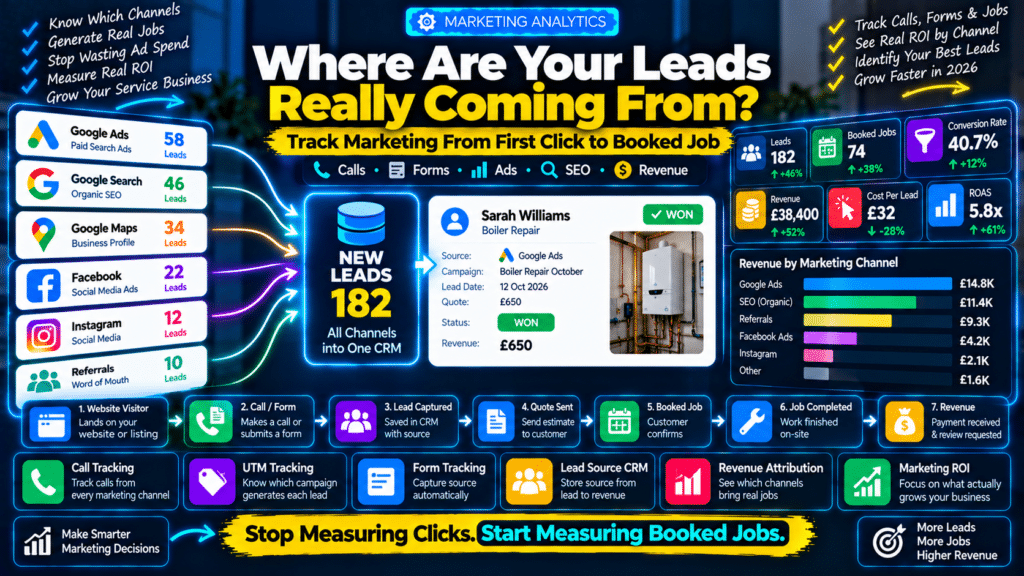
A service business can spend thousands every month on marketing and still be unable to answer one basic question:
Where did our best customers actually come from?
You may be investing in:
- Google Ads;
- Google Business Profile;
- SEO;
- Facebook;
- Instagram;
- local directories;
- referrals;
- email;
- flyers.
The phone rings.
Someone submits a quote form.
A technician gets booked.
Revenue comes in.
But nobody knows which marketing channel created the job.
That makes it difficult to answer:
Should we spend more on Google Ads?
Is SEO actually working?
Are Facebook leads profitable?
Is Google Business Profile generating jobs?
Which campaigns should we stop paying for?
This is why service business lead tracking matters.
The goal is not simply to measure:
traffic.
The goal is to connect:
Marketing Source → Lead → Quote → Booked Job → Revenue
When you can do that, marketing decisions become much easier.
What Is Lead Source Tracking?
Lead source tracking means recording where a potential customer first found or contacted your business.
Common lead sources include:
- Google organic search;
- Google Maps;
- Google Ads;
- Facebook Ads;
- Instagram;
- referrals;
- directories;
- email;
- repeat customers.
For example:
Customer: Sarah Williams
Service: Boiler Repair
Lead Source: Google Ads
Job Value: £420
That is much more useful than knowing:
Google Ads generated 25 clicks.
Clicks do not pay the bills.
Booked jobs do.
The Lead Tracking Funnel
A useful marketing tracking system follows the customer through the whole journey.
Marketing Channel
↓
Website Visit / Phone Call
↓
Lead
↓
Quote
↓
Booked Job
↓
Completed Job
↓
Revenue
This lets you measure not only:
how many leads did we get?
but also:
which leads became profitable customers?
Why Website Traffic Alone Is Not Enough
Imagine two marketing channels.
Channel A
1,000 website visitors.
10 leads.
2 jobs.
£800 revenue.
Channel B
250 website visitors.
20 leads.
12 jobs.
£7,500 revenue.
If you only look at traffic, Channel A appears stronger.
But Channel B is clearly generating more business.
That is why service businesses should measure:
- leads;
- quote requests;
- phone calls;
- bookings;
- revenue.
Not only:
- page views;
- impressions;
- social followers.
Start by Defining What Counts as a Lead
Before tracking anything, decide what your business considers a lead.
For most service businesses, this might include:
- phone call;
- quote form submission;
- booking;
- WhatsApp enquiry;
- email enquiry;
- live-chat conversation.
Do not count every website visitor as a lead.
A visitor becomes a lead when they show meaningful interest in buying your service.
Track Phone Calls
Phone calls are one of the most important conversions for local service businesses.
This is especially true for:
- plumbers;
- electricians;
- HVAC;
- locksmiths;
- roofers;
- emergency services.
If 70% of your customers call instead of submitting forms, tracking forms alone gives you an incomplete picture.
What Is Call Tracking?
Call tracking uses different phone numbers to identify where callers came from.
For example:
Google Ads
uses:
Number A
Facebook Ads
uses:
Number B
Direct Mail
uses:
Number C
When someone calls, the system records the marketing source.
More advanced systems use dynamic number insertion.
This automatically changes the phone number shown on the website depending on how the visitor arrived.
Example of Dynamic Number Insertion
Visitor arrives through:
Google Ads
↓
Website displays:
01234 111111
Another visitor arrives through:
Organic Search
↓
Website displays:
01234 222222
Both numbers route to the same business.
But the tracking system knows the first caller came from:
Google Ads
and the second from:
SEO.
That is extremely useful for service businesses that depend on phone enquiries.
Do Not Change Your Main Business Number Everywhere
Call tracking should be implemented carefully.
Your actual business number should remain consistent in important business listings such as:
- Google Business Profile;
- core directory listings;
- business citations.
Dynamic tracking numbers are usually better used on the website through appropriate call-tracking technology.
You do not want random tracking numbers creating inconsistent business information across the web.
Track Website Forms
Every quote form should record more than:
- name;
- email;
- phone.
Behind the scenes, you can also capture information such as:
- source;
- medium;
- campaign;
- landing page;
- referring website.
The customer does not need to fill this information manually.
It can be captured automatically.
Use UTM Parameters
UTM parameters help identify where a website visitor came from.
A normal URL might be:
example.com/boiler-repair/
A campaign URL could include information identifying:
- source;
- medium;
- campaign.
For example, the data might represent:
Source: facebook
Medium: paid-social
Campaign: winter-boiler-offer
When the visitor submits the form, that marketing information can be stored with the lead.
Useful UTM Fields
The most common are:
utm_source
Where did the traffic come from?
Examples:
- google;
- facebook;
- newsletter.
utm_medium
What type of traffic?
Examples:
- cpc;
- email;
- social.
utm_campaign
Which campaign?
Example:
winter-boiler-service
You can also use additional fields for more detailed tracking when needed.
Example Facebook Campaign
Imagine you run:
Winter Boiler Service
on Facebook.
A visitor clicks the ad.
↓
Visits your landing page.
↓
Requests a quote.
Instead of seeing:
New Lead — Sarah
your CRM can record:
Lead: Sarah
Source: Facebook
Campaign: Winter Boiler Service
Service: Boiler Maintenance
Now you know exactly where that lead came from.
Track Google Ads Properly
For Google Ads, do not measure success only by:
- clicks;
- impressions;
- cost per click.
Track actual actions such as:
- calls;
- quote submissions;
- bookings.
The important metric is not:
Cost Per Click
It is closer to:
Cost Per Qualified Lead
and ultimately:
Cost Per Booked Job.
Cost Per Lead Formula
If you spend:
£1,000
and generate:
25 leads
your cost per lead is:
£40
Formula:
Marketing Spend ÷ Leads = Cost Per Lead
But that still does not tell the whole story.
Cost Per Booked Job
Imagine those 25 leads produce:
10 booked jobs.
Then:
£1,000 ÷ 10 = £100 per booked job
That is much more meaningful.
Compare That With Job Value
Suppose the average booked job is:
£550
You are spending:
£100
to generate:
£550 revenue.
That may be profitable depending on:
- labour;
- materials;
- overhead;
- repeat business.
Now you can make a real decision.
Track Google Business Profile Leads
Google Business Profile can generate leads without the customer visiting your website first.
A customer may:
- call directly;
- visit the website;
- request directions;
- interact with the listing.
For local service businesses, these interactions matter.
You should monitor Google Business Profile performance separately from normal website organic traffic.
SEO Leads vs Google Maps Leads
These are often mixed together.
They are related, but not identical.
Organic SEO
Customer searches:
boiler repair Birmingham
↓
Clicks your normal website result.
Google Maps / Local Results
Customer sees your Business Profile.
↓
Calls directly.
If you want accurate marketing reporting, try to distinguish these channels where possible.
Track Landing Pages
The first page a customer visits can provide useful information about their intent.
For example:
Customer lands on:
/emergency-plumber/
Then books.
That suggests the emergency-plumbing page is contributing to leads.
Another customer lands on:
/blog/how-to-fix-a-leaking-tap/
reads the guide and leaves.
Both visits are useful.
But they have different commercial value.
Your Most Important Pages Are Not Always Your Most Visited Pages
A blog might receive:
10,000 visits
and generate:
5 enquiries.
A service page might receive:
800 visits
and generate:
70 enquiries.
The service page is far more commercially valuable.
That is why marketing reports should include:
conversion rate.
Website Lead Conversion Rate
Formula:
Leads ÷ Website Visitors × 100
For example:
2,000 website visitors.
80 leads.
Conversion rate:
4%.
This lets you compare different:
- landing pages;
- services;
- marketing channels.
Use a CRM to Store Lead Source
Analytics tools are useful.
But eventually, lead-source information should reach your CRM.
A customer record might look like:
Name: Sarah Williams
Source: Google Ads
Campaign: Emergency Plumbing
Service: Burst Pipe Repair
Lead Date: 8 October
Quote: £650
Status: Won
Revenue: £650
This creates a much stronger marketing picture.
Do Not Lose the Source When the Lead Becomes a Customer
A common mistake is:
website captures source
but when the office manually creates the customer inside another system, the attribution disappears.
Try to preserve lead-source information through:
Lead
↓
Customer
↓
Job
↓
Revenue
That is what makes true marketing attribution possible.
Ask Customers How They Found You
Technology will not always capture everything.
Add a simple CRM field:
How did you hear about us?
Possible answers:
- Google;
- Google Maps;
- Facebook;
- Instagram;
- Referral;
- Repeat Customer;
- Local Directory;
- Other.
This is especially useful for:
- offline marketing;
- word of mouth;
- vehicle signage;
- flyers.
Do Not Rely Only on Self-Reported Source
Customers may say:
Google.
But that could mean:
- Google Ads;
- SEO;
- Google Business Profile.
So use customer answers alongside technical tracking rather than treating them as perfect data.
Track Referrals Separately
Referrals are often extremely valuable.
Create a lead source such as:
Customer Referral
Then consider also recording:
Referred By
For example:
Lead Source: Customer Referral
Referred By: John Smith
This lets you see how much business comes from word-of-mouth.
Track Repeat Customers
Repeat business should be its own source.
If a customer booked three years ago and returns, that is different from a new SEO lead.
Useful lead-source values might include:
Repeat Customer
Existing Customer
This helps you understand customer retention.
Track Offline Marketing
Digital analytics cannot automatically track everything.
For offline campaigns, consider:
- dedicated phone numbers;
- QR codes;
- unique landing pages;
- campaign codes.
Example Flyer Campaign
Flyer URL:
example.com/autumn-offer
or QR code.
Anyone visiting that URL can be associated with:
Autumn Flyer Campaign
You can then compare:
Printing Cost
with:
Jobs Generated.
Example Van Tracking
Vehicle signage is harder to measure.
You could use:
- dedicated phone number;
- memorable campaign URL;
- “How did you hear about us?” field.
It will not be perfect.
But some data is better than none.
Track WhatsApp Leads
If WhatsApp is part of your sales process, treat it as a lead channel.
You may use dedicated:
- links;
- landing pages;
- campaign buttons
that help identify where the conversation started.
Do not let WhatsApp enquiries become invisible simply because they happen outside the website form.
Track Live Chat Leads
The same principle applies to:
- live chat;
- AI chatbot;
- website messaging.
If the chat creates a lead, record:
- original source;
- landing page;
- campaign;
- conversation outcome.
Build a Simple Lead Source List
Avoid creating 100 different source values.
For a normal service business, something like this may be enough:
- Google Ads
- Organic Search
- Google Business Profile
- Facebook Ads
- Organic Social
- Referral
- Repeat Customer
- Directory
- Offline
- Other
Keep the structure understandable.
Source vs Campaign
These should not be confused.
Source
Where did the lead come from?
Example:
Google Ads
Campaign
Which marketing campaign?
Example:
Boiler Repair October
A business may have dozens of campaigns under the same source.
Track Lead Quality
Not every lead has equal value.
Consider assigning outcomes such as:
- Qualified;
- Unqualified;
- Won;
- Lost;
- Spam.
A campaign generating:
100 leads
sounds impressive.
But if:
70 are irrelevant
then the campaign may be poor.
Example
Campaign A
50 leads.
20 qualified.
10 jobs.
Campaign B
25 leads.
22 qualified.
15 jobs.
Campaign B is generating fewer leads but better leads.
That is why:
lead quantity
and:
lead quality
must be measured together.
Track Lost Lead Reasons
When a lead does not become a job, record why.
Possible reasons:
- too expensive;
- outside service area;
- no response;
- chose competitor;
- unavailable appointment;
- service not offered;
- spam.
This can reveal marketing problems.
For example:
If many Google Ads leads are:
outside service area
your campaign targeting may need correction.
If many customers say:
too expensive
the issue may be:
- pricing;
- positioning;
- sales process.
Track Call Outcomes
Do not only record:
Call Received.
Also record:
- booked;
- quote requested;
- spam;
- existing customer;
- missed;
- unqualified.
This makes call tracking much more useful.
Track Missed Calls Separately
A marketing campaign may be generating excellent leads.
But if your team misses the calls, the campaign may look unprofitable.
For example:
Google Ads generates:
30 calls
but:
12 are missed.
The problem may not be advertising.
The problem may be:
call handling.
This is why attribution and operations need to be analyzed together.
Marketing Attribution Example
Imagine a plumbing company spends:
Google Ads
Spend: £2,000
Leads: 50
Booked jobs: 20
Revenue: £12,000
Facebook Ads
Spend: £1,000
Leads: 60
Booked jobs: 8
Revenue: £3,200
Facebook generated more leads.
But Google Ads generated much more revenue.
This changes the marketing decision completely.
Calculate Return on Ad Spend
A useful basic metric is:
ROAS — Return on Ad Spend
Formula:
Revenue Attributed to Ads ÷ Ad Spend
Example:
£12,000 revenue.
£2,000 ad spend.
ROAS:
6x
This means every £1 spent generated £6 in revenue.
But remember:
revenue is not profit.
Track Profit Where Possible
For stronger reporting, connect the marketing source with:
- job revenue;
- estimated job profit.
Then you may discover:
Campaign A
Revenue: £20,000
Profit: £3,000
Campaign B
Revenue: £15,000
Profit: £6,000
Campaign B may actually be better.
Use Google Analytics for Website Behavior
Google Analytics can help understand:
- acquisition channels;
- landing pages;
- website events;
- user journeys.
For service businesses, configure important actions such as:
- form submission;
- phone-button click;
- booking completion.
Do not leave analytics installed without defining useful conversions.
Use Google Search Console for Organic Search
Search Console helps answer:
- which searches show your website;
- which pages receive impressions;
- which queries generate clicks.
It is especially useful for analyzing:
- service pages;
- location pages;
- blog content.
Search Console does not replace CRM attribution.
But it helps explain how organic visibility is developing.
Use Your Field-Service Software
If your field-service platform supports custom:
- lead source;
- tags;
- customer fields,
use them.
The ultimate goal is to connect:
marketing source
with:
job revenue.
That is far more valuable than having marketing data trapped in a separate dashboard.
Example Lead Tracking Workflow
A strong workflow might look like:
Google Ads Click
↓
UTM data stored.
↓
Customer submits quote form.
↓
CRM contact created.
↓
Lead Source:
Google Ads
Campaign:
Boiler Repair
↓
Office sends quote.
↓
Customer accepts.
↓
Job completed.
↓
Revenue:
£1,200
Now the marketing report can attribute:
£1,200 revenue
to:
Google Ads → Boiler Repair campaign.
Simple Tracking Setup for a Small Business
You do not need an enterprise analytics system.
Start with:
Website
Google Analytics.
Organic Search
Google Search Console.
Phone Calls
Call-tracking software if calls are important.
CRM
Lead Source field.
Forms
UTM capture.
Offline Leads
“How did you hear about us?”
That covers most of the customer journey.
More Advanced Tracking Setup
A larger service company might use:
Google Ads
↓
Call Tracking / Website Tracking
↓
CRM
↓
Field-Service Software
↓
Accounting / Revenue Data
↓
Reporting Dashboard
This gives management a complete picture from:
click
to:
cash.
What Should Be on Your Marketing Dashboard?
A practical monthly dashboard might include:
Spend
How much was spent by channel?
Leads
How many leads?
Qualified Leads
How many were genuine opportunities?
Booked Jobs
How many converted?
Revenue
How much revenue was generated?
Cost Per Lead
Marketing spend divided by leads.
Cost Per Booked Job
Spend divided by won jobs.
Conversion Rate
Percentage of leads becoming customers.
ROAS
Revenue divided by ad spend.
These metrics help business owners make actual budget decisions.
Example Monthly Report
| Channel | Spend | Leads | Jobs | Revenue |
|---|---|---|---|---|
| Google Ads | £2,500 | 55 | 24 | £14,800 |
| Organic SEO | £1,200 | 38 | 20 | £11,400 |
| Facebook Ads | £900 | 47 | 9 | £4,200 |
| Referrals | £0 | 18 | 15 | £9,300 |
This immediately tells a much better story than:
Website traffic increased 22%.
Do Not Judge SEO Only by Immediate Revenue
SEO can influence customers earlier in the buying process.
A person might:
- discover your guide;
- return later;
- search your brand;
- call.
Attribution is not always perfect.
Use marketing data to guide decisions, not pretend every customer journey can be measured perfectly.
First-Touch vs Last-Touch Attribution
Imagine:
Customer first finds you from:
Facebook.
Later searches your brand on Google.
Then books.
First-Touch Attribution
Credits:
Facebook.
Last-Touch Attribution
Credits:
Google.
Neither tells the entire story.
For most small service businesses, perfect multi-touch attribution is unnecessary.
Start by tracking:
- first known source;
- lead source;
- booked revenue.
That is already a major improvement.
Track Marketing by Service Type
This is especially useful.
For example:
Google Ads
Generates mostly:
- emergency plumbing;
- boiler repair.
SEO
Generates:
- bathroom renovation;
- boiler installation.
The revenue and margins may differ significantly.
Tracking by:
source + service
can show which marketing works best for each part of the business.
Track Marketing by Location
You can also analyze:
- Birmingham;
- Solihull;
- Redditch.
For example:
Google Ads Birmingham
may perform well.
But:
Google Ads Coventry
may generate expensive low-quality leads.
Without location tracking, you may never notice.
Do Not Forget Customer Lifetime Value
A cleaning customer worth:
£100
per visit may book:
50 times.
Their long-term value is:
£5,000.
A one-time emergency repair customer might spend:
£400 once.
This changes how much you can afford to spend acquiring each customer.
Recurring businesses should track:
Customer Lifetime Value
alongside initial job revenue.
Common Lead Tracking Mistakes
Tracking Clicks Instead of Customers
Traffic is only the beginning.
Not Tracking Phone Calls
This can hide a large percentage of leads.
Losing UTM Data
Make sure source information reaches the CRM.
Too Many Lead Sources
Keep your categories understandable.
No Revenue Connection
Lead counts without job value can be misleading.
Ignoring Lost Leads
Lost-lead reasons reveal marketing and sales problems.
Mixing New and Repeat Customers
Track them separately.
Assuming Attribution Is Perfect
Some customer journeys will always be difficult to measure.
No Team Training
Office staff should know why:
Lead Source
needs to be recorded accurately.
Lead Tracking Checklist
Before launching a campaign, make sure:
- Google Analytics is installed;
- Search Console is connected;
- quote forms are tracked;
- phone calls are tracked where appropriate;
- UTM parameters are used;
- CRM has a Lead Source field;
- campaigns have consistent names;
- referral leads are recorded;
- repeat customers are identified;
- booked jobs can be traced back to lead source;
- revenue can be compared by channel;
- monthly reporting is reviewed.
Sources and Further Reading
These official resources back up the methods in this guide and are worth reading alongside it.
- Marketing and sales (U.S. Small Business Administration): planning and measuring marketing for a small business.
- SEO Starter Guide (Google Search Central): how Google finds and ranks pages.
Related guides
- Local SEO for Trades: A Practical Small-Business Guide
- Best Local SEO Tools for Service Businesses in 2026: 6 Tools Compared
- How to Automate Review Requests for a Service Business in 2026
- Tools, Software and Automation for Trades: Start Here
Frequently Asked Questions
How do I track where service business leads come from?
Use a combination of:
- website analytics;
- UTM parameters;
- call tracking;
- CRM lead-source fields;
- form tracking;
- customer-reported attribution.
Then connect the lead source to the eventual:
- quote;
- job;
- revenue.
What is lead-source tracking?
Lead-source tracking records where a potential customer first found or contacted your business, such as:
- Google Ads;
- SEO;
- Google Business Profile;
- Facebook;
- referrals.
What is call tracking?
Call tracking uses dedicated or dynamically inserted phone numbers to identify which marketing source produced a call.
Should service businesses use UTM parameters?
Yes.
UTMs are particularly useful for tracking campaigns from:
- ads;
- email;
- social media;
- partner websites.
Should I track Google Business Profile separately?
Yes.
Google Business Profile can generate:
- calls;
- website visits;
- other interactions
without behaving exactly like normal organic website traffic.
What is cost per lead?
Cost per lead is:
Marketing Spend ÷ Leads Generated
If you spend £1,000 and generate 25 leads, your CPL is:
£40.
What is cost per booked job?
Cost per booked job is:
Marketing Spend ÷ Booked Jobs
This is usually more useful than cost per click for a service business.
What is ROAS?
ROAS means:
Return on Ad Spend.
Formula:
Revenue Attributed to Advertising ÷ Advertising Spend
What should service businesses track besides leads?
Also track:
- qualified leads;
- booked jobs;
- revenue;
- average job value;
- lost-lead reasons;
- customer acquisition cost.
Do I need expensive attribution software?
Usually not at first.
A small service business can get far with:
- Google Analytics;
- Search Console;
- a CRM;
- proper UTM tracking;
- call tracking where needed.
Conclusion
Learning how to track service business leads changes marketing from guesswork into something measurable.
Instead of asking:
“Do you think Google Ads is working?”
you can say:
“Google Ads generated 24 booked jobs and £14,800 revenue last month.”
Instead of saying:
“SEO traffic is increasing.”
you can say:
“Organic search generated 20 new customers.”
The ideal tracking system connects:
Marketing Channel
↓
Lead
↓
Quote
↓
Booked Job
↓
Revenue
Start with the basics:
Google Analytics
for website behavior.
Search Console
for organic search.
UTM parameters
for campaigns.
Call tracking
for phone enquiries.
CRM lead-source fields
for customer attribution.
Then connect the marketing source to actual jobs.
The goal is not perfect analytics.
Perfect attribution rarely exists.
The goal is enough accurate information to answer:
Where are our customers coming from?
Which channels produce the best jobs?
What should we invest more in?
What should we stop paying for?
That is what turns marketing data into better business decisions.