Running a contracting business requires much more than completing projects on site.
Contractors may also need to manage:
- enquiries;
- estimates;
- proposals;
- customers;
- crews;
- subcontractors;
- schedules;
- project notes;
- invoices;
- payments;
- lead follow-up;
- marketing.
As the business grows, those administrative tasks can take a significant amount of time away from actual projects.
That is where AI tools for contractors can help.
AI can assist with repetitive business tasks such as responding to leads, drafting estimates, organizing information, answering customer calls, creating marketing content, scheduling work, and connecting different business systems.
Jobber’s 2026 guide to AI for contractors highlights estimating, scheduling, dispatching, project management, sales, and office administration as practical areas where AI can assist contracting businesses (source: Jobber).
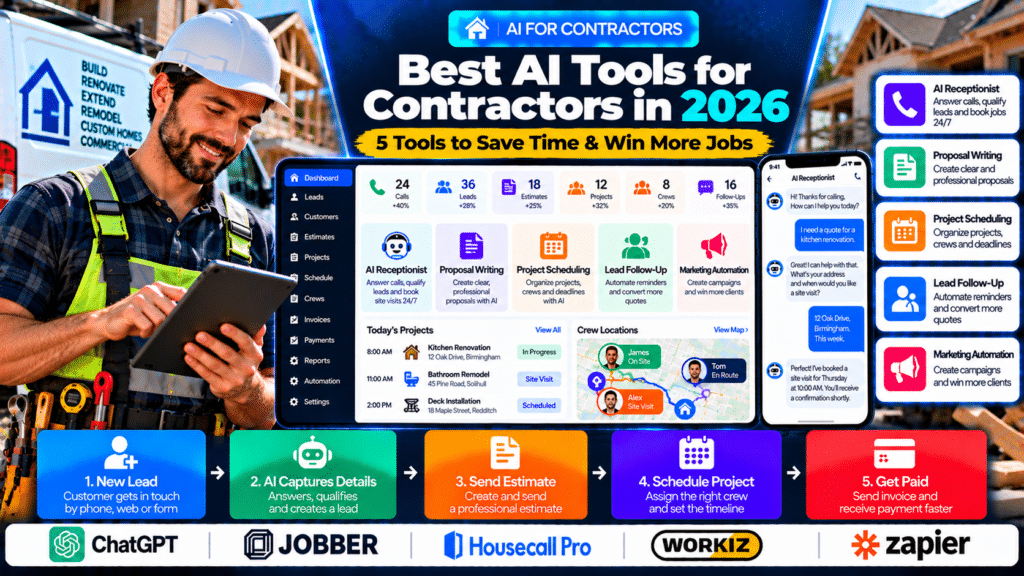
In this guide, we compare five AI-powered tools contractors may want to evaluate in 2026:
- ChatGPT;
- Jobber AI;
- Housecall Pro;
- Workiz Genius AI;
- Zapier.
Quick Comparison of the Best AI Tools for Contractors
| Tool | Best For | Main AI Use |
|---|---|---|
| ChatGPT | General contractor productivity | Writing, research, planning, proposals and customer communication |
| Jobber AI | Small and growing contractors | Quotes, schedules, customer management and AI-assisted field operations |
| Housecall Pro | Home-service contractors | AI-assisted customer service and lead handling |
| Workiz Genius AI | Service and construction contractors | AI answering, scheduling, dispatch and operational automation |
| Zapier | Contractors using multiple apps | Lead automation, follow-up and cross-app workflows |
How Can Contractors Use AI?
AI can help contractors with work surrounding the actual construction or service job.
Common uses include:
- drafting quote descriptions;
- responding to new enquiries;
- organizing site notes;
- preparing follow-up messages;
- creating customer updates;
- building marketing campaigns;
- summarizing project information;
- capturing missed calls;
- automating lead workflows;
- scheduling follow-up tasks.
The most effective approach is usually not to automate everything.
Start with one repetitive process that consumes time every week.
Housecall Pro’s 2026 guidance makes a similar recommendation: start with one repetitive task such as drafting messages, summarizing notes, organizing schedules, or analyzing business data, while keeping human review around important customer, pricing, or payroll decisions (source: Housecall Pro).
AI Should Support Contractors, Not Replace Professional Judgment
AI can be valuable for:
- administration;
- communication;
- research;
- marketing;
- organization.
It should not automatically make final decisions about:
- structural safety;
- building-code compliance;
- engineering;
- electrical safety;
- gas safety;
- site hazards;
- professional sign-off.
AI can support the contractor.
Qualified professionals should remain responsible for technical and safety-critical decisions.
1. ChatGPT
ChatGPT is a general-purpose AI assistant that contractors can use for writing, research, planning, analysis, and business operations.
OpenAI currently positions ChatGPT for small businesses as a platform that can help teams manage customers, create marketing materials, prepare reports, and handle operational work (source: OpenAI).
Why ChatGPT Is Useful for Contractors
Its main advantage is flexibility.
A contractor can use the same tool for many different business tasks.
Draft Customer Messages
For example:
Rewrite this professionally: We visited today and can start the bathroom renovation next Monday. Work should take about seven working days.
ChatGPT can help turn rough notes into a clearer customer update.
Improve Estimate Descriptions
A contractor might enter:
Remove old decking, prepare base, install new composite decking, waste removal.
AI can help turn that into a more structured scope of work.
The contractor should still verify:
- measurements;
- materials;
- exclusions;
- labour;
- price.
Create Proposal Content
Contractors can use AI to draft:
- project introductions;
- scope summaries;
- exclusions;
- payment-stage explanations;
- next-step instructions.
This can help make proposals easier for customers to understand.
Summarize Site Notes
Imagine a contractor records:
customer wants island moved 300mm, extra sockets, flooring decision pending, plumber coming Tuesday.
ChatGPT can organize that into a cleaner action summary.
Create Marketing Content
ChatGPT can help draft:
- Google Business Profile posts;
- social media content;
- service-page copy;
- email campaigns;
- customer FAQs.
For example:
Write a Google Business Profile post promoting kitchen renovation services.
Research and Planning
Contractors can also use ChatGPT to help organize:
- project checklists;
- meeting agendas;
- procurement lists;
- sales processes;
- internal SOPs.
OpenAI launched a dedicated small-business program in 2026 focused on helping entrepreneurs use ChatGPT to improve productivity and scale their businesses (source: OpenAI).
ChatGPT Work
For more involved tasks, ChatGPT Work can research, analyze information, work across connected apps and files, and produce finished outputs. OpenAI says Work can also support scheduled and recurring tasks where available (source: OpenAI Help Center).
Best For
ChatGPT may be useful for:
- general contractors;
- remodelers;
- small construction companies;
- office teams;
- project managers;
- business owners.
Possible Limitation
ChatGPT is not dedicated construction-management software.
It does not replace a core system for:
- project scheduling;
- job costing;
- subcontractor management;
- invoicing;
- construction documentation.
2. Jobber AI
Jobber provides business-management software for small and growing contractors.
Its 2026 contractor software comparison highlights Jobber as an all-in-one option for residential contractors and remodelers that want quoting, scheduling, customer communication, invoicing, and payments in one platform (source: Jobber).
Jobber has also added AI directly into its platform.
Why Jobber AI Is Useful for Contractors
The main benefit is that Jobber AI works around information already stored in Jobber.
That can include:
- customers;
- jobs;
- estimates;
- schedules;
- invoices.
This provides more operational context than using a completely separate AI tool.
Jobber AI Voice and Chat
Jobber AI currently supports voice and chat interactions across its platform.
Its mobile voice functionality can help users complete tasks hands-free, including:
- creating quotes;
- sending invoices;
- checking schedules;
- capturing job details (source: Jobber Help Center).
This can be useful when contractors are:
- on site;
- driving between jobs;
- inspecting work;
- unable to type long notes.
Example
After a site visit, a contractor could capture information immediately instead of waiting until returning to the office.
That may help reduce forgotten details.
Quotes to Payment
Jobber’s current contractor tools focus on connecting the workflow from:
Quote → Schedule → Job → Invoice → Payment
Its contractor platform also includes mobile access so crews can stay connected to job information while working in the field (source: Jobber).
AI for Administrative Work
Jobber’s own 2026 contractor AI guide identifies AI receptionists, automation tools, and business-management assistants as practical technologies contractors can use to reduce administrative work (source: Jobber).
Best For
Jobber AI may suit:
- small general contractors;
- remodelers;
- residential contractors;
- service-oriented contracting businesses;
- growing teams.
Possible Limitation
Jobber itself notes that its strengths are more aligned with residential, service-focused, and smaller general-contracting operations than highly complex commercial construction projects (source: Jobber).
3. Housecall Pro
Housecall Pro is primarily designed for home-service businesses and contractors.
One particularly relevant AI use case is answering and managing customer enquiries.
Housecall Pro’s 2026 guide to AI answering services explains that AI answering systems can pick up calls, collect customer information, answer common questions, and in some cases book jobs (source: Housecall Pro).
Why This Matters for Contractors
Contractors frequently miss calls because they are:
- on a job site;
- meeting customers;
- driving;
- using equipment;
- coordinating workers.
A missed call may represent a potential project.
AI-assisted call handling can help capture that opportunity.
Customer Enquiry Example
A homeowner calls:
I’m looking for someone to renovate our bathroom. Can someone come and quote it?
An AI-assisted workflow could:
Answer Call
↓
Collect Customer Details
↓
Identify Service
↓
Capture Preferred Date
↓
Create Booking or Lead
↓
Notify Office
This reduces the chance of an enquiry disappearing into voicemail.
AI Adoption in Home Services
Housecall Pro reported in 2026 that 48% of home-service professionals in its survey were actively using AI, with adoption increasing from the previous year (source: Housecall Pro).
That does not mean every contractor needs AI.
It does suggest these tools are becoming more common in service-business operations.
Best For
Housecall Pro may be more relevant to:
- residential contractors;
- repair businesses;
- remodeling services;
- home-service companies;
- contractors managing frequent customer appointments.
Possible Limitation
Contractors running complex long-term construction projects may need specialized construction project-management software in addition to or instead of a home-service platform.
4. Workiz Genius AI
Workiz provides construction and field-service business software with AI built into its operational workflows.
Its construction platform includes:
- scheduling;
- job management;
- proposals;
- payments;
- communication;
- routing (source: Workiz).
Workiz’s broader Genius AI toolkit adds AI answering and operational automation.
Genius Answering
Workiz describes Genius Answering as an AI-powered service capable of:
- answering incoming calls;
- speaking with customers;
- identifying the service they need;
- adding jobs to the schedule (source: Workiz).
Why This Can Help Contractors
Contractors often receive calls while their teams are already working.
Instead of every unanswered call becoming voicemail, AI can collect the information and move it into the business workflow.
Automated Job Assignment
Workiz also currently allows Genius Answering to assign booked jobs automatically based on:
- technician availability;
- relevant skills;
- service areas (source: Workiz).
This may be useful for service-oriented contractors with several field workers.
Construction Scheduling
Workiz’s construction platform allows companies to organize jobs and assign them according to job needs.
It also promotes route planning that considers existing jobs, traffic, and worker expertise (source: Workiz).
Estimates and Proposals
Workiz supports proposals with multiple options such as:
Good
Better
Best
This can help contractors present different levels of scope or specification to customers (source: Workiz).
Automated Communication
Workiz’s field-service automation tools can automate rules such as sending a customer an SMS when an invoice becomes due (source: Workiz).
Best For
Workiz may suit:
- construction service companies;
- remodeling businesses;
- multi-crew contractors;
- contractors with significant call volume;
- businesses wanting stronger operational automation.
Possible Limitation
Businesses with complex commercial construction, drawing management, RFIs, detailed project financial controls, and large subcontractor networks may still need more specialized construction-management systems.
5. Zapier
Zapier is different from the other platforms in this comparison.
It focuses on connecting different applications and automating workflows between them.
This can be particularly useful for contractors because many businesses already use several separate tools.
Example Contractor Tech Stack
A contractor might use:
- website forms;
- Gmail;
- CRM software;
- estimating software;
- Google Sheets;
- accounting software;
- project-management software.
Without automation, staff may repeatedly transfer the same information between systems.
Zapier can help connect those steps.
Example Lead Workflow
A homeowner submits a renovation enquiry.
↓
Lead is added to the CRM.
↓
Office receives an alert.
↓
Customer receives a confirmation.
↓
Follow-up task is created.
↓
Estimate appointment is scheduled.
Real Contractor Automation Example
Zapier has published a case study about Contractor Appointments, a business in the construction and contracting sector.
The company built AI-powered workflows that process customer texts, check availability, and automatically book appointments. Zapier reports that the system books between 20 and 50 additional appointments per day through that workflow (source: Zapier).
The same case study describes using Zapier with OpenAI to interpret customer messages and generate more natural follow-up responses (source: Zapier).
Those results belong to that specific company and should not be assumed to represent typical results for every contractor.
Long-Term Lead Follow-Up
Contracting projects can have long sales cycles.
A customer may say:
Contact me again in three months.
Automation can help ensure that follow-up actually happens.
The same Zapier contractor case study describes automatically scheduling future follow-ups when prospects are not ready immediately (source: Zapier).
Best For
Zapier may suit:
- contractors already using several apps;
- businesses with repetitive data entry;
- companies wanting custom lead workflows;
- contractors building more advanced automation.
Possible Limitation
Complex automation needs testing.
Poorly configured workflows can create:
- duplicate leads;
- incorrect messages;
- missing information;
- unwanted notifications.
Which AI Tool Is Best for Contractors?
The answer depends on the problem you are trying to solve.
Choose ChatGPT When
You want help with:
- writing;
- planning;
- proposals;
- customer messages;
- research;
- marketing.
Choose Jobber AI When
You want AI connected to:
- customers;
- quotes;
- schedules;
- jobs;
- invoices.
Choose Housecall Pro When
You want stronger support around:
- customer enquiries;
- phone calls;
- home-service bookings;
- office workflows.
Choose Workiz Genius AI When
You want:
- AI call answering;
- automated scheduling;
- dispatch;
- proposals;
- operational automation.
Choose Zapier When
You want to connect several existing tools into custom workflows.
Best AI Tools for General Contractors
General contractors typically need broader project coordination than smaller service businesses.
The workflow may include:
- estimating;
- scheduling;
- subcontractors;
- client communication;
- documentation;
- project costs;
- payments.
Jobber’s 2026 comparison of general contractor software notes that contractors should look for platforms connecting estimating, scheduling, communication, documentation, budgeting, invoicing, and payments (source: Jobber).
AI can support parts of that workflow, especially:
- communication;
- documentation;
- follow-up;
- admin.
AI for Remodelers
Remodeling companies often manage longer sales cycles.
A typical workflow might be:
New Lead
↓
Site Visit
↓
Estimate
↓
Proposal
↓
Customer Follow-Up
↓
Project Scheduled
↓
Work Completed
AI can help reduce delays between these stages.
Useful applications include:
- proposal writing;
- follow-up;
- customer updates;
- meeting summaries.
AI for Small Construction Businesses
Smaller companies may not need a complex AI stack.
A simple combination can be enough:
ChatGPT + Contractor Management Software + Automation
The goal should be to remove repetitive work rather than add another complicated system.
AI Receptionists for Contractors
AI receptionists are one of the most practical AI applications for contractors.
They can help:
- answer calls;
- collect customer details;
- identify the requested service;
- capture project information;
- schedule consultations;
- create leads.
Housecall Pro’s current contractor-focused guide highlights these types of functions as key capabilities of AI answering services (source: Housecall Pro).
Workiz Genius Answering can also speak with customers and add jobs directly to a schedule (source: Workiz).
AI for Contractor Estimates
AI can help improve the presentation of estimates.
For example:
Raw Notes
demo old kitchen, new cabinets, worktops, flooring, electrics extra.
AI could help organize this into sections such as:
Demolition
Cabinet Installation
Worktops
Flooring
Exclusions
The contractor must still verify:
- quantities;
- scope;
- pricing;
- labour;
- tax;
- exclusions.
AI should help with organization, not make the final commercial decision.
AI for Proposals
Contractor proposals can become lengthy.
AI can help structure:
- project summary;
- scope;
- timeline;
- payment terms;
- exclusions;
- next steps.
This can save time when the contractor already knows the actual project requirements.
AI for Lead Follow-Up
Many contracting leads do not convert immediately.
A customer may request three or four estimates before deciding.
A useful workflow could be:
Estimate Sent
↓
Wait 2 Days
↓
Follow-Up Message
↓
No Response
↓
Create Sales Task
↓
Follow Up Again Later
Automation helps ensure opportunities are not forgotten.
AI for Site Notes
Contractors often capture quick notes during site visits.
For example:
kitchen wall maybe load bearing, engineer required, customer wants bifolds, measure rear opening, check drainage.
AI can organize those notes into a structured action list.
However, it should not decide whether the wall is actually load-bearing.
That requires appropriate professional assessment.
AI for Customer Updates
Customers frequently ask:
- When are you starting?
- What happens next?
- Has the material arrived?
- When will the electrician be here?
- Is the project still on schedule?
AI can help draft clear updates from information already provided by the project team.
AI for Contractor Marketing
Contractors can use AI to help create:
- project case studies;
- before-and-after descriptions;
- Google Business Profile posts;
- social media posts;
- email campaigns;
- local service pages.
For example:
Turn these project notes into a short case study for a kitchen renovation.
AI can create a first draft quickly.
The contractor should then add:
- real project details;
- authentic photos;
- actual results.
AI for Project Documentation
AI can help organize:
- meeting notes;
- daily reports;
- change summaries;
- customer requests.
This can be useful when project information arrives through:
- emails;
- texts;
- notes;
- site meetings.
Important contractual documents should still receive human review.
AI for Subcontractor Coordination
Some contractor platforms also provide tools for managing subcontractors.
Workiz, for example, allows subcontractors to receive limited dashboard access and communicate through its mobile tools (source: Workiz).
AI could support the administrative side of coordination by helping organize instructions or summarize updates.
Actual trade responsibilities and site decisions remain human-led.
AI for Missed Calls
A simple workflow could be:
Customer Calls
↓
No Human Available
↓
AI Answers
↓
Customer Details Captured
↓
Consultation Booked
↓
Office Receives Summary
For contractors generating expensive leads through advertising, recovering even some missed enquiries may be valuable.
AI for Review Requests
A contractor could automate:
Project Completed
↓
Final Payment Received
↓
Review Request
This creates a consistent review process instead of relying on staff to remember after every project.
What Should Contractors Not Fully Automate?
Some work should remain human-led.
This includes:
- safety decisions;
- engineering decisions;
- building-code interpretation;
- structural assessments;
- contract disputes;
- final pricing approval;
- change-order approval;
- difficult customer complaints.
AI should assist experienced professionals rather than replace accountability.
How to Choose AI Tools for a Contracting Business
Step 1: Find Your Biggest Bottleneck
Ask:
- Are leads being missed?
- Do estimates take too long?
- Are customers waiting for replies?
- Are projects poorly documented?
- Are follow-ups being forgotten?
Step 2: Pick One Workflow
Start with one process.
For example:
New Lead → Immediate Response → Site Visit Booking
Step 3: Test With Real Scenarios
Try:
- a normal enquiry;
- a large project;
- a reschedule;
- an unusual customer request;
- an urgent service enquiry.
Step 4: Keep Human Approval
Keep people involved in:
- pricing;
- contracts;
- safety;
- technical decisions;
- important customer communication.
Step 5: Review Privacy and Security
Contractors may handle sensitive customer and project information.
Review each provider’s controls before giving an AI system access to business data.
OpenAI states that ChatGPT Business customers control their business data and that business workspace information is not used for model training by default (source: OpenAI).
Step 6: Measure the Result
Track:
- response time;
- estimates sent;
- conversion rate;
- appointments booked;
- admin hours;
- missed calls.
The AI system should improve a real business metric.
Common AI Mistakes Contractors Should Avoid
Automating Before Fixing the Process
If the underlying workflow is broken, automation may simply make the problem happen faster.
Letting AI Decide Pricing
AI can help structure an estimate.
Final pricing should remain with the business.
Trusting Technical Answers Without Verification
Construction decisions can have serious consequences.
Verify technical information.
Using Too Many AI Tools
A complicated software stack can increase admin.
Publishing Generic AI Marketing
Your website should reflect real:
- projects;
- services;
- locations;
- experience.
Forgetting Human Escalation
Customers still need access to a person when the situation is unusual or important.
Related guides
- Best AI Tools for Plumbers in 2026: 7 Tools to Save Time & Win More Jobs
- Best AI Tools for Home-Service Businesses in 2026: Handyman, Pest Control, Solar, Moving, Pool and More
- Best AI Tools for Roofers in 2026: 5 Tools to Save Time & Win More Roofing Jobs
- Tools, Software and Automation for Trades: Start Here
Frequently Asked Questions
What are the best AI tools for contractors?
ChatGPT, Jobber AI, Housecall Pro, Workiz Genius AI and Zapier are useful options depending on whether the contractor needs writing assistance, field-service management, AI answering, scheduling or workflow automation.
How can contractors use ChatGPT?
Contractors can use ChatGPT to draft customer messages, proposals, estimate descriptions, project summaries, marketing content, checklists and internal procedures.
Does Jobber work for general contractors?
Yes. Jobber currently positions its platform as suitable for small and growing residential contractors and remodelers that need quoting, scheduling, customer communication, invoicing and payments (source: Jobber).
Does Jobber have AI?
Yes. Jobber AI currently supports voice and chat, including hands-free tasks such as creating quotes, sending invoices and checking schedules (source: Jobber Help Center).
Does Workiz have AI for contractors?
Yes. Workiz currently provides Genius AI, including AI answering, scheduling and other operational automation, alongside dedicated construction-management functionality (source: Workiz).
Can AI answer calls for contractors?
Yes. AI answering systems can collect customer details, answer routine questions and potentially book appointments. Housecall Pro and Workiz both describe contractor/home-service use cases for this type of technology (source: Housecall Pro).
Can AI create contractor estimates?
AI can help structure descriptions and organize project information, but contractors should independently verify scope, quantities, labour, materials and pricing.
Can AI help contractors get more jobs?
AI can help contractors respond faster, capture missed enquiries and follow up existing opportunities. Actual results depend on lead quality, pricing, reputation, service quality and implementation.
Conclusion
The best AI tools for contractors are the tools that remove real administrative bottlenecks.
ChatGPT is a flexible option for writing, planning, research, customer communication and business operations. OpenAI continues to expand ChatGPT’s small-business and multi-step workflow capabilities in 2026 (source: OpenAI).
Jobber AI is particularly useful for smaller contractors and remodelers that want AI connected to quotes, schedules, customers, jobs, invoices and field workflows (source: Jobber).
Housecall Pro is relevant where customer enquiries and call handling are a major part of a home-service contractor’s workflow. Its 2026 guidance highlights AI answering as a way to capture calls, customer details and booking opportunities (source: Housecall Pro).
Workiz Genius AI combines AI answering and automation with construction-oriented scheduling, proposals, payments and field-service management (source: Workiz).
And Zapier can be particularly useful for contractors that already use several systems and want AI-powered automation between them. Its Contractor Appointments case study demonstrates how one contracting business has used AI workflows for appointment booking and long-term lead follow-up (source: Zapier).
The best question to start with is not:
“Where can we add AI?”
Instead ask:
“Which repetitive task costs our contracting business the most time or opportunities?”
Then solve that process first.
For many contractors, a practical starting workflow may be:
New Lead → AI Captures Details → Site Visit → Estimate → Follow-Up → Schedule Project → Complete Work → Get Paid
When AI makes that process faster while qualified people remain responsible for technical, financial, and safety decisions, it can become a practical tool for running a more efficient contracting business.