Running a small service business often involves dozens of repetitive tasks every day.
A new customer submits a form.
Someone needs to reply.
A quote is sent.
Someone needs to follow up.
A customer books an appointment.
The team needs to know.
A job is completed.
An invoice needs to be sent.
Payment arrives.
A review request should go out.
None of these tasks is particularly complicated.
The problem is that together they consume hours.
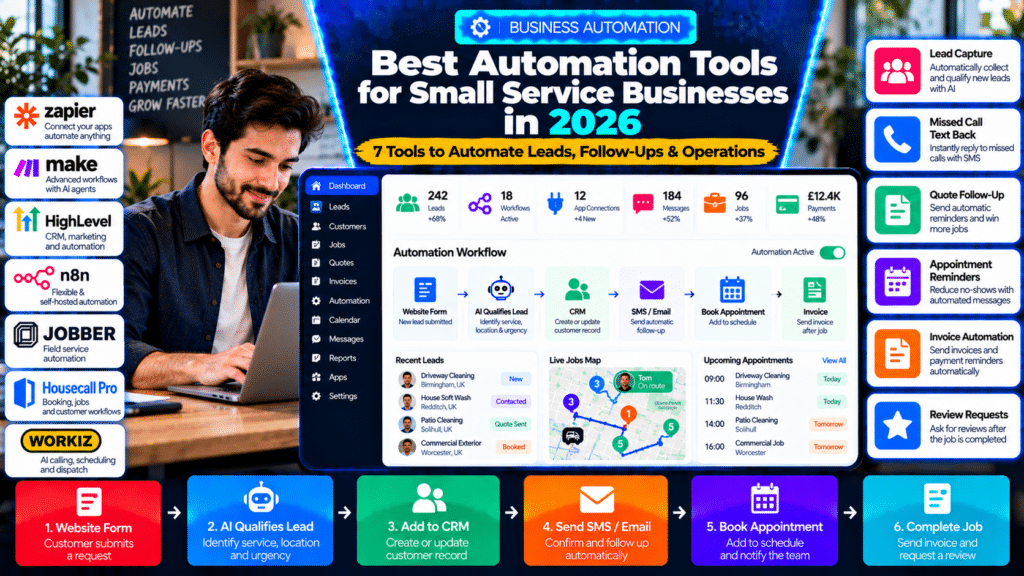
That is why automation tools for small service businesses can be so valuable.
Modern automation platforms can help connect:
- leads;
- emails;
- SMS;
- CRM systems;
- calendars;
- quotes;
- invoices;
- field-service software;
- spreadsheets;
- AI tools.
And in 2026, automation is increasingly moving beyond basic:
“If this happens, do that.”
Platforms such as Make and HighLevel are now combining traditional workflows with AI agents that can interpret information and make decisions inside automated processes. Make says its current AI Agents can work across more than 3,000 apps, while HighLevel can now generate complete workflows from natural-language instructions (source: Make).
In this guide, we compare seven automation platforms small service businesses may want to evaluate:
- Zapier;
- Make;
- GoHighLevel;
- n8n;
- Jobber Automations;
- Housecall Pro;
- Workiz.
Quick Comparison of the Best Automation Tools for Small Service Businesses
| Tool | Best For | Main Strength |
|---|---|---|
| Zapier | Easy cross-app automation | Huge integration ecosystem and simple workflows |
| Make | Visual and advanced automation | Complex workflows and AI agents |
| GoHighLevel | Lead and marketing automation | CRM, SMS, email, funnels and AI workflows |
| n8n | Flexible technical automation | Self-hosting and highly customizable workflows |
| Jobber | Field-service businesses | Quotes, invoices, customer and job automation |
| Housecall Pro | Home-service businesses | Booking, jobs, estimates and customer workflows |
| Workiz | Growing service teams | Scheduling, dispatch, calls and field-service automation |
What Is Business Automation?
Business automation means using software to complete repetitive tasks automatically.
A simple example is:
Customer submits website form
↓
CRM creates lead
↓
Customer receives confirmation
↓
Salesperson gets notification
Instead of someone manually completing each step, software handles the workflow.
Traditional Automation vs AI Automation
Traditional automation follows fixed rules.
For example:
If invoice becomes overdue → send reminder.
AI automation can handle less structured information.
For example:
Read incoming customer message → identify what service they need → categorize lead → route it to the correct workflow.
Make describes AI automation as combining artificial intelligence with workflow automation so systems can interpret messy inputs, make decisions and generate outputs before triggering the next action (source: Make).
Both approaches are useful.
You do not need AI for every workflow.
1. Zapier
Zapier is one of the most widely known automation platforms.
Its main purpose is connecting different apps so information can move between them automatically.
Why Zapier Is Useful for Service Businesses
Many service companies already use several systems.
For example:
- WordPress;
- Gmail;
- Google Sheets;
- CRM;
- accounting software;
- calendar;
- field-service software.
Zapier can connect them without requiring the business to build a custom application.
Example Lead Workflow
A customer submits a website form.
↓
Zapier creates a CRM lead.
↓
Customer gets an email.
↓
Sales team receives notification.
↓
Follow-up task is created.
Lead Qualification
AI can also be added to a workflow.
For example, a lead message says:
My boiler has stopped working and I need someone today.
AI can classify it as:
Emergency Heating Lead
and send it to the urgent workflow.
Quote Follow-Up
Another useful automation is:
Quote Sent
↓
Wait 2 Days
↓
Check Status
↓
If Not Approved → Send Follow-Up
This can reduce forgotten opportunities.
Review Requests
A simple workflow could be:
Payment Received
↓
Wait 1 Day
↓
Send Review Request
Best For
Zapier is particularly useful for:
- beginners;
- small teams;
- businesses using many cloud apps;
- straightforward integrations.
Possible Limitation
Very complex workflows can become harder to manage and may become expensive as task volume increases.
2. Make
Make is another cross-app automation platform, but its visual workflow builder is particularly strong for more complicated processes.
In 2026, Make expanded its platform with its new generation of Make AI Agents.
Make says these agents can orchestrate processes across more than 3,000 apps while combining AI decision-making with traditional automation (source: Make).
Why Make Is Useful
Make gives users detailed control over:
- triggers;
- conditions;
- branches;
- transformations;
- API calls;
- AI steps.
Example Service Lead Workflow
Website Lead
↓
AI Reads Message
↓
If:
Emergency
→ notify dispatcher immediately.
If:
Normal Quote
→ create CRM opportunity.
If:
Outside Service Area
→ send polite response.
One automation can handle several paths.
Make AI Agents
The newer Make AI Agents can perform more flexible tasks than a traditional workflow.
Make says users can:
- create reusable agents;
- choose AI models;
- connect them to workflows;
- let them make adaptive decisions;
- inspect how the agent works (source: Make Help Center).
That last point matters.
AI automation should be observable.
You need to understand what it did and why.
Best For
Make may suit:
- automation-focused businesses;
- agencies;
- more technical users;
- complex multi-step workflows.
Possible Limitation
The learning curve is higher than simpler automation platforms.
3. GoHighLevel
GoHighLevel is different because it combines:
- CRM;
- lead management;
- email;
- SMS;
- calendars;
- funnels;
- automation;
- AI.
That makes it especially useful for businesses focused on lead generation and follow-up.
HighLevel Workflows
HighLevel workflows use:
Triggers + Actions
A workflow can begin when something happens such as:
- form submitted;
- appointment booked;
- payment received.
It can then perform actions automatically, including:
- sending email;
- sending SMS;
- assigning contacts;
- updating opportunities;
- creating tasks (source: HighLevel Support Portal).
Example Missed-Call Workflow
A customer calls but nobody answers.
↓
Missed Call Trigger
↓
Send SMS
Sorry we missed your call. How can we help?
↓
Customer Replies
↓
Lead enters sales pipeline
This can be extremely useful for:
- plumbers;
- electricians;
- HVAC companies;
- roofers;
- cleaners;
- contractors.
Workflow AI Builder
In 2026, HighLevel introduced more advanced AI workflow creation.
Its Workflow AI Builder can generate an entire workflow when the user describes the goal in plain language (source: HighLevel Support Portal).
For example:
When a new lead submits our website form, send an SMS immediately, wait 10 minutes, notify the sales team and follow up again the next morning if there is no reply.
HighLevel can build the structure automatically for review.
AI Employee
HighLevel’s broader AI Employee offering includes tools such as:
- Conversation AI;
- Voice AI;
- Reviews AI;
- Content AI;
- Ask AI;
- AI Studio (source: HighLevel Support Portal).
That makes it one of the more comprehensive options for businesses that want automation plus AI communication.
AI Agent Workflow Action
HighLevel also added an AI Agent action to workflows in 2026.
Instead of manually configuring every action, the agent can decide which tools and steps to use based on the instructions provided (source: HighLevel Support Portal).
Best For
GoHighLevel may suit:
- agencies;
- lead-driven service businesses;
- companies doing SMS/email follow-up;
- businesses wanting CRM and automation together.
Possible Limitation
It can be more platform than a very small business needs if the only requirement is a few simple automations.
4. n8n
n8n is particularly popular with developers and more technical automation users.
It allows businesses to create highly customized workflows and connect APIs, databases, AI systems and business applications.
Why n8n Is Different
The main advantages are flexibility and control.
A business can build workflows involving:
- webhooks;
- APIs;
- databases;
- CRMs;
- AI models;
- spreadsheets;
- messaging systems.
Example Lead Enrichment Workflow
Website Lead
↓
Check Company Data
↓
AI Summarizes Business
↓
Score Lead
↓
Add to CRM
↓
Generate Personalized Follow-Up
This can be useful for agencies or B2B service companies.
AI Workflows
n8n can combine LLMs with normal workflow logic.
For example:
Incoming Email
↓
AI Reads Message
↓
Extract Customer Name
↓
Identify Required Service
↓
Create CRM Lead
↓
Draft Reply
Self-Hosting
One major reason technical teams choose n8n is the ability to self-host.
This can provide greater control over:
- infrastructure;
- workflow execution;
- data handling.
Best For
n8n may suit:
- developers;
- technical agencies;
- companies wanting custom automation;
- businesses with API-heavy workflows.
Possible Limitation
It is usually less beginner-friendly than Zapier or a built-in field-service automation platform.
5. Jobber Automations
For trades and field-service companies, sometimes the best automation tool is already inside the software used to manage jobs.
Jobber’s current automation system handles repetitive admin such as:
- quote follow-up;
- invoice follow-up;
- draft quote creation;
- high-value opportunity alerts (source: Jobber Help Center).
Why Built-In Automation Can Be Better
If the workflow already happens entirely inside Jobber, there may be no reason to add another platform.
For example:
Client Request
↓
Draft Quote
↓
Quote Sent
↓
Automatic Follow-Up
↓
Job Booked
↓
Invoice
↓
Invoice Reminder
This reduces the number of systems involved.
Jobber AI
Jobber AI also powers capabilities such as:
- AI rewrite;
- Receptionist;
- voice commands;
- background automations.
In the mobile app, users can perform tasks hands-free such as creating quotes, sending invoices, checking schedules and capturing field information (source: Jobber Help Center).
Best For
Jobber may suit:
- plumbers;
- electricians;
- landscapers;
- cleaners;
- pressure washers;
- other small field-service companies.
Possible Limitation
Jobber’s automation is primarily centered around the Jobber ecosystem.
For more complex automation across unrelated apps, Make, Zapier or n8n may be more flexible.
6. Housecall Pro
Housecall Pro also provides built-in automation for home-service businesses.
This can be useful when the workflow revolves around:
- estimates;
- jobs;
- customers;
- technicians;
- payments.
Approved Estimate Automation
In 2026, Housecall Pro added an option that can automatically create a job when an estimate is approved (source: Housecall Pro Help Center).
That removes a manual step.
The workflow becomes:
Estimate Sent
↓
Customer Approves
↓
Job Automatically Created
↓
Scheduling Begins
This may seem small, but repeated hundreds of times it can save significant admin.
AI Team
Housecall Pro also combines automation with AI for:
- customer service;
- analytics;
- marketing;
- business guidance.
This makes it more useful for businesses that want automation within the same platform used to manage field operations.
Best For
Housecall Pro may suit:
- HVAC;
- plumbing;
- electrical;
- cleaning;
- pressure washing;
- other home-service businesses.
Possible Limitation
It is not designed as a universal integration platform.
It is best when most of the workflow already happens inside Housecall Pro.
7. Workiz
Workiz is another field-service platform with strong automation and AI functionality.
Its automation capabilities are particularly relevant to businesses with:
- incoming calls;
- scheduling;
- technicians;
- dispatch;
- invoices;
- recurring customers.
Example Workiz Workflow
Customer Calls
↓
AI Answering Captures Lead
↓
Job Scheduled
↓
Technician Assigned
↓
Customer Gets Confirmation
↓
Job Completed
↓
Invoice Sent
Workiz’s Genius AI toolkit combines AI answering with broader operational automation inside the platform.
Best For
Workiz may suit:
- garage-door companies;
- locksmiths;
- appliance repair;
- cleaners;
- pressure washers;
- multi-technician service businesses.
Possible Limitation
Businesses that need broad integration across many unrelated external systems may still want Zapier, Make or n8n alongside Workiz.
Which Automation Tool Is Best for Small Service Businesses?
There is no single winner for every business.
Choose Zapier When
You want:
- simple automation;
- lots of app integrations;
- fast setup;
- minimal technical knowledge.
Choose Make When
You want:
- advanced workflows;
- visual automation;
- AI agents;
- complex conditional logic.
Choose GoHighLevel When
You want:
- CRM;
- email;
- SMS;
- lead nurturing;
- marketing automation;
- AI communication.
Choose n8n When
You want:
- maximum flexibility;
- custom APIs;
- developer control;
- self-hosting.
Choose Jobber When
You already manage your field-service business in Jobber and primarily need operational automation.
Choose Housecall Pro When
Your automation mainly revolves around home-service:
- estimates;
- jobs;
- customers;
- technicians.
Choose Workiz When
You need stronger automation around:
- calls;
- scheduling;
- dispatch;
- mobile field teams.
Best Automation Workflows for Service Businesses
The software matters less than the workflow.
Here are some of the most useful automations.
1. New Lead Follow-Up
Website Form Submitted
↓
Create CRM Lead
↓
Send Email
↓
Send SMS
↓
Notify Salesperson
This is one of the first automations many businesses should build.
2. Missed Call Text Back
Customer Calls
↓
No Answer
↓
Send Immediate SMS
Sorry we missed your call. How can we help?
This is particularly useful for trades where the owner is often in the field.
3. Quote Follow-Up
Quote Sent
↓
Wait 2 Days
↓
Quote Not Approved
↓
Send Follow-Up
↓
Create Sales Task
Many businesses lose revenue simply because nobody follows up.
4. Appointment Reminders
Job Scheduled
↓
Reminder 24 Hours Before
↓
Reminder / ETA on Job Day
This can reduce missed appointments.
5. Job Completion to Invoice
Job Marked Complete
↓
Create / Send Invoice
↓
Payment Reminder If Needed
This can shorten the time between completing work and getting paid.
6. Payment to Review Request
Payment Received
↓
Wait
↓
Send Review Request
This makes reputation management consistent.
7. Lead Qualification With AI
New Lead
↓
AI Reads Enquiry
↓
Identify Service
↓
Identify Urgency
↓
Route Lead
For example:
No heating and elderly resident in house.
could be classified differently from:
Looking for a boiler replacement quote next month.
8. Customer Reactivation
Customer Has Not Booked in 12 Months
↓
Send Personalized Reminder
This can work well for:
- HVAC maintenance;
- landscaping;
- pool service;
- cleaning;
- pest control.
9. Recurring Service Automation
Recurring Plan
↓
Schedule Visit
↓
Send Reminder
↓
Complete Service
↓
Invoice
↓
Schedule Next Visit
This is valuable for subscription-style service businesses.
10. Internal Team Notifications
High-Value Lead Arrives
↓
Notify Sales Team
or:
Emergency Job Created
↓
Notify Dispatcher
Automation should help employees respond faster, not just communicate with customers.
Automation vs AI Agents: What Is the Difference?
This distinction is becoming more important in 2026.
Automation
A traditional workflow follows rules.
If X happens → do Y.
AI Agent
An AI agent can evaluate information and decide what to do.
For example:
Read Incoming Message
↓
Determine:
- what the customer needs;
- how urgent it is;
- which workflow fits.
↓
Take the appropriate action.
Make and HighLevel are both moving strongly in this direction.
Make AI Agents can operate across workflows and tools, while HighLevel now supports AI Agent actions that can decide how to complete multi-step tasks (source: Make).
Should Every Business Use AI Agents?
No.
For predictable tasks, normal automation is often better.
For example:
Payment Received → Send Receipt
does not need AI.
But:
Read customer message → understand request → route correctly
may benefit from AI.
A useful rule is:
Use rules when the answer is predictable.
Use AI when interpretation is required.
How to Start Automating a Service Business
Step 1: Find Repetitive Tasks
Write down everything employees repeat.
Examples:
- copying leads;
- sending reminders;
- following up estimates;
- creating calendar entries;
- requesting reviews.
Step 2: Estimate the Time Cost
If a task takes five minutes and happens 30 times per week:
5 × 30 = 150 minutes
That is 2.5 hours every week.
That task may be a good automation candidate.
Step 3: Start With One Workflow
Do not automate the entire company at once.
Start with something such as:
Website Lead → CRM → Confirmation
Step 4: Test Failure Cases
Ask:
- What if the phone number is missing?
- What if the customer replies?
- What if the CRM is unavailable?
- What if AI misunderstands the request?
Step 5: Add Human Escalation
Important workflows should have a human fallback.
For example:
AI Unsure
↓
Send to Office Team
Step 6: Measure Results
Track:
- response time;
- admin hours;
- booking rate;
- quote conversion;
- unpaid invoices.
Automation should produce a measurable benefit.
Common Automation Mistakes Small Businesses Should Avoid
Automating a Bad Process
If the process is broken, automation can simply make the problem happen faster.
Building Too Much at Once
Start with small, stable workflows.
Adding AI Where Rules Would Work Better
Not every workflow needs an AI model.
No Human Escalation
Some situations need judgment.
Too Many Platforms
A business using six automation systems may spend more time maintaining integrations than doing work.
Never Testing Automations
Every workflow should be tested before it touches real customers.
Related guides
- How to Automate Invoice Reminders for a Service Business in 2026
- How to Automate Review Requests for a Service Business in 2026
- How to Automate Appointment Reminders for a Service Business in 2026
- Tools, Software and Automation for Trades: Start Here
Frequently Asked Questions
What are the best automation tools for small service businesses?
Zapier, Make, GoHighLevel, n8n, Jobber, Housecall Pro and Workiz are strong options depending on whether the business needs cross-app integrations, marketing automation, developer flexibility or field-service automation.
Is Zapier good for service businesses?
Yes. Zapier can connect forms, CRMs, calendars, email, spreadsheets and many other systems, making it useful for simple lead and admin workflows.
Is Make better than Zapier?
Make can be more suitable for complex, visual and branching workflows, while Zapier can be easier for straightforward automation. The better option depends on workflow complexity and technical comfort.
Is GoHighLevel good for automation?
Yes. HighLevel’s workflows can automate lead management, follow-up and communications. In 2026, its Workflow AI Builder can also generate full workflows from natural-language instructions (source: HighLevel Support Portal).
Does Jobber have automation?
Yes. Jobber’s current automations can handle repetitive tasks such as quote follow-ups, invoice follow-ups, draft quote creation and opportunity alerts (source: Jobber Help Center).
Does Housecall Pro automate jobs?
Yes. For example, Housecall Pro can now automatically create a new job when an estimate is approved (source: Housecall Pro Help Center).
Do I need AI for business automation?
No. Many valuable workflows only require normal rule-based automation. AI is most useful when the workflow needs to understand or classify unstructured information.
Conclusion
The best automation tools for small service businesses depend on what the business is trying to automate.
Zapier is a strong choice for straightforward integrations across different cloud applications.
Make is better suited to businesses that want more visual control, complex workflows and increasingly sophisticated AI agents. Its new AI Agents can work across more than 3,000 applications while keeping their decisions visible inside the workflow builder (source: Make).
GoHighLevel is particularly useful for companies focused on lead generation, SMS, email, CRM and sales follow-up. Its 2026 Workflow AI tools can now build automation structures directly from plain-language instructions (source: HighLevel Support Portal).
n8n is a strong option for technical teams that want greater control, custom APIs and flexible deployment.
Jobber, Housecall Pro and Workiz can be better choices when the automation primarily revolves around a field-service business rather than connecting dozens of unrelated applications.
The most important lesson is:
Do not start with the tool. Start with the process.
Ask:
“Which repetitive task costs our team the most time every week?”
Then automate that workflow first.
For many service businesses, the best first workflow is:
New Lead → Instant Response → CRM → Follow-Up → Booking
Once that works reliably, move to:
Quote → Job → Invoice → Payment → Review
That approach can turn automation from an interesting technology into a practical system that actually reduces admin and helps the business grow.