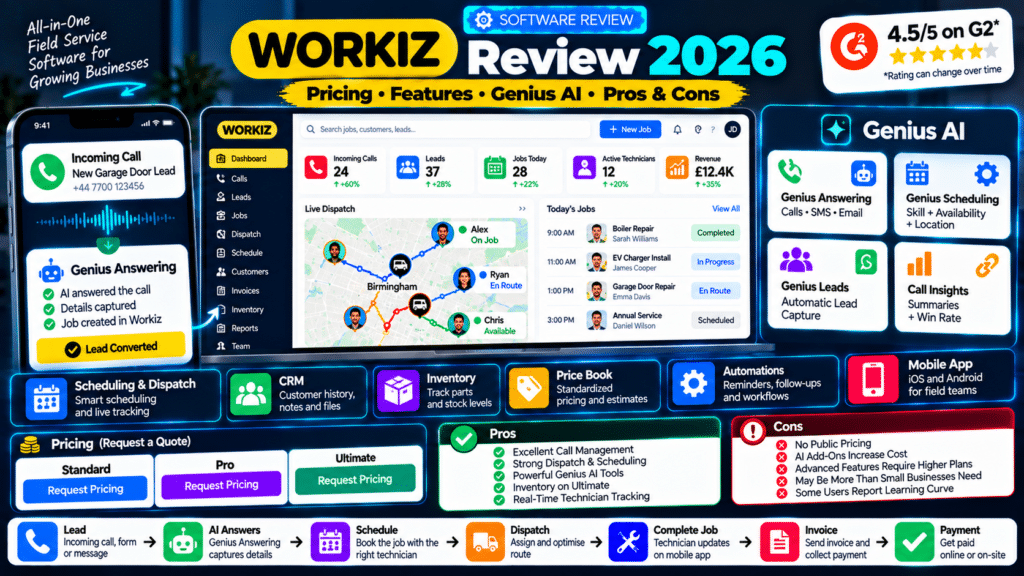
Workiz has evolved from traditional field-service management software into a much broader platform built around one major goal:
help service businesses turn more leads into completed and paid jobs.
The platform combines:
- customer management;
- estimates;
- scheduling;
- dispatch;
- technician tracking;
- invoicing;
- payments;
- phone calls;
- SMS;
- email;
- automation;
- AI answering;
- AI scheduling;
- marketing.
That makes Workiz particularly interesting for businesses where daily operations revolve around:
Phone Call → Lead → Schedule → Dispatch → Technician → Invoice → Payment
Workiz currently positions itself as an AI growth platform for home-service companies and says more than 120,000 home-service professionals in the U.S. and Canada use its technology (source: Workiz).
Its strongest differentiator in 2026 is the Genius AI ecosystem.
Instead of adding one generic chatbot, Workiz has AI across several operational areas:
- Genius Answering;
- Genius Leads;
- Genius Scheduling;
- Call Insights;
- Smart Messaging;
- Genius Marketing.
So is Workiz worth considering?
For businesses with significant:
- call volume;
- dispatching;
- technician coordination;
- recurring administration;
yes.
But smaller companies that mainly need basic:
- scheduling;
- quotes;
- invoices
may find simpler software easier and potentially more cost-effective.
This Workiz review breaks down its plans, features, Genius AI tools, mobile app, communications, automations, inventory, strengths, weaknesses and ideal use cases.
Workiz Review: Quick Verdict
Overall:
Strong field-service management platform with particularly advanced communications, dispatch and AI capabilities.
Best For:
Growing field-service businesses where calls, dispatch, lead handling and technician coordination are central to everyday operations.
Pricing:
Workiz currently uses request-based pricing for its Standard, Pro and Ultimate plans rather than publishing fixed subscription prices publicly (source: Workiz).
Free Trial:
7 days with no credit card required according to Workiz’s current pricing page (source: Workiz).
Mobile Apps:
Available for iOS and Android (source: Workiz).
Standout Features:
- Genius Answering;
- Genius Scheduling;
- built-in phone and messaging;
- scheduling and dispatch;
- AI call insights;
- Genius Leads;
- inventory management on Ultimate;
- purchase orders on Ultimate;
- equipment tracking;
- multi-day jobs;
- field-service automation.
Main Drawback:
Public subscription pricing is not disclosed, and several advanced operational capabilities require Pro, Ultimate or separate Genius add-ons (source: Workiz).
Workiz at a Glance
| Area | Assessment |
|---|---|
| Scheduling | Excellent |
| Dispatch | Excellent |
| CRM | Very Good |
| Phone System | Excellent |
| AI Answering | Excellent |
| Lead Capture | Strong |
| Estimates | Very Good |
| Invoicing | Very Good |
| Automation | Strong |
| Inventory | Strong on Ultimate |
| Mobile App | Very Good |
| Recurring Jobs | Strong |
| Solo Businesses | Depends on requirements |
| Growing Teams | Excellent |
| Call-Heavy Businesses | Excellent |
| Pricing Transparency | Weak |
This review is based on Workiz’s currently published product documentation and third-party review information rather than hands-on testing of every feature.
What Is Workiz?
Workiz is field-service management software for companies that send technicians or crews to customer locations.
Its core platform includes tools for:
- leads;
- customers;
- estimates;
- jobs;
- scheduling;
- dispatch;
- invoices;
- payments;
- communications;
- reporting.
Workiz also includes operational tools such as:
- service areas;
- subcontractor management;
- custom fields;
- technician location tracking;
- recurring jobs.
Its current feature page describes scheduling and dispatch around technician:
- availability;
- service area;
- skill set (source: Workiz).
That makes Workiz much more than a basic appointment calendar.
Who Is Workiz Designed For?
Workiz is particularly relevant to field-service businesses such as:
- locksmiths;
- garage-door companies;
- appliance-repair businesses;
- HVAC companies;
- plumbers;
- electricians;
- cleaning companies;
- pressure-washing businesses;
- other mobile service teams.
The strongest fit is usually a business with multiple moving parts.
For example:
Customer Calls
↓
Lead Created
↓
Technician Selected
↓
Job Scheduled
↓
Technician Travels
↓
Work Completed
↓
Invoice Sent
↓
Payment Collected
The more frequently that workflow happens, the more valuable automation becomes.
Workiz Pricing in 2026
Workiz currently offers three primary plans:
- Standard;
- Pro;
- Ultimate.
However, unlike Jobber or Housecall Pro, Workiz does not currently publish fixed monthly pricing for these tiers.
Each plan shows:
Request pricing. Workiz
That means the actual cost depends on the sales quote and business configuration.
Workiz Standard
Workiz describes Standard as the plan for growing teams.
Current features include:
- unlimited jobs;
- unlimited invoices;
- unlimited estimates;
- unlimited clients;
- scheduling;
- five automations;
- online payments;
- service areas;
- built-in reporting;
- client management;
- custom fields;
- subcontractor management;
- QuickBooks integration (source: Workiz).
It also includes:
- recurring jobs;
- Client Portal;
- Price Book;
- mobile application;
- team location tracking (source: Workiz).
Who Should Choose Standard?
Standard may work for a business that already has:
- several technicians;
- regular incoming jobs;
- invoicing needs;
- scheduling complexity;
but does not yet need Workiz’s more advanced AI scheduling or inventory tools.
Workiz Pro
Pro is positioned for a mid-size team.
It includes everything in Standard and adds:
- Genius Leads;
- Genius Scheduling;
- performance pay;
- custom reporting;
- ten automations;
- multi-location management;
- additional permissions (source: Workiz).
Who Should Choose Pro?
Pro becomes more relevant when a company wants Workiz to do more than simply record and schedule jobs.
The strongest additions are:
Genius Leads
and:
Genius Scheduling.
These reduce manual work around:
- processing enquiries;
- assigning technicians.
Workiz Ultimate
Ultimate is Workiz’s highest main tier and is positioned for:
multi-location larger teams and franchises. Workiz
It currently adds:
- 30 automations;
- service plans;
- sales proposals;
- inventory management;
- flat-rate pricing;
- checklists;
- multi-day jobs;
- franchise management;
- equipment tracking;
- purchase orders;
- custom documents;
- tasks;
- open API;
- Zapier integration (source: Workiz).
Who Should Choose Ultimate?
Ultimate becomes more interesting when the business needs deeper operational control.
Examples include businesses that manage:
- parts;
- equipment;
- large jobs;
- multiple locations;
- purchasing;
- recurring service agreements.
This is where Workiz begins moving beyond normal small-business FSM functionality.
Workiz Free Trial
Workiz’s current pricing page says it offers a:
7-day free trial
with:
no credit card required. Workiz
That gives businesses an opportunity to test actual workflows before committing.
This is important because Workiz has enough functionality that browsing feature lists alone does not tell you whether your staff will like using it.
Workiz Scheduling Review
Scheduling is one of Workiz’s strongest areas.
Its scheduling tools use a visual calendar and support drag-and-drop job assignment.
Workiz can assign jobs based on:
- technician availability;
- service area;
- skills (source: Workiz).
That becomes important as a team grows.
A small business with one technician can simply ask:
When am I free?
A larger service company must ask:
Who is free, nearby and qualified for this job?
That is a more complicated scheduling problem.
Genius Scheduling
Genius Scheduling is available on Pro and Ultimate.
It can automatically identify an appropriate technician and appointment time based on:
- availability;
- proximity;
- skill set (source: Workiz).
Example
Imagine a customer needs commercial electrical work.
Three technicians are available.
Technician A
Closest to customer, but lacks the required skill.
Technician B
Qualified and reasonably close.
Technician C
Qualified but already has another job nearby at that time.
Smart scheduling should consider more than:
who is closest?
That is where Genius Scheduling can be useful.
Scheduling Verdict
Excellent for multi-technician businesses.
Smaller businesses may not need this depth, but the functionality becomes increasingly useful as dispatch complexity grows.
Workiz Dispatch Review
Dispatch is another major Workiz strength.
The platform combines:
- schedules;
- technician location;
- service area;
- skill information.
Dispatchers can use real-time technician information to assign the most appropriate team member.
Workiz’s mobile tools also provide GPS location tracking so office staff can see where technicians are and make better dispatch decisions (source: Workiz).
Dispatch Verdict
One of the strongest reasons to consider Workiz.
This is particularly valuable for:
- emergency repair;
- locksmithing;
- garage-door service;
- appliance repair;
- HVAC.
Workiz Genius AI Review
The biggest story in Workiz in 2026 is Genius AI.
Its AI capabilities are spread across several specific functions rather than appearing as one general assistant.
Current Genius capabilities include:
- AI Answering;
- Genius Leads;
- Genius Scheduling;
- AI Call Insights;
- Smart Messaging;
- Genius Marketing (source: Workiz).
This gives Workiz a more operationally focused AI strategy than many competitors.
Genius Answering Review
Genius Answering is one of Workiz’s standout products.
It can communicate with customers across:
- phone;
- email;
- SMS;
- website forms;
- lead sources (source: Workiz).
It can also:
- book jobs;
- reschedule appointments;
- cancel jobs;
- answer questions;
- collect job information;
- transfer calls to staff;
- trigger workflows (source: Workiz).
This goes beyond a basic AI receptionist.
AI Dispatching
Genius Answering can use Workiz’s live operational information to help schedule and dispatch technicians.
Workiz says it can consider:
- technician skills;
- live availability
when helping customers schedule or reschedule work (source: Workiz).
That integration between:
AI conversation
and:
dispatch system
is one of Workiz’s clearest differentiators.
Multilingual Support
Genius Answering currently supports:
- English;
- Spanish;
- French (source: Workiz).
That may be valuable for businesses serving multilingual customer bases.
Customer Context
The AI can recognize known customers and access relevant:
- job history;
- notes;
- customer details (source: Workiz).
This makes interactions more contextual than a standalone phone bot that knows nothing about the customer.
Genius Answering Verdict
Excellent for call-heavy service businesses.
However, it is positioned as a separate Genius add-on, so the total cost should be considered alongside the base Workiz plan (source: Workiz).
Genius Leads Review
Genius Leads is available on Pro and Ultimate.
Its purpose is to turn incoming lead information into structured opportunities without staff manually copying data.
Workiz says Genius Leads can extract relevant information from:
- emails;
- SMS;
- other lead sources
and automatically build the job or opportunity (source: Workiz).
Example
A lead arrives:
Need garage-door repair at 123 Main Street. Door won’t open. Available this afternoon. Call 555-1234.
Instead of manually reading and entering:
- customer;
- phone;
- address;
- problem;
- preferred time;
Genius Leads can extract the relevant details.
Genius Leads Verdict
Very useful for businesses processing high lead volume.
A solo operator receiving only a handful of leads per week may not need it.
Genius Phone Review
Workiz also offers Genius Phone, an AI-powered phone system built into the platform.
It brings:
- calls;
- SMS;
into the same service-business environment (source: Workiz).
Call Recordings and Transcripts
Workiz can record and summarize calls.
Its phone platform provides:
- call recordings;
- transcripts;
- AI-generated call insights;
- searchable call information (source: Workiz).
This can help managers identify:
- missed opportunities;
- dispatcher performance;
- reasons customers did not book.
Smart Call Routing
Workiz’s phone system also supports call flows and routing.
That means incoming calls can be sent to:
- sales;
- dispatch;
- specific departments
depending on the setup (source: Workiz).
Genius Phone Verdict
A major Workiz advantage.
Businesses currently paying separately for:
- phone software;
- CRM;
- call tracking
may find value in having these functions connected.
Again, Genius Phone is listed as a separate add-on on Workiz’s pricing page (source: Workiz).
Workiz CRM Review
Workiz includes customer-management functionality tied directly to field-service operations.
Its CRM can show:
- current opportunity;
- customer details;
- past jobs;
- files;
- overdue payments (source: Workiz).
This is useful because customer information does not sit separately from operational history.
Custom Fields
Workiz also supports custom fields.
Businesses can create fields for information such as:
- gate codes;
- alarm instructions;
- warranty information;
- purchase-order numbers;
- pet details;
- job-site instructions (source: Workiz).
These fields can be:
- required;
- searchable;
- hidden based on user permissions.
They also appear in the mobile app (source: Workiz).
CRM Verdict
Very flexible for field-service operations.
The custom fields are particularly useful when businesses have industry-specific information they need technicians to see.
Workiz Estimates and Proposals Review
Workiz supports:
- estimates;
- proposals;
- Price Book functionality.
Its feature set allows businesses to create custom estimates, while higher-level sales proposals can provide:
good / better / best
options (source: Workiz).
Example
An HVAC company could present:
Good
Basic repair.
Better
Repair + upgraded component.
Best
Replacement system.
This gives customers choices while creating upsell opportunities.
Sales Proposals are currently an Ultimate feature (source: Workiz).
Estimates Verdict
Very good.
The strongest proposal tools require the highest plan, so smaller businesses should check whether basic estimates are enough.
Workiz Price Book Review
Workiz includes Price Book functionality across its main plans, while flat-rate functionality is listed under Ultimate (source: Workiz).
Its Price Book can help businesses standardize:
- services;
- parts;
- prices;
- margins.
Workiz also links Price Book with inventory so technicians can see stock levels before quoting (source: Workiz).
Why This Matters
Imagine two technicians quote the same repair.
Without a shared Price Book:
Technician A: $450
Technician B: $625
That inconsistency can create:
- pricing problems;
- margin problems;
- customer complaints.
A standardized Price Book helps keep quoting more consistent.
Price Book Verdict
Strong, particularly for repair businesses.
Workiz Inventory Management Review
Inventory management is currently an Ultimate feature (source: Workiz).
Workiz can help businesses track:
- inventory activity;
- stock levels;
- low-stock alerts (source: Workiz).
It also connects with Price Book functionality.
This can be particularly valuable for:
- appliance repair;
- HVAC;
- garage-door repair;
- electrical service.
Purchase Orders
Ultimate also includes:
- purchase orders (source: Workiz).
That makes Workiz more useful for companies where technicians regularly need:
- replacement parts;
- materials;
- stock replenishment.
Equipment Tracking
Workiz Ultimate includes equipment tracking.
The feature can record information such as:
- serial number;
- photos;
- warranty;
- service history
for equipment associated with a customer site (source: Workiz).
Example
An HVAC contractor could track:
Customer AC Unit
- model;
- serial number;
- installation date;
- warranty;
- previous repairs.
This can significantly improve future service visits.
Inventory Verdict
One of Workiz’s stronger advanced-operation capabilities.
Businesses that do not carry parts or equipment may never need it.
Workiz Automation Review
Workiz includes automation allowances based on plan:
Standard: 5
Pro: 10
Ultimate: 30 (source: Workiz).
Its automation system can handle repetitive tasks such as:
- appointment reminders;
- estimate follow-ups;
- overdue invoice reminders (source: Workiz).
Example Automation
Appointment Tomorrow
↓
Send reminder.
Another:
Invoice Becomes Overdue
↓
Send customer notification.
↓
Notify office manager.
Another:
Estimate Sent
↓
Wait.
↓
Send follow-up.
Automation Verdict
Strong, but plan limits matter.
A business with many different workflows may eventually need Ultimate’s 30 automations or another automation platform.
Workiz Mobile App Review
Workiz offers mobile apps for:
- iOS;
- Android (source: Workiz).
Technicians can use the app for:
- schedules;
- job details;
- customer history;
- notes;
- photos;
- status updates;
- communication;
- invoices;
- payments.
The mobile app also supports real-time synchronization between field staff and dispatchers (source: Workiz).
Offline Support
Workiz says its app can continue working in areas with limited or no connectivity, with changes syncing after the connection returns (source: Workiz).
That can be useful for technicians working:
- in basements;
- rural areas;
- low-signal buildings.
Real-Time GPS
The Workiz app uses GPS to help dispatchers see technician locations and make better assignments (source: Workiz).
Mobile App Verdict
Very strong for technician coordination.
This is one of the platform’s most important practical areas.
Workiz Invoicing and Payments Review
Workiz includes professional invoicing and online payments.
Its platform can support payment methods including:
- cards;
- mobile wallets;
- ACH;
- cash;
- checks;
- consumer financing (source: Workiz).
Workiz Pay also includes functionality such as:
- estimate deposits;
- card readers;
- tap to pay (source: Workiz).
Why This Matters
A technician can potentially move directly from:
job completed
to:
invoice
to:
payment
before leaving the customer.
That can improve cash flow.
Workiz Recurring Jobs and Service Plans
Recurring jobs are included across Standard, Pro and Ultimate (source: Workiz).
Service Plans are an Ultimate feature (source: Workiz).
This makes Workiz relevant for businesses providing recurring maintenance such as:
- HVAC;
- cleaning;
- pest control;
- pool service.
A recurring-service workflow could be:
Service Plan
↓
Automatic Schedule
↓
Reminder
↓
Technician Visit
↓
Invoice
↓
Next Visit
Workiz Reporting Review
Built-in reporting is included across the main plans.
Pro and Ultimate add:
- custom reports (source: Workiz).
The platform also uses call intelligence and phone analytics to provide additional insight into:
- conversion;
- missed opportunities;
- dispatcher performance (source: Workiz).
Reporting Verdict
Strong for operational reporting.
Businesses wanting extremely deep accounting or BI may still use dedicated reporting platforms.
Workiz Genius Marketing Review
Genius Marketing is another Workiz add-on.
It uses live customer and job data to create marketing campaigns.
Current features include:
- blast campaigns;
- automated campaigns;
- email;
- SMS;
- AI writing/design;
- reputation management (source: Workiz).
Its reputation-management tools can help businesses request and manage reviews (source: Workiz).
Genius Marketing Verdict
Useful if you want marketing connected directly to service history.
However, businesses already using:
- GoHighLevel;
- Mailchimp;
- another CRM
should compare whether they need another marketing layer.
What Are Workiz’s Biggest Strengths?
1. Call and Communication Tools
This is one of the strongest reasons to choose Workiz.
Phone, SMS and email can sit close to the CRM and job workflow.
2. Genius Answering
AI can handle:
- calls;
- messages;
- booking;
- rescheduling;
- customer questions (source: Workiz).
3. Dispatch and Scheduling
Workiz is particularly strong for:
- technician assignment;
- GPS visibility;
- skill-based scheduling.
4. Genius Leads
High-volume lead processing can be significantly faster.
5. Inventory and Equipment Tracking
Ultimate goes deeper than many simpler FSM platforms.
6. Custom Fields
Businesses can adapt Workiz to their specific operating process (source: Workiz).
7. Mobile Field Operations
Technicians can manage significant parts of the job without returning to the office.
What Are Workiz’s Main Weaknesses?
1. No Public Subscription Pricing
This is the clearest drawback when researching the software.
Standard, Pro and Ultimate all require a pricing request (source: Workiz).
That makes it harder to compare Workiz quickly against:
- Jobber;
- Housecall Pro;
- ServiceM8.
2. Several Major AI Products Are Add-Ons
Workiz lists:
- Genius Phone;
- Genius Answering;
- Genius Marketing
as separate add-ons (source: Workiz).
The total cost may therefore be substantially higher than the base plan quote.
3. Inventory Requires Ultimate
If inventory, purchase orders and equipment tracking are key reasons you want Workiz, you need the highest main tier (source: Workiz).
4. More Complexity Than Some Small Businesses Need
A one-person pressure-washing business may not need:
- call intelligence;
- inventory;
- complex dispatch;
- franchise tools.
A simpler platform may be easier.
5. User Experience Is Not Universally Praised
G2 currently shows Workiz at 4.5 out of 5 from 244 reviews (source: G2).
Many reviewers praise:
- ease of use;
- communication;
- organization.
However, some reviewers report concerns around:
- bugs;
- support;
- interface friction (source: G2).
No software receives universally positive feedback, so testing the product with your own team matters.
What Do Users Think About Workiz?
As of October 2026, Workiz’s G2 seller page shows:
4.5 / 5
from:
244 reviews. G2
Recent positive reviews mention:
- easy learning;
- centralized communication;
- job organization;
- estimates and billing.
One September 2026 reviewer specifically praised call recording, the message center and the ease of estimates and billing (source: G2).
At the same time, negative feedback exists.
One July 2026 reviewer described the software as clunky and reported issues with bugs and support (source: G2).
The takeaway is straightforward:
reviews are generally strong, but use the trial to test your exact workflow.
Is Workiz Good for Solo Operators?
It can be, but Workiz is easier to justify once operational complexity increases.
A solo operator mainly needing:
- calendar;
- estimates;
- invoices
may find simpler tools adequate.
Workiz becomes more compelling if that solo business also wants:
- AI answering;
- phone integration;
- automation;
- lead capture.
Verdict for Solo Operators
Good if communications are the pain point; potentially excessive if needs are simple.
Is Workiz Good for Small Teams?
Yes.
This is one of the strongest Workiz use cases.
A team with:
- dispatcher;
- office administrator;
- several technicians
can benefit from:
- shared calls;
- scheduling;
- GPS;
- job updates;
- customer records.
Verdict for Small Teams
Excellent.
Is Workiz Good for Locksmiths?
Yes.
Locksmith companies often depend on:
- fast phone response;
- technician availability;
- location;
- same-day dispatch.
These are some of Workiz’s strongest capabilities.
Verdict
Excellent fit.
Is Workiz Good for Garage-Door Companies?
Yes.
Garage-door businesses often need:
- incoming-call management;
- parts;
- dispatch;
- technician skill matching;
- same-day work.
Workiz’s combination of:
- Genius Answering;
- Genius Scheduling;
- inventory;
- purchase orders
makes it particularly relevant.
Is Workiz Good for Appliance Repair?
Yes, especially once the business grows.
Appliance repair often involves:
- model information;
- serial numbers;
- parts;
- multiple visits.
Equipment tracking can store:
- serial numbers;
- warranty information;
- service history (source: Workiz).
This makes Workiz Ultimate potentially useful for larger appliance-repair operations.
Is Workiz Good for HVAC?
Yes.
HVAC companies may benefit from:
- Price Book;
- flat-rate pricing;
- service plans;
- equipment tracking;
- recurring maintenance.
Several of those deeper functions are Ultimate features (source: Workiz).
Is Workiz Good for Cleaning Businesses?
It can work well.
A cleaning business can use:
- recurring jobs;
- schedules;
- reminders;
- payments;
- team location.
But a cleaning company may not need Workiz’s deeper:
- inventory;
- AI call-dispatch;
- equipment-management
capabilities.
Compare simpler alternatives before committing.
Workiz vs Jobber
The simplest difference is:
Jobber
Particularly strong for:
- simplicity;
- recurring services;
- quoting;
- job costing;
- transparent entry pricing.
Workiz
Particularly strong for:
- calls;
- AI answering;
- dispatch;
- smart scheduling;
- inventory;
- equipment.
We covered this in detail in our Jobber vs Workiz comparison.
Workiz vs Housecall Pro
Housecall Pro is strong for:
- Price Book;
- home-service scheduling;
- job costing;
- Customer Portal;
- AI Team.
Workiz is especially interesting when:
- phone operations;
- dispatch;
- call analytics;
- AI lead handling
are more important.
Workiz vs ServiceTitan
ServiceTitan generally targets larger and more operationally complex contractors.
Workiz sits between:
- lightweight small-business FSM;
- larger enterprise-style systems.
Businesses needing very advanced:
- accounting;
- warehousing;
- enterprise reporting
should compare both carefully.
Best Workiz Alternatives
Alternatives include:
Jobber
Best for simple and growing service-business workflows.
Housecall Pro
Strong for home-service operations and structured pricing.
FieldPulse
Strong for customizable workflows.
ServiceM8
Good for smaller mobile-first businesses.
ServiceTitan
Better suited to larger and more complex contractors.
Who Should Use Workiz?
Workiz is worth evaluating if your company:
- receives significant call volume;
- dispatches several technicians;
- wants AI answering;
- needs lead automation;
- manages equipment or parts;
- needs real-time technician locations;
- wants communications inside the FSM platform.
It is particularly attractive when your main bottleneck is:
coordination.
Who May Not Need Workiz?
You may not need it if:
- you work alone;
- receive only a few jobs per week;
- rarely answer calls;
- do not manage parts;
- do not need dispatch;
- already use simple software successfully.
Do not buy a complex operational platform if your business problem is simply:
“I need to send invoices.”
How to Test Workiz Properly
Use the free trial for a real workflow.
Do not only explore the dashboard.
Test Scenario
Create:
Customer:
Sarah Williams
Service:
Garage Door Repair
Then:
- Create the lead.
- Create an estimate.
- Schedule the job.
- Assign a technician.
- Reschedule it.
- Send an on-my-way notification.
- Open the job on mobile.
- Add photos.
- Add service notes.
- Create the invoice.
- Take payment.
- Review the customer record.
Then test:
Incoming Call
Pretend the office cannot answer.
Check:
- how Workiz captures the lead;
- whether Genius Answering understands the request;
- whether it can book or reschedule correctly;
- whether the correct technician gets selected;
- what information appears for office staff.
If AI and dispatch are your reasons for buying Workiz, this part of the trial matters more than the basic invoice screen.
Related guides
- Jobber vs Workiz (2026): Which Is Better for Service Businesses?
- Housecall Pro Review 2026: Pricing, Features, AI, Pros & Cons
- Jobber Review 2026: Pricing, Features, Pros & Cons
- Tools, Software and Automation for Trades: Start Here
Frequently Asked Questions
Is Workiz worth it in 2026?
Workiz can be worth it for growing field-service businesses that need scheduling, dispatch, integrated communications, AI answering, technician tracking and automation in one system.
It may be more platform than a very small business needs.
How much does Workiz cost?
Workiz currently does not publicly list fixed prices for Standard, Pro or Ultimate. Businesses need to request pricing directly (source: Workiz).
Does Workiz have a free trial?
Yes. Workiz’s pricing page currently states that it offers a seven-day free trial without requiring a credit card (source: Workiz).
Does Workiz have AI?
Yes. Workiz’s Genius AI ecosystem includes Genius Answering, Genius Leads, Genius Scheduling, Call Insights, Smart Messaging and Genius Marketing (source: Workiz).
Can Workiz answer phone calls?
Yes. Genius Answering can answer customer calls and messages, handle questions, book or reschedule jobs and transfer calls to staff when required (source: Workiz).
Can Workiz dispatch technicians automatically?
Workiz’s Genius Scheduling and Genius Answering can use technician availability, skills and proximity as part of scheduling and dispatch workflows (source: Workiz).
Does Workiz have inventory management?
Yes, but inventory management is currently an Ultimate feature (source: Workiz).
Does Workiz support purchase orders?
Yes. Purchase orders are currently included with Ultimate (source: Workiz).
Does Workiz have equipment tracking?
Yes. Ultimate includes equipment tracking, which can store service history, serial numbers, warranty information and related details (source: Workiz).
Does Workiz have a mobile app?
Yes. Workiz has iOS and Android apps that support job details, scheduling, communication, notes, photos, technician updates and more (source: Workiz).
Does Workiz work offline?
Workiz says its mobile app can continue to access and update information during limited or no connectivity and sync changes when the connection returns (source: Workiz).
Is Workiz good for small businesses?
Yes, particularly businesses with multiple technicians and meaningful scheduling, dispatch or phone-management requirements.
Solo operators with very simple requirements may want to compare lighter alternatives.
Workiz Review: Final Verdict
Our Workiz review for 2026 comes down to one main point:
Workiz is at its best when a service business has moved beyond:
“I need a calendar and invoices.”
and now needs:
“I need my calls, leads, technicians, schedule, jobs and payments to work together.”
Its core field-service platform provides:
- CRM;
- scheduling;
- dispatch;
- estimates;
- jobs;
- invoices;
- payments;
- mobile field work.
But the real differentiator is its communication and AI layer.
Genius Answering can handle incoming calls and messages, collect information and schedule or reschedule customers using live business information (source: Workiz).
Genius Scheduling can help assign jobs based on technician availability, proximity and skills (source: Workiz).
Genius Leads can reduce manual lead entry by extracting information from incoming enquiries (source: Workiz).
And Genius Phone connects communication with call recordings, transcripts and AI-generated insights (source: Workiz).
Workiz also goes deeper operationally on its Ultimate plan with:
- inventory;
- purchase orders;
- equipment tracking;
- multi-day jobs;
- franchise management;
- API access (source: Workiz).
The biggest drawback is pricing transparency.
Because Workiz does not publish fixed subscription pricing for Standard, Pro or Ultimate, you need to speak with the company before knowing the true monthly cost (source: Workiz).
And because:
- Genius Phone;
- Genius Answering;
- Genius Marketing
are presented as add-ons, businesses should request a full quote based on the exact functionality they need (source: Workiz).
So the recommendation is straightforward.
For a solo cleaner who mainly needs:
- scheduling;
- invoices;
- recurring jobs;
Workiz may be more software than necessary.
For a growing locksmith, appliance-repair, garage-door, HVAC or similar business dealing with:
- high inbound call volume;
- several technicians;
- same-day dispatch;
- customer communication;
- parts and equipment;
Workiz can be a very strong fit.
Its current G2 rating of 4.5 out of 5 from 244 reviews also suggests generally positive customer sentiment, although individual reviews show that user experience and support can vary (source: G2).
The best way to decide is to use the trial and test one complete workflow:
Lead → Call → Schedule → Dispatch → Technician → Invoice → Payment
Then ask:
Did Workiz reduce the number of manual steps?
If the answer is yes—especially around calls and dispatch—the platform may justify its cost.