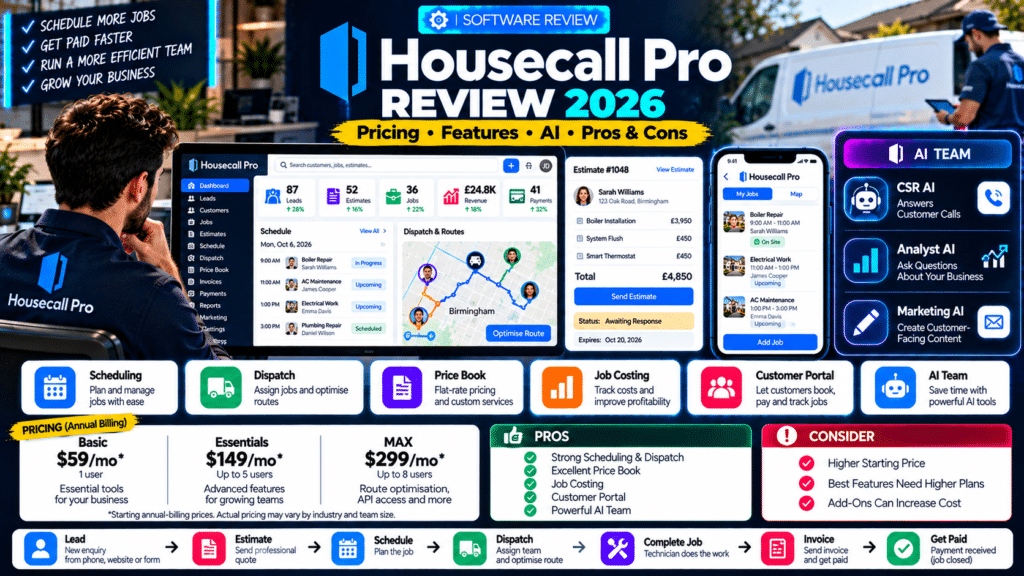
Housecall Pro is one of the biggest field-service management platforms aimed specifically at home-service businesses.
It is designed to help companies manage the complete customer and job lifecycle from:
New Lead
↓
Estimate
↓
Schedule
↓
Dispatch
↓
Complete Job
↓
Invoice
↓
Payment
That makes it relevant to businesses such as:
- HVAC;
- plumbing;
- electrical;
- cleaning;
- landscaping;
- garage-door repair;
- appliance repair;
- pest control;
- pool service;
- window cleaning;
- handyman services.
Housecall Pro now goes far beyond basic scheduling.
Its 2026 platform includes:
- CRM;
- online booking;
- scheduling;
- dispatch;
- route optimization;
- estimates;
- proposals;
- Price Book;
- job costing;
- Customer Portal;
- sales Pipeline;
- marketing tools;
- reporting;
- AI-powered assistants.
Housecall Pro says its field-service platform is used across teams ranging from solo operators to businesses with more than 100 employees (source: Housecall Pro).
So is Housecall Pro worth it in 2026?
For many home-service businesses, yes—especially if you want scheduling, estimates, customer communication, pricing and field operations tightly connected in one platform.
But it is not automatically the best choice for every small business.
Its entry price is higher than some alternatives, certain advanced tools sit on higher plans or paid add-ons, and a very small company may not need the full system.
This Housecall Pro review looks at current pricing, core features, AI, Price Book, job costing, routing, pros, cons and who should consider using it.
Housecall Pro Review: Quick Verdict
Overall: Strong field-service platform for home-service businesses that want scheduling, dispatch, customer management, pricing and sales tools in one system.
Best For:
Home-service companies that want strong scheduling, quoting, Price Book functionality, customer communication and increasingly advanced AI.
Starting Price:
From $59 per month when billed annually for the Basic plan (source: Housecall Pro).
Free Trial:
14 days with no credit card required (source: Housecall Pro).
Mobile Apps:
Included across plans for iOS and Android (source: Housecall Pro).
Standout Features:
- scheduling and dispatch;
- Price Book;
- estimates and proposals;
- route optimization;
- job costing;
- Customer Portal;
- AI Team;
- CRM;
- automated invoicing and reminders.
Main Drawback:
The strongest operational and sales features become more expensive as you move into Essentials, MAX and paid add-ons.
Housecall Pro at a Glance
| Area | Our Assessment |
|---|---|
| Ease of Use | Very Good |
| CRM | Very Good |
| Scheduling | Excellent |
| Dispatch | Excellent |
| Estimates | Excellent |
| Price Book | Excellent |
| Job Costing | Strong |
| Customer Portal | Strong |
| Route Optimization | Strong on MAX |
| AI Features | Very Strong |
| Mobile Tools | Very Good |
| Solo Operators | Good |
| Small Teams | Excellent |
| Larger Teams | Very Good |
| Value | Strong if you use the broader feature set |
This review is based on Housecall Pro’s currently published product documentation and feature information rather than hands-on testing of every function.
What Is Housecall Pro?
Housecall Pro is cloud-based field-service management software built around home-service operations.
Instead of managing:
- customers;
- estimates;
- calendars;
- technicians;
- invoices;
- payments
in separate systems, businesses can manage them inside one connected platform.
Housecall Pro’s current feature set includes:
- invoicing;
- payments;
- scheduling;
- dispatch;
- sales Pipeline;
- estimates;
- customer records;
- reporting (source: Housecall Pro).
The system is designed around the full operational workflow rather than one isolated task.
Who Is Housecall Pro Designed For?
Housecall Pro supports a wide range of home-service industries, including:
- plumbing;
- HVAC;
- electrical;
- cleaning;
- landscaping;
- garage-door repair;
- pool and spa;
- pest control;
- window cleaning;
- handyman;
- appliance repair;
- locksmithing;
- painting;
- construction and remodeling (source: Housecall Pro).
It makes the most sense when a business regularly needs to move customers through:
Lead → Estimate → Job → Technician → Invoice
If your business operates mainly through field appointments, Housecall Pro is much more relevant than a generic CRM.
Housecall Pro Pricing in 2026
Housecall Pro currently offers three standard plans:
- Basic;
- Essentials;
- MAX.
Its general field-service pricing as of 2026 is:
| Plan | Annual Billing | Monthly Billing | Included Users |
|---|---|---|---|
| Basic | $59/month | $79/month | 1 |
| Essentials | $149/month | $189/month | Up to 5 |
| MAX | $299/month | $329/month | Up to 8 |
Housecall Pro also offers a 14-day free trial (source: Housecall Pro).
Pricing can vary depending on:
- industry;
- mechanical package;
- team size;
- selected add-ons.
For example, HVAC, plumbing and electrical businesses can see different industry-specific packages and pricing (source: Housecall Pro).
That means businesses should always check their actual industry configuration before buying.
Housecall Pro Basic
Basic is the entry plan for solo operators.
Housecall Pro positions it around core tools such as:
- scheduling;
- dispatch;
- quotes;
- invoicing;
- payments;
- online booking;
- review management (source: Housecall Pro).
Its current annual-billing price is:
$59 per month
for one user (source: Housecall Pro).
Who Should Choose Basic?
Basic may fit:
- solo plumbers;
- cleaners;
- handymen;
- small appliance technicians;
- owner-operators.
If you mainly need:
customers + schedule + quotes + invoices
Basic may provide enough functionality without immediately moving into more complex plans.
Housecall Pro Essentials
Essentials is aimed at growing teams.
Its current standard price is:
$149 per month billed annually
or:
$189 monthly
for up to five users (source: Housecall Pro).
This level becomes more relevant when the company needs stronger functionality around:
- teams;
- sales;
- profitability;
- service agreements;
- structured pricing.
Housecall Pro’s current pricing information highlights functionality such as:
- job costing;
- flat-rate pricing;
- Price Book tools;
- sales proposals;
- membership plans
among features available in higher configurations (source: Housecall Pro).
Who Should Choose Essentials?
Essentials may make sense for businesses that have:
- several technicians;
- standardized service pricing;
- larger estimates;
- service agreements;
- a need to track job profitability.
Housecall Pro MAX
MAX is aimed at scaling businesses.
Its current standard price is:
$299 per month billed annually
or:
$329 monthly
with up to eight users included (source: Housecall Pro).
MAX adds or emphasizes tools such as:
- route optimization;
- API access;
- advanced support;
- broader operational control (source: Housecall Pro).
Who Should Choose MAX?
MAX becomes more relevant when:
- routes matter;
- several technicians are operating daily;
- integrations are important;
- management needs stronger operational tools.
Is Housecall Pro Expensive?
Compared with very lightweight service software, it can be.
Compared with buying separate systems for:
- CRM;
- scheduling;
- dispatch;
- estimates;
- payments;
- Price Book;
- reporting;
- AI;
- customer communication,
the cost may make more sense.
The important question is not:
“What is the cheapest plan?”
It is:
“Which plan contains the functions we would otherwise pay for separately?”
Housecall Pro CRM Review
Housecall Pro’s CRM is built around real service history.
Customer profiles can connect information such as:
- contact details;
- properties;
- previous jobs;
- invoices;
- estimates;
- service history;
- attachments.
Housecall Pro’s help documentation includes tools for:
- multiple customer addresses;
- parent/child billing;
- customer job history;
- customer attachments (source: Housecall Pro Help Center).
That makes the CRM useful for returning customers.
Example
A plumber visits a customer for the third time.
Instead of relying on memory, the business can review:
- earlier work;
- previous invoices;
- customer information;
- relevant property history.
CRM Verdict
Very good for field-service businesses.
It is not intended to replace an enterprise sales CRM.
Its strength is keeping customer records connected directly to service operations.
Housecall Pro Scheduling Review
Scheduling is one of Housecall Pro’s core strengths.
Users can create jobs with:
- customer details;
- service items;
- assigned employees;
- schedule information;
- notes;
- files (source: Housecall Pro Help Center).
Its schedule is designed for businesses that need to:
- assign technicians;
- move appointments;
- respond to changes;
- coordinate several jobs per day.
This becomes increasingly valuable once a company grows beyond a single technician.
Scheduling Verdict
Excellent for small and medium home-service teams.
Housecall Pro Dispatch Review
Dispatch is closely tied to scheduling.
Dispatchers can use the platform to:
- assign workers;
- view job information;
- make changes;
- manage technician schedules.
The advantage is that jobs are not sitting separately from customer information.
The dispatcher can see the operational context before assigning work.
Dispatch Verdict
One of the platform’s strongest areas.
This is especially useful for:
- HVAC;
- plumbing;
- electrical;
- appliance repair;
- locksmiths;
- garage-door companies.
Housecall Pro Route Optimization Review
Housecall Pro has expanded its routing tools substantially in 2026.
Its Optimize by Drive Time feature automatically rearranges a technician’s jobs for the day to reduce total travel time using real locations and live traffic (source: Housecall Pro Help Center).
The tool lets dispatchers:
- choose a technician;
- set start and end locations;
- lock fixed appointments;
- optimize remaining jobs.
Housecall Pro currently states that this feature is available on MAX (source: Housecall Pro Help Center).
Example
A technician has six jobs.
Instead of:
A → F → B → E → C → D
the software might reorganize the day into:
A → B → C → D → E → F
based on actual drive time.
Route Optimization Verdict
Strong, particularly for route-heavy businesses—but tied to MAX.
This may matter for:
- pool service;
- pest control;
- cleaning;
- window cleaning;
- multi-call repair businesses.
Housecall Pro Routes
Housecall Pro also introduced route-based scheduling, where businesses can organize work around routes rather than only assigning everything directly to individual employees (source: Housecall Pro Help Center).
That can make sense for recurring-service businesses where jobs naturally belong to:
- Monday North Route;
- Tuesday West Route;
- Commercial Route A.
This is particularly interesting for businesses with dense recurring customer schedules.
Housecall Pro Estimates Review
Housecall Pro refreshed its estimate experience in 2026.
Its updated estimates can show:
- employee assignment;
- expiry date;
- customer approval settings;
- estimate title;
- Summary of Work;
- pricing options;
- attachments and tags (source: Housecall Pro Help Center).
This gives businesses more control over customer-facing proposals.
Why Estimate Structure Matters
Compare:
Air conditioning installation — $9,500
with:
Supply and installation of new high-efficiency air-conditioning system, including removal of existing equipment, commissioning and customer handover.
The second version provides much more clarity.
Housecall Pro’s Summary of Work field supports that kind of customer-facing description (source: Housecall Pro Help Center).
Estimates Verdict
Strong and becoming more polished.
Housecall Pro Price Book Review
The Price Book is one of Housecall Pro’s biggest differentiators.
Housecall Pro provides default Price Books tailored by industry.
Its current Price Book collection supports areas including:
- services;
- materials;
- tax categories;
- discounts;
- mobile pricing;
- flat-rate pricing;
- visual Price Book;
- price adjustments (source: Housecall Pro Help Center).
Default Industry Price Books
Housecall Pro provides common services with homeowner-friendly descriptions.
Mechanical industries such as:
- HVAC;
- plumbing;
- electrical
receive more extensive default content than many other industries (source: Housecall Pro Help Center).
Why This Matters
Imagine an HVAC technician quoting:
Capacitor Replacement
Instead of manually writing the same service description every time, the business can use standardized items from the Price Book.
That improves consistency across technicians.
Flat-Rate Pricing
The platform also supports flat-rate pricing.
This can help businesses standardize:
- labour;
- materials;
- margins;
- service pricing.
That is particularly relevant to mechanical trades.
Price Book Verdict
Excellent.
This is one of the clearest reasons an HVAC, plumbing or electrical company may choose Housecall Pro over a simpler system.
Housecall Pro Job Costing Review
Housecall Pro’s Job Costing tracks expenses and profitability for individual jobs.
The platform can account for:
- labour;
- materials;
- miscellaneous expenses;
- commissions;
- services (source: Housecall Pro Help Center).
It can then show information such as:
- revenue;
- total costs;
- profit margin;
- gross profit.
Housecall Pro also provides aggregate job-costing reports (source: Housecall Pro Help Center).
Example
A plumbing installation brings in:
Revenue: $6,000
Costs:
- labour: $1,800;
- materials: $2,100;
- miscellaneous: $300.
Total cost:
$4,200
Gross profit:
$1,800
Margin:
30%
Without job costing, an owner may only see:
$6,000 job
and assume it performed well.
Job Costing Verdict
Strong and useful for growing teams.
This becomes more valuable when a company has:
- several technicians;
- different service lines;
- varying labour costs.
Housecall Pro Customer Portal Review
Housecall Pro’s Customer Portal gives customers self-service access to their history with the business.
Customers can:
- view upcoming appointments;
- view past appointments;
- see invoices;
- pay invoices;
- view estimates;
- communicate appointment changes (source: Housecall Pro Help Center).
Access uses a magic link rather than requiring customers to create a traditional password (source: Housecall Pro Help Center).
Why This Matters
Customers do not always want to call the office to ask:
- When is my appointment?
- What was my last invoice?
- Can I pay online?
A self-service portal can reduce those calls.
Customer Portal Verdict
Very useful for customer experience.
Housecall Pro Pipeline Review
Pipeline is Housecall Pro’s sales-management layer.
It helps businesses manage:
- incoming opportunities;
- estimates;
- sales stages;
- follow-up.
Housecall Pro positions Pipeline as a system for managing the sales funnel and automating follow-up to help turn leads and estimates into jobs (source: Housecall Pro).
This is important because field-service software is increasingly expected to help with both:
operations
and:
sales.
Pipeline Verdict
Strong for businesses with higher-value estimates or longer sales cycles.
Housecall Pro AI Team Review
Housecall Pro’s AI strategy is one of the most interesting parts of the platform in 2026.
Instead of one generic AI assistant, it provides an AI Team with specialized roles.
The current AI Team includes:
- CSR AI;
- Analyst AI;
- Marketing AI;
- Coach AI;
- Help AI (source: Housecall Pro Help Center).
Most AI Team members are included with Housecall Pro accounts, while CSR AI is offered separately as an optional add-on (source: Housecall Pro Help Center).
Analyst AI
Analyst AI can generate reports from real business data.
A business owner could ask:
Who was our highest-performing technician last quarter?
Housecall Pro says Analyst AI can generate reports using actual account data and save them for later use (source: Housecall Pro Help Center).
Why This Matters
Traditional reporting can require:
- filters;
- exports;
- spreadsheets.
Natural-language reporting makes analytics easier for business owners who are not data specialists.
Marketing AI
Marketing AI helps write content such as:
- emails;
- service descriptions;
- review responses (source: Housecall Pro Help Center).
This is useful for reducing repetitive writing work inside the same platform.
Coach AI
Coach AI provides operational and growth suggestions based on patterns used by successful home-service businesses (source: Housecall Pro Help Center).
This should be treated as guidance rather than a replacement for professional financial or management advice.
Help AI
Help AI answers product and account questions.
Examples include:
- checking estimate approval;
- finding tasks;
- changing schedule views;
- restoring customer information (source: Housecall Pro Help Center).
This can reduce the time spent searching help documentation.
AI Team Verdict
One of Housecall Pro’s strongest developments in 2026.
The biggest advantage is that the AI sits inside the operational platform rather than functioning as a completely separate chatbot.
CSR AI Review
CSR AI is Housecall Pro’s AI customer-service assistant.
It can:
- answer customer calls;
- interact with callers;
- ask questions;
- summarize conversations;
- provide call logs (source: Housecall Pro Help Center).
Housecall Pro also allows businesses to configure:
- call forwarding;
- whether CSR AI handles bookings;
- escalation when a human is requested (source: Housecall Pro Help Center).
Why CSR AI Matters
For a small plumbing company:
Technician on job
↓
Customer calls
↓
CSR AI answers
↓
Customer explains issue
↓
Call summarized
↓
Office follows up or booking proceeds
That can reduce missed calls.
Important Note
CSR AI is an add-on rather than being included automatically with every plan (source: Housecall Pro Help Center).
CSR AI Verdict
Potentially valuable for call-heavy businesses, but test it with real customer scenarios before depending on it completely.
Housecall Pro Mobile App Review
Housecall Pro includes mobile access on iOS and Android across its plans (source: Housecall Pro).
Field staff can use mobile tools to manage jobs while away from the office.
This matters because field-service software should not require technicians to return to a desktop for every update.
A good mobile workflow should let staff:
- see job details;
- review customer information;
- update work;
- communicate;
- capture information.
Mobile Verdict
Strong overall.
The practical value depends heavily on technician adoption.
Housecall Pro Invoicing Review
Housecall Pro includes:
- digital invoicing;
- automated reminders;
- payments;
- QuickBooks integration options (source: Housecall Pro).
It also provides auto-invoicing workflows within its job and invoice system (source: Housecall Pro Help Center).
This can reduce delays between:
job completion
and:
customer payment.
Invoicing Verdict
Very strong for normal home-service workflows.
Housecall Pro Payments Review
Housecall Pro lets businesses accept:
- card payments;
- bank payments;
- financing options.
Its current pricing page notes card processing rates can start as low as 2.59%, though actual rates depend on configuration (source: Housecall Pro).
Payment processing should be evaluated alongside:
- subscription cost;
- financing fees;
- transaction fees.
Housecall Pro Marketing Review
Housecall Pro also provides marketing functionality.
Its Campaigns tool supports:
- SMS;
- email campaigns.
Current paid Campaigns packages begin at:
- Basic: $9/month;
- Essentials: $19/month;
- MAX: $49/month;
- MAX+: $89/month
with different message limits (source: Housecall Pro Help Center).
This is separate from the main subscription.
Marketing Verdict
Useful, but calculate add-on costs carefully.
A business with advanced marketing requirements may still use another marketing platform.
Housecall Pro Automation Review
Housecall Pro automates several parts of the customer lifecycle.
Examples include:
- invoice reminders;
- estimate follow-up;
- job creation;
- customer communication.
One useful 2026 feature automatically creates a job when a customer approves an estimate (source: Housecall Pro Help Center).
That can turn:
Estimate Approved
directly into:
Job Created
without office staff manually rebuilding the information.
What Are Housecall Pro’s Biggest Strengths?
1. Strong Home-Service Focus
The platform is clearly built around businesses that send technicians into the field.
2. Excellent Scheduling and Dispatch
This is one of its strongest operational areas.
3. Strong Price Book
Particularly useful for:
- HVAC;
- electrical;
- plumbing.
4. Good Job Costing
It can track detailed job profitability using labour, material and other costs (source: Housecall Pro Help Center).
5. Strong Customer Experience
Customer Portal, online booking and automated communication reduce office workload.
6. Advanced AI Team
The AI Team gives the platform increasingly useful:
- reporting;
- writing;
- coaching;
- customer-service capabilities (source: Housecall Pro Help Center).
7. Native Route Optimization
MAX users can automatically optimize technician schedules by real drive time (source: Housecall Pro Help Center).
What Are Housecall Pro’s Main Weaknesses?
1. Higher Starting Price
Basic starts at $59 per month annually, compared with cheaper entry options from some competitors (source: Housecall Pro).
For a solo business doing only a few jobs per month, that may be more than necessary.
2. Advanced Features Are Spread Across Plans
Route optimization, API access and other capabilities are tied to higher plans (source: Housecall Pro).
3. Add-On Costs Can Accumulate
Examples include:
- CSR AI;
- Campaigns;
- certain sales or growth tools.
The total monthly cost may be higher than the base subscription.
4. Pricing Can Vary by Industry
Mechanical industries may see different packages and pricing from the standard plan structure (source: Housecall Pro).
This makes buying slightly less straightforward.
5. Small Businesses May Not Need Everything
A one-person window-cleaning business may never use:
- advanced Price Book;
- job costing;
- route optimization;
- API access.
In that case, a simpler platform may provide better value.
Is Housecall Pro Good for Solo Operators?
Yes, but the value depends on workload.
Basic provides the main tools a solo operator might need:
- scheduling;
- estimates;
- invoicing;
- online booking;
- payments.
However, at $59 per month annually, the business should be busy enough to benefit from the administrative savings (source: Housecall Pro).
Verdict for Solo Operators
Good, but not necessarily the cheapest option.
Is Housecall Pro Good for Small Teams?
Yes.
This is one of its strongest use cases.
Essentials supports up to five users under standard pricing (source: Housecall Pro).
At this stage, features such as:
- dispatch;
- shared customer records;
- Price Book;
- job costing;
- sales workflow
become much more valuable.
Verdict for Small Teams
Excellent fit.
Is Housecall Pro Good for HVAC?
Yes.
HVAC is one of the industries where Housecall Pro’s Price Book becomes particularly useful.
Its default mechanical-industry Price Books contain deeper categories and services than its general industry templates (source: Housecall Pro Help Center).
Its HVAC-specific packages also include more specialized pricing structures (source: Housecall Pro).
Verdict for HVAC
One of the stronger Housecall Pro use cases.
Is Housecall Pro Good for Plumbers?
Yes.
Plumbing companies can benefit from:
- flat-rate pricing;
- Price Book;
- dispatch;
- job costing;
- technician scheduling.
The standardization is particularly useful when several plumbers are quoting the same types of jobs.
Is Housecall Pro Good for Electricians?
Yes.
Like plumbing and HVAC, electrical businesses receive more detailed default Price Book content than many general industries (source: Housecall Pro Help Center).
This can help standardize service descriptions and pricing.
Is Housecall Pro Good for Cleaning Businesses?
Yes, but the strongest features may be different.
A cleaning company may care more about:
- recurring scheduling;
- customer communication;
- payments;
- routes
than:
- extensive flat-rate Price Book tools.
It can still work well, but simpler competitors may also be worth testing.
Housecall Pro vs Jobber
Housecall Pro and Jobber overlap heavily.
A simple way to think about them is:
Jobber
Often particularly attractive for:
- solo operators;
- simpler workflows;
- recurring services;
- lower entry pricing.
Housecall Pro
Particularly attractive for:
- Price Book;
- flat-rate pricing;
- mechanical trades;
- AI Team;
- customer-service workflows.
We covered the comparison in detail in our Jobber vs Housecall Pro guide.
Housecall Pro vs Workiz
Workiz becomes especially interesting for businesses that depend heavily on:
- calls;
- dispatch;
- AI answering;
- communications.
Housecall Pro may have the advantage if:
- Price Book;
- job costing;
- home-service sales workflows
are higher priorities.
Housecall Pro vs ServiceTitan
These usually serve different levels of operational complexity.
Housecall Pro can fit:
- solo operators;
- small teams;
- medium-sized service businesses.
ServiceTitan typically becomes more relevant when businesses require deeper:
- enterprise operations;
- inventory;
- large-team management;
- advanced reporting.
Do not assume that bigger software is automatically better.
Best Housecall Pro Alternatives
Strong alternatives include:
Jobber
Excellent for smaller service companies and recurring-service workflows.
Workiz
Strong for call-heavy and dispatch-heavy businesses.
FieldPulse
Useful for customizable workflows and multi-team operations.
ServiceM8
Interesting for smaller mobile-first service businesses.
ServiceTitan
More suitable for highly complex or larger contractors.
Who Should Use Housecall Pro?
Housecall Pro is worth considering if your company:
- manages field technicians;
- sends estimates;
- schedules multiple jobs;
- wants structured pricing;
- needs job costing;
- values customer self-service;
- wants AI integrated into operations.
It is particularly compelling for businesses that have moved beyond:
one owner + one phone + one calendar.
Who May Not Need Housecall Pro?
You may not need it if:
- you only complete a handful of jobs each month;
- you do not need dispatch;
- your current invoice and calendar system works well;
- your business is project-based rather than service-call-based;
- you require a specialized industry platform Housecall Pro does not support deeply enough.
How to Test Housecall Pro Properly
Housecall Pro offers a 14-day free trial with no credit card required (source: Housecall Pro).
Do not spend the entire trial exploring menus.
Run one complete workflow.
Test Scenario
Create:
Customer:
Sarah Williams
Service:
Boiler Repair
Then:
- Add the customer.
- Create an estimate.
- Add items from the Price Book.
- Send the estimate.
- Approve the estimate.
- Create the job.
- Schedule a technician.
- Dispatch the technician.
- Add field notes.
- Upload photos.
- Complete the job.
- Send the invoice.
- Record payment.
- Check job profitability.
- Review the customer’s portal experience.
Then ask:
- Was scheduling easy?
- Was the Price Book useful?
- Was the technician workflow clear?
- Did the customer communication look professional?
- Did job costing provide useful information?
- Which features required a more expensive plan?
That tells you much more than comparing feature lists alone.
Related guides
- Workiz Review 2026: Pricing, Features, Genius AI, Pros & Cons
- Jobber Review 2026: Pricing, Features, Pros & Cons
- Jobber vs Housecall Pro (2026): Which Is Better for Service Businesses?
- Tools, Software and Automation for Trades: Start Here
Frequently Asked Questions
Is Housecall Pro worth it in 2026?
For many home-service businesses, yes. It combines scheduling, dispatch, estimates, invoicing, customer management, payments, Price Book functionality, job costing and AI inside one platform (source: Housecall Pro).
How much does Housecall Pro cost?
Standard pricing currently starts at $59 per month billed annually for Basic, $149 for Essentials and $299 for MAX. Monthly billing costs more (source: Housecall Pro).
Does Housecall Pro offer a free trial?
Yes. Housecall Pro currently offers a 14-day free trial without requiring a credit card (source: Housecall Pro).
Does Housecall Pro have AI?
Yes. Its AI Team includes CSR AI, Analyst AI, Marketing AI, Coach AI and Help AI (source: Housecall Pro Help Center).
Is CSR AI included with Housecall Pro?
CSR AI is an optional add-on, while other AI Team members are included with Housecall Pro accounts (source: Housecall Pro Help Center).
Does Housecall Pro have route optimization?
Yes. Housecall Pro’s Optimize by Drive Time feature can reorder a technician’s jobs based on actual drive time and traffic. It is currently available on MAX (source: Housecall Pro Help Center).
Does Housecall Pro have job costing?
Yes. Job Costing tracks labour, materials, miscellaneous costs, commissions and other job expenses and can report profitability (source: Housecall Pro Help Center).
Does Housecall Pro have a Price Book?
Yes. Housecall Pro includes Price Book functionality with services, materials, flat-rate pricing and industry-specific default content (source: Housecall Pro Help Center).
Is Housecall Pro good for HVAC?
Yes. HVAC is one of the strongest use cases because Housecall Pro provides more detailed Price Book content and specialized mechanical-trade packages (source: Housecall Pro Help Center).
Can customers pay through Housecall Pro?
Yes. Customers can pay invoices digitally, including through the Customer Portal (source: Housecall Pro Help Center).
Housecall Pro Review: Final Verdict
Our Housecall Pro review for 2026 comes down to one main point:
Housecall Pro is strongest when a service company wants more than a simple calendar and invoice tool.
It brings together:
Lead → Estimate → Price Book → Schedule → Dispatch → Job → Invoice → Payment
inside one operational platform.
Basic gives solo operators the core tools needed to run jobs, schedule work, send quotes and collect payment, starting at $59 per month with annual billing (source: Housecall Pro).
Essentials becomes more interesting for growing teams that need deeper pricing, sales and profitability tools.
And MAX becomes more relevant when route optimization, API access and broader operational control matter (source: Housecall Pro).
The platform’s Price Book remains one of its strongest differentiators, particularly for HVAC, plumbing and electrical businesses that rely on standardized services and flat-rate pricing (source: Housecall Pro Help Center).
Its Job Costing tools also provide meaningful visibility into whether individual jobs are actually profitable rather than merely generating revenue (source: Housecall Pro Help Center).
And in 2026, the AI Team makes Housecall Pro more interesting than older reviews may suggest.
Analyst AI can work with real business data, Marketing AI can assist with customer-facing content, and CSR AI can help handle incoming customer calls (source: Housecall Pro Help Center).
The main downside is cost.
As businesses unlock more sophisticated:
- routing;
- AI;
- marketing;
- integrations;
- sales tools,
the monthly software bill can grow.
So the real question is not:
“Is Housecall Pro good?”
It is.
The better question is:
“Will we use enough of Housecall Pro’s deeper tools to justify the price?”
For an HVAC, plumbing or electrical business with multiple technicians:
very possibly.
For a solo service professional needing only simple scheduling and invoicing:
compare it carefully with cheaper alternatives.
The best way to decide is to use the 14-day trial and run a real customer from:
estimate to payment.
If Housecall Pro makes that workflow faster for your office, technicians and customers, it may be a very strong fit.