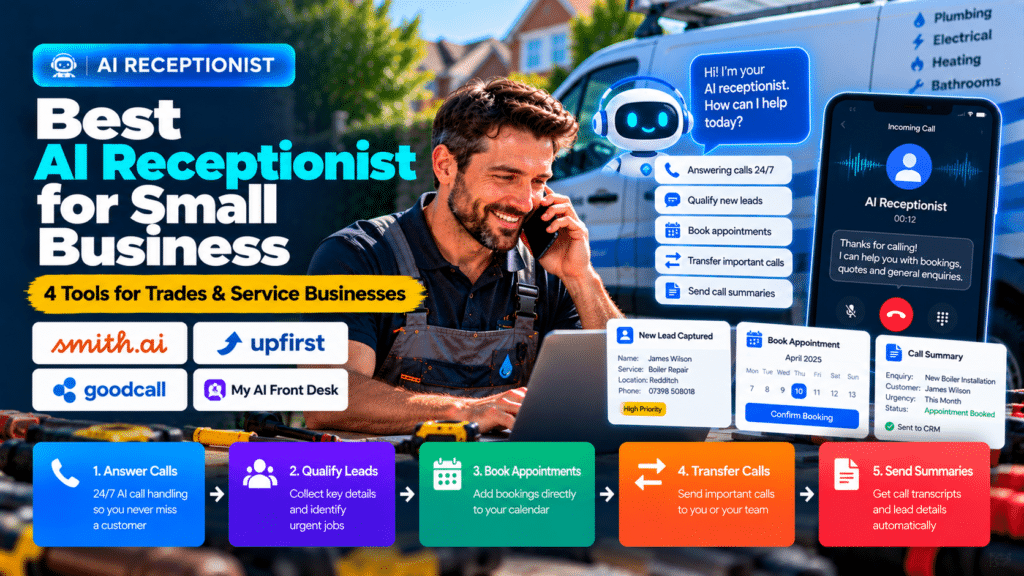
Missing a phone call can be expensive for a small service business.
A plumber may be under a sink.
An electrician may be on a ladder.
A contractor may be driving between jobs.
In all of those situations, the phone can ring at exactly the wrong time.
That is where an AI receptionist for small business can help.
Modern AI receptionist tools can answer calls, collect customer details, qualify leads, book appointments, route callers and send summaries without requiring someone to sit beside the phone all day.
For trades and home-service businesses, that can be especially useful because so much work happens away from a desk.
This guide compares several current AI receptionist platforms and explains what trades businesses should look for before choosing one.
Quick Comparison of the Best AI Receptionists
| Platform | Best For | Current Entry Pricing | Key Strength |
|---|---|---|---|
| Smith.ai | Businesses wanting AI plus optional human escalation | Free for 25 calls/month | Human backup and strong lead handling |
| Upfirst | Small businesses wanting low-cost call coverage | $24.95/month for 30 calls | Affordable per-call pricing |
| Goodcall | Businesses wanting configurable AI call flows | $79/month | Unlimited minutes with customer-based limits |
| My AI Front Desk | Businesses wanting phone + SMS + chat + CRM | $99/month | Broader front-office automation |
Pricing and features change frequently, so always check the provider’s current page before subscribing.
What Is an AI Receptionist?
An AI receptionist is software that answers business phone calls using conversational AI.
Instead of sending every missed call to voicemail, the AI can speak to the caller and handle certain tasks automatically.
Depending on the platform, it may be able to:
- answer calls 24/7;
- collect names and contact details;
- ask why the customer is calling;
- qualify leads;
- answer common questions;
- book appointments;
- transfer calls;
- send text messages;
- create call summaries;
- push information into a CRM.
For trades businesses, the most useful benefit is often simple:
fewer valuable calls go unanswered.
Why AI Receptionists Make Sense for Trades
Trades businesses are unusually well suited to AI call handling because employees are often unable to answer immediately.
A technician may be:
- driving;
- working with tools;
- in a noisy environment;
- speaking with a customer;
- handling an emergency.
Traditional voicemail forces the caller to leave a message and wait.
An AI receptionist can instead handle the first part of the conversation immediately.
For example:
Caller: “I have a leaking pipe and need someone today.”
The AI might collect:
- name;
- phone number;
- address;
- postcode;
- type of problem;
- urgency.
It could then notify the business or route the call.
The AI does not replace the plumber.
It makes sure the enquiry is captured.
1. Smith.ai
Smith.ai offers both AI and human receptionist services.
Its current AI Receptionist plan includes 24/7 answering, recording, transcription, summaries, lead qualification, call routing and scheduling integrations. Smith.ai also offers optional escalation to live North America-based receptionists (source: Smith.ai).
Current Pricing
Smith.ai currently offers a free AI Receptionist plan with 25 live calls per month. Its Pro plan starts at $150 per month for 75 calls, while Enterprise plans begin at $500 per month (source: Smith.ai).
Why Smith.ai Stands Out
Its biggest differentiator is the ability to combine AI with human backup.
That can be useful when a caller asks something the AI cannot handle confidently.
For a trades business, this could help with:
- complex enquiries;
- unhappy customers;
- high-value leads;
- unusual scheduling requests.
Best For
Smith.ai may suit:
- contractors;
- professional service companies;
- home-service businesses;
- companies wanting AI plus human escalation.
Potential Limitation
It can become more expensive than lower-cost AI-only services as call volume grows.
2. Upfirst
Upfirst is a lower-cost AI answering service aimed at small businesses.
Its current Starter plan costs $24.95 per month for 30 calls, with additional calls charged at $1.50 each (source: Upfirst).
Included Features
Upfirst currently includes:
- 24/7 answering;
- call summaries;
- recordings and transcripts;
- call transfers;
- appointment scheduling;
- in-call texting;
- spam blocking;
- Zapier integration;
- support for 35+ languages (source: Upfirst).
Why It Can Work for Trades
The lower entry price can make it attractive for solo tradespeople or smaller companies that do not receive hundreds of calls each month.
A plumber could use it mainly for:
- missed calls;
- after-hours calls;
- overflow calls.
Best For
Upfirst may suit:
- solo tradespeople;
- small service companies;
- businesses wanting inexpensive 24/7 call capture.
Potential Limitation
If call volume increases significantly, businesses should compare overage costs carefully.
3. Goodcall
Goodcall provides configurable AI phone agents for business calls.
Its current Starter plan is $79 per month per agent, Growth is $129, and Scale is $249. Goodcall’s pricing model includes unlimited minutes and tokens, with usage limits based partly on unique customers (source: Goodcall).
Key Features
Goodcall supports:
- custom logic flows;
- call routing;
- CRM integrations;
- appointment booking;
- lead capture;
- call analytics;
- configurable responses (source: Goodcall).
Why It Can Work for Service Businesses
The logic-flow approach can be useful when different callers need different treatment.
For example:
Emergency leak → urgent workflow
Quote request → collect details
Existing customer → route to support
New installation → book consultation
That can make the system more useful than a simple message-taking bot.
Best For
Goodcall may suit:
- plumbing companies;
- electricians;
- HVAC firms;
- multi-service businesses;
- teams wanting configurable call flows.
Potential Limitation
Businesses should check how its customer-based limits compare with their actual call volume.
4. My AI Front Desk
My AI Front Desk positions itself as more than a phone-answering tool.
Its current Business-in-a-Box plan starts at $99 per month, or $79 per month when billed annually, and includes 200 voice minutes plus SMS, chat, CRM and automation tools (source: My AI Frontdesk).
Features
The current plan includes:
- AI phone answering;
- live calendar booking;
- call transfers;
- transcripts and summaries;
- SMS;
- web chat;
- built-in CRM;
- workflow automations (source: My AI Frontdesk).
Why It Stands Out
The appeal is that it combines multiple communication channels.
A business could potentially use one system for:
Phone → SMS → Chat → CRM → Follow-Up
That may reduce the number of separate apps needed.
Best For
My AI Front Desk may suit:
- businesses wanting a broader front-office system;
- service companies using multiple communication channels;
- teams that want CRM and automation included.
Potential Limitation
If you only need simple call answering, the broader feature set may be unnecessary.
AI Receptionist vs Traditional Answering Service
A traditional answering service uses human receptionists.
An AI receptionist uses automated conversational software.
Both approaches have advantages.
AI Receptionist Advantages
AI systems can often provide:
- 24/7 availability;
- lower entry pricing;
- consistent scripts;
- instant summaries;
- automation;
- integrations.
Human Receptionist Advantages
Human receptionists may perform better when callers are:
- upset;
- confused;
- asking unusual questions;
- dealing with sensitive situations.
Some providers, such as Smith.ai, combine both approaches (source: Smith.ai).
AI Receptionist vs Voicemail
Voicemail is cheaper, but it does very little.
A caller can:
- leave a message;
- hang up;
- wait for a callback.
An AI receptionist can potentially:
- answer immediately;
- collect information;
- book an appointment;
- transfer the call;
- send a summary.
For businesses where phone calls generate valuable leads, that difference can matter.
What Features Should Trades Businesses Look For?
24/7 Answering
This is especially useful for:
- emergency plumbers;
- HVAC companies;
- businesses receiving after-hours enquiries.
Lead Qualification
The AI should be able to ask useful questions.
For example:
- What service do you need?
- What is your postcode?
- Is this urgent?
- Are you an existing customer?
Appointment Booking
A strong AI receptionist should be able to connect with a calendar where appropriate.
Call Transfer
Some calls should reach a human immediately.
Examples include:
- emergencies;
- existing high-value customers;
- complaints.
CRM Integration
If customer information can move directly into your CRM, staff do not need to enter it manually.
Call Summaries
A useful summary should tell you:
- who called;
- why they called;
- what happened;
- what action is needed.
Spam Blocking
Paying for spam calls is frustrating.
Check whether the provider detects and excludes unwanted calls.
Multilingual Support
This can be useful for businesses serving diverse local markets.
Human Escalation
Some businesses may prefer a system that can transfer difficult calls to a live receptionist.
AI Receptionist for Plumbers
Plumbing companies often receive urgent enquiries.
Useful workflows include:
Emergency leak → collect address → flag urgent → alert staff
or:
Routine maintenance → book available appointment
The system should not give unsafe plumbing advice or make technical decisions.
Its job is to capture and route the enquiry.
AI Receptionist for Electricians
Electricians may receive calls about:
- power loss;
- inspections;
- rewiring;
- EV chargers;
- installations.
An AI receptionist can collect the basic information and help organize the lead.
Technical safety advice should remain with qualified electricians.
AI Receptionist for HVAC Businesses
HVAC companies often experience seasonal call spikes.
AI receptionists can help manage:
- breakdown calls;
- maintenance requests;
- installation enquiries;
- appointment booking.
This can be useful during extremely busy periods.
AI Receptionist for Contractors
Contractors often receive higher-value but lower-volume enquiries.
The AI may need to collect:
- project type;
- location;
- budget range;
- preferred start date;
- contact details.
For larger projects, the goal may be to book a consultation rather than schedule the work itself.
How Much Does an AI Receptionist Cost?
Current entry pricing varies significantly.
Examples include:
- Upfirst: $24.95/month for 30 calls (source: Upfirst);
- Smith.ai: free for 25 calls/month, then paid tiers (source: Smith.ai);
- Goodcall: $79/month per agent (source: Goodcall);
- My AI Front Desk: $99/month or $79 annually (source: My AI Frontdesk).
The cheapest headline price does not always mean the lowest real cost.
Check:
- call or minute limits;
- overages;
- number of users;
- number of phone numbers;
- integrations;
- SMS fees;
- human escalation fees.
How to Calculate Whether an AI Receptionist Is Worth It
Start with your missed-call problem.
Suppose you miss 20 genuine leads each month.
If even one or two of those calls would have become paying customers, the receptionist may pay for itself.
A simple calculation is:
Monthly AI receptionist cost
versus
Value of recovered leads + admin time saved
Do not assume every missed call is valuable.
Measure real outcomes.
How to Test an AI Receptionist Before Going Live
Do not configure the system and immediately send every customer to it.
Test it first.
Make Different Types of Calls
Try:
- new customer;
- existing customer;
- emergency;
- complaint;
- wrong number;
- unusual question.
Test Interruptions
Real callers interrupt.
Make sure the AI handles natural conversation.
Test Names and Addresses
Trades businesses often need accurate:
- names;
- phone numbers;
- addresses;
- postcodes.
Test Transfers
Make sure important calls actually reach the right person.
Test Booking
Confirm that appointments appear correctly in your calendar.
Review Call Summaries
Check whether important information is captured accurately.
What Should the AI Receptionist Say?
Keep the greeting simple.
For example:
“Thanks for calling ABC Plumbing. How can I help you today?”
Avoid making the AI sound unnecessarily complicated.
The call flow should focus on what the business actually needs.
For a plumber:
- identify the service;
- collect address;
- identify urgency;
- collect contact details;
- book or route appropriately.
What Should an AI Receptionist Not Do?
Avoid giving it responsibilities that require professional judgment.
It should not:
- diagnose electrical faults;
- give gas-safety advice;
- make legal promises;
- guarantee pricing;
- confirm work the business cannot deliver;
- decide whether a situation is medically or technically safe.
AI receptionist systems should support intake and communication.
They should not replace qualified professionals.
Common AI Receptionist Mistakes
Automating Every Call
Some calls should reach humans.
Poor Setup
A weak knowledge base produces weak answers.
No Escalation Rules
Make sure the AI knows when to transfer.
Overcomplicated Scripts
Natural conversation is usually better than long rigid scripts.
Failing to Review Calls
Check transcripts and recordings regularly.
Ignoring Customer Feedback
If customers find the system frustrating, adjust it.
Which AI Receptionist Is Best for Small Trades Businesses?
Different businesses have different priorities.
Best for AI + Human Backup
Smith.ai
Its AI-first approach can escalate to live receptionists when needed (source: Smith.ai).
Best for Low-Cost Entry
Upfirst
Its current $24.95 starter tier is one of the lower entry prices among the platforms covered here (source: Upfirst).
Best for Configurable Call Flows
Goodcall
Its logic-flow features make it useful for businesses with different call types (source: Goodcall).
Best for Broader Front-Office Automation
My AI Front Desk
It combines phone answering with chat, SMS, CRM and automation (source: My AI Frontdesk).
Related guides
- AI Receptionist vs Virtual Receptionist: Which Is Better for Trades?
- Best Answering Service for Small Business: AI and Human Options
- Best AI Tools for Small Business: 15 Practical Tools to Save Time and Grow
- Tools, Software and Automation for Trades: Start Here
Frequently Asked Questions
What is the best AI receptionist for small business?
Smith.ai, Upfirst, Goodcall and My AI Front Desk are all worth considering. The best option depends on call volume, budget, integrations and whether you want human backup.
Can an AI receptionist answer calls 24/7?
Yes. The platforms covered in this guide offer 24/7 AI call handling on applicable plans (source: Smith.ai).
Can an AI receptionist book appointments?
Yes. Many platforms can connect with calendars and book appointments during calls (source: Smith.ai).
Can plumbers use AI receptionists?
Yes. Plumbers can use AI receptionists to capture leads, collect job details, handle missed calls and book appropriate appointments.
Can electricians use AI receptionists?
Yes. Electricians can use them for lead intake, call routing, appointment scheduling and collecting customer information.
Is an AI receptionist cheaper than a human receptionist?
AI receptionist plans generally cost less than employing a full-time receptionist, but they do not provide the same level of human judgment or empathy.
Can AI receptionists transfer calls?
Yes. Platforms such as Smith.ai, Upfirst and Goodcall support call routing or transfers (source: Smith.ai).
Conclusion
The best AI receptionist for small business is the one that matches your actual call workflow.
If you want AI with access to human escalation, Smith.ai is worth considering.
If budget is the main priority, Upfirst provides a low-cost entry point.
If you need configurable call flows, Goodcall offers strong automation controls.
If you want phone answering combined with SMS, chat, CRM and workflow automation, My AI Front Desk provides a broader system.
For trades businesses, the key question is not whether AI can answer the phone.
It can.
The more important question is whether it can reliably:
- capture the right information;
- recognize urgent calls;
- book appropriate appointments;
- transfer important callers;
- integrate with your existing systems.
Test the service carefully before putting it in front of every customer.
A well-configured AI receptionist can reduce missed calls and repetitive admin.
A badly configured one can create a poor first impression.