
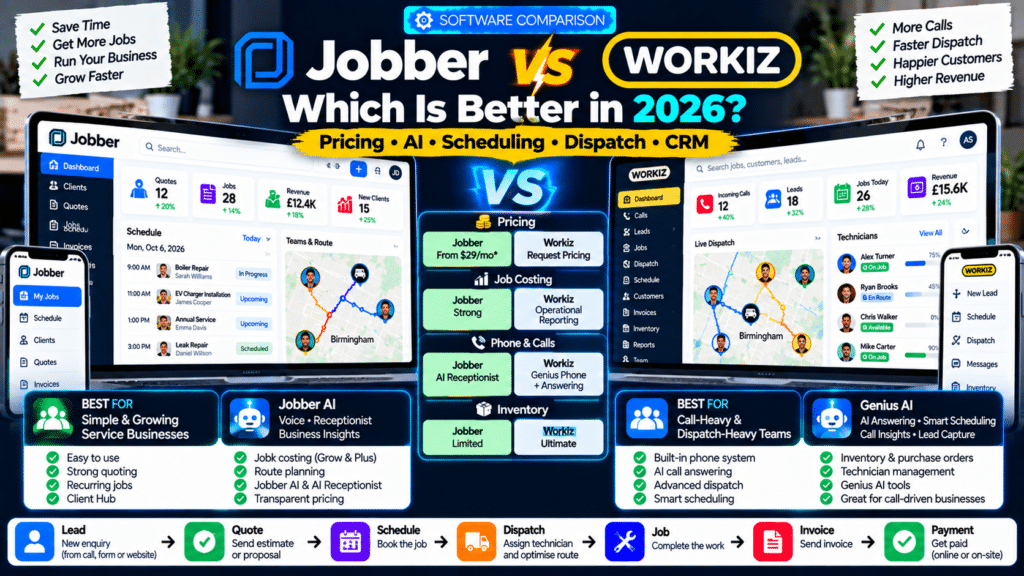
If you run a plumbing, electrical, cleaning, locksmith, garage-door, appliance-repair, landscaping or other field-service business, Jobber vs Workiz is an important software comparison.
Both platforms can help manage the core service workflow:
Lead
↓
Quote
↓
Schedule
↓
Dispatch
↓
Complete Job
↓
Invoice
↓
Payment
But their strengths are different.
Jobber is especially strong for businesses that want a straightforward system for:
- customer management;
- quoting;
- recurring work;
- scheduling;
- invoicing;
- payments;
- job costing;
- customer self-service.
Workiz puts more emphasis on:
- calls;
- communications;
- AI answering;
- dispatch;
- smart scheduling;
- lead capture;
- technician coordination.
In 2026, both platforms have also expanded significantly into AI.
Jobber now offers AI voice and chat, AI Receptionist and business recommendations, while Workiz has built its Genius AI suite around answering, call intelligence, lead capture, messaging and technician scheduling (source: Jobber).
So which one is better?
For many small and recurring-service businesses, Jobber will be the easier all-around choice.
For businesses where incoming calls, dispatch and technician coordination are central to daily operations, Workiz deserves serious consideration.
Jobber vs Workiz: Quick Comparison
| Feature | Jobber | Workiz |
|---|---|---|
| Public Starting Price | From $29/month annually | Request pricing |
| Free Trial | Yes | Check current offer |
| CRM | Yes | Yes |
| Estimates | Yes | Yes |
| Scheduling | Yes | Yes |
| Dispatch | Yes | Yes |
| Route Tools | Yes | Yes |
| Recurring Jobs | Yes | Yes |
| Online Booking | Yes | Yes |
| Customer Portal | Client Hub | Client Portal |
| Job Costing | Grow and Plus | Different profitability/reporting tools |
| AI Assistant | Jobber AI | Genius AI |
| AI Phone Answering | AI Receptionist | Genius Answering |
| Built-In Phone System | More limited | Major strength via Genius Phone |
| Inventory | Not its main strength | Ultimate |
| Purchase Orders | Limited compared with Workiz | Ultimate |
| Multi-Day Jobs | Supported through job structure | Ultimate feature |
| Best For | Small and growing service companies | Call-heavy, dispatch-heavy service teams |
Jobber publishes its current pricing directly, beginning at $29 per month on annual billing for one Core user. Workiz currently asks businesses to request pricing for Standard, Pro and Ultimate rather than displaying a standard subscription price publicly (source: Jobber).
What Is Jobber?
Jobber is field-service management software built around the full customer lifecycle.
Its core structure connects:
Request → Quote → Job → Invoice
with:
- CRM;
- scheduling;
- online booking;
- payments;
- customer communication;
- reporting.
Jobber’s current Core plan supports one user with unlimited quotes, jobs and invoices, while higher plans add automation, team features, job costing and advanced sales functionality (source: Jobber Help Center).
Jobber tends to work especially well for businesses that want a relatively straightforward operating system without building a complex back-office environment.
What Is Workiz?
Workiz is another field-service management platform, but its positioning is more heavily focused on:
- dispatch;
- phone communication;
- lead handling;
- technician assignment;
- automation.
Its current feature set includes:
- estimates;
- jobs;
- scheduling;
- invoicing;
- online payments;
- recurring jobs;
- client management;
- team tracking;
- service areas;
- AI functionality (source: Workiz).
Workiz’s Genius AI tools include:
- Genius Answering;
- Genius Leads;
- Genius Scheduling;
- Call Insights;
- Smart Messaging;
- Genius Marketing (source: Workiz).
That makes Workiz particularly interesting for businesses where the phone and dispatch board are at the center of operations.
Jobber vs Workiz Pricing
Pricing is one of the biggest differences in how the two companies sell their products.
Jobber Pricing in 2026
Jobber currently publishes four main plans.
| Jobber Plan | Starting Annual Price |
|---|---|
| Core | $29/month |
| Connect | $99/month |
| Grow | $149/month |
| Plus | $399/month |
These starting figures depend on team size and billing configuration. Jobber also offers monthly and one-year commitment options (source: Jobber).
Core
Best suited to a solo operator.
Includes:
- scheduling;
- online booking;
- quotes;
- invoices;
- online payments;
- reporting;
- CRM.
Connect
Adds more automation, including:
- customer reminders;
- quote follow-up;
- invoice follow-up;
- QuickBooks Online synchronization;
- time and expense tracking (source: Jobber).
Grow
Adds:
- advanced quotes;
- optional line items;
- job costing;
- two-way SMS;
- custom workflow automation (source: Jobber).
Plus
Adds Jobber’s more advanced growth tools, including:
- Pipeline;
- Marketing Suite;
- AI Receptionist;
- advanced profitability tools;
- custom reporting;
- premium support (source: Jobber).
Workiz Pricing in 2026
Workiz currently offers:
Standard
Pro
Ultimate
but does not publish a universal price for these plans on its public pricing page.
Instead, each tier uses:
Request pricing. Workiz
That makes direct cost comparison harder.
Workiz Standard
Designed for growing teams.
Includes:
- scheduling;
- estimates;
- jobs;
- invoices;
- five automations;
- online payments;
- service areas;
- built-in reports;
- client management;
- subcontractor management;
- QuickBooks integration (source: Workiz).
Workiz Pro
Adds more AI and automation.
Current Pro features include:
- Genius Leads;
- Genius Scheduling;
- custom reports;
- performance pay;
- ten automations (source: Workiz).
Workiz Ultimate
Adds deeper operations functionality including:
- service plans;
- 30 automations;
- sales proposals;
- inventory management;
- flat-rate pricing;
- checklists;
- multi-day jobs;
- equipment tracking;
- purchase orders;
- open API;
- franchise functionality (source: Workiz).
Pricing Winner
For pricing transparency:
Jobber wins.
You can see the current starting prices before speaking to sales.
Workiz may still be competitively priced for a particular business, but you need a quote to know the actual subscription cost.
Jobber vs Workiz for CRM
Both include customer management.
Jobber CRM
Jobber’s CRM keeps customer records connected with:
- requests;
- quotes;
- jobs;
- invoices;
- payments;
- communication;
- property information.
Jobber also includes Client Hub, where customers can:
- approve quotes;
- see appointments;
- pay invoices (source: Jobber).
Workiz CRM
Workiz stores customers, jobs and communication in one system.
One advantage is how closely its communication tools connect with CRM.
Workiz’s built-in phone and messaging environment is designed to centralize:
- calls;
- email;
- SMS
so staff can see customer communication alongside operational records (source: Workiz).
CRM Winner
For a simple quote-to-payment customer workflow:
Jobber has a slight edge.
For businesses where phone conversations and messaging are central to the customer record:
Workiz becomes particularly attractive.
Jobber vs Workiz for Scheduling
Both platforms provide strong scheduling functionality.
Jobber Scheduling
Jobber allows businesses to:
- create jobs;
- assign team members;
- see availability;
- manage recurring visits;
- drag and drop work on the calendar.
Its map and routing tools can also generate efficient routes and help assign work based on technician GPS location (source: Jobber).
Workiz Scheduling
Workiz provides standard scheduling plus Genius Scheduling on higher plans.
Genius Scheduling uses factors including:
- technician availability;
- proximity;
- skill set
to identify an appropriate technician and time for the job (source: Workiz).
That makes it particularly interesting for companies where technician skill matching is important.
Example
Imagine three technicians:
Alex
Available nearby but does not work on commercial systems.
David
Farther away but has the required certification.
Sarah
Already booked.
A smarter scheduling system should not simply choose whoever is geographically closest.
Workiz’s Genius Scheduling is designed around this broader assignment problem.
Scheduling Winner
For simple and recurring scheduling:
Jobber.
For advanced technician matching using:
- skills;
- proximity;
- availability:
Workiz has an interesting advantage.
Jobber vs Workiz for Dispatch
Dispatch is one of Workiz’s strongest areas.
Jobber Dispatch
Jobber provides:
- team schedules;
- GPS location;
- maps;
- routing;
- schedule notifications.
This is more than enough for many small field-service teams (source: Jobber).
Workiz Dispatch
Workiz is more dispatch-centric.
Its Genius AI can connect incoming customer requests with:
- real-time technician availability;
- technician skills;
- dispatch information.
Genius Answering can even move beyond simply answering a call and use operational information to help schedule or reschedule the right technician (source: Workiz).
Dispatch Winner
For businesses where dispatch is a major operational function:
Workiz wins.
For a smaller business where dispatch mainly means:
assign technician → send job information → track progress
Jobber remains more than capable.
Jobber vs Workiz for Phone Calls
This is one of the biggest differences.
Jobber AI Receptionist
Jobber offers Receptionist powered by Jobber AI.
It can provide 24/7 phone and text service and can:
- answer customer questions;
- create requests;
- book jobs;
- reschedule appointments;
- create follow-up tasks (source: Jobber Help Center).
Receptionist is included with unlimited usage on Plus and can currently be added to selected other plans for $29 per month with 30 conversations included (source: Jobber Help Center).
Workiz Genius Answering
Workiz makes phone automation a much larger part of its platform.
Genius Answering can:
- answer calls;
- respond to SMS;
- respond to email;
- handle website enquiries;
- schedule jobs;
- reschedule jobs;
- cancel jobs;
- transfer callers to staff;
- use customer history;
- use business pricing and policy information (source: Workiz).
It can also work in:
- English;
- Spanish;
- French (source: Workiz).
Genius Phone
Workiz also offers Genius Phone as a broader integrated communications system.
Its main platform can centralize:
- calls;
- SMS;
inside the CRM and generate AI-powered call insights and summaries (source: Workiz).
Phone Winner
Workiz.
If your company lives on the phone, Workiz’s communications focus is one of its clearest advantages.
This is particularly relevant to:
- locksmiths;
- garage-door repair;
- appliance repair;
- emergency plumbing;
- other call-driven businesses.
Jobber AI vs Workiz Genius AI
Both companies are investing heavily in AI, but they are approaching it differently.
Jobber AI
Jobber AI currently powers:
- Chat;
- Voice;
- Receptionist;
- AI Rewrite;
- business recommendations;
- automations (source: Jobber Help Center).
Jobber Voice
Technicians can use voice in the Jobber mobile app to perform tasks such as:
- creating quotes;
- sending invoices;
- checking schedules;
- capturing field details (source: Jobber Help Center).
That is a practical field workflow.
Workiz Genius AI
Workiz’s Genius ecosystem is more operationally distributed.
It includes:
Genius Answering
Customer communications.
Genius Scheduling
Technician assignment.
Genius Leads
Lead capture.
Call Insights
Call summaries and analysis.
Smart Messaging
AI-assisted customer communication.
Genius Marketing
Campaigns using live Workiz data (source: Workiz).
AI Winner
This is close, but the emphasis differs.
Choose Jobber if you want:
- an AI assistant;
- hands-free field work;
- business recommendations;
- AI Receptionist.
Choose Workiz if you want AI deeply connected to:
- calls;
- leads;
- technician scheduling;
- dispatch;
- messaging.
For a call-heavy business:
Workiz has the edge.
For a broader everyday field-service assistant:
Jobber AI is very compelling.
Jobber vs Workiz for Quotes
Jobber is particularly strong in quoting.
On Grow and Plus it supports:
- rich quote customization;
- optional line items;
- upselling;
- job costing (source: Jobber).
Example
A pressure-washing company could offer:
Base
Driveway Cleaning
Optional
Patio Cleaning
Optional
Gutter Cleaning
The customer can choose the additional services.
Workiz also supports estimates across all plans and adds Sales Proposals on Ultimate (source: Workiz).
Quoting Winner
For a small or growing business that wants strong quote presentation and optional upsells:
Jobber wins.
For businesses needing more complex proposal and operational functionality on the highest tier:
Workiz Ultimate is worth evaluating.
Jobber vs Workiz for Job Costing
Jobber provides dedicated job costing on Grow and Plus.
It calculates:
- total price;
- total cost;
- profit;
- profit margin
using data including employee time and line-item costs (source: Jobber Help Center).
That makes it easier to answer:
Did this job actually make money?
Workiz provides reporting and performance tools, but Jobber’s dedicated job-costing workflow is a clearer strength in this direct comparison.
Job Costing Winner
Jobber.
Especially if profitability by individual job is a major decision factor.
Jobber vs Workiz for Inventory
This is an area where Workiz has a stronger offering.
Workiz Ultimate currently includes:
- inventory management;
- equipment tracking;
- purchase orders (source: Workiz).
These features can matter for businesses that carry:
- repair parts;
- equipment;
- truck stock;
- replacement components.
Examples include:
- appliance repair;
- HVAC;
- garage doors;
- electrical service.
Jobber is much more focused on:
- customers;
- jobs;
- quoting;
- field operations;
- profitability
than on deep inventory and purchasing.
Inventory Winner
Workiz.
If inventory and purchase orders are critical to your operation, this may be one of the strongest reasons to choose it.
Jobber vs Workiz for Recurring Jobs
Both platforms support recurring work.
Workiz lists recurring jobs across Standard, Pro and Ultimate (source: Workiz).
Jobber also has strong recurring job workflows and is particularly popular with recurring-service industries.
Examples include:
- cleaning;
- lawn care;
- pool service;
- pest control;
- window cleaning.
Recurring Work Winner
Jobber has a slight edge for straightforward recurring-service operations.
Its overall customer, scheduling and payment workflow is particularly easy to understand for these business models.
Jobber vs Workiz for Automation
Both have automation.
Jobber
Connect adds standard automations such as:
- quote follow-ups;
- invoice follow-ups;
- customer reminders.
Grow adds custom workflow automation (source: Jobber).
Workiz
Workiz currently limits the number of standard automations by plan:
Standard: 5
Pro: 10
Ultimate: 30 (source: Workiz).
Its AI tools then add further automation around:
- leads;
- communication;
- scheduling;
- marketing.
Automation Winner
For operational and AI-driven automation:
Workiz has more aggressive capabilities.
For simple, easy-to-manage workflows:
Jobber may be easier for smaller teams.
Jobber vs Workiz for Customer Self-Service
Jobber provides Client Hub.
Customers can use it to:
- approve quotes;
- check appointments;
- pay invoices (source: Jobber).
Workiz also includes a Client Portal across Standard, Pro and Ultimate (source: Workiz).
Both therefore provide customers with self-service functionality.
Customer Portal Winner
Tie.
The more important question is which interface your actual customers prefer.
Jobber vs Workiz for Online Booking
Both platforms support online booking.
Jobber can automatically schedule bookings based on business preferences (source: Jobber).
Workiz also includes online booking with optional checkout across its plans (source: Workiz).
Online Booking Winner
Tie for most service businesses.
Workiz becomes more interesting when the booking process also needs to connect to AI answering and dispatch.
Jobber vs Workiz for Subcontractors
Workiz includes subcontractor management in its current Standard, Pro and Ultimate plans (source: Workiz).
Jobber’s own current comparison page also highlights Workiz as potentially attractive to businesses that rely heavily on subcontractors (source: Jobber).
This can matter for businesses that regularly send work to independent technicians rather than only employees.
Subcontractor Winner
Workiz.
Jobber vs Workiz for Larger Operations
As a business becomes more complicated, requirements may include:
- inventory;
- franchise operations;
- equipment tracking;
- purchase orders;
- API access.
Workiz Ultimate currently includes all of these (source: Workiz).
Jobber Plus instead emphasizes:
- profitability;
- Pipeline;
- marketing;
- job files;
- AI Receptionist;
- advanced reporting;
- crew coordination (source: Jobber).
So these products scale in somewhat different directions.
Jobber Scales Toward
- sales;
- profitability;
- marketing;
- customer experience.
Workiz Scales Toward
- operations;
- dispatch;
- inventory;
- equipment;
- multi-location control.
That distinction can become important.
Which Is Better for a Solo Operator?
For many solo operators:
Jobber.
Why?
Core is clearly priced at:
$29/month annually
and provides one user with unlimited:
- quotes;
- jobs;
- invoices (source: Jobber).
You know exactly what the entry point costs.
A solo technician may not need Workiz’s deeper dispatch and phone infrastructure.
Which Is Better for a 2–5 Person Team?
This is closer.
Jobber is strong if the company wants:
- scheduling;
- quotes;
- payments;
- recurring jobs;
- simple team coordination.
Workiz becomes more attractive if those five people include:
- dispatcher;
- office staff;
- several mobile technicians
and the company handles lots of phone calls.
Which Is Better for Emergency Service Businesses?
Examples include:
- locksmiths;
- garage-door repair;
- emergency appliance repair;
- emergency plumbing.
For these companies:
Workiz may have the stronger fit.
Why?
Because speed of:
Call → Lead → Technician
is extremely important.
Genius Answering can interact with customers and use live scheduling information to help move the request into dispatch (source: Workiz).
Which Is Better for Cleaning, Landscaping and Recurring Services?
For more predictable recurring work:
Jobber may have the stronger fit.
The workflow tends to be:
Customer → Recurring Schedule → Service → Invoice → Repeat
rather than:
Emergency Call → Dispatcher → Technician.
Jobber’s straightforward structure fits this model well.
Which Is Better for Appliance Repair?
This one is more interesting.
Appliance repair often requires:
- calls;
- dispatch;
- parts;
- second visits.
Because Workiz Ultimate includes:
- inventory;
- purchase orders;
- equipment tracking
it can be particularly relevant for larger appliance-repair operations (source: Workiz).
A smaller appliance-repair company may still prefer Jobber for simplicity.
Which Is Better for Garage-Door Companies?
Workiz deserves strong consideration.
Garage-door companies often deal with:
- emergency calls;
- dispatch;
- parts;
- technician skill matching.
These are areas where Workiz is particularly strong.
Which Is Better for Pressure Washing or Window Cleaning?
For these businesses:
Jobber often makes more sense.
The main workflow usually involves:
- quote;
- route;
- recurring customer;
- invoice.
They typically do not need sophisticated parts management.
Jobber Pros and Cons
Jobber Pros
- Public, straightforward starting pricing.
- Excellent for solo and smaller teams.
- Strong quote-to-payment workflow.
- Good recurring-job support.
- Strong Client Hub.
- Job costing on Grow and Plus.
- AI Voice.
- AI Receptionist.
- Good route tools.
- Strong quote customization.
Jobber Cons
- Advanced features require higher plans.
- Deep inventory and purchase-order management are not key strengths.
- AI Receptionist can require an add-on outside Plus.
- Complex call-center operations may be better served elsewhere.
Workiz Pros and Cons
Workiz Pros
- Excellent focus on phone-driven operations.
- Genius Answering.
- Genius Scheduling.
- AI call summaries and insights.
- Strong dispatch orientation.
- Integrated phone and messaging ecosystem.
- Inventory on Ultimate.
- Purchase orders on Ultimate.
- Equipment tracking.
- Strong subcontractor support.
- Multi-location and franchise functionality.
Workiz Cons
- Base subscription pricing is not published openly.
- Several deeper operational features require Ultimate.
- Genius Phone, Genius Answering and Genius Marketing are positioned as add-ons.
- May be more operational complexity than a very small business needs (source: Workiz).
Jobber vs Workiz: Which Should You Choose?
Choose Jobber if you want:
- simple onboarding;
- transparent entry pricing;
- strong quoting;
- recurring jobs;
- job costing;
- customer self-service;
- straightforward scheduling;
- AI help for everyday field work.
Choose Workiz if you want:
- advanced call handling;
- AI answering;
- dispatch-heavy operations;
- skill-based smart scheduling;
- integrated communications;
- inventory;
- purchase orders;
- equipment management.
A Simple Decision Example
Imagine two companies.
Company A: Window Cleaning Business
Three cleaners.
Most customers are recurring.
Main problems:
- route planning;
- quotes;
- reminders;
- invoices.
Jobber probably makes more sense.
Company B: Garage-Door Repair Company
Eight technicians.
High inbound call volume.
Many same-day jobs.
Main problems:
- missed calls;
- dispatcher workload;
- technician assignment;
- inventory.
Workiz may be a better fit.
The company size is not the only factor.
The workflow matters more.
How to Test Jobber and Workiz Properly
Do not spend a trial only clicking through menus.
Create the same realistic workflow in both systems.
For example:
Customer: Sarah Williams
Service: Garage Door Repair
Then test:
- Create the lead.
- Send a quote.
- Schedule the job.
- Assign a technician.
- Reschedule it.
- Send an on-my-way message.
- Add technician notes.
- Complete the job.
- Send an invoice.
- Record payment.
- Review profitability.
- Check the customer’s experience.
Then create an incoming-call scenario.
Ask:
- What happens when nobody answers?
- Can AI collect the lead?
- Can it book the job?
- Can it assign the right technician?
- Does office staff receive enough information?
The answer to those questions may determine the winner more clearly than a feature table.
Related guides
- Workiz Review 2026: Pricing, Features, Genius AI, Pros & Cons
- Jobber Review 2026: Pricing, Features, Pros & Cons
- Jobber vs Housecall Pro (2026): Which Is Better for Service Businesses?
- Tools, Software and Automation for Trades: Start Here
Frequently Asked Questions
Is Jobber better than Workiz?
Jobber may be better for smaller and recurring-service businesses that prioritize simplicity, quoting, customer management and job profitability.
Workiz may be better for call-heavy and dispatch-heavy businesses that need stronger AI answering, communications, technician scheduling and operational tools.
Is Jobber cheaper than Workiz?
Jobber publicly starts at $29 per month with annual billing for Core. Workiz currently uses request-based pricing for Standard, Pro and Ultimate, so you need a sales quote for a direct cost comparison (source: Jobber).
Does Jobber have AI?
Yes. Jobber AI supports voice, chat, Receptionist, recommendations, automations and other AI-assisted workflows (source: Jobber Help Center).
Does Workiz have AI?
Yes. Workiz’s Genius AI includes AI Answering, Genius Scheduling, Genius Leads, Call Insights, Smart Messaging and Genius Marketing (source: Workiz).
Can Workiz answer customer calls?
Yes. Genius Answering can handle phone calls as well as email, SMS, web forms and other lead sources. It can also book, reschedule or cancel jobs and transfer calls to human staff (source: Workiz).
Can Jobber answer customer calls?
Yes. Receptionist powered by Jobber AI offers 24/7 phone and text support and can handle enquiries, requests, appointment changes and bookings based on business settings (source: Jobber Help Center).
Does Jobber have job costing?
Yes. Job costing is currently included on Grow and Plus and tracks total cost, profit and profit margin for jobs (source: Jobber Help Center).
Does Workiz have inventory management?
Yes, but inventory management is currently included on the Ultimate plan. Ultimate also adds purchase orders and equipment tracking (source: Workiz).
Which is better for dispatch?
Workiz has an edge for more sophisticated dispatch operations because its Genius Scheduling and Genius Answering can use technician skills, proximity and availability.
Jobber is still strong for normal small-team dispatch.
Which is better for solo operators?
Jobber is generally easier to recommend because its Core plan is explicitly designed for one user and starts at a published $29 per month with annual billing (source: Jobber Help Center).
Conclusion
The Jobber vs Workiz decision in 2026 comes down less to which platform has more features and more to how your service business actually operates.
Jobber is one of the stronger options for businesses that want a clean workflow from:
Lead → Quote → Schedule → Job → Invoice → Payment
Its published pricing starts at $29 per month annually, and higher plans add automated follow-up, job costing, custom workflows and AI functionality (source: Jobber).
Workiz becomes especially compelling when your operation revolves around:
Phone Call → Dispatcher → Technician
Its Genius AI suite connects answering, lead capture, communication and smart scheduling, while higher plans go deeper into inventory, purchase orders, equipment tracking and multi-location operations (source: Workiz).
So the simplest recommendation is:
Choose Jobber for simplicity, recurring work, quoting and profitability.
Choose Workiz for calls, dispatch, AI answering and deeper field operations.
For a three-person cleaning company:
Jobber may be the better fit.
For an eight-technician garage-door or locksmith business handling urgent inbound calls:
Workiz may be the better fit.
The best approach is to test both platforms using the same real workflow.
Do not only compare:
features.
Compare:
how many steps your team needs to take to turn a lead into a paid job.
That is the comparison that actually matters.


1 thought on “Jobber vs Workiz (2026): Which Is Better for Service Businesses?”
Pingback: ServiceTitan Review 2026: Pricing, Pros, Cons & Fit