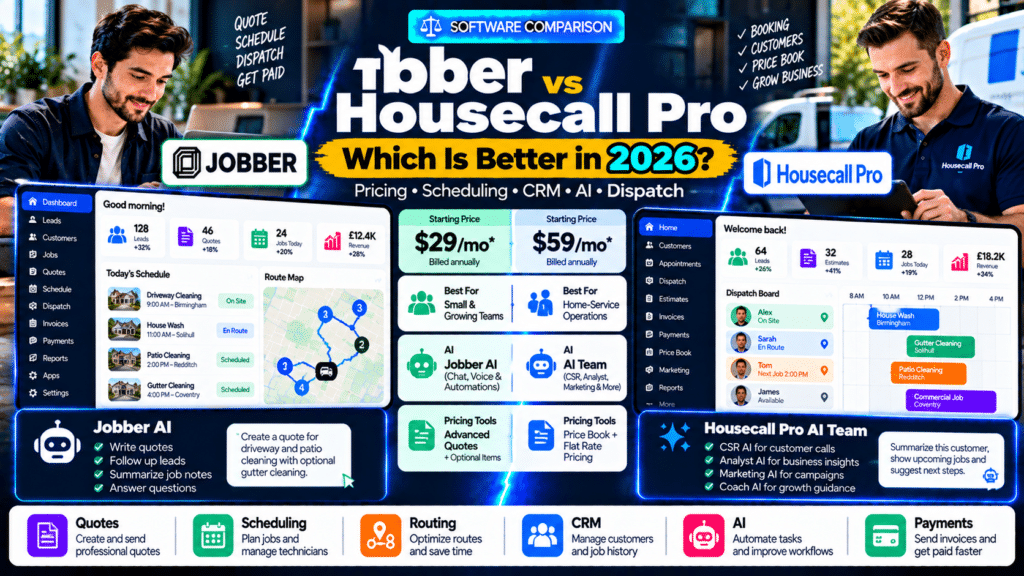
If you run a home-service or field-service business, Jobber vs Housecall Pro is one of the comparisons you are likely to encounter when choosing software.
Both platforms are designed to help service companies manage tasks such as:
- leads;
- customers;
- estimates;
- scheduling;
- dispatch;
- field technicians;
- invoices;
- payments;
- customer communication;
- reporting.
At first glance, they can look very similar.
But they are not identical.
Jobber tends to emphasize a straightforward quote-to-payment workflow, flexible plans for smaller companies, built-in automation and increasingly deep AI functionality.
Housecall Pro combines core field-service management with a particularly strong set of customer-experience, price-book, booking, sales and AI tools.
Pricing also differs.
As of 2026, Jobber’s published plans start at $29 per month when billed annually, while Housecall Pro’s standard plans start at $59 per month when billed annually. Both offer a 14-day free trial, although features and pricing can vary by plan and, in Housecall Pro’s case, by industry and business configuration (source: Jobber).
So which is actually better?
The answer depends on how your business operates.
Jobber vs Housecall Pro: Quick Comparison
| Feature | Jobber | Housecall Pro |
|---|---|---|
| Starting annual price | From $29/month | From $59/month |
| Free trial | 14 days | 14 days |
| CRM | Yes | Yes |
| Estimates | Yes | Yes |
| Scheduling | Yes | Yes |
| Dispatch | Yes | Yes |
| Route optimization | Yes | Yes |
| GPS tracking | Yes | Yes |
| Mobile apps | iOS + Android | iOS + Android |
| Online booking | Yes | Yes |
| Customer portal | Client Hub | Customer Portal |
| Job costing | Available on higher plans | Available |
| Price book | Yes | Strong built-in price-book tools |
| AI tools | Jobber AI | AI Team |
| AI receptionist | Available | CSR AI |
| Quote automation | Yes | Yes |
| Invoice automation | Yes | Yes |
| Best for | Small and growing service companies | Home-service teams wanting strong operations and customer tools |
Pricing and feature availability depend on plan, so always verify current plan details before buying (source: Jobber).
What Is Jobber?
Jobber is field-service management software designed around the complete customer and job lifecycle.
Its workflow can take a service business from:
Lead
↓
Quote
↓
Schedule
↓
Complete Work
↓
Invoice
↓
Payment
Jobber’s platform includes CRM, scheduling, quoting, invoicing, customer communication, online booking and field-service tools across its plans (source: Jobber Help Center).
Jobber is used across many service industries, including businesses such as:
- cleaning;
- landscaping;
- plumbing;
- electrical;
- HVAC;
- pressure washing;
- window cleaning;
- pool service.
One of its strengths is making a relatively complex field-service workflow feel approachable for smaller businesses.
What Is Housecall Pro?
Housecall Pro is another field-service platform built primarily for home-service companies.
Its platform includes:
- scheduling;
- dispatch;
- estimates;
- invoicing;
- online booking;
- CRM;
- GPS;
- customer communication;
- price books;
- job costing;
- reporting;
- AI features (source: Housecall Pro).
Housecall Pro is designed for teams ranging from solo operators to much larger service companies and supports industries including plumbing, HVAC, electrical, cleaning, landscaping, garage-door repair, pool service, pest control, appliance repair and locksmithing (source: Housecall Pro).
Jobber vs Housecall Pro Pricing
Pricing is one of the clearest differences between the two platforms.
Jobber Pricing in 2026
Jobber currently offers four main plan levels:
Core
Connect
Grow
Plus
The Core plan starts at $29 per month when billed annually and is designed around a single user.
Jobber’s Grow plan starts at $149 per month with annual billing and adds features such as advanced quoting, optional line items, job costing, time tracking and custom automations.
Plus starts at $399 per month for up to five users under annual billing and adds Jobber’s broader advanced feature set and support options (source: Jobber).
Jobber also supports monthly billing and annual commitment options (source: Jobber Help Center).
Housecall Pro Pricing in 2026
Housecall Pro’s standard pricing currently uses three tiers:
Basic
Essentials
MAX
For its general service-business pricing, Housecall Pro lists:
| Plan | Monthly Billing | Annual-Billing Rate |
|---|---|---|
| Basic | $79/month | $59/month |
| Essentials | $189/month | $149/month |
| MAX | $329/month | $299/month |
Basic includes one user, Essentials includes up to five users, and MAX includes up to eight users under this standard pricing structure (source: Housecall Pro).
Housecall Pro also notes that pricing can vary depending on industry and package configuration, particularly for mechanical trades such as HVAC, plumbing and electrical (source: Housecall Pro).
Which Is Cheaper?
For a solo operator looking primarily at entry pricing:
Jobber has the lower starting price.
$29/month annually versus Housecall Pro’s standard $59/month annual Basic rate (source: Jobber).
However, price alone should not decide the purchase.
The important question is:
Which plan actually includes the features your business needs?
A cheaper plan that requires multiple upgrades or external tools may not remain cheaper in practice.
Jobber vs Housecall Pro for CRM
Both platforms include customer-management functionality.
Jobber CRM
Jobber’s CRM keeps client information connected with:
- quotes;
- jobs;
- invoices;
- payments;
- communication;
- service history.
Its Core plan already includes lead and client-management functionality (source: Jobber Help Center).
This means a company can see the progression from:
Lead → Client → Job → Payment
without building a separate CRM.
Housecall Pro CRM
Housecall Pro also connects customer information with core field-service workflows.
Its platform can combine customer records with:
- scheduling;
- dispatch;
- estimates;
- invoices;
- payments;
- service history (source: Housecall Pro).
Housecall Pro also has a useful AI feature called Tell me more.
From a customer profile, it can summarize context including:
- upcoming jobs;
- outstanding balances;
- service history;
- suggested next actions (source: Housecall Pro Help Center).
CRM Winner
For basic customer management:
Tie.
Both are much more than simple contact databases.
Housecall Pro gets an advantage if you strongly value AI-generated customer context, while Jobber remains very straightforward for businesses that want customer data tightly connected to the quote-to-payment workflow.
Jobber vs Housecall Pro for Scheduling
Scheduling is essential for both platforms.
Jobber Scheduling
Jobber supports scheduling across field teams and recurring work.
Businesses can manage:
- visits;
- technician assignments;
- recurring jobs;
- calendar changes.
Its Connect plan is specifically positioned around scheduling, tracking and team coordination (source: Jobber Help Center).
Housecall Pro Scheduling
Housecall Pro offers drag-and-drop scheduling for:
- assigning jobs;
- changing appointments;
- managing field teams;
- sending status updates (source: Housecall Pro).
Its routing tools can also work with technician locations and job assignments.
Scheduling Winner
For most small service businesses:
Very close.
Both can handle everyday scheduling well.
The choice should depend more on the surrounding workflow than the calendar alone.
Jobber vs Housecall Pro for Route Optimization
This area is worth checking carefully because older comparisons may now be outdated.
Housecall Pro currently has dedicated route-optimization functionality.
Its current route tools include:
- route planning;
- live tracking;
- technician GPS;
- customer arrival updates;
- reassigning technicians during the day (source: Housecall Pro).
Jobber also provides route optimization and technician location functionality across its field-service platform.
So in 2026:
both platforms provide routing functionality.
This is important because some older comparison pages may describe Housecall Pro as requiring external routing, while Housecall Pro’s current product pages now advertise native route planning and optimization capabilities (source: Housecall Pro).
Routing Winner
Tie for most users.
If routing is business-critical, test both platforms using an actual workday rather than deciding from a feature checklist.
Create:
- six jobs;
- several technicians;
- an emergency appointment;
- one cancellation.
Then see which system is easier to adjust.
Jobber vs Housecall Pro for Estimates
Both systems provide professional estimates, but their strengths differ slightly.
Jobber Quotes
Jobber supports:
- itemized quotes;
- online approval;
- optional line items;
- advanced quote customization;
- automated follow-ups.
Its advanced quote customization can include:
- project summaries;
- photos;
- attachments;
- branding;
- Google reviews (source: Jobber Help Center).
Advanced customization is currently available on Grow and Plus.
Good Jobber Use Case
A landscaping company could send:
Base Service
Lawn Renovation
Optional Upgrade
New Edging
Optional Upgrade
Irrigation Adjustment
The customer can choose optional items before approval.
Housecall Pro Estimates
Housecall Pro supports quotes and proposals along with a detailed Price Book.
Its Price Book can include:
- services;
- materials;
- categories;
- images;
- service descriptions;
- discounts;
- flat-rate pricing (source: Housecall Pro Help Center).
Housecall Pro’s default Price Books also include industry-specific services, with particularly detailed libraries for trades such as:
- HVAC;
- plumbing;
- electrical (source: Housecall Pro Help Center).
Estimate Winner
For visually customized proposals and optional quote add-ons:
Jobber is very strong.
For businesses heavily dependent on structured service pricing and flat-rate price books:
Housecall Pro has a strong advantage.
This is especially relevant to HVAC, plumbing and electrical contractors.
Jobber vs Housecall Pro for Price Books
This is one area where Housecall Pro deserves special attention.
Its Price Book is a substantial part of the platform.
Businesses can organize:
- services;
- materials;
- categories;
- flat-rate pricing;
- images;
- pricing forms.
Housecall Pro also offers tools for adjusting groups of service prices by percentage (source: Housecall Pro Help Center).
That could be useful if:
- labour rates increase;
- material costs rise;
- the business changes pricing across an entire service category.
Price Book Winner
Housecall Pro.
For businesses where standardized flat-rate service pricing is central to operations, Housecall Pro is particularly compelling.
Jobber vs Housecall Pro for Dispatch
Both platforms support field-team dispatch.
The office can assign technicians, track jobs and make schedule changes during the day.
Housecall Pro combines routing with live technician tracking on a map (source: Housecall Pro).
Jobber likewise provides field coordination and dispatch tools integrated with schedules and technician workflows.
Dispatch Winner
For normal small-team dispatch:
Tie.
For larger or more complicated operations, run a demo with your actual dispatch scenario before choosing.
Jobber vs Housecall Pro Mobile Apps
Both platforms offer mobile apps for technicians.
Field staff can access work information without depending on office staff.
Typical mobile workflows include:
- viewing schedules;
- reading customer notes;
- capturing photos;
- completing checklists;
- preparing invoices;
- collecting information from the field.
Jobber Mobile + AI Voice
Jobber has pushed further into voice-based field work.
Jobber AI can help users perform tasks such as:
- creating quotes;
- updating schedules;
- sending messages
using voice commands on supported plans (source: Jobber).
That can be particularly useful when technicians are:
- driving between jobs;
- wearing gloves;
- carrying tools;
- unable to type comfortably.
Housecall Pro Mobile + AI Team
Housecall Pro’s AI Team is also available inside its ecosystem and includes specialized AI assistants for different business needs.
Its current AI Team includes:
- CSR AI;
- Analyst AI;
- Marketing AI;
- Coach AI;
- Help AI (source: Housecall Pro Help Center).
Mobile Winner
For AI voice interaction with field-service data:
Jobber has an interesting advantage.
For a broader collection of specialized AI business assistants:
Housecall Pro is compelling.
Jobber AI vs Housecall Pro AI Team
AI is becoming one of the more significant differences between these platforms.
Jobber AI
Jobber AI can work with business information and help users perform or understand operational tasks.
Higher-tier Jobber plans include AI Chat and AI Voice capabilities (source: Jobber).
Jobber also offers an AI-powered Receptionist as an add-on.
The Receptionist can handle calls and messages when the business is unavailable and includes a monthly conversation allowance depending on the add-on (source: Jobber Help Center).
Housecall Pro AI Team
Housecall Pro takes a slightly different approach.
Instead of one AI assistant, it offers specialized AI teammates.
These include:
CSR AI
For customer service and calls.
Analyst AI
For business reporting and data questions.
Marketing AI
For marketing assistance.
Coach AI
For business guidance.
Help AI
For product assistance.
Housecall Pro states that its AI Team can perform tasks ranging from answering the phone and booking work to generating reports (source: Housecall Pro Help Center).
AI Winner
This depends on what you want.
Choose Jobber if you value AI directly embedded into everyday operational work and voice interaction.
Choose Housecall Pro if you prefer specialized AI assistants covering several different business functions.
Neither should be chosen solely because it has an “AI” label.
Test the specific AI workflow you actually need.
Jobber vs Housecall Pro for Online Booking
Both platforms let customers book online.
Jobber Online Booking
Jobber allows customers or leads to submit requests and book through:
- the business website;
- Client Hub;
- connected channels.
Its Core plan includes request and online-booking capabilities (source: Jobber Help Center).
Housecall Pro Online Booking
Housecall Pro allows customers to book and potentially pay online through the business website or other supported booking experiences.
Its current online-booking platform also supports dynamic pricing and customer self-service through the Customer Portal (source: Housecall Pro).
Online Booking Winner
Tie for most businesses.
Housecall Pro deserves extra attention if dynamic pricing during online booking is important.
Jobber Client Hub vs Housecall Pro Customer Portal
Both give customers a self-service area.
Jobber Client Hub
Customers can use Client Hub to:
- approve quotes;
- review appointments;
- pay invoices;
- request work.
This feature is included in Jobber’s platform plans (source: Jobber).
Housecall Pro Customer Portal
Housecall Pro’s portal lets customers:
- view past jobs;
- manage appointments;
- approve estimates;
- pay invoices;
- communicate with the business (source: Housecall Pro).
Portal Winner
Tie.
The best choice comes down to which experience your customers and staff prefer in actual testing.
Jobber vs Housecall Pro for Job Costing
Understanding profitability becomes increasingly important as a business grows.
Jobber Job Costing
Jobber’s job costing can calculate:
- revenue;
- labour;
- line-item costs;
- total cost;
- profit;
- profit margin.
It is currently available on Grow and Plus (source: Jobber Help Center).
Housecall Pro Job Costing
Housecall Pro also includes job-costing functionality in its wider platform, helping companies understand costs associated with individual jobs (source: Housecall Pro).
Job Costing Winner
Tie for the basic capability.
The more important question is whether the depth of each platform’s costing meets your accounting and reporting requirements.
Jobber vs Housecall Pro for Automation
Both platforms can automate repetitive administrative work.
Jobber Automation
Jobber’s Grow plan includes custom workflow automation capabilities (source: Jobber Help Center).
Jobber also supports automated processes around:
- invoices;
- customer communication;
- quote follow-up.
Housecall Pro Automation
Housecall Pro combines automation across areas such as:
- estimates;
- customer communication;
- invoices;
- scheduling.
Its price book and pricing forms also help standardize how jobs are quoted (source: Housecall Pro Help Center).
Automation Winner
For most small service businesses:
Tie.
For highly custom cross-app automation, neither platform should necessarily replace tools such as:
- Zapier;
- Make;
- n8n.
Those tools can extend the core FSM platform.
Jobber vs Housecall Pro for Marketing
Both platforms now extend beyond basic job management.
Jobber Marketing
Jobber offers a Marketing Suite containing:
- campaigns;
- reviews;
- referrals;
- Job Showcase;
- social posting;
- marketing planning (source: Jobber Help Center).
Its website tool is included across Jobber plans.
Housecall Pro Marketing
Housecall Pro offers:
- campaigns;
- email marketing;
- SMS marketing;
- review management;
- website services;
- AI marketing support (source: Housecall Pro).
Marketing Winner
Both have grown substantially here.
If marketing is a major purchasing reason, compare the exact features and add-on costs rather than assuming either platform replaces a dedicated CRM or marketing-automation platform.
Which Is Better for Solo Operators?
For a single-person business, Jobber is particularly attractive because of its lower starting price.
Its Core plan is aimed specifically at one-user operations and includes:
- unlimited quotes;
- jobs;
- invoices;
- online booking;
- lead management (source: Jobber Help Center).
Housecall Pro’s Basic plan is also designed for one user but starts higher under its standard pricing (source: Housecall Pro).
Winner for Solo Operators
Jobber, especially if price and simplicity matter.
Which Is Better for 2–5 Person Teams?
This becomes much closer.
A growing company may care about:
- shared scheduling;
- dispatch;
- technician locations;
- quoting;
- payment;
- customer communication.
Both platforms perform strongly here.
Housecall Pro’s standard Essentials plan includes five users, while Jobber’s plan structure also supports team-based pricing and additional users (source: Housecall Pro).
Winner for Small Teams
Depends on workflow.
Choose based on:
- price-book requirements;
- routing;
- AI;
- quote workflow;
- customer experience.
Which Is Better for HVAC, Plumbing and Electrical?
Housecall Pro is particularly interesting for these trades because its Price Book provides deeper default service libraries for mechanical industries such as:
- HVAC;
- plumbing;
- electrical (source: Housecall Pro Help Center).
It also offers flat-rate pricing tools designed around:
- labour;
- materials;
- markups;
- standardized services (source: Housecall Pro Help Center).
Jobber is still a strong option for these businesses, particularly smaller companies that prioritize simplicity and general field-service management.
Winner for Price-Book-Driven Mechanical Trades
Housecall Pro.
Which Is Better for Cleaning, Landscaping and Recurring Services?
For businesses managing many recurring appointments, ease of:
- scheduling;
- routing;
- customer communication;
- automatic payments
can matter more than advanced price-book functionality.
Jobber is particularly strong for this style of workflow.
Winner
Jobber has a slight edge for straightforward recurring-service operations.
But Housecall Pro remains competitive.
Which Is Better for Businesses With Lots of Inbound Calls?
Housecall Pro’s AI Team includes CSR AI specifically around customer-service workflows (source: Housecall Pro Help Center).
Jobber offers AI Receptionist as an add-on that handles client calls and messages (source: Jobber Help Center).
Both can therefore help companies reduce missed opportunities.
Winner
Tie until you test the actual call experience.
The important factors include:
- booking accuracy;
- escalation;
- service knowledge;
- call quality;
- pricing.
Jobber Pros and Cons
Jobber Pros
- Lower entry price.
- Simple quote-to-payment workflow.
- Strong fit for solo and small service businesses.
- Built-in routing.
- CRM and Client Hub.
- Advanced quoting on higher plans.
- Jobber AI.
- AI Voice.
- Custom automations on Grow.
- Strong recurring-service workflow.
Jobber Cons
- Several advanced capabilities require higher plans.
- AI Receptionist is an add-on.
- Advanced quote customization is limited to Grow and Plus.
- Highly complex businesses may eventually need deeper operational functionality.
Housecall Pro Pros and Cons
Housecall Pro Pros
- Strong home-service focus.
- Scheduling and dispatch.
- Native route optimization.
- Strong Price Book.
- Flat-rate pricing tools.
- Online booking.
- Customer Portal.
- AI Team.
- CRM.
- Job costing.
- Industry-specific features.
Housecall Pro Cons
- Higher entry price than Jobber.
- Pricing can vary by industry and configuration.
- Some advanced capabilities require add-ons or higher plans.
- May be more software than a very small solo operator requires.
Jobber vs Housecall Pro: Which Should You Choose?
Choose Jobber if your priorities are:
- lower starting cost;
- simple setup;
- quoting;
- recurring scheduling;
- route planning;
- invoicing;
- straightforward field-service management;
- AI integrated into everyday workflows.
Choose Housecall Pro if your priorities are:
- advanced price books;
- flat-rate pricing;
- customer service automation;
- structured home-service workflows;
- online booking;
- specialized AI assistants;
- deeper mechanical-trade pricing tools.
How to Test Jobber and Housecall Pro Before Choosing
Both platforms offer a 14-day trial, so do not test them using fake data alone (source: Jobber).
Use the same realistic workflow in both systems.
Test Scenario
Create:
Customer:
John Smith
Job:
Boiler repair
Steps:
- Add the lead.
- Create the quote.
- Send it to the customer.
- Approve the quote.
- Convert it into a job.
- Schedule a technician.
- Reschedule the appointment.
- Send an on-my-way update.
- Add job photos.
- Complete the job.
- Send the invoice.
- Record payment.
- Send a review request.
Then ask:
Which system required fewer clicks?
Which mobile app was easier?
Which customer emails looked better?
Which schedule was easier to understand?
Which reporting gave you the information you actually need?
That test is more useful than comparing 100 features you may never use.
Related guides
- Jobber vs Workiz (2026): Which Is Better for Service Businesses?
- Housecall Pro Review 2026: Pricing, Features, AI, Pros & Cons
- Jobber Review 2026: Pricing, Features, Pros & Cons
- Tools, Software and Automation for Trades: Start Here
Frequently Asked Questions
Is Jobber better than Housecall Pro?
Jobber can be better for smaller businesses that prioritize simplicity, recurring work, transparent entry pricing and a straightforward quote-to-payment workflow.
Housecall Pro may be better for businesses that rely heavily on structured price books, flat-rate pricing, customer-service automation and deeper home-service functionality.
Is Jobber cheaper than Housecall Pro?
At the entry level, yes.
Jobber Core currently starts at $29 per month when billed annually, while Housecall Pro’s standard Basic plan starts at $59 per month when billed annually (source: Jobber).
Does Jobber have AI?
Yes.
Jobber currently provides AI Chat and AI Voice capabilities on supported plans and offers an AI-powered Receptionist as an add-on (source: Jobber).
Does Housecall Pro have AI?
Yes.
Housecall Pro’s AI Team includes CSR AI, Analyst AI, Marketing AI, Coach AI and Help AI (source: Housecall Pro Help Center).
Does Housecall Pro have route optimization?
Yes.
Housecall Pro now has dedicated route-optimization functionality with route planning, live tracking, GPS-based technician visibility and customer updates (source: Housecall Pro).
Does Jobber have job costing?
Yes.
Jobber’s job-costing functionality is currently available on Grow and Plus and tracks profit, margin and job costs (source: Jobber Help Center).
Which is better for HVAC?
Housecall Pro deserves strong consideration because it offers an extensive Price Book and flat-rate pricing functionality for mechanical trades.
Jobber may still be the better option for smaller HVAC companies that want a simpler operational platform.
Which is better for a solo business?
Jobber is particularly attractive because its Core plan is specifically designed for one-user businesses and starts at a lower price (source: Jobber Help Center).
Conclusion
The Jobber vs Housecall Pro decision is closer in 2026 than many older comparisons suggest.
Both platforms now provide strong functionality around:
- CRM;
- scheduling;
- estimates;
- dispatch;
- routing;
- invoicing;
- payments;
- mobile field work;
- automation;
- AI.
Jobber is probably the better starting point for many solo operators and smaller service businesses because of its lower entry pricing and straightforward quote-to-payment workflow.
Its Core plan starts at $29 per month when billed annually, while higher plans add advanced quotes, job costing, custom automations, AI functionality and more sophisticated team tools (source: Jobber).
Housecall Pro becomes particularly compelling for home-service businesses that want a powerful Price Book, flat-rate pricing, customer-service automation and specialized AI tools.
Its AI Team now includes dedicated assistants for customer service, analytics, marketing and business guidance, while its field-service platform provides scheduling, dispatch, routing, CRM, online booking, job costing and customer portals (source: Housecall Pro Help Center).
There is no universal winner.
For a solo cleaner or landscaper:
Jobber may make more sense.
For an HVAC or plumbing company built around a detailed flat-rate Price Book:
Housecall Pro may make more sense.
For a five-person company:
test both.
The most important comparison is not:
Which platform has more features?
It is:
Which platform makes your actual workflow easier?
Test the complete process:
Lead → Quote → Schedule → Dispatch → Job → Invoice → Payment
Whichever platform handles that workflow with less friction for your office, technicians and customers is probably the better choice for your business.