A technician finishes a service call.
The repair is complete.
The customer is happy.
Then comes the part many field technicians dislike:
documentation.
They may need to record:
- what the customer reported;
- what they inspected;
- what fault they found;
- what repair they completed;
- which parts they used;
- what the customer should do next.
When technicians are busy, job notes often become:
Replaced valve. Tested. All okay.
That may be enough to close the job today.
But six months later, another technician opens the customer record and has almost no useful information.
This is where AI technician job reports can help.
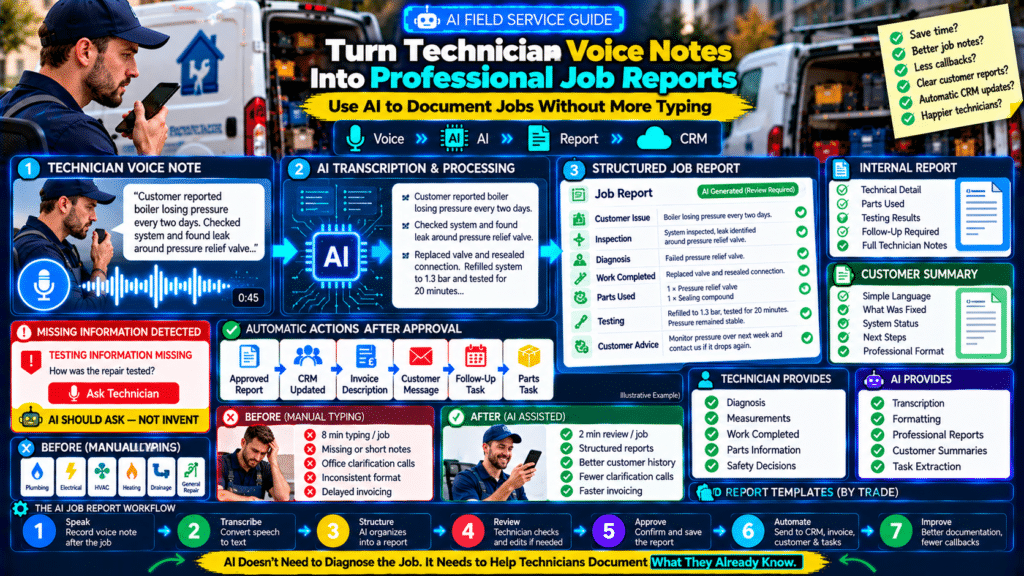
Instead of requiring a technician to type a long report on a phone, a business can allow them to record a short voice note such as:
Customer reported boiler losing pressure every two days. Checked system and found leak around pressure relief valve. Replaced valve and resealed connection. Refilled system to 1.3 bar and tested heating for twenty minutes. Pressure remained stable. Advised customer to monitor pressure over the next week and call if it drops again.
AI can then turn that into:
Professional Job Report
Customer Issue:
Boiler losing pressure approximately every two days.
Inspection:
System inspected and leak identified around the pressure relief valve.
Work Completed:
Pressure relief valve replaced and connection resealed.
Testing:
System refilled to 1.3 bar and heating tested for 20 minutes. Pressure remained stable during testing.
Customer Advice:
Customer advised to monitor system pressure for the next seven days and contact the company if pressure drops again.
That creates better documentation without forcing technicians to spend another ten minutes typing after every appointment.
A practical workflow looks like:
Technician Finishes Job
↓
Records Voice Note
↓
Speech Converted to Text
↓
AI Structures Information
↓
Technician Reviews
↓
Report Saved to CRM
↓
Customer Summary Sent
Done correctly, this can improve:
- technician productivity;
- customer communication;
- future diagnostics;
- invoicing;
- office efficiency.
But AI should assist with documentation—not invent technical facts.
The technician should remain responsible for reviewing the final report.
Why Technician Job Notes Matter
Job documentation may seem like administration.
In reality, it affects much more.
Good notes help with:
- future visits;
- warranties;
- callbacks;
- customer disputes;
- invoicing;
- technician handovers.
Consider the difference.
Weak Note
Fixed boiler.
Better Note
Customer reported boiler losing pressure. Identified leak at pressure relief valve connection. Replaced valve, resealed fitting, refilled system to 1.3 bar, and tested operation for 20 minutes. No further pressure loss observed during testing.
The second note gives the next technician useful information.
Why Technicians Often Write Poor Notes
The problem is not necessarily laziness.
Field technicians may be:
- working from a phone;
- wearing gloves;
- standing in a van;
- trying to reach the next job;
- dealing with poor signal.
Typing detailed reports repeatedly can become frustrating.
Voice input is much easier.
A technician can often explain the job in:
30–90 seconds.
AI can then organize that explanation into a structured format.
What AI Should Do
AI is useful for transforming technician information.
It can:
- organize;
- summarize;
- format;
- rewrite clearly;
- identify missing fields.
AI should not decide what actually happened.
Think of it as:
documentation assistant
rather than:
technical witness.
What AI Should Not Do
AI should not automatically invent:
- measurements;
- parts;
- diagnoses;
- safety checks;
- customer approvals.
If the technician never said:
insulation resistance measured at 200 MΩ
the report should not invent that figure.
For technical and regulated work, fabricated details can create serious problems.
The Best Rule
Use:
AI for structure.
Use:
technicians for facts.
Step 1: Create a Standard Voice-Note Structure
Technicians should not simply speak randomly for five minutes.
Give them a simple structure.
For example:
Problem
Inspection
Diagnosis
Work Completed
Parts Used
Testing
Customer Advice
A technician might say:
Problem: customer reported no hot water. Inspection: boiler firing but diverter valve not moving correctly. Diagnosis: failed diverter valve actuator. Work completed: replaced actuator. Testing: ran heating and hot water several times and both operated correctly. Customer advice: monitor system and call if problem returns.
The AI now receives clean information.
Step 2: Use a Technician Voice Template
A simple field prompt could say:
Before Closing the Job, Record:
- What did the customer report?
- What did you inspect?
- What did you find?
- What work did you complete?
- What parts did you use?
- How did you test it?
- What did you tell the customer?
This takes very little time.
But it dramatically improves report quality.
Step 3: Convert Speech to Text
The audio must first become text.
This can happen through:
- mobile speech-to-text;
- field service software;
- transcription software;
- AI voice services.
The output does not need to be perfect.
The AI can often clean:
- punctuation;
- repeated words;
- broken sentences.
But technical terms should still be reviewed.
Technical Terms Can Be Transcribed Incorrectly
A technician may say:
RCD.
The transcription may produce:
RCB.
Or a product model may be misunderstood.
That is why the technician should review the final version.
This is especially important for:
- model numbers;
- part numbers;
- measurements;
- technical terminology.
Step 4: Structure the Report With AI
Once the transcript exists, AI can transform it into a standard template.
Example instruction:
Turn this technician voice note into a professional service report. Use only the information provided. Do not invent measurements, parts, diagnoses, approvals, or safety checks. Organize it into Customer Issue, Inspection, Diagnosis, Work Completed, Parts Used, Testing, and Recommendations. If information is missing, write “Not provided.”
That final sentence matters.
It prevents the AI from trying to fill every field.
Example Input
Customer said kitchen sockets were intermittently losing power. Checked consumer unit and socket circuit. Found loose connection at one socket behind washing machine. Tightened connection and checked other accessible sockets. Tested circuit afterward and everything stayed powered. Told customer to call if issue returns.
AI Output
Customer Issue
Customer reported intermittent power loss affecting kitchen sockets.
Inspection
Consumer unit and relevant socket circuit inspected.
Diagnosis
Loose connection identified at a socket behind the washing machine.
Work Completed
Loose connection tightened and other accessible sockets inspected.
Testing
Circuit tested following the repair and sockets remained powered during testing.
Customer Advice
Customer advised to contact the company if the issue returns.
Much cleaner.
Step 5: Generate Two Different Versions
One of the best uses of this workflow is creating:
an internal technician report
and:
a customer-friendly summary.
They should not necessarily be identical.
Internal Report
Can contain:
- technical terminology;
- detailed observations;
- parts;
- measurements.
Customer Summary
Should use:
- simple language;
- clear explanation;
- next steps.
This saves technicians from writing the same job twice.
Example
Internal
Replaced failed 25 µF run capacitor on outdoor condenser unit. Verified compressor and fan operation following replacement.
Customer Version
We identified a failed electrical component in the outdoor unit and replaced it. The system was tested afterward and was operating normally at the time of completion.
Both describe the same job.
Different audience.
Step 6: Create Invoice Descriptions Automatically
The same job information can help generate an invoice description.
Example job report:
Identified failed pressure relief valve, replaced valve, resealed fitting and tested system.
Invoice line:
Boiler Repair – Pressure Relief Valve Replacement
Description:
Diagnosed pressure-loss issue, replaced faulty pressure relief valve, resealed connection and tested system operation.
The office no longer needs to decipher:
valve job
from technician notes.
Do Not Let AI Decide Pricing
AI may help generate:
- invoice wording.
But actual pricing should come from:
- price book;
- approved quote;
- technician authorization.
Do not allow language generation to silently change billing amounts.
Step 7: Extract Parts Used
Technicians can mention parts in the voice note.
Example:
Used one 22mm isolation valve and two compression fittings.
AI can extract:
Parts Used
- 1 × 22 mm isolation valve
- 2 × compression fittings
This can help:
- inventory;
- invoicing;
- job costing.
Part Numbers Need Verification
Never assume AI transcription gets:
- SKU;
- serial;
- model numbers
perfectly right.
For important identifiers, consider:
- barcode scan;
- photo;
- structured technician entry.
Voice should supplement—not replace—reliable capture.
Step 8: Extract Follow-Up Tasks
Sometimes the job is not finished.
Technician says:
Need to order replacement control board and return next week.
AI can generate:
Follow-Up Required: Yes
Action: Order replacement control board.
Next Step: Schedule return visit after part arrives.
This can automatically create an office task.
Example Workflow
Voice Note
↓
AI detects:
FOLLOW-UP REQUIRED
↓
CRM task:
Order control board
↓
Parts team notified
↓
Customer receives update
↓
Return appointment scheduled
This is where documentation becomes automation.
Step 9: Detect Quote Opportunities
A technician may say:
Customer also asked for a quote for an EV charger.
The AI can extract:
Sales Opportunity: EV charger installation
Then create:
- CRM opportunity;
- office follow-up task.
This reduces opportunities being forgotten.
Do Not Automatically Sell From Casual Comments
A technician may mention:
customer’s consumer unit is older.
That does not necessarily mean:
create replacement quote.
Your automation should distinguish between:
- explicit customer request;
- technician recommendation;
- general observation.
Human review is important.
Step 10: Detect Maintenance Recommendations
Example:
Air-conditioning system working but filters are heavily contaminated. Customer advised replacement soon.
AI can add:
Recommendation: Replace filters.
The office can then:
- include recommendation in summary;
- create reminder.
This makes future follow-up more consistent.
Step 11: Generate a Customer Completion Message
After the technician approves the report, AI can produce:
Hi Sarah, today’s boiler repair has been completed. We identified a leak around the pressure relief valve, replaced the affected component and tested the system afterward. The pressure remained stable during testing. Please monitor the pressure over the next few days and contact us if you notice it dropping again.
This is much better than:
Job done thanks.
Customer Messages Should Avoid False Guarantees
Do not allow AI to generate statements such as:
The problem is permanently fixed.
unless that is genuinely confirmed and appropriate.
Safer language:
The system was operating normally during testing following the repair.
Accurate communication matters.
Step 12: Update Customer History
The approved report can become part of the customer’s history.
Future technician sees:
October 2026
Pressure relief valve replaced.
March 2026
Annual boiler service.
November 2025
Pressure issue investigated.
Now recurring problems become easier to spot.
AI Can Summarize Long Customer Histories
Imagine a customer has:
18 previous jobs.
Instead of reading every note, AI can generate:
Customer Equipment History
- Recurring boiler pressure issue identified on three previous visits.
- Pressure relief valve replaced October 2026.
- Expansion vessel recharged March 2026.
- Annual service completed November 2025.
This can help technicians prepare before arrival.
But the underlying original reports should remain available.
Step 13: Create Technician Handover Notes
Some jobs require another technician.
AI can create:
Handover Summary
Intermittent electrical fault investigated. Loose socket connection repaired, but customer also reports occasional tripping of upstairs circuit that could not be reproduced during visit. Further diagnostic visit recommended if issue continues.
The next technician gets context immediately.
Step 14: Create Office Notes
The office does not always need the full technical report.
AI can extract:
Office Actions
- Invoice completed repair.
- Order replacement filter.
- Contact customer about annual maintenance plan.
- No return appointment currently required.
This reduces office admin.
Step 15: Add Missing-Information Checks
Before the job is closed, AI can check whether important fields were mentioned.
Example:
Missing Information
- Testing method not provided.
- Customer advice not provided.
Then prompt the technician:
How was the repair tested?
This can improve documentation consistency.
AI Should Ask, Not Invent
This is an important design principle.
Wrong:
AI assumes a test was completed.
Right:
AI flags that testing information is missing.
That makes the workflow safer.
Example Missing-Information Workflow
Technician says:
Replaced damaged socket and all okay.
AI responds:
Report incomplete:
- What testing was carried out after replacement?
- Was any customer advice provided?
Technician adds:
Tested socket and circuit afterward. Customer advised not to use damaged extension lead that caused overheating.
Then report is completed.
Step 16: Use Structured Fields Where Facts Matter Most
Not everything should come from free-form AI text.
Important data may still need dedicated fields.
Examples:
Job Status
Completed / Follow-up Required
Customer Approval
Yes / No
Parts Used
Structured list
Payment
Paid / Unpaid
Safety Documentation
Required checklist
Use AI around structured data.
Do not replace everything with a chatbot.
Step 17: Use Photos With Job Notes
A stronger job record may include:
- voice note;
- photos;
- structured fields.
Example:
Before Photo
Corroded fitting.
After Photo
Replacement completed.
Voice Note
Explains diagnosis and testing.
The combination gives future technicians better context.
Can AI Analyze the Photos?
AI tools may be able to summarize visible content in photos.
But do not rely on image analysis alone for technical safety decisions.
A qualified technician should determine:
- fault;
- compliance;
- safety.
Images are supporting evidence.
Step 18: Create Consistent Terminology
One technician writes:
customer unit.
Another:
fuse board.
Another:
distribution board.
Your reports can become inconsistent.
AI can standardize terminology where appropriate.
But technical terminology should match:
- your region;
- company standards.
For example, UK terminology may differ from US terminology.
Step 19: Keep Original Technician Input
Do not automatically delete the original:
- voice note;
- transcript.
If practical and appropriate under your retention/privacy policies, keeping the original input helps with:
- quality checks;
- disputes;
- AI errors.
Your retention rules should account for privacy and applicable laws.
Step 20: Let the Technician Approve Before Saving
A strong workflow should be:
Technician speaks
↓
AI drafts
↓
Technician reviews
↓
Technician edits if needed
↓
Technician approves
↓
Final report saved
Do not silently insert an AI-generated report into official records without review where accuracy matters.
Human Review Can Be Fast
The goal is not to bring back all the admin.
A review might take:
20–30 seconds.
Technician checks:
- facts;
- measurements;
- parts;
- recommendations.
Then taps:
Approve.
Much faster than writing everything from scratch.
Step 21: Add Confidence Rules
Your automation can treat certain content differently.
For example:
Low Risk
Grammar correction.
Automatic.
Medium Risk
Customer summary.
Technician approval.
High Risk
Technical measurement or safety statement.
Explicit technician verification required.
This is a better use of AI than treating every sentence equally.
Step 22: Protect Customer Data
Voice notes may contain:
- names;
- addresses;
- equipment details;
- customer information.
Choose tools and workflows that fit your:
- privacy obligations;
- data policies.
Do not casually send sensitive customer information into random AI services without understanding:
- data handling;
- retention;
- access controls.
Minimize Data Sent to AI
If the AI does not need:
- full customer address;
- payment information;
do not include it.
Send only the information required for the task.
Data minimization reduces risk.
Step 23: Create an AI Job Report Policy
Your company can document:
AI May
- transcribe;
- format;
- summarize;
- suggest missing fields.
AI May Not
- invent technical facts;
- approve work;
- certify compliance;
- alter pricing;
- make safety decisions.
This makes expectations clear.
Step 24: Train Technicians on Good Voice Notes
Better input creates better AI output.
Poor input:
Yeah fixed it, everything’s okay.
Better:
Customer reported leak under kitchen sink. Found compression fitting on cold-water pipe leaking. Replaced fitting and tested by running water for ten minutes. No further leak observed. Customer advised to monitor cabinet area for moisture.
The second one creates an excellent report.
Use the 60-Second Rule
Aim for voice notes that answer the required fields in:
about one minute
for ordinary jobs.
Long projects may need more detail.
Technicians should be:
- concise;
- factual.
Step 25: Create Trade-Specific Templates
Different trades need different information.
Plumbing Template
- customer issue;
- leak/fault location;
- diagnosis;
- parts;
- repair;
- testing;
- recommendations.
Electrical Template
- reported issue;
- circuit/equipment;
- findings;
- work completed;
- testing;
- customer advice.
HVAC Template
- complaint;
- equipment;
- diagnostic findings;
- readings;
- parts;
- operation after repair;
- recommendations.
Cleaning Template
- areas serviced;
- condition;
- work completed;
- issues;
- customer requests.
Templates improve relevance.
Step 26: Create Job-Type Templates
Even inside one trade:
installation
and:
repair
need different reports.
For example:
Repair
Focus on:
- diagnosis;
- repair;
- testing.
Installation
Focus on:
- equipment installed;
- work completed;
- commissioning;
- customer handover.
Use the right template automatically based on job type.
Step 27: Connect the Workflow to CRM or Field Service Software
A mature system can send the approved report to:
- customer record;
- job record.
Then trigger:
- invoice;
- follow-up;
- customer summary.
Possible flow:
Technician Voice Note
↓
Transcription
↓
AI Report
↓
Technician Approval
↓
CRM / Field Service Software
↓
Invoice + Customer Summary + Follow-Up
This turns documentation into an operational workflow.
Step 28: Use Automation Platforms Carefully
Tools such as workflow automation platforms can connect:
- forms;
- transcription;
- AI;
- CRM;
- email;
- SMS.
The exact platform matters less than having:
clear approval rules.
Do not build a complicated automation before the basic process works.
Start Simple
Version 1:
Voice Note → AI Draft → Technician Copies to Job
Later:
Voice → Automatic Draft → Approval → CRM
Later still:
Approval → Invoice + Follow-Up + Inventory Task
Build gradually.
Step 29: Measure Time Saved
Before automation:
Technician documentation:
8 minutes/job
After:
2 minutes/job
Saving:
6 minutes/job
If:
6 technicians
×
5 jobs/day
=
30 jobs.
Savings:
30 × 6 minutes
=
180 minutes/day
or:
3 technician hours/day
That is meaningful.
These are illustrative numbers.
Track your own operation.
Time Savings Can Become Capacity
Saving:
3 technician hours/day
does not automatically mean:
3 extra billable hours.
But some of that capacity may support:
- additional jobs;
- less overtime;
- better punctuality.
That is why documentation efficiency can affect profitability.
Step 30: Measure Documentation Quality
Do not only measure speed.
Track:
- reports completed;
- required fields present;
- technician corrections;
- office clarification requests.
Example:
Before
Reports with all required fields:
61%
After
94%
That may be more valuable than time savings alone.
Step 31: Track Office Clarification Calls
Before:
Office contacts technicians:
20 times/week
to ask:
What did you actually do on this job?
After structured reports:
5 times/week.
That is operational savings for both:
- office;
- field.
Step 32: Track Invoice Delay
Poor notes can delay invoicing.
Example:
Job completed:
Monday.
Invoice waits until:
Wednesday
because office needs clarification.
Better report:
invoice sent:
same day.
Faster documentation can improve cash flow.
Step 33: Track Callback Diagnosis Time
A customer calls three months later.
Better historical reports help the next technician understand:
- previous fault;
- previous repair.
This may reduce diagnostic time.
Quality documentation creates future value.
Before AI Workflow
Technician notes:
Pump replaced.
Office:
Which pump?
Customer:
Why was it replaced?
Next technician:
What happened last time?
After AI Workflow
Report contains:
Customer Issue
Diagnosis
Part Replaced
Testing
Recommendations
Everyone has better information.
Example Full AI Workflow
Customer books:
No heating.
Technician visits.
Voice note:
Customer reported no heating upstairs. Checked zone valve and found actuator not responding. Replaced actuator, tested thermostat demand and heating opened correctly. Ran system for fifteen minutes. Upstairs radiators heated normally. Customer advised to contact us if zone stops responding again.
AI creates:
Job Report
Issue: No heating upstairs.
Diagnosis: Zone valve actuator not responding.
Work Completed: Actuator replaced.
Testing: Thermostat demand tested and system operated for 15 minutes. Upstairs radiators heated normally.
Advice: Customer advised to contact company if issue returns.
Then automation:
Job Report Saved
↓
Invoice Description Generated
↓
Customer Completion Message Generated
↓
CRM History Updated
All from one voice note.
Example Follow-Up Workflow
Technician says:
Compressor tested but unit still not cooling correctly. Suspect control board problem. Need manufacturer’s board before further repair.
AI creates:
Job Status: Follow-Up Required
Diagnosis: Further investigation indicates possible control board issue.
Required Action: Confirm correct manufacturer replacement board.
Office Task: Check availability and price.
Customer Communication: Further repair required once correct component is confirmed.
This prevents the job disappearing into someone’s memory.
Example Sales Opportunity Workflow
Technician says:
Customer asked about replacing old system with heat pump next year and wants someone to contact them.
AI extracts:
Opportunity: Heat pump replacement.
Timing: Next year.
Action: Sales follow-up.
That can create a future CRM task automatically.
What AI Should Never Infer
If technician says:
Old consumer unit.
AI should not output:
Consumer unit is unsafe and must be replaced.
Unless the technician explicitly made that finding.
This distinction is critical.
Avoid Fake Precision
AI sometimes produces polished language that sounds more certain than the source information.
Technician:
Seems like pump may be failing.
Bad AI output:
Pump failure confirmed.
Better:
Technician noted possible pump deterioration; further monitoring or investigation may be required.
Preserve uncertainty.
Preserve Technician Meaning
AI should improve:
- clarity;
- formatting.
It should not change:
- diagnosis;
- certainty;
- recommendation.
The polished report must remain faithful to what the technician actually said.
Use “Not Provided” Instead of Guessing
If:
Testing
was never mentioned:
write:
Testing: Not provided.
Better to show missing data than fabricate professional-sounding details.
Create an Approval Checklist
Before saving:
- Customer issue correct
- Diagnosis correct
- Work completed correct
- Parts correct
- Testing correct
- Recommendations correct
- No invented details
- Follow-up status correct
Technician taps:
Approve.
AI Job Report Dashboard
Useful metrics:
Reports Generated
Average Documentation Time
Technician Approval Rate
Reports Requiring Correction
Missing Field Rate
Office Clarification Requests
Invoice Time
Follow-Up Tasks Captured
This helps measure whether the automation actually works.
Example Dashboard
Jobs documented:
420/month
Average documentation time:
Before:
7.5 min
After:
2.2 min
Reports requiring significant correction:
4%
Missing fields:
Before:
27%
After:
6%
Office clarification requests:
Down:
68%
Mark these as:
Illustrative Example
Cost vs Benefit
Suppose automation costs:
£250/month
and saves:
40 staff hours/month.
The system may be attractive.
But also consider:
- setup;
- maintenance;
- review.
Do not automate simply because AI sounds exciting.
Automate when the workflow produces:
measurable operational value.
Common AI Job Report Mistakes
Letting AI Invent Details
Biggest risk.
Skipping Technician Approval
Official report may contain errors.
Recording Unstructured Voice Notes
Poor input creates poor reports.
No Standard Template
Reports remain inconsistent.
Over-Automating Safety Documentation
Qualified humans must verify technical compliance.
Sending Sensitive Data Everywhere
Creates privacy risk.
Deleting Original Information Immediately
Can remove useful evidence.
Automating Before Defining the Process
Creates complicated chaos.
Ignoring Technician Adoption
If the workflow is annoying, employees will avoid it.
Measuring Only Time Saved
Documentation quality matters too.
AI Technician Report Checklist
Before implementation:
- Standard report template created
- Voice-note structure defined
- Technician training completed
- Transcription tested with technical terms
- AI instructed not to invent facts
- Missing information flagged
- Technician approval required
- Customer summary separated from internal report
- Follow-up tasks captured
- CRM integration defined
- Sensitive data minimized
- Retention/privacy rules reviewed
- Documentation time measured
- Quality metrics tracked
Sources and Further Reading
These official resources back up the methods in this guide and are worth reading alongside it.
- AI Risk Management Framework (NIST): a practical framework for using AI responsibly.
- Secure Your Business (CISA): protecting customer data and business accounts.
Related guides
- How Small Service Businesses Can Use AI Without Replacing Their Team
- Best AI Receptionist for Small Business: Trades Edition
- Best AI Tools for Small Business: 15 Practical Tools to Save Time and Grow
- Tools, Software and Automation for Trades: Start Here
Frequently Asked Questions
Can AI write technician job reports?
Yes.
AI can transform technician-provided information into a structured report.
The technician should review the report for accuracy before it becomes an official record.
Can technicians use voice notes instead of typing?
Yes.
Voice notes can be:
- transcribed;
- structured by AI.
This can reduce manual typing.
Can AI automatically identify parts used?
It can extract parts mentioned in the technician’s notes.
Important:
- model numbers;
- quantities
should still be verified.
Can AI create customer summaries?
Yes.
The same technical job information can be rewritten into simpler customer-friendly language.
Can AI update a CRM automatically?
With appropriate integrations, an approved report can be sent to a CRM or field-service system.
Should AI generate technical diagnoses?
AI should not independently decide the actual diagnosis.
Diagnosis should come from the qualified technician.
What happens if information is missing?
The AI should flag missing information or write:
Not provided
rather than inventing it.
Can AI generate invoices from job notes?
It can help generate invoice descriptions.
Pricing and billing amounts should remain controlled by the business’s approved pricing system.
Is AI job-report automation suitable for small businesses?
It can be.
Even a simple:
voice → transcription → AI report
workflow may reduce documentation time.
Does AI replace field technicians?
No.
The technician performs:
- diagnosis;
- technical work;
- verification.
AI helps organize the documentation.
Conclusion
Using AI technician job reports can solve a very practical service-business problem:
technicians know what they did, but that information does not always reach the business clearly.
Instead of asking technicians to type long reports after every job, use:
Voice Note
↓
Transcription
↓
AI Formatting
↓
Technician Review
↓
Approved Job Report
Then the same information can support:
CRM History
Customer Summary
Invoice Description
Follow-Up Tasks
Future Technician Handover
The important rule is:
AI should transform facts—not invent them.
Technicians remain responsible for:
- diagnosis;
- measurements;
- work completed;
- safety decisions.
AI can help make those facts:
- clearer;
- more structured;
- easier to reuse.
A well-designed system can reduce:
typing
missing information
office clarification calls
and:
invoice delays
while creating better records for future jobs.
That is the kind of AI automation that makes sense for trades.
Not AI for the sake of AI.
But AI removing:
real administrative work
from people who would rather spend their time:
serving customers and completing jobs.