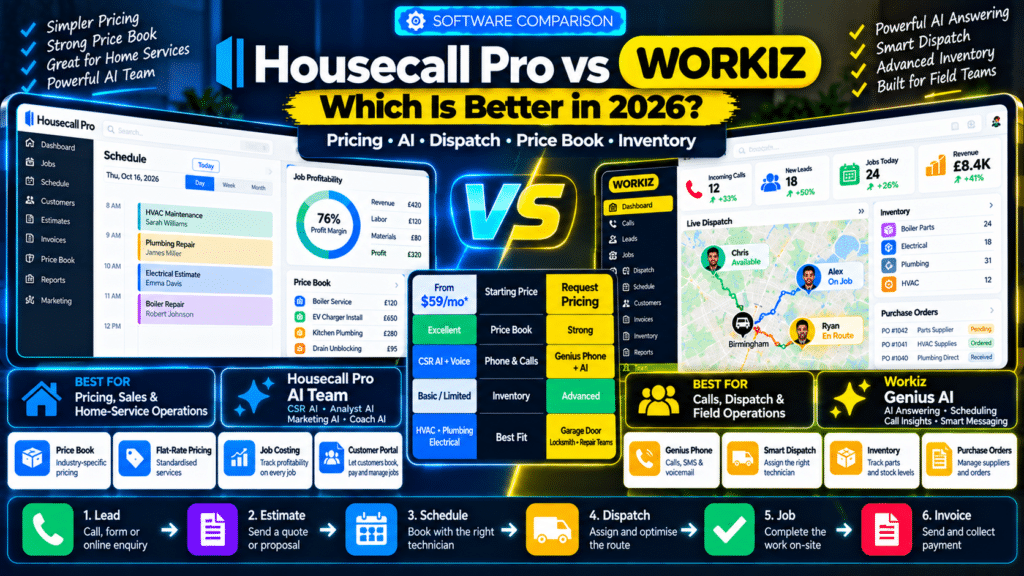
If your service business has outgrown spreadsheets, shared calendars and disconnected apps, Housecall Pro vs Workiz is a comparison worth making.
Both platforms can manage a large part of the field-service workflow:
Lead
↓
Estimate
↓
Schedule
↓
Dispatch
↓
Complete Job
↓
Invoice
↓
Payment
But they are strongest in different areas.
Housecall Pro is especially strong for home-service businesses that want:
- scheduling;
- dispatch;
- Price Book;
- flat-rate pricing;
- job costing;
- Customer Portal;
- recurring service plans;
- AI assistants.
Workiz puts more emphasis on:
- incoming calls;
- built-in communications;
- AI answering;
- AI scheduling;
- technician coordination;
- inventory;
- purchase orders;
- operational automation.
So which is better in 2026?
For many HVAC, plumbing and electrical companies that care heavily about structured pricing and a polished home-service workflow, Housecall Pro may be the better fit.
For businesses where calls, dispatch and technician assignment dominate daily operations, Workiz may have the stronger advantage.
Housecall Pro vs Workiz: Quick Comparison
| Feature | Housecall Pro | Workiz |
|---|---|---|
| Public Starting Price | From $59/month annually | Request pricing |
| Free Trial | 14 days | 7 days |
| CRM | Yes | Yes |
| Scheduling | Yes | Yes |
| Dispatch | Yes | Yes |
| Route Optimization | MAX | Yes |
| Estimates | Yes | Yes |
| Price Book | Strong | Yes |
| Flat-Rate Pricing | Essentials+ | Ultimate |
| Job Costing | Yes | Profitability/reporting tools |
| Customer Portal | Yes | Yes |
| AI Phone Answering | CSR AI | Genius Answering |
| AI Business Assistants | AI Team | Genius AI suite |
| Inventory | More limited | Ultimate |
| Purchase Orders | Limited use cases | Strong dedicated feature |
| Equipment Tracking | Available in some packages | Ultimate |
| Best For | Home-service companies | Call-heavy and dispatch-heavy teams |
Housecall Pro currently publishes standard annual pricing starting at $59/month for Basic, $149/month for Essentials and $299/month for MAX, while Workiz currently asks businesses to request pricing for Standard, Pro and Ultimate (source: Housecall Pro).
What Is Housecall Pro?
Housecall Pro is field-service management software built primarily for home-service companies.
Its platform covers areas such as:
- scheduling;
- dispatch;
- estimates;
- invoicing;
- payments;
- Price Book;
- job costing;
- CRM;
- review management;
- route planning;
- AI assistance.
Housecall Pro currently positions Basic for getting started, Essentials for growing teams and MAX for scaling businesses. Its general field-service pricing includes one user on Basic, up to five on Essentials and up to eight on MAX (source: Housecall Pro).
What Is Workiz?
Workiz is also a field-service management platform, but it is particularly focused on keeping the flow between:
calls → leads → dispatch → technicians
tightly connected.
Its current feature set includes:
- scheduling and dispatch;
- estimates;
- invoices;
- online booking;
- CRM;
- inventory;
- Client Portal;
- purchase orders;
- reporting;
- AI answering;
- AI lead capture;
- AI scheduling;
- built-in phone and messaging (source: Workiz).
Workiz’s Genius AI ecosystem is one of its biggest differentiators.
Housecall Pro vs Workiz Pricing
Pricing is one of the clearest differences.
Housecall Pro Pricing in 2026
Housecall Pro currently publishes standard annual prices of:
| Plan | Annual Price |
|---|---|
| Basic | $59/month |
| Essentials | $149/month |
| MAX | $299/month |
Monthly billing is higher.
Basic includes one user, Essentials includes up to five and MAX includes up to eight under the standard field-service pricing structure (source: Housecall Pro).
Basic
Includes core tools such as:
- online booking;
- scheduling;
- dispatch;
- estimates;
- invoicing;
- payments;
- Price Book;
- job costing;
- review management (source: Housecall Pro).
Essentials
Adds features including:
- routes;
- flat-rate pricing;
- checklist automations;
- employee GPS;
- commissions;
- QuickBooks Online sync (source: Housecall Pro).
MAX
Adds:
- route optimization;
- recurring service plans;
- sales proposals;
- open API;
- dedicated onboarding;
- escalated support (source: Housecall Pro).
Workiz Pricing in 2026
Workiz currently offers:
- Standard;
- Pro;
- Ultimate.
However, all three are shown as:
Request pricing. Workiz
Standard
Includes:
- scheduling;
- jobs;
- estimates;
- invoices;
- five automations;
- online payments;
- client management;
- custom fields;
- subcontractor management;
- QuickBooks integration (source: Workiz).
Pro
Adds:
- Genius Leads;
- Genius Scheduling;
- custom reports;
- performance pay;
- 10 automations (source: Workiz).
Ultimate
Adds:
- service plans;
- 30 automations;
- sales proposals;
- inventory;
- flat-rate pricing;
- checklists;
- multi-day jobs;
- franchise management;
- open API (source: Workiz).
Pricing Winner
For transparency:
Housecall Pro wins.
You know the standard entry prices before talking to sales.
Workiz may still offer competitive pricing for a particular business, but you need a quote to know the real cost.
Housecall Pro vs Workiz for Scheduling
Both platforms are strong here.
Housecall Pro Scheduling
Housecall Pro includes scheduling and dispatch even on Basic.
Businesses can:
- assign technicians;
- move appointments;
- coordinate jobs;
- manage customer schedules (source: Housecall Pro).
Essentials also adds route grouping and sequencing.
MAX goes further with route optimization based on:
- real job locations;
- live road traffic.
Housecall Pro’s Optimize by Drive Time automatically reorders jobs within a technician’s day to reduce travel (source: Housecall Pro Help Center).
Workiz Scheduling
Workiz includes drag-and-drop scheduling and can assign work based on:
- availability;
- service area;
- skill set (source: Workiz).
Its Genius Scheduling goes further by automatically helping identify the best:
- technician;
- appointment time
based on availability, proximity and skills (source: Workiz).
Scheduling Winner
For standard home-service scheduling:
Tie.
For technician skill matching:
Workiz has an edge.
For advanced day-of route optimization:
Housecall Pro MAX is strong.
Housecall Pro vs Workiz for Dispatch
Dispatch is central to both platforms.
Housecall Pro Dispatch
Housecall Pro supports:
- technician assignments;
- GPS;
- route planning;
- job status;
- scheduling changes.
Essentials includes employee GPS tracking, while MAX adds automatic route optimization (source: Housecall Pro).
Workiz Dispatch
Workiz is particularly dispatch-focused.
Its platform combines:
- real-time GPS;
- technician skills;
- service area;
- availability;
- calendar status.
Its dispatch tools are designed to let the office respond quickly to:
- same-day jobs;
- emergency requests;
- schedule changes (source: Workiz).
Dispatch Winner
For a normal home-service team:
very close.
For businesses where dispatching is the operational center of the company:
Workiz has the advantage.
Housecall Pro AI Team vs Workiz Genius AI
This is one of the most interesting comparisons.
Both companies have moved heavily into AI.
Housecall Pro AI Team
Housecall Pro’s AI Team currently includes:
- CSR AI;
- Analyst AI;
- Marketing AI;
- Coach AI;
- Help AI (source: Housecall Pro Help Center).
Housecall Pro says most of these AI Team functions are included across plans, while CSR AI 24/7 call answering is a paid feature (source: Housecall Pro).
Analyst AI
Helps generate insights and reports.
Marketing AI
Helps create marketing content.
Coach AI
Provides business recommendations.
Help AI
Helps users navigate the platform.
CSR AI
Handles customer calls and can help with booking workflows (source: Housecall Pro Help Center).
Workiz Genius AI
Workiz takes a more operational approach.
Its current AI tools include:
- Genius Answering;
- Genius Leads;
- Genius Scheduling;
- Call Insights;
- Smart Messaging;
- Genius Marketing (source: Workiz).
Genius Answering
Handles:
- calls;
- SMS;
- email;
- web forms;
- lead sources.
It can also:
- book jobs;
- reschedule;
- cancel;
- answer service questions;
- transfer calls;
- trigger workflows (source: Workiz).
Genius Scheduling
Matches jobs using:
- technician availability;
- skill;
- proximity (source: Workiz).
Genius Leads
Turns incoming enquiries into trackable leads.
Call Insights
Summarizes and analyzes calls.
AI Winner
This depends on what kind of AI you want.
Choose Housecall Pro if you want a broader set of AI assistants for:
- analytics;
- marketing;
- coaching;
- customer support.
Choose Workiz if you want AI concentrated around:
- calls;
- dispatch;
- lead capture;
- technician scheduling.
For call-heavy field operations:
Workiz has the edge.
Housecall Pro CSR AI vs Workiz Genius Answering
These products overlap directly.
Housecall Pro CSR AI
CSR AI can:
- answer customer calls;
- ask questions;
- use business information;
- produce call summaries.
Housecall Pro’s current setup also allows users to configure whether CSR AI can book jobs and where callers should be escalated if they ask for a human (source: Housecall Pro Help Center).
Workiz Genius Answering
Genius Answering goes deeper into dispatch.
It can:
- answer calls;
- text;
- respond to email;
- process web leads;
- book;
- reschedule;
- cancel;
- use customer history;
- use live technician availability;
- choose an appropriate technician (source: Workiz).
It currently supports:
- English;
- Spanish;
- French (source: Workiz).
AI Answering Winner
Workiz.
Housecall Pro CSR AI is powerful, but Workiz Genius Answering is more tightly tied into:
AI answering + dispatch + technician assignment.
Housecall Pro vs Workiz for Phone Systems
This is another important difference.
Housecall Pro Voice
Housecall Pro offers voice and call tracking options.
Its help documentation currently lists:
- call tracking from $45/month plus overages;
- VoIP and call tracking from $65/month plus overages (source: Housecall Pro Help Center).
This can bring calls into the Housecall Pro ecosystem.
Workiz Genius Phone
Workiz puts much more emphasis on built-in communications.
Genius Phone brings:
- phone;
- text;
into one environment.
It also provides:
- call recordings;
- transcripts;
- searchable calls;
- AI insights;
- win-rate analysis;
- dispatcher coaching information (source: Workiz).
Phone System Winner
Workiz.
If your phone is one of the most important tools in the business, Workiz is particularly strong.
Housecall Pro vs Workiz for Price Books
Housecall Pro has one of the strongest Price Book systems in this category.
Housecall Pro Price Book
Housecall Pro provides industry-specific default Price Books.
Mechanical industries such as:
- HVAC;
- plumbing;
- electrical
receive deeper collections of preloaded services and categories (source: Housecall Pro Help Center).
Businesses can manage:
- services;
- prices;
- descriptions;
- categories;
- tax;
- discounts.
Housecall Pro also supports pricing forms, service adjustments and flat-rate pricing (source: Housecall Pro Help Center).
Workiz Price Book
Workiz also provides Price Book functionality.
Its system can connect standardized services and pricing with:
- estimates;
- inventory;
- field operations (source: Workiz).
Flat-rate pricing is currently listed under Ultimate (source: Workiz).
Price Book Winner
Housecall Pro.
Especially for:
- HVAC;
- plumbing;
- electrical.
Its deeper default industry content and flat-rate pricing ecosystem are major advantages.
Housecall Pro vs Workiz for Job Costing
Housecall Pro
Job Costing is built directly into Housecall Pro and can track costs and profitability across jobs (source: Housecall Pro Help Center).
Housecall Pro can also track materials as job inputs without exposing those costs directly to the customer invoice (source: Housecall Pro Help Center).
This is useful when you want to understand:
Revenue
minus:
- labour;
- materials;
- expenses.
Workiz
Workiz provides:
- built-in reports;
- custom reports;
- job financial summaries;
- inventory and PO cost tracking.
Purchase-order costs can be linked directly to jobs, helping the business monitor profitability and cost overruns (source: Workiz).
Job Costing Winner
For straightforward dedicated job costing:
Housecall Pro has the clearer edge.
For businesses where cost tracking is closely tied to:
- inventory;
- purchase orders;
- materials;
Workiz becomes particularly strong.
Housecall Pro vs Workiz for Inventory
This is where Workiz clearly stands out.
Housecall Pro
Housecall Pro supports materials and job inputs and can connect materials to Price Book services (source: Housecall Pro Help Center).
However, deep warehouse and inventory management are not its strongest focus.
Workiz
Workiz has dedicated inventory management designed to track:
- stock levels;
- activity;
- low inventory;
- usage;
- items across vehicles and locations (source: Workiz).
Inventory management is currently an Ultimate feature (source: Workiz).
Inventory Winner
Workiz.
Especially for:
- appliance repair;
- HVAC;
- garage-door companies;
- electrical businesses carrying parts.
Housecall Pro vs Workiz for Purchase Orders
Workiz has a dedicated Purchase Orders system.
Businesses can:
- create POs;
- assign vendors;
- connect orders to jobs;
- link items to Price Book entries;
- track ordered, received or returned status (source: Workiz).
That is a meaningful advantage for businesses ordering:
- replacement parts;
- equipment;
- materials.
Housecall Pro supports purchasing in certain integrations and workflows, but purchase orders are not as central to its general FSM positioning.
Purchase Order Winner
Workiz.
Housecall Pro vs Workiz for Customer Portals
Both provide customer self-service.
Housecall Pro Customer Portal
Housecall Pro customers can manage:
- jobs;
- appointments;
- invoices;
- payments;
- estimates.
This reduces the number of routine calls to the office.
Workiz Client Portal
Workiz’s Client Portal allows customers to:
- view past and upcoming services;
- approve estimates;
- sign proposals;
- pay invoices;
- manage appointments (source: Workiz).
Customer Portal Winner
Tie.
The better choice will come down to the actual customer experience your team prefers.
Housecall Pro vs Workiz for Online Booking
Housecall Pro includes online booking on Basic.
Customers can book online directly from supported web experiences (source: Housecall Pro).
Workiz also offers online booking connected directly to real-time calendar availability.
Customers can choose available service times, while businesses can decide whether new bookings enter as:
- active jobs;
- pending leads (source: Workiz).
Online Booking Winner
Tie.
Workiz gets a slight edge if you care heavily about syncing bookings directly with a dispatch-first workflow.
Housecall Pro vs Workiz for Routes
Housecall Pro MAX provides Optimize by Drive Time, which reorders a technician’s daily jobs using live traffic and actual job locations (source: Housecall Pro Help Center).
Workiz also offers route planning with:
- real-time GPS;
- technician tracking;
- optimized job routes (source: Workiz).
Routing Winner
Tie for most users.
Housecall Pro has a very clear dedicated day-of optimization feature.
Workiz integrates routing more tightly with:
- technician location;
- dispatch;
- Genius Scheduling.
Housecall Pro vs Workiz for Automations
Both platforms support automation, but in different ways.
Housecall Pro
Housecall Pro automates many native workflows such as:
- reminders;
- estimate follow-up;
- invoices;
- reviews;
- scheduling-related communication.
Its AI Team also adds more automation around business insights and communication.
Workiz
Workiz uses more explicit automation limits by plan:
Standard: 5
Pro: 10
Ultimate: 30 (source: Workiz).
Its automation system follows simple rules such as:
When invoice is due → send SMS. Workiz
Automation Winner
For simple built-in home-service workflows:
Housecall Pro is very convenient.
For businesses wanting explicit custom automation capacity combined with Genius AI:
Workiz has more operational flexibility.
Housecall Pro vs Workiz for Marketing
Housecall Pro includes:
- review management;
- AI marketing assistance;
- customer communication tools.
Marketing AI is part of its broader AI Team (source: Housecall Pro Help Center).
Workiz offers Genius Marketing, which uses live job and customer data for:
- SMS;
- email;
- reputation management;
- campaign targeting (source: Workiz).
Marketing Winner
For marketing deeply connected to operational customer data:
Workiz has an interesting advantage.
For broader AI content assistance inside the FSM platform:
Housecall Pro is strong.
Which Is Better for HVAC?
For HVAC companies:
Housecall Pro may have the edge.
Why?
Its Price Book provides deeper mechanical-trade content for:
- HVAC;
- plumbing;
- electrical (source: Housecall Pro Help Center).
It also supports:
- flat-rate pricing;
- job costing;
- service plans;
- proposals.
However, Workiz becomes particularly compelling for HVAC companies with:
- lots of inbound calls;
- complex dispatch;
- inventory;
- purchase-order needs.
Which Is Better for Plumbing?
For a plumbing company emphasizing:
- structured pricing;
- estimating;
- profitability;
Housecall Pro may be the stronger option.
For an emergency plumbing business where the main concern is:
Call → Dispatch → Nearest Qualified Technician
Workiz may make more sense.
Which Is Better for Electricians?
This is close.
Housecall Pro has strong:
- electrical Price Book content;
- flat-rate pricing;
- job costing (source: Housecall Pro Help Center).
Workiz has strong:
- dispatch;
- AI answering;
- inventory;
- technician matching.
A project-heavy electrician may prefer Housecall Pro.
A same-day service electrician may prefer Workiz.
Which Is Better for Locksmiths?
Workiz.
Locksmith operations often depend heavily on:
- incoming calls;
- fast dispatch;
- technician location;
- same-day appointments.
Those are core Workiz strengths.
Which Is Better for Garage-Door Companies?
Workiz has a strong advantage.
Garage-door businesses often need:
- calls;
- parts;
- dispatch;
- purchase orders;
- inventory.
Workiz’s operational tools fit that model especially well.
Which Is Better for Cleaning Businesses?
For cleaning companies:
Housecall Pro may be simpler.
Many cleaning businesses mainly need:
- recurring schedules;
- booking;
- customer communication;
- invoices;
- reviews.
They may not need Workiz’s deeper:
- inventory;
- phone intelligence;
- purchase-order functionality.
Housecall Pro Pros and Cons
Housecall Pro Pros
- Transparent public pricing.
- Strong scheduling and dispatch.
- Excellent Price Book.
- Flat-rate pricing.
- Strong job costing.
- Customer Portal.
- Route optimization on MAX.
- Broad AI Team.
- Strong fit for HVAC, plumbing and electrical.
Housecall Pro Cons
- Advanced features require higher plans.
- MAX becomes expensive.
- CSR AI call answering is a paid feature.
- Voice can add additional monthly cost.
- Inventory depth is weaker than Workiz.
Workiz Pros and Cons
Workiz Pros
- Excellent call handling.
- Strong dispatch.
- Genius Answering.
- Genius Scheduling.
- Built-in phone and messaging.
- Inventory.
- Purchase orders.
- Technician GPS.
- Client Portal.
- Strong fit for call-heavy businesses.
Workiz Cons
- No public base pricing.
- Important AI tools may involve add-ons.
- Inventory requires Ultimate.
- More operational complexity than some small businesses need.
- Highest value appears once the business has several technicians.
Housecall Pro vs Workiz: Which Should You Choose?
Choose Housecall Pro if your priorities are:
- transparent pricing;
- Price Book;
- flat-rate pricing;
- job costing;
- proposals;
- home-service operations;
- broad AI assistance.
Choose Workiz if your priorities are:
- phone calls;
- AI answering;
- dispatch;
- technician matching;
- inventory;
- purchase orders;
- communication inside the CRM.
Simple Decision Example
Imagine two companies.
Company A: HVAC Contractor
Five technicians.
Main needs:
- estimates;
- Price Book;
- flat-rate pricing;
- job costing;
- maintenance plans.
Housecall Pro may be the better fit.
Company B: Garage-Door Repair Company
Eight technicians.
Main needs:
- lots of incoming calls;
- same-day service;
- parts;
- technician assignment;
- inventory;
- purchase orders.
Workiz may be the better fit.
That illustrates the main difference.
Housecall Pro is particularly strong around:
pricing + customer workflow + profitability.
Workiz is particularly strong around:
communications + dispatch + operations.
How to Test Housecall Pro and Workiz Properly
Do not judge them only from sales demos.
Run the same workflow in both.
Test Scenario
Customer: Sarah Williams
Service: Garage Door Repair
Then:
- Create the lead.
- Build an estimate.
- Schedule the job.
- Assign a technician.
- Reschedule the appointment.
- Send an on-my-way message.
- Open the job on mobile.
- Add photos.
- Add parts.
- Complete the work.
- Create the invoice.
- Collect payment.
Then test phone handling.
Call Test
Have someone call while the office is unavailable.
Check:
- Does AI answer?
- Can it understand the request?
- Can it book?
- Can it reschedule?
- Can it select the right technician?
- Is the call summarized?
- Can staff easily take over?
Then test pricing.
Estimate Test
Create the same estimate in both platforms.
Ask:
- Which Price Book is easier?
- Which proposal looks better?
- Which system tracks costs more clearly?
- Which technician workflow is faster?
The better platform is the one that reduces real operational work.
Related guides
- Jobber vs Housecall Pro (2026): Which Is Better for Service Businesses?
- Jobber vs Workiz (2026): Which Is Better for Service Businesses?
- Tools, Software and Automation for Trades: Start Here
Frequently Asked Questions
Is Housecall Pro better than Workiz?
Housecall Pro may be better for home-service businesses that prioritize Price Book, flat-rate pricing, job costing and structured customer workflows.
Workiz may be better for call-heavy and dispatch-heavy teams that need AI answering, technician matching, inventory and purchase orders.
Is Housecall Pro cheaper than Workiz?
Housecall Pro publishes standard pricing from $59 per month annually for Basic. Workiz currently uses request-based pricing, so a direct price comparison requires a Workiz quote (source: Housecall Pro).
Does Housecall Pro have AI?
Yes. Housecall Pro’s AI Team includes CSR AI, Analyst AI, Marketing AI, Coach AI and Help AI (source: Housecall Pro Help Center).
Does Workiz have AI?
Yes. Workiz’s Genius AI tools include Genius Answering, Genius Leads, Genius Scheduling, AI Call Insights, Smart Messaging and Genius Marketing (source: Workiz).
Can Housecall Pro answer calls automatically?
Yes. CSR AI can answer customer calls and can be configured for booking and escalation workflows (source: Housecall Pro Help Center).
Can Workiz answer calls automatically?
Yes. Genius Answering can answer calls, email, SMS and web leads, and can book, reschedule or cancel jobs using live business data (source: Workiz).
Which is better for dispatch?
Workiz has a slight advantage for sophisticated dispatch because its AI can consider technician:
- skills;
- proximity;
- availability.
Housecall Pro remains very strong and adds route optimization on MAX (source: Workiz).
Which is better for Price Book functionality?
Housecall Pro.
Its default Price Books are particularly deep for HVAC, plumbing and electrical, and its broader pricing system includes flat-rate tools and detailed customization (source: Housecall Pro Help Center).
Which is better for inventory?
Workiz.
Its inventory platform supports real-time stock visibility and low-stock alerts, while Ultimate also adds purchase orders (source: Workiz).
Which is better for HVAC?
Housecall Pro may be the better default choice because of its strong mechanical-trade Price Book and pricing tools.
Workiz may be preferable for HVAC businesses that prioritize call handling, parts and dispatch.
Which is better for a small service team?
Both can work well.
Housecall Pro may feel more straightforward for a typical home-service operation.
Workiz may be more attractive when the small team handles heavy inbound calls and same-day dispatch.
Conclusion
The Housecall Pro vs Workiz comparison in 2026 is not about choosing one universally better platform.
They optimize different parts of the service-business workflow.
Housecall Pro is particularly strong around:
Estimate → Price Book → Schedule → Job → Profitability
Its public pricing starts at $59 per month annually, and its Essentials and MAX plans add capabilities such as flat-rate pricing, GPS, route tools, proposals and service plans (source: Housecall Pro).
Its Price Book is especially compelling for mechanical trades, with deeper default content for HVAC, plumbing and electrical businesses (source: Housecall Pro Help Center).
And its AI Team adds specialized support across:
- customer service;
- reporting;
- marketing;
- coaching;
- product help (source: Housecall Pro Help Center).
Workiz, on the other hand, is particularly strong around:
Call → Lead → Schedule → Dispatch → Technician
Its Genius Answering system can handle calls and messages, use customer history, schedule or reschedule work and work with live technician availability (source: Workiz).
Its broader platform also goes deeper into:
- inventory;
- purchase orders;
- technician GPS;
- equipment-heavy operations (source: Workiz).
So the practical recommendation is:
Choose Housecall Pro if pricing, estimating and profitability are your biggest priorities.
Choose Workiz if calls, dispatch and field coordination are your biggest priorities.
For an HVAC company using detailed flat-rate pricing:
Housecall Pro may win.
For a garage-door or locksmith company handling large numbers of urgent calls:
Workiz may win.
The best test is not:
Which platform has more features?
It is:
Which platform makes your most common customer workflow faster?
Run the same process in both:
Lead → Estimate → Schedule → Dispatch → Job → Invoice → Payment
Then choose the system that removes the most friction for:
- your office;
- technicians;
- customers.