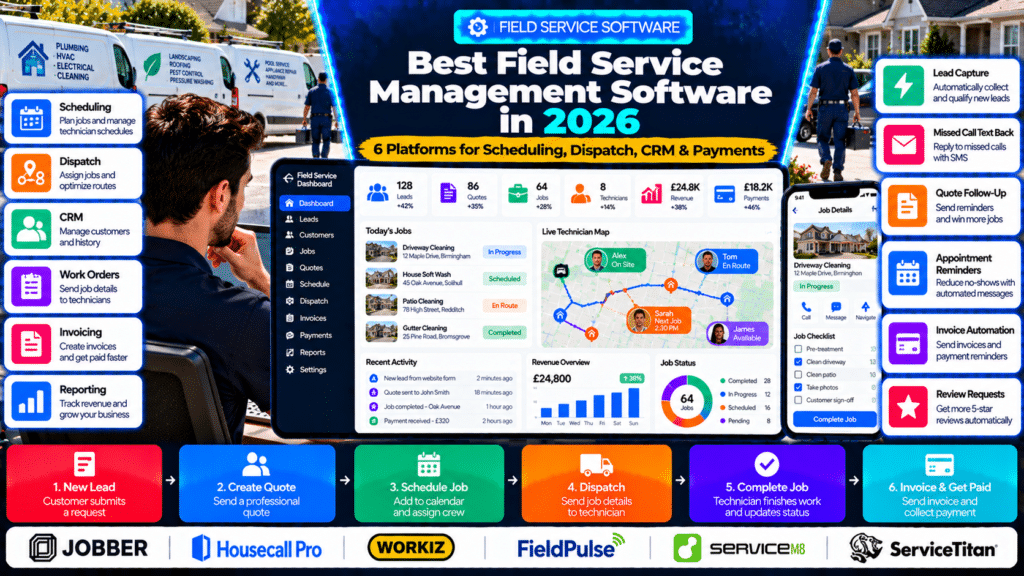
Running a field-service business with spreadsheets, paper job sheets, text messages, and several disconnected apps can work when the company is very small.
But eventually, the cracks begin to show.
You may start dealing with:
- missed appointments;
- double bookings;
- technicians calling the office for job details;
- forgotten quote follow-ups;
- invoices sent late;
- customer information stored in different places;
- inefficient routes;
- poor visibility into job profitability.
That is where field service management software becomes valuable.
Field service management, or FSM, software brings the core service workflow into one system.
That usually includes:
- leads;
- customers;
- quotes;
- work orders;
- scheduling;
- dispatch;
- technician mobile apps;
- invoicing;
- payments;
- customer communication;
- reporting.
ServiceTitan describes FSM software as cloud-based software that helps field-service companies manage functions such as job management, scheduling, dispatching, estimates, invoices and payments in one platform (source: ServiceTitan).
In this guide, we compare six of the best field service management software platforms for small businesses in 2026:
- Jobber;
- Housecall Pro;
- Workiz;
- FieldPulse;
- ServiceM8;
- ServiceTitan.
Quick Comparison of the Best Field Service Management Software
| Software | Best For | Standout Strength |
|---|---|---|
| Jobber | Small and growing home-service businesses | Ease of use and complete quote-to-payment workflow |
| Housecall Pro | Home-service teams | Scheduling, dispatch, CRM and customer experience |
| Workiz | Call-heavy and multi-technician businesses | AI answering, dispatch and communications |
| FieldPulse | Businesses needing customizable operations | Scheduling, workflows, CRM and reporting |
| ServiceM8 | Solo operators and smaller trade businesses | Mobile-first job management and strong AI tools |
| ServiceTitan | Larger or rapidly scaling contractors | Advanced operations, reporting, inventory and profitability |
What Is Field Service Management Software?
Field service management software is designed for businesses that send employees or contractors away from the office to perform work at customer locations.
Examples include:
- plumbers;
- electricians;
- HVAC companies;
- cleaners;
- landscapers;
- roofers;
- locksmiths;
- appliance-repair businesses;
- pest-control companies;
- pool-service businesses.
A typical FSM workflow looks like:
Customer Enquiry
↓
Quote
↓
Customer Approval
↓
Schedule
↓
Dispatch Technician
↓
Complete Job
↓
Invoice
↓
Payment
↓
Follow-Up
Instead of managing each stage in a different application, field-service software keeps the workflow connected.
What Features Should Field Service Software Have?
The right features depend on the size and type of business.
However, most service businesses should look for several core capabilities.
Scheduling and Dispatch
The system should let you:
- view technician availability;
- assign jobs;
- reschedule work quickly;
- manage recurring jobs;
- track job status.
CRM
A field-service CRM should store:
- customer contact information;
- addresses;
- job history;
- quotes;
- invoices;
- notes;
- communication history.
Quotes and Estimates
Good FSM software should allow the business to:
- create professional quotes;
- add optional services;
- collect digital approval;
- follow up automatically.
Work Orders
Technicians need access to:
- job instructions;
- photos;
- checklists;
- customer history;
- service notes.
Mobile App
A strong mobile app allows technicians to work without constantly contacting the office.
They should be able to:
- see jobs;
- update status;
- upload photos;
- create invoices;
- collect payment.
Invoicing and Payments
The system should make it easy to:
- create invoices;
- send them quickly;
- accept digital payments;
- track overdue balances.
Customer Communication
Useful features include:
- booking confirmations;
- appointment reminders;
- on-my-way texts;
- follow-up messages;
- customer portals.
Reporting
As the business grows, owners need visibility into:
- revenue;
- quote conversion;
- technician performance;
- job profitability;
- outstanding invoices.
1. Jobber
Jobber is one of the strongest options for small and growing service businesses that want an easy-to-understand system without moving immediately into enterprise-level complexity.
Its field-service platform covers:
- quoting;
- scheduling;
- job management;
- invoicing;
- payments;
- CRM;
- customer communication;
- reporting (source: Jobber).
Why Jobber Is Strong for Small Businesses
The main advantage is that the workflow is easy to understand.
A business can move from:
Request → Quote → Job → Invoice → Payment
without needing several separate systems.
Quotes
Jobber allows businesses to create interactive quotes that customers can approve online.
It also supports:
- optional upgrades;
- financing;
- automated quote follow-up (source: Jobber).
Example
A pressure-washing company could quote:
Base Service
Driveway Cleaning
Optional Add-On
Patio Cleaning
Optional Add-On
Gutter Cleaning
The customer can select the additional work directly from the quote.
Scheduling
Jobber includes a customizable calendar where businesses can:
- schedule jobs;
- assign team members;
- reschedule work;
- manage recurring visits (source: Jobber).
It can also automatically generate more efficient driving routes.
Dispatch
Jobber’s dispatch tools include:
- drag-and-drop scheduling;
- GPS tracking;
- automated visit reminders;
- on-my-way texts (source: Jobber).
That gives the office better visibility over field teams.
Mobile App
Technicians can use the Jobber app to:
- view their schedule;
- access job details;
- upload photos;
- complete forms;
- create quotes;
- send invoices (source: Jobber).
This reduces calls back to the office.
Customer Communication
Jobber can automate:
- appointment reminders;
- quote follow-ups;
- job follow-ups;
- overdue invoice reminders (source: Jobber).
Customers can also use Client Hub to:
- approve quotes;
- request work;
- review appointments;
- make payments.
Jobber AI
Jobber has expanded its AI capabilities significantly in 2026.
Its current platform includes AI designed specifically around service businesses, including assistance with:
- quote drafting;
- upsell opportunities;
- field notes;
- customer communication (source: Jobber).
Jobber also introduced Jobber Voice for field teams, which can convert spoken information into job notes and updates (source: Jobber).
Best For
Jobber may be especially suitable for:
- owner-operators;
- small teams;
- growing home-service companies;
- businesses wanting easy setup;
- recurring service businesses.
Possible Limitation
Very large contractors with complex inventory, payroll, multi-location operations or highly detailed financial workflows may eventually need deeper enterprise functionality.
2. Housecall Pro
Housecall Pro is another strong all-in-one field-service platform built around home-service businesses.
Its current feature set includes:
- scheduling;
- dispatch;
- estimates;
- invoices;
- payments;
- CRM;
- GPS tracking;
- online booking;
- job costing;
- reporting (source: Housecall Pro).
Why Housecall Pro Stands Out
Housecall Pro places a strong emphasis on the entire customer experience.
That includes everything from:
Booking → Technician Arrival → Job → Payment → Follow-Up
Scheduling
Housecall Pro includes a drag-and-drop scheduling calendar.
Businesses can assign technicians based on factors such as:
- availability;
- location;
- skills (source: Housecall Pro).
Dispatch
Its dispatching tools provide:
- job status visibility;
- route maps;
- technician assignment;
- multiple visits;
- GPS tracking (source: Housecall Pro).
That is helpful when the schedule changes throughout the day.
Route Optimization
Housecall Pro can show estimated travel time between jobs and help optimize routes to reduce unnecessary driving (source: Housecall Pro).
Customer Communication
Businesses can send:
- appointment reminders;
- on-my-way texts;
- technician information;
- arrival updates (source: Housecall Pro).
This can reduce customers calling the office to ask where the technician is.
CRM
Housecall Pro’s CRM combines customer records with:
- scheduling;
- dispatch;
- estimates;
- invoices;
- payments;
- reporting (source: Housecall Pro).
Sales Pipeline
Housecall Pro also includes Pipeline for managing leads and estimates.
Its current automation features can:
- follow up leads;
- follow up estimates;
- follow up jobs;
- use AI to help draft follow-up messages (source: Housecall Pro).
Best For
Housecall Pro may suit:
- home-service businesses;
- teams of several technicians;
- companies wanting strong scheduling and dispatch;
- businesses focused heavily on customer experience.
Possible Limitation
Businesses with very specialized workflows may need to confirm that its job structure fits their exact operational process.
3. Workiz
Workiz is particularly strong for businesses where:
- calls;
- dispatch;
- scheduling;
- technician coordination
are central to daily operations.
Its platform includes:
- scheduling and dispatch;
- invoicing;
- proposals;
- inventory;
- online booking;
- mobile app;
- reporting;
- built-in phone and messaging;
- AI functionality (source: Workiz).
Scheduling and Dispatch
Workiz lets office teams assign jobs based on:
- technician availability;
- service area;
- skill set (source: Workiz).
Its Genius Scheduling functionality can also consider:
- proximity;
- technician skill;
- availability.
This can reduce:
- dead time;
- poor routing;
- double booking.
AI Answering
One of Workiz’s biggest differentiators is AI Answering.
Workiz says the AI can:
- answer calls;
- answer customer questions;
- book jobs;
- reschedule jobs;
- dispatch technicians (source: Workiz).
This can be particularly valuable for businesses such as:
- locksmiths;
- garage-door companies;
- appliance repair;
- emergency services.
Built-In Communications
Workiz combines:
- phone;
- SMS;
inside its CRM.
This helps prevent customer conversations from being scattered across personal phones and separate inboxes (source: Workiz).
Call Intelligence
Workiz AI can create summaries and insights from customer calls.
That can help businesses understand:
- why leads did not book;
- dispatcher performance;
- sales patterns (source: Workiz).
Invoicing
Workiz can automatically send invoices when jobs are completed and automate overdue-payment reminders (source: Workiz).
It supports several payment methods including:
- card;
- ACH;
- digital wallets;
- financing.
Inventory
Workiz also includes inventory-management functionality, making it more relevant for businesses that need to track parts and materials.
Best For
Workiz may be particularly suitable for:
- multi-technician businesses;
- emergency service businesses;
- businesses with high call volume;
- companies wanting AI answering;
- dispatch-heavy operations.
Possible Limitation
A very simple one-person service business may not need all of its phone, AI and operational features.
4. FieldPulse
FieldPulse is a flexible FSM platform focused on service businesses that want strong control over:
- scheduling;
- workflows;
- customer management;
- reporting.
Its feature set includes:
- scheduling and dispatch;
- custom workflows;
- CRM;
- customer portal;
- dashboards;
- reporting (source: FieldPulse).
Why FieldPulse Stands Out
The key differentiator is flexibility.
Some service businesses have straightforward workflows.
Others may need:
Lead → Site Visit → Proposal → Approval → Parts → Installation → Follow-Up
A customizable workflow system can become more valuable as operations become complex.
Scheduling
FieldPulse has drag-and-drop scheduling that lets dispatchers:
- assign jobs;
- adjust workloads;
- make last-minute changes (source: FieldPulse).
Multi-Team Views
Businesses can manage scheduling by:
- team;
- role;
- service;
- location;
- job status (source: FieldPulse).
This may be useful for companies running several crews.
Real-Time Dispatch
Technicians receive updates when:
- new jobs are assigned;
- appointments change;
- schedules are modified (source: FieldPulse).
GPS Tracking
FieldPulse can show technician locations in real time and help dispatchers assign jobs based on proximity (source: FieldPulse).
Customer Portal
Customers can:
- book appointments;
- approve proposals;
- pay invoices
through the FieldPulse customer portal (source: FieldPulse).
Reporting
FieldPulse currently offers more than 60 prebuilt reports as well as custom reporting (source: FieldPulse).
That can help owners analyze:
- sales;
- job performance;
- technician performance;
- revenue.
Best For
FieldPulse may suit:
- businesses with several crews;
- companies needing flexible workflows;
- operations that value detailed reporting;
- businesses with more complicated dispatch needs.
Possible Limitation
Companies that prioritize the simplest possible setup may find a more configurable system requires additional implementation effort.
5. ServiceM8
ServiceM8 is a mobile-focused field-service platform designed for trade and service businesses.
Its core platform covers:
- jobs;
- scheduling;
- quotes;
- invoicing;
- payments;
- customer history;
- dispatch;
- mobile field work (source: ServiceM8).
Why ServiceM8 Is Interesting in 2026
ServiceM8 has added a surprisingly broad set of AI capabilities.
Its current feature list includes:
- AI automated quoting;
- AI email writing;
- AI report builder;
- AI invoice generator;
- AI scheduling;
- AI phone agent;
- AI CRM assistant (source: ServiceM8).
That makes it one of the more AI-heavy platforms in this comparison.
Job Management
Field staff can access:
- client details;
- job details;
- photos;
- notes;
- history
directly from the field (source: ServiceM8).
Scheduling
ServiceM8 supports:
- drag-and-drop scheduling;
- schedule updates;
- booking windows;
- urgent dispatch;
- booking suggestions;
- auto routing (source: ServiceM8).
AI Scheduling
Its AI scheduling can suggest appointment times based on factors including:
- staff schedules;
- previous jobs;
- technician experience;
- travel time (source: ServiceM8).
AI Phone Agent
ServiceM8 also offers an AI-powered phone agent that can answer calls for the business (source: ServiceM8).
AI Quote and Invoice Generation
The software can draft:
- quote descriptions;
- materials/services;
- invoice descriptions;
- billable items (source: ServiceM8).
This can reduce paperwork for technicians.
Mobile App
ServiceM8’s mobile app allows field staff to:
- view jobs;
- capture photos;
- collect signatures;
- work offline (source: ServiceM8).
Offline support can be especially useful where field staff work in areas with weak connectivity.
Free Plan
ServiceM8 also currently offers a free plan aimed at solo operators, with core functionality including:
- jobs;
- scheduling;
- quoting;
- invoicing;
- customer history;
- online booking;
- basic AI tools (source: ServiceM8).
Best For
ServiceM8 may be especially suitable for:
- solo operators;
- smaller trade businesses;
- mobile-first companies;
- businesses heavily using iPhone or iPad;
- companies wanting built-in AI functionality.
Possible Limitation
Businesses should verify device compatibility and whether their team prefers ServiceM8’s mobile-first ecosystem before committing.
6. ServiceTitan
ServiceTitan is the most enterprise-oriented platform in this comparison.
It provides field-service management for both small-to-medium and larger contractors, with functionality covering:
- scheduling;
- dispatch;
- field mobile apps;
- estimates;
- forms;
- GPS;
- reporting;
- inventory;
- job costing;
- service agreements (source: ServiceTitan).
Why ServiceTitan Is Different
ServiceTitan goes deeper into operational and financial control than many simpler FSM systems.
That makes it particularly relevant when a business has:
- several departments;
- significant inventory;
- many technicians;
- detailed reporting requirements;
- complex job costing.
Scheduling
ServiceTitan supports automated scheduling and capacity planning (source: ServiceTitan).
Dispatch
Its dispatch functionality helps assign technicians to work and manage changes throughout the day.
Technician Tracking
ServiceTitan includes real-time technician tracking for both office staff and customer communication (source: ServiceTitan).
Job Costing
One important strength is job-costing functionality.
Owners can compare:
Budget
vs.
Actual Cost
to understand job profitability (source: ServiceTitan).
Inventory
ServiceTitan includes inventory-management functionality to track materials and equipment required for jobs (source: ServiceTitan).
Reporting
Its platform includes:
- dashboards;
- custom reports;
- KPI tracking.
This becomes increasingly important as a business grows.
FSM vs ERP
ServiceTitan itself distinguishes basic FSM from more advanced field-service ERP.
According to ServiceTitan, standard FSM software is mainly focused on:
- scheduling;
- dispatch;
- invoicing;
- field operations.
Field-service ERP adds deeper functionality such as:
- inventory;
- payroll;
- purchasing;
- job costing;
- multi-location operations;
- advanced analytics (source: ServiceTitan).
That distinction is useful when deciding whether a smaller tool is still enough for the business.
Best For
ServiceTitan may suit:
- larger service businesses;
- fast-growing HVAC, plumbing and electrical companies;
- multi-location operations;
- businesses requiring advanced reporting and inventory;
- contractors needing deeper financial visibility.
Possible Limitation
A small two-person company may find it more sophisticated than necessary.
Which Field Service Management Software Is Best?
The answer depends on the size and complexity of the business.
Choose Jobber When
You want:
- easy setup;
- quoting;
- scheduling;
- CRM;
- invoicing;
- good customer communication;
- a platform suited to small and growing teams.
Choose Housecall Pro When
You want:
- scheduling;
- dispatch;
- strong customer experience;
- sales pipeline;
- online booking;
- route management.
Choose Workiz When
You want:
- AI call answering;
- built-in phone;
- dispatch;
- scheduling;
- inventory;
- stronger communications.
Choose FieldPulse When
You want:
- custom workflows;
- flexible scheduling;
- detailed reporting;
- multi-team operations.
Choose ServiceM8 When
You want:
- mobile-first operations;
- strong AI tools;
- straightforward job management;
- a good fit for solo or small teams.
Choose ServiceTitan When
You need:
- advanced reporting;
- inventory;
- job costing;
- large-team dispatch;
- enterprise-level control.
Best Field Service Software for Solo Operators
A solo operator generally needs simplicity more than complexity.
The highest-priority features are usually:
- quotes;
- scheduling;
- invoices;
- customer records;
- reminders.
ServiceM8 can be particularly interesting because it currently offers a free plan with core field-service functionality (source: ServiceM8).
Jobber can also be attractive for solo operators who plan to grow and want a polished quote-to-payment workflow.
Best Field Service Software for Small Teams
For a team of roughly:
2–10 people
the biggest needs often become:
- shared schedules;
- job assignments;
- customer history;
- mobile access;
- payments.
Jobber and Housecall Pro are both strong candidates here.
Workiz becomes particularly attractive if incoming calls and dispatch are major parts of the business.
Best Field Service Software for Growing Teams
As a company grows, it may need:
- technician GPS;
- multi-team scheduling;
- reporting;
- inventory;
- job costing;
- advanced workflows.
FieldPulse, Workiz and ServiceTitan become more relevant as this complexity increases.
Field Service Software vs CRM
A CRM mainly manages:
- leads;
- contacts;
- sales activity;
- communication.
FSM software adds operational functionality for actually delivering the service.
That typically includes:
- work orders;
- schedules;
- dispatch;
- technicians;
- field notes;
- invoices.
For a service business, the ideal system often combines both.
Jobber, Housecall Pro, FieldPulse and other FSM platforms include CRM functionality directly in the field-service system.
Field Service Software vs Scheduling Software
Scheduling software mainly answers:
Who is working where and when?
FSM software answers much more:
Who is the customer?
What work was quoted?
Which technician is assigned?
What happened on-site?
Has the invoice been paid?
If the only problem is scheduling, dedicated scheduling software may be enough.
If the business needs an end-to-end workflow, FSM is usually more appropriate.
Field Service Software vs Work Order Software
Work-order software focuses on:
- creating jobs;
- assigning work;
- tracking completion.
FSM software normally adds:
- CRM;
- estimates;
- scheduling;
- dispatch;
- invoices;
- payments;
- communication.
For a customer-facing service company, that broader workflow can be more useful.
What Industries Need Field Service Management Software?
FSM software can be useful for many industries, including:
- plumbing;
- electrical;
- HVAC;
- roofing;
- landscaping;
- cleaning;
- pest control;
- pool service;
- pressure washing;
- appliance repair;
- locksmithing;
- garage-door services.
ServiceTitan lists many of these trades among the industries that commonly use field-service platforms (source: ServiceTitan).
How to Choose Field Service Management Software
Step 1: Map Your Current Workflow
Write down what happens from:
Lead → Payment
For example:
Call
↓
Quote
↓
Schedule
↓
Dispatch
↓
Job
↓
Invoice
↓
Payment
Identify where the most admin happens.
Step 2: Prioritize Must-Have Features
Separate:
Must Have
from:
Nice to Have
A small plumbing company may need:
- scheduling;
- dispatch;
- invoicing;
- CRM.
It may not need:
- advanced enterprise inventory;
- multi-location ERP;
- custom financial reporting.
Step 3: Test the Mobile App
Do not evaluate FSM software only from the office dashboard.
The technicians will use it every day.
Test whether they can easily:
- find the job;
- see customer details;
- upload photos;
- complete checklists;
- create invoices.
Step 4: Test the Dispatch Workflow
Create a realistic day with:
- several technicians;
- an emergency job;
- a cancellation;
- a delayed technician.
Then see how easily the software handles those changes.
Step 5: Check Customer Experience
Test what the customer receives.
Look at:
- quotes;
- booking confirmations;
- reminders;
- invoices;
- payment links.
The system should make the company look professional.
Step 6: Check Reporting
Ask whether the software can easily answer:
- How much revenue did we generate?
- What is our quote conversion rate?
- Which technician is busiest?
- Which jobs are most profitable?
- Which invoices remain unpaid?
Step 7: Check Integrations
You may need integrations with:
- QuickBooks;
- Xero;
- Google Calendar;
- Zapier;
- payment providers;
- phone systems.
Avoid assuming every integration exists.
Verify it before migrating.
Step 8: Consider Future Growth
Buying software only for today’s business can mean migrating again too soon.
Ask:
Will this still work if we double the number of technicians?
Common Field Service Software Mistakes
Choosing Only on Price
The cheapest option is not always the lowest-cost option.
Poor dispatch or slow invoicing can cost more than the software subscription.
Buying Too Much Software
A two-person business may not need an enterprise platform.
Complexity can become its own problem.
Ignoring Technician Experience
If technicians hate using the mobile app, the system will contain poor data.
Not Cleaning Customer Data Before Migration
Duplicate or outdated records can create a bad start.
Automating Before the Workflow Is Clear
Automation works best when the business already knows how the process should work.
Never Reviewing Reports
FSM software creates useful data.
Use it.
More Options Built for Small Trade Businesses
The tools above suit most service companies. These three are also worth a look if you run a small trade business, especially in the UK, Australia or New Zealand where they are widely used.
3. Tradify
Tradify is a job-management platform built specifically for trades.
Its plans include job tracking, scheduling, quoting, invoicing, pricing, online payments, email tracking and accounting integrations. Tradify also offers AI-powered SmartTools on higher plans (source: Tradify).
What Tradify Does Well
Tradify keeps the interface and workflow focused on the practical needs of tradespeople.
A small trade business can use it for:
- job management;
- scheduling;
- quoting;
- invoicing;
- customer records;
- material pricing;
- accounting synchronization.
Tradify currently lists its Lite plan at $47 USD per user per month and Pro at $51 per user per month, with a 14-day free trial (source: Tradify).
Best For
Tradify is particularly suitable for:
- electricians;
- plumbers;
- builders;
- contractors;
- small trade teams;
- businesses that want straightforward job management.
Possible Limitations
Because pricing is per user, costs can grow as more office staff and technicians need access.
4. Fergus
Fergus is another platform designed specifically around trade-business workflows.
Its features include quoting and estimating, job cards, calendars, materials, recurring jobs, checklists, enquiry management, mobile access, job costing, accounting integrations and supplier integrations (source: Fergus).
What Fergus Does Well
Fergus places strong emphasis on knowing what each job actually costs.
That can be useful for businesses trying to improve margins rather than simply manage appointments.
Fergus also supports:
- timesheets;
- materials;
- supplier data;
- invoicing;
- job tracking;
- mobile workflows.
Its US pricing currently starts at $31 per month for the Essentials plan and $44 for Pro, while pricing varies by region (source: Fergus).
Best For
Fergus may appeal to:
- electricians;
- plumbers;
- builders;
- contractors;
- small crews;
- trade businesses focused on job profitability.
Possible Limitations
Businesses should check regional pricing and available integrations because plans and features can differ by market.
6. Simpro
Simpro is a comprehensive field-service platform designed for businesses handling service work, projects, maintenance, inventory and more complex operations.
Its base platform includes quoting, estimating, scheduling, inventory, purchasing, field operations, invoicing, payments and reporting (source: Simpro).
What Simpro Does Well
Simpro stands out when a business needs deeper operational control.
Capabilities include:
- service jobs;
- projects;
- recurring maintenance;
- asset management;
- inventory;
- scheduling;
- dispatch;
- work orders;
- job costing;
- reporting;
- customer records.
Simpro also supports recurring maintenance and asset-service workflows, making it relevant to companies performing regular commercial or contract work (source: Simpro).
Best For
Simpro may suit:
- electrical contractors;
- commercial HVAC companies;
- plumbing businesses with complex workflows;
- maintenance companies;
- multi-team field operations;
- growing commercial service businesses.
Pricing
Simpro uses custom pricing based on team size, required features and add-ons. Its pricing page states that an initial setup fee may also apply depending on onboarding, training and migration requirements (source: Simpro).
Possible Limitations
Very small businesses may find a simpler platform faster and easier to implement.
What Field Service Software Costs a Small Business
How Much Does Field Service Management Software Cost?
Pricing varies significantly.
A solo operator may find entry-level software for a relatively modest monthly fee, while larger platforms can cost substantially more.
The real cost may also include:
- additional users;
- payment-processing fees;
- setup;
- onboarding;
- premium support;
- SMS usage;
- AI features;
- accounting integrations;
- add-ons.
When comparing software, calculate the total cost based on the number of people who actually need access.
Should a Small Business Choose the Cheapest Option?
Not necessarily.
Cheap software can become expensive if it creates more manual work.
Likewise, expensive software is not automatically better.
A useful way to compare platforms is to calculate:
Software cost
versus
Admin time saved + fewer missed leads + faster invoicing + better job visibility
If a system saves several hours each week, the higher subscription may still make financial sense.
Related guides
- Field Service Software: What It Does and How to Choose It
- Best Invoicing Software for Service Businesses in 2026: 7 Tools Compared
- Best Work Order Software for Small Service Businesses
- Tools, Software and Automation for Trades: Start Here
Frequently Asked Questions
What is the best field service management software for small businesses?
Jobber, Housecall Pro, Workiz, FieldPulse and ServiceM8 are strong options for small and growing service businesses. ServiceTitan becomes more relevant as operational complexity increases.
What does field service management software do?
FSM software helps businesses manage customer records, quotes, schedules, technicians, work orders, invoices, payments and reporting in one connected system.
Is Jobber good for small businesses?
Yes. Jobber is designed around home-service businesses and includes quoting, scheduling, invoicing, CRM, customer communication and field-service management (source: Jobber).
Is Housecall Pro field service management software?
Yes. Housecall Pro combines scheduling, dispatching, estimates, invoices, payments, CRM, GPS tracking and reporting (source: Housecall Pro).
Is Workiz good for dispatching?
Yes. Workiz includes drag-and-drop scheduling, AI-supported scheduling, technician assignment and dispatch functionality (source: Workiz).
Does FieldPulse have GPS tracking?
Yes. FieldPulse supports live technician tracking and can help dispatchers assign jobs based on technician proximity (source: FieldPulse).
Does ServiceM8 use AI?
Yes. ServiceM8 currently includes AI-assisted quoting, invoicing, scheduling, report building, email writing, a phone agent and a CRM assistant (source: ServiceM8).
Is ServiceTitan suitable for small businesses?
It can support small-to-medium businesses, but its deeper features around reporting, job costing, inventory and operational control may be more valuable to larger or rapidly scaling companies (source: ServiceTitan).
Do I need field service software if I only have one technician?
Not necessarily.
But it can still be useful if you are spending too much time manually handling:
- quotes;
- appointments;
- customer records;
- invoices.
A simpler platform is usually better for a solo operator.
Conclusion
The best field service management software for small businesses depends less on which platform has the longest feature list and more on how the business actually operates.
Jobber is one of the strongest all-around choices for small and growing service businesses because it connects quoting, scheduling, field work, customer communication, invoicing and payments in a relatively straightforward workflow (source: Jobber).
Housecall Pro is particularly strong for home-service businesses that care about scheduling, dispatch, route management, customer communication and sales follow-up (source: Housecall Pro).
Workiz stands out for call-heavy and dispatch-heavy businesses because it combines field-service management with built-in communications, AI answering, AI lead capture and smart scheduling (source: Workiz).
FieldPulse is a strong option for teams that want more control over scheduling, custom workflows, reporting and multi-team operations (source: FieldPulse).
ServiceM8 is especially interesting for smaller and mobile-first businesses because it combines core FSM functionality with a broad set of AI features and even offers a free plan for solo operators (source: ServiceM8).
And ServiceTitan becomes particularly relevant when the company needs deeper job costing, reporting, inventory and operational control across larger teams (source: ServiceTitan).
The best way to choose is to map your actual workflow:
Lead → Quote → Schedule → Dispatch → Job → Invoice → Payment
Then identify which platform handles those steps with the least friction for your team.
The best software is not the one with the most features.
It is the one your office and technicians will actually use every day.