Invoicing sounds simple until a service business starts getting busy.
At first, the process might be:
Complete Job
↓
Create Invoice
↓
Email Customer
↓
Wait for Payment
That can work when you have five customers.
It becomes much harder when you have:
- several technicians;
- dozens of jobs each week;
- recurring customers;
- deposits;
- partial payments;
- overdue balances;
- different payment terms.
At that point, invoicing software should do more than create a PDF.
The best invoicing software for service businesses can help manage:
- estimates;
- invoices;
- online payments;
- recurring billing;
- deposits;
- payment reminders;
- partial payments;
- job profitability;
- accounting.
For field-service businesses, it may also connect invoicing directly to:
Schedule → Job → Technician → Invoice → Payment
That reduces the amount of information office staff need to enter manually.
In this guide, we compare seven strong options:
- Jobber;
- Housecall Pro;
- Workiz;
- QuickBooks Online;
- Xero;
- FreshBooks;
- Zoho Invoice.
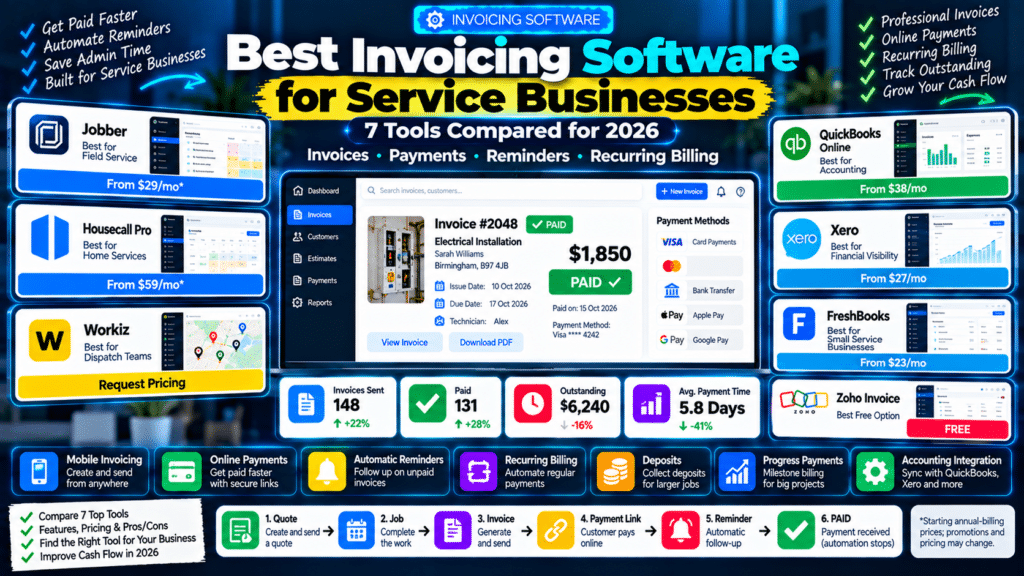
Best Invoicing Software for Service Businesses: Quick Comparison
| Software | Best For | Starting Price / Model |
|---|---|---|
| Jobber | Field-service businesses wanting job-to-invoice workflow | From $29/month annually |
| Housecall Pro | Home-service companies needing invoicing + dispatch | From $59/month annually |
| Workiz | Call- and dispatch-heavy field-service teams | Request pricing |
| QuickBooks Online | Businesses wanting invoicing + full accounting | From $38/month regular US price |
| Xero | Businesses wanting accounting + strong financial visibility | From $27/month in the US |
| FreshBooks | Solo operators and smaller service businesses | From $23/month regular USD price |
| Zoho Invoice | Small businesses wanting free invoicing | Free |
Pricing and promotions can change, so verify the current offer before subscribing.
What Should Invoicing Software Do for a Service Business?
A useful invoicing platform should reduce the number of manual steps between:
finishing the job
and:
receiving the money.
At minimum, look for:
- professional invoices;
- payment terms;
- online payment links;
- invoice status;
- overdue tracking;
- automatic reminders.
Depending on your business, you may also need:
- deposits;
- recurring invoices;
- progress billing;
- partial payments;
- mobile invoicing;
- accounting integrations;
- job costing.
Field-Service Invoicing vs Accounting Software
Before choosing a platform, understand that these tools fall into two broad groups.
Field-Service Software
Examples:
- Jobber;
- Housecall Pro;
- Workiz.
These connect invoices directly to:
- customers;
- schedules;
- technicians;
- jobs.
Accounting Software
Examples:
- QuickBooks;
- Xero;
- FreshBooks.
These go deeper into:
- bookkeeping;
- bank reconciliation;
- expenses;
- reports;
- tax preparation.
Neither approach is automatically better.
The right choice depends on whether your biggest problem is:
running jobs
or:
running the books.
1. Jobber
Jobber is one of the strongest invoicing options for small and growing field-service businesses.
Its biggest advantage is that the invoice is connected to the rest of the service workflow.
A typical process can be:
Lead
↓
Quote
↓
Job
↓
Invoice
↓
Payment
Jobber’s Core plan currently starts at $29 per month when billed annually for one user and includes unlimited quotes, jobs and invoices (source: Jobber).
Jobber Invoicing Features
Jobber lets businesses:
- create invoices;
- send invoices;
- set due dates;
- collect online payments;
- monitor status;
- follow up on unpaid invoices.
Its mobile app lets technicians create, send and collect payment on invoices while still at the job site (source: Jobber Help Center).
That is useful because the workflow can become:
Technician Finishes Job
↓
Invoice Created On-Site
↓
Customer Pays
instead of:
Technician Finishes Job
↓
Office Creates Invoice Two Days Later
Jobber Progress Invoicing
Jobber also supports progress invoicing on all plans.
That allows larger projects to be billed through a schedule such as:
Deposit
↓
Milestone Payment
↓
Final Balance
Jobber says progress invoicing can be configured from either the quote or job stage (source: Jobber Help Center).
That is useful for:
- renovations;
- installations;
- roofing;
- landscaping;
- larger electrical projects.
Automatic Payments
For recurring work, Jobber can automatically charge a customer’s saved payment method when using Jobber Payments on eligible plans.
The platform can automatically:
- generate the invoice;
- charge the customer;
- record payment (source: Jobber Help Center).
That can work well for:
- cleaning;
- pool service;
- lawn care;
- recurring maintenance.
Invoice Follow-Up
Jobber Connect and higher plans add automated invoice follow-ups.
That means the system can automatically remind customers when an invoice is overdue (source: Jobber).
Best For
Jobber is particularly strong for:
- plumbers;
- electricians;
- cleaners;
- landscapers;
- pressure washers;
- pool-service businesses.
Possible Limitation
Jobber is primarily field-service software.
If you need deeper:
- bookkeeping;
- financial statements;
- tax accounting;
you may still connect it with software such as QuickBooks Online.
2. Housecall Pro
Housecall Pro is another strong invoicing platform for home-service businesses.
Its Basic plan currently starts at $59 per month billed annually and includes:
- invoices;
- payments;
- scheduling;
- dispatching;
- online booking;
- estimates (source: Housecall Pro).
Housecall Pro Invoicing
Invoices can be sent from:
- desktop;
- mobile.
Customers can receive them through:
- email;
- text.
Housecall Pro lets businesses customize invoice messages, add attachments and enable direct online payment from the invoice (source: Housecall Pro Help Center).
Improved Invoice Management
Housecall Pro significantly expanded its invoicing system in 2026.
Recent updates include:
- improved invoice list views;
- due-date filtering;
- status filtering;
- aging reports in beta;
- improved reminder controls;
- customer exclusions from reminders (source: Housecall Pro Help Center).
This makes Housecall Pro increasingly useful for accounts-receivable management rather than simply invoice creation.
Progress Invoicing
Housecall Pro also supports progress invoicing.
A large job can be billed by:
- percentage;
- fixed amount.
Each progress invoice can have its own:
- due terms;
- payment options (source: Housecall Pro Help Center).
For example:
Roof Replacement — $20,000
could become:
25% Deposit
50% Mid-Project
25% Completion
Auto Invoicing
Housecall Pro can also automatically resend open unpaid invoices on schedules such as:
- daily;
- weekly;
- monthly;
- annually (source: Housecall Pro Help Center).
This is useful for recurring services and customers who regularly have outstanding balances.
Best For
Housecall Pro may be particularly strong for:
- HVAC;
- plumbing;
- electrical;
- cleaning;
- other home-service businesses.
Possible Limitation
It is more expensive than lightweight invoicing software if you only need:
- invoices;
- payment links.
You are really paying for a broader field-service platform.
3. Workiz
Workiz combines invoicing with:
- dispatch;
- technician management;
- phone communication;
- CRM;
- automation.
Its current Standard, Pro and Ultimate plans use request-based pricing rather than publishing a standard monthly price. That makes it harder to compare purely on cost.
Workiz Mobile Invoicing
Workiz lets technicians create invoices while still in the field.
Its invoicing platform can automatically populate invoices using:
- job data;
- labour;
- pricing items.
Customers can receive invoices through:
- email;
- SMS.
Workiz also supports invoice status tracking such as:
- Sent;
- Viewed;
- Paid;
- Overdue (source: Workiz).
Workiz Payments
Customers can pay from invoices using options including:
- credit cards;
- debit cards;
- Apple Pay;
- Google Pay;
- ACH;
- supported financing options (source: Workiz).
That provides more payment flexibility than simply placing bank details on an invoice.
Deposits and Milestone Billing
Workiz supports:
- upfront deposits;
- payment schedules;
- milestone payments.
Its 2026 Payment Schedules feature lets businesses divide the total job value into multiple payments tied to:
- project stages;
- dates;
- approvals (source: Workiz Help Center).
This can be useful for larger installations and repair jobs.
Automatic Invoice Reminders
Workiz can automatically follow up on unpaid invoices.
Its invoicing platform specifically includes automatic payment reminder schedules and overdue follow-up (source: Workiz).
QuickBooks Integration
Workiz integrates with QuickBooks Online and can synchronize invoices and payments.
Workiz says its reconciliation system can match WorkizPay data with QuickBooks entries to reduce duplicate admin (source: Workiz).
Best For
Workiz may be particularly good for:
- locksmiths;
- garage-door businesses;
- appliance repair;
- HVAC;
- dispatch-heavy service teams.
Possible Limitation
If your only requirement is invoicing, Workiz may be far more system than you need.
Its strongest value comes when you also need:
- dispatch;
- calls;
- technicians;
- CRM.
4. QuickBooks Online
QuickBooks Online is different from Jobber, Housecall Pro and Workiz.
It is primarily accounting software.
That makes it a strong option when you want invoicing tied directly to:
- bookkeeping;
- bank activity;
- expenses;
- financial reports.
QuickBooks Pricing in 2026
QuickBooks Online’s current regular US monthly prices are:
| Plan | Regular Monthly Price |
|---|---|
| Simple Start | $38 |
| Essentials | $85 |
| Plus | $140 |
| Advanced | $340 |
Promotional pricing is often available for new customers (source: QuickBooks).
QuickBooks Invoicing
QuickBooks lets businesses:
- customize invoices;
- send them by email;
- add payment options;
- track invoice status;
- set due dates;
- add reminders (source: QuickBooks).
Customers can pay directly through invoices when QuickBooks Payments is enabled.
Automatic Invoice Reminders
QuickBooks can automatically remind customers when invoices are:
- almost due;
- overdue.
Businesses can customize the email message so it matches their brand and payment process (source: QuickBooks).
Recurring Invoices
QuickBooks supports recurring invoice templates.
That is useful for businesses billing:
- weekly;
- monthly;
- annually.
Recurring invoices can also work with automatic payments through QuickBooks Payments (source: QuickBooks).
Autopay
Customers can enroll in Autopay for recurring invoices.
Once enabled, future payments can process automatically instead of customers manually paying each invoice (source: QuickBooks).
Advanced Workflows
QuickBooks Online Advanced also provides workflow automation.
Intuit says it currently offers more than 60 workflow templates covering areas such as:
- invoices;
- bills;
- estimates;
- purchase orders;
- payment reminders (source: QuickBooks).
Best For
QuickBooks Online may be best for businesses that care most about:
- invoicing;
- accounting;
- taxes;
- financial reporting.
Possible Limitation
QuickBooks is not a complete field-service platform.
It does not replace dedicated:
- scheduling;
- technician dispatch;
- route management
in the way Jobber or Housecall Pro does.
5. Xero
Xero is another strong accounting-first option.
It combines invoicing with:
- bank reconciliation;
- bills;
- reports;
- cash-flow tools;
- accounting.
Xero Pricing in 2026
Xero increased US prices from October 1, 2026.
Current standard pricing is:
| Plan | Monthly Price |
|---|---|
| Early | $27 |
| Growing | $59 |
| Established | $97 |
Xero Invoicing
Xero supports:
- quotes;
- invoices;
- online invoice payments;
- automated invoicing tasks.
The Early plan currently allows up to 20 invoices, while Growing removes that lower invoicing limit (source: Xero).
Best for Growing Accounting Needs
One of Xero’s biggest strengths is that the invoicing system sits inside a broader financial platform.
For example, a contractor can use Xero for:
Quote
↓
Invoice
↓
Payment
↓
Expense Tracking
↓
Accounting Reports
Xero specifically markets its invoicing functionality to contractors and service businesses that want to manage financial admin from the same system (source: Xero).
Established Plan
Xero Established adds more advanced functionality such as:
- project time and cost tracking;
- multiple currencies;
- deeper performance analytics (source: Xero).
That may be useful for businesses handling:
- commercial projects;
- larger teams;
- international customers.
Best For
Xero may be best for:
- contractors;
- agencies;
- service businesses;
- businesses already working with an accountant who prefers Xero.
Possible Limitation
Like QuickBooks, Xero is accounting software first.
It does not provide the same technician scheduling and dispatch workflow as field-service platforms.
6. FreshBooks
FreshBooks is especially attractive to:
- freelancers;
- solo service providers;
- smaller service businesses.
Its interface is built around:
- clients;
- estimates;
- invoices;
- expenses;
- payments.
FreshBooks Pricing in 2026
FreshBooks increased its pricing in 2026.
Current regular USD pricing is:
| Plan | Monthly Price |
|---|---|
| Lite | $23 |
| Plus | $43 |
| Premium | $70 |
Annual billing receives a discount, and promotional pricing may temporarily reduce these figures (source: FreshBooks).
FreshBooks Lite
Lite supports invoicing up to:
5 clients.
It includes:
- estimates;
- expense tracking;
- online payments;
- basic tax-time reports (source: FreshBooks).
That can be enough for a very small operator.
FreshBooks Plus
Plus increases the customer allowance to:
50 clients
and adds functionality such as:
- proposals;
- retainers;
- additional accounting reports;
- expense receipt scanning (source: FreshBooks).
FreshBooks Premium
Premium supports:
unlimited clients
and adds tools such as:
- project profitability;
- accounts payable;
- customized email templates (source: FreshBooks).
Online Payments
FreshBooks supports payment methods including:
- cards;
- ACH;
- Apple Pay;
- Google Pay;
- supported buy-now-pay-later options (source: FreshBooks).
Best For
FreshBooks may be particularly good for:
- consultants;
- designers;
- photographers;
- independent contractors;
- smaller service companies.
Possible Limitation
FreshBooks client limits on lower plans can become restrictive.
A high-volume home-service business may outgrow Lite or Plus quickly.
7. Zoho Invoice
Zoho Invoice stands out for one simple reason:
it is free invoicing software.
Zoho describes Invoice as a free, feature-rich invoicing platform for small businesses (source: Zoho).
That makes it an attractive starting point for small businesses that do not yet need a complete:
- accounting suite;
- field-service system.
Zoho Invoice Features
Zoho Invoice includes:
- customizable invoices;
- scheduled invoices;
- recurring invoices;
- customer portal;
- payment reminders;
- online payments;
- payment tracking;
- refunds;
- offline payment recording (source: Zoho).
Automatic Payment Reminders
Zoho Invoice allows businesses to automate reminders:
- before due date;
- after due date;
- around an expected payment date.
The platform includes several preconfigured reminder slots that businesses can enable and customize (source: Zoho).
Recurring Billing
Zoho Invoice can automatically generate recurring invoices according to a defined schedule (source: Zoho).
That can be useful for:
- maintenance contracts;
- monthly services;
- retainer-style billing.
Customer Portal
Customers can use the Zoho Invoice portal to:
- see invoices;
- approve quotes;
- make payments;
- manage transactions (source: Zoho).
Best For
Zoho Invoice is particularly attractive for:
- startups;
- freelancers;
- solo contractors;
- very small service businesses.
Possible Limitation
If you need:
- dispatch;
- technicians;
- work orders;
- job costing;
Zoho Invoice alone will not replace a full field-service platform.
Which Invoicing Software Is Best for Service Businesses?
The answer depends on what you need beyond invoices.
Choose Jobber When
You want:
Field Service + Invoicing
Best for:
- jobs;
- scheduling;
- technician workflows;
- invoicing;
- online payments.
Choose Housecall Pro When
You want:
Home Service Operations + Invoicing
Best for:
- dispatch;
- Price Book;
- progressive billing;
- automatic reminders.
Choose Workiz When
You want:
Calls + Dispatch + Invoicing
Best for:
- call-heavy operations;
- technician coordination;
- milestone payments.
Choose QuickBooks When
You want:
Accounting + Invoicing
Best for:
- bookkeeping;
- reporting;
- recurring billing;
- financial management.
Choose Xero When
You want:
Accounting + Financial Visibility
Best for:
- contractors;
- scalable accounting;
- reporting.
Choose FreshBooks When
You want:
Simple Invoicing + Client Management
Best for:
- solo professionals;
- consultants;
- smaller service businesses.
Choose Zoho Invoice When
You want:
Free Invoicing
Best for:
- new businesses;
- solopreneurs;
- simple billing.
Best Invoicing Software for Contractors
For contractors, I would shortlist:
Jobber
Housecall Pro
QuickBooks Online
The best choice depends on the operating model.
Jobber
Choose it when technicians and jobs are central.
Housecall Pro
Choose it when home-service dispatch and structured pricing matter.
QuickBooks
Choose it when accounting is the main priority.
Best Invoicing Software for Solo Service Businesses
For a solo operator, paying hundreds every month may not make sense.
Consider:
Zoho Invoice
if you mainly need invoicing.
FreshBooks
if you also want simple expense and client management.
Jobber Core
if you need:
- quotes;
- jobs;
- scheduling;
- invoices
in the same system.
Best Invoicing Software for Growing Field-Service Teams
For teams with multiple technicians:
Jobber
Housecall Pro
or:
Workiz
usually make more sense than accounting-only systems.
Why?
Because the invoice can connect directly to:
- technician work;
- job details;
- estimates;
- customer record.
That reduces duplicate data entry.
Best Invoicing Software for Accounting
For accounting depth:
QuickBooks Online
and:
Xero
are stronger.
They are designed to manage broader financial records such as:
- income;
- expenses;
- bank transactions;
- financial reports.
A service business may even use:
Jobber + QuickBooks
or:
Workiz + QuickBooks
instead of choosing only one system.
Best Free Invoicing Software
Zoho Invoice is the strongest option in this comparison if price is the main concern.
It currently provides:
- recurring invoices;
- reminders;
- customer portal;
- payment integrations
without requiring a paid subscription (source: Zoho).
However, free does not automatically mean best.
If using separate software creates extra administrative work, a paid field-service platform may save more money overall.
Best Software for Mobile Invoicing
For technicians creating invoices on-site:
Jobber
Housecall Pro
Workiz
are the strongest options here.
Jobber lets technicians create and collect payment from invoices through its mobile app (source: Jobber Help Center).
Housecall Pro allows invoices to be sent from its mobile app through email or text (source: Housecall Pro Help Center).
Workiz allows technicians to generate invoices and collect payments directly in the field (source: Workiz).
Best Software for Recurring Invoices
Strong options include:
- QuickBooks;
- Xero;
- Zoho Invoice;
- Jobber.
QuickBooks supports recurring invoices and optional Autopay (source: QuickBooks).
Zoho Invoice supports scheduled recurring invoices and automatic customer charging through supported payment gateways (source: Zoho).
Jobber can automatically invoice and charge customers with saved payment methods for eligible recurring jobs (source: Jobber Help Center).
Best Software for Progress Billing
For larger projects, consider:
Jobber
Housecall Pro
Workiz
Jobber supports progress invoicing across all plans (source: Jobber Help Center).
Housecall Pro lets businesses generate multiple partial invoices against one larger job total (source: Housecall Pro Help Center).
Workiz Payment Schedules support milestone-based billing inside a single invoice structure (source: Workiz Help Center).
Best Software for Automated Invoice Reminders
Several tools on this list support automatic follow-up.
Jobber
Automated invoice follow-ups on Connect and above (source: Jobber).
Housecall Pro
Automatic reminders plus improved invoice management and aging tools (source: Housecall Pro Help Center).
Workiz
Automatic payment-reminder schedules (source: Workiz).
QuickBooks
Automatic reminders before or after invoice due dates (source: QuickBooks).
Zoho Invoice
Configurable automatic reminders around due dates and expected payment dates (source: Zoho).
What Features Should You Look For?
1. Mobile Invoicing
Technicians should be able to invoice without returning to the office.
2. Online Payments
Look for:
- card;
- ACH / bank transfer;
- digital wallets.
3. Automatic Reminders
The software should track overdue balances for you.
4. Deposits
Important for:
- installations;
- larger projects;
- custom work.
5. Partial and Progress Payments
Useful for jobs that last:
- days;
- weeks;
- months.
6. Recurring Billing
Important for:
- cleaning;
- pool service;
- pest control;
- maintenance plans.
7. Accounting Integration
Make sure invoice data can reach your bookkeeping system.
8. Invoice Status Tracking
You should know whether the invoice is:
- draft;
- sent;
- viewed;
- overdue;
- paid.
9. Customer Portal
A portal can let customers:
- view invoices;
- pay;
- see transaction history.
10. Reporting
Useful reports include:
- outstanding invoices;
- aging;
- revenue;
- payments received.
Do You Need Field-Service Software or Just Invoicing Software?
Ask how much of your operation you want the platform to manage.
You Probably Need Field-Service Software If
You also need:
- scheduling;
- dispatch;
- technicians;
- job history;
- routes;
- customer communication.
Look at:
Jobber
Housecall Pro
Workiz
You Probably Need Accounting Software If
You mainly care about:
- bookkeeping;
- expenses;
- reporting;
- reconciliation.
Look at:
QuickBooks
Xero
FreshBooks
You May Only Need Basic Invoicing If
You are:
- solo;
- newly established;
- processing relatively few jobs.
Zoho Invoice may be enough.
Example: Solo Electrician
Needs:
- quotes;
- schedule;
- invoice after each job;
- online payment.
A good shortlist:
Jobber Core
or:
Zoho Invoice + calendar
The first is more integrated.
The second is cheaper.
Example: Five-Technician HVAC Company
Needs:
- scheduling;
- dispatch;
- estimates;
- Price Book;
- invoicing;
- payments;
- job costing.
A good shortlist:
Housecall Pro
Jobber
The company may then connect the chosen FSM platform to accounting software.
Example: Garage-Door Repair Company
Needs:
- incoming calls;
- dispatch;
- technicians;
- parts;
- invoices;
- immediate payment.
A strong option:
Workiz
because invoicing is connected to a broader dispatch and communications workflow.
Example: Consultant
Needs:
- invoices;
- expenses;
- proposals;
- reports.
A strong shortlist:
FreshBooks
QuickBooks
Xero
There is little reason to pay for field-service dispatch tools.
Common Invoicing Software Mistakes
Choosing Only by Price
The cheapest system can cost more if it adds manual work.
Ignoring Payment Processing Fees
Subscription price is only part of the total cost.
No Automatic Reminders
This creates unnecessary admin.
No Mobile Workflow
Technicians should not have to wait for office staff to invoice.
No Accounting Plan
Know where invoice and payment data will eventually go.
Overbuying Software
A solo contractor may not need a $300+ operations platform.
Using Separate Tools That Do Not Sync
This creates duplicate customer and invoice data.
How to Compare Invoicing Software Properly
Do not test only:
Can it create an invoice?
Almost every tool can.
Test the complete workflow.
Test Scenario
Create:
Customer: Sarah Williams
Service: Boiler Repair
Amount: $450
Then:
- Create the customer.
- Create an estimate.
- Convert it to a job if relevant.
- Complete the work.
- Create an invoice.
- Add payment terms.
- Send the invoice.
- Open it as the customer.
- Pay online.
- Check payment status.
- Trigger an overdue reminder on another test invoice.
- Review reporting.
Then ask:
- Was it fast?
- Could a technician do this?
- Was the invoice professional?
- Was payment easy?
- Did the accounting update correctly?
That is how you find the right platform.
Invoicing for Recurring Service Work
What Is the Best Invoicing Software for Recurring Services?
Recurring invoicing is especially important for:
- cleaners;
- maintenance companies;
- landscapers;
- service contracts.
Xero, FreshBooks, Square, Zoho Invoice and Jobber all provide recurring billing capabilities in some form (source: Xero).
Related guides
- Best Field Service Management Software for Small Businesses in 2026
- Best Work Order Software for Small Service Businesses
- Best Free CRM Software for Small Trade Businesses
- Tools, Software and Automation for Trades: Start Here
Frequently Asked Questions
What is the best invoicing software for service businesses?
Jobber, Housecall Pro and Workiz are strong options when invoicing needs to connect directly to jobs and technicians.
QuickBooks and Xero are stronger when accounting is the main priority.
FreshBooks is useful for smaller client-based businesses, while Zoho Invoice is attractive for free invoicing.
What is the best invoicing software for contractors?
Jobber and Housecall Pro are particularly strong for contractors who need invoicing tied to field-service workflows.
QuickBooks is often a better fit when accounting depth is more important.
How much does Jobber cost?
Jobber currently starts at $29 per month for Core when billed annually for one user. Core includes unlimited quotes, jobs and invoices (source: Jobber).
How much does Housecall Pro cost?
Housecall Pro’s standard field-service Basic plan currently starts at $59 per month billed annually for one user (source: Housecall Pro).
How much does Workiz cost?
Workiz currently does not display standard public pricing for Standard, Pro or Ultimate. Businesses need to request pricing.
How much does QuickBooks Online cost?
Current regular US pricing begins at $38 per month for Simple Start, with Essentials at $85, Plus at $140 and Advanced at $340. Promotional pricing may reduce the initial cost (source: QuickBooks).
How much does Xero cost?
As of October 2026, standard US pricing is $27 per month for Early, $59 for Growing and $97 for Established (source: Xero).
How much does FreshBooks cost?
FreshBooks’ current regular USD monthly pricing is $23 for Lite, $43 for Plus and $70 for Premium (source: FreshBooks).
Is Zoho Invoice free?
Yes. Zoho currently describes Zoho Invoice as free invoicing software for small businesses (source: Zoho).
Which invoicing software supports automatic reminders?
Jobber, Housecall Pro, Workiz, QuickBooks and Zoho Invoice all provide options for automatic payment follow-up or overdue reminders (source: Jobber).
Which software supports recurring invoices?
QuickBooks, Xero, FreshBooks, Zoho Invoice and several field-service platforms support recurring billing in some form.
QuickBooks and Zoho Invoice have particularly clear recurring invoice automation (source: QuickBooks).
Do I need accounting software as well as field-service software?
Possibly.
Many businesses run their operations in a platform such as:
- Jobber;
- Housecall Pro;
- Workiz
and connect financial data to:
- QuickBooks;
- Xero.
This allows each tool to focus on what it does best.
Conclusion
The best invoicing software for service businesses depends on what happens before and after the invoice.
If your workflow is:
Customer → Technician → Job → Invoice
then a field-service platform often makes the most sense.
Jobber is particularly strong for small and growing field-service businesses that want a straightforward job-to-payment process. Its Core plan starts at $29 per month annually, while higher tiers add automatic invoice follow-up and deeper automation (source: Jobber).
Housecall Pro is a strong choice for home-service companies that want invoicing alongside scheduling, dispatch, Price Book and progress billing. Its Basic plan currently starts at $59 per month annually (source: Housecall Pro).
Workiz is particularly compelling for businesses where invoicing must connect tightly to calls, dispatch and technicians. Its field-service invoicing system supports mobile invoicing, online payments, overdue reminders and QuickBooks synchronization (source: Workiz).
If the workflow is more:
Invoice → Accounting → Reporting
then look more closely at:
QuickBooks Online or Xero.
QuickBooks combines invoicing with automatic reminders, recurring billing and a much broader bookkeeping system (source: QuickBooks).
Xero provides invoicing inside a scalable accounting platform, with standard US plans currently starting at $27 per month (source: Xero).
For simpler needs, FreshBooks remains attractive for freelancers and smaller service businesses, while Zoho Invoice stands out because it provides a substantial invoicing feature set for free (source: FreshBooks).
The right question is not:
“Which software makes the nicest invoice?”
Most modern systems can do that.
The better question is:
“Which software makes it easiest to move from completed work to money in the bank?”
For a service business, the ideal workflow is:
Quote
↓
Job
↓
Invoice
↓
Payment Link
↓
Automatic Reminder
↓
Paid
Choose the tool that removes the most manual steps from that process without adding unnecessary complexity.